









Features
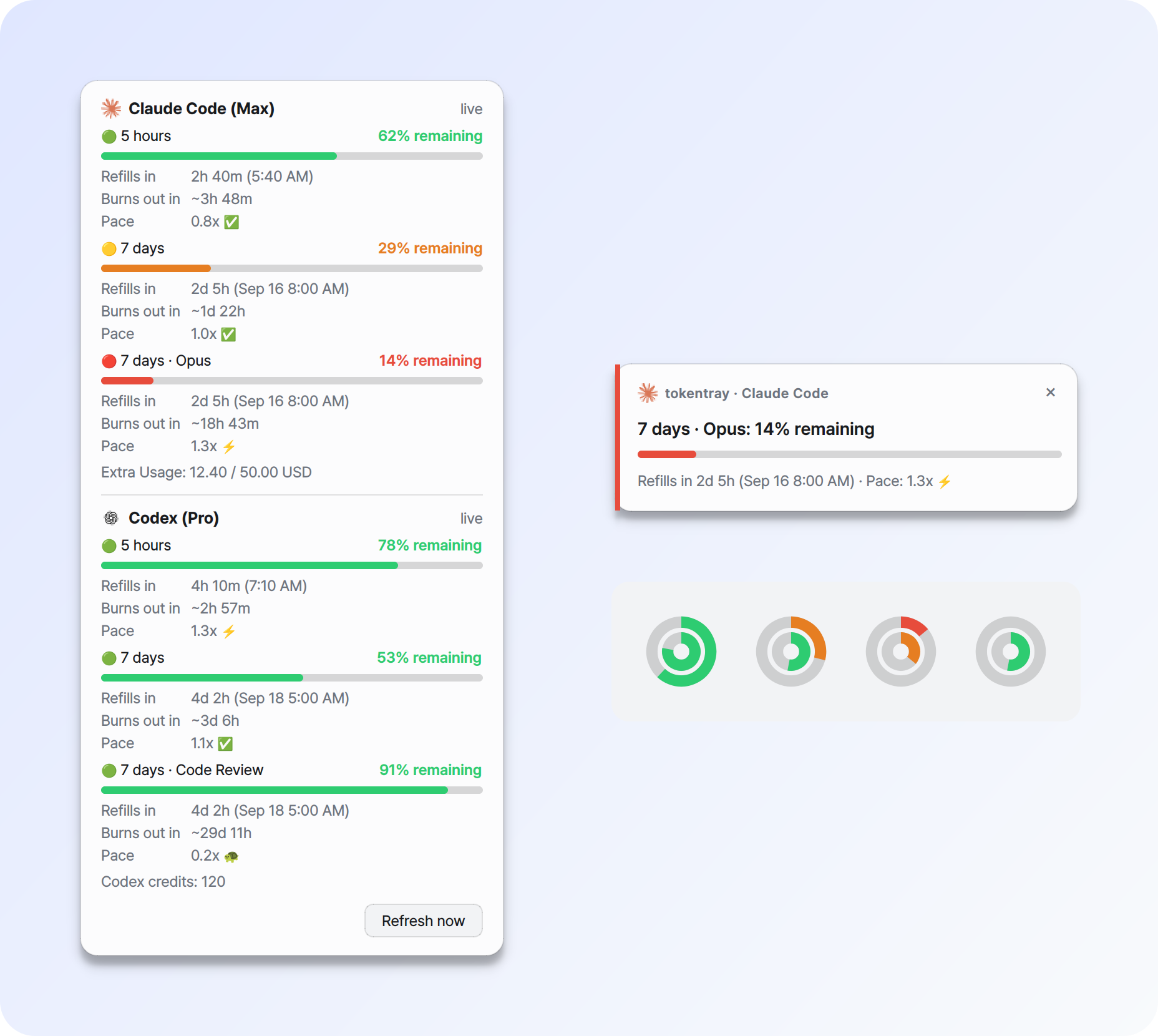
- 🟢 Tray rings at a glance - Claude on the outside, Codex inside. Green above 50% left, amber down to 21%, red at 20% or below, grey without data.
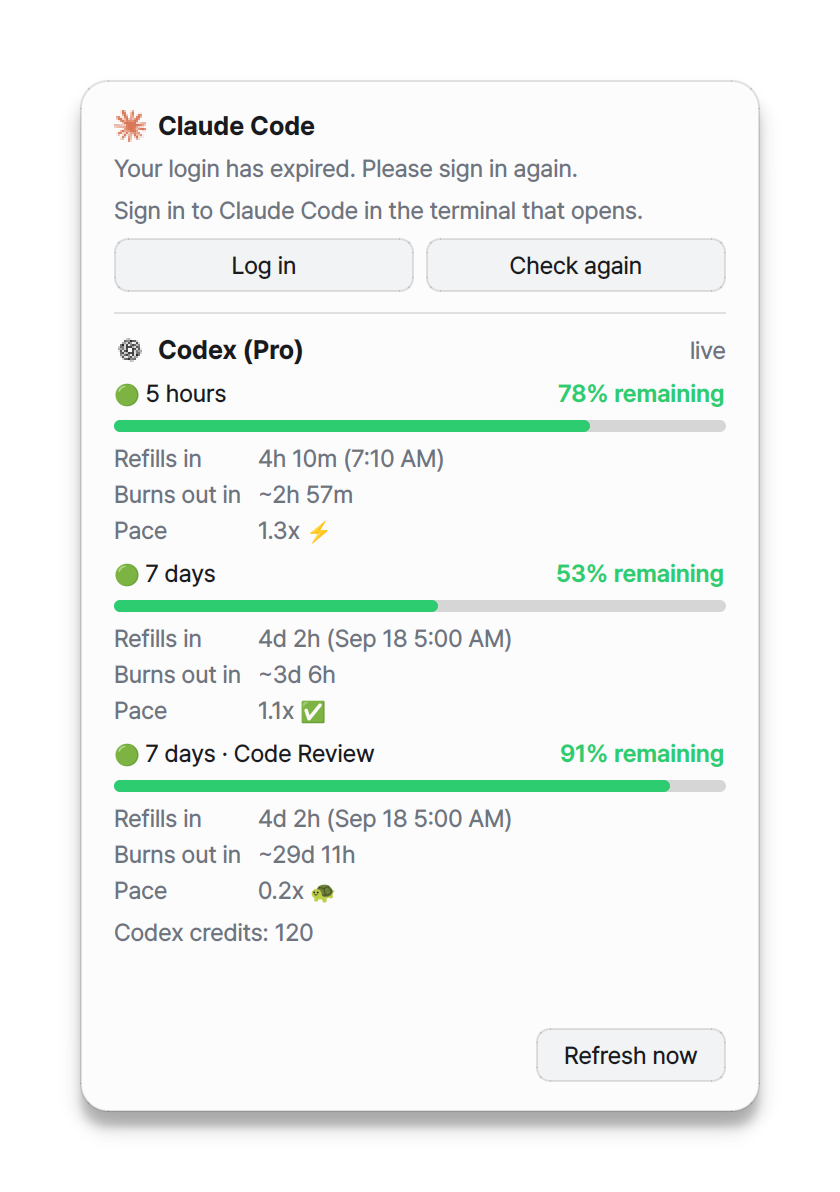
- 📊 Detail panel - remaining %, time to reset, burn-out estimate and pace for every limit, including Opus/Sonnet and Codex model limits.
- 🔔 Alerts before you run out - at 50, 25 and 10% remaining, plus reminders before a reset.
- 🔑 One-click login recovery - opens a terminal with
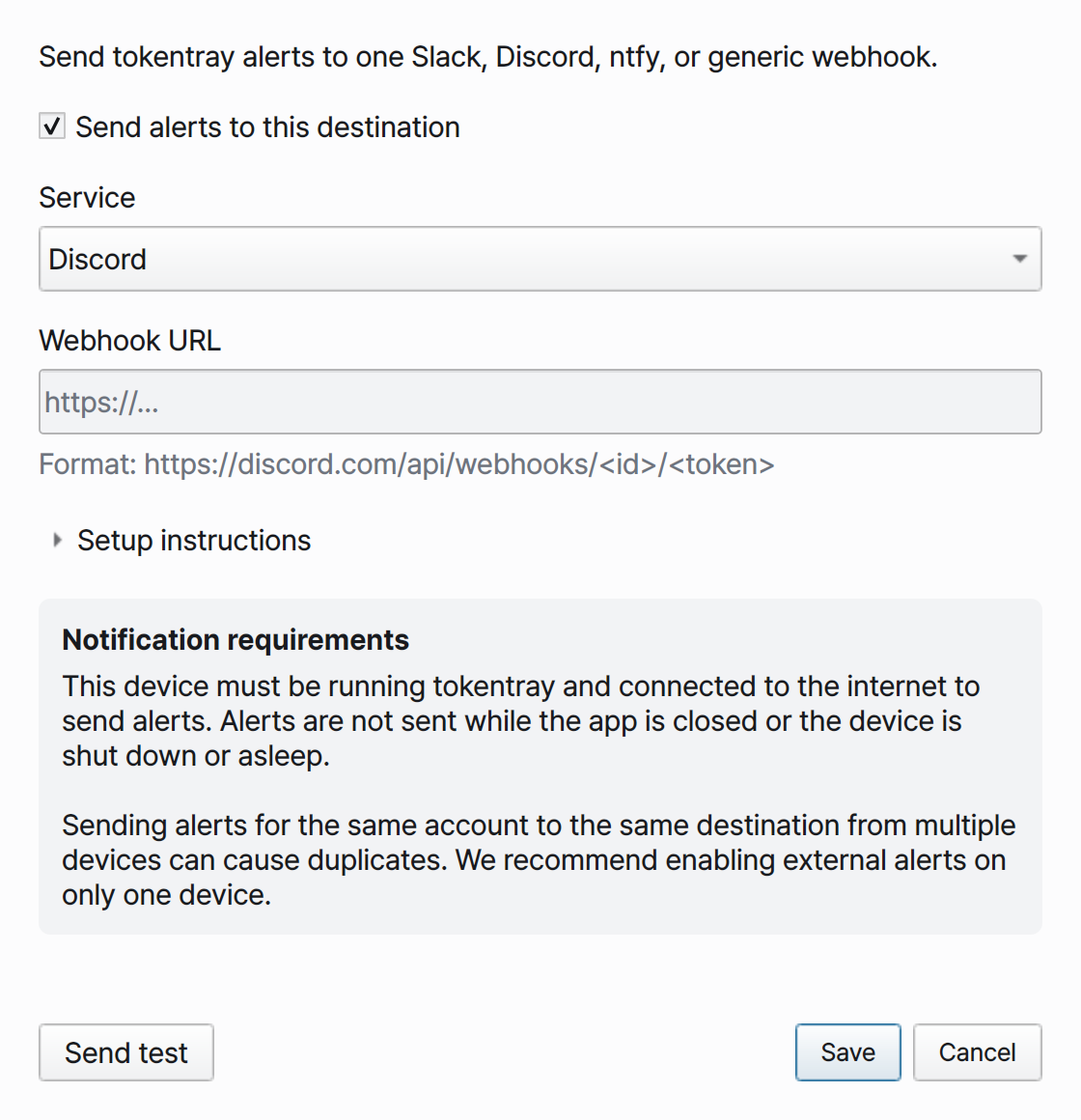
claude auth loginorcodex loginwhen a login expires. - 🌐 Webhooks - forward alerts to Slack, Discord, ntfy or any HTTP endpoint.
- 🖥️ Windows, macOS and Linux, in English or Korean.
A pace of 1.0x means you will hit the limit exactly at reset if you keep going at your average rate so far.
Install

Install uv once:
# macOS / Linux
curl -LsSf https://astral.sh/uv/install.sh | sh
# Windows (PowerShell)
powershell -ExecutionPolicy ByPass -c "irm https://astral.sh/uv/install.ps1 | iex"
brew install uv and winget install --id=astral-sh.uv -e work too. Then:
uv tool install tokentray
If the shell cannot find tokentray afterwards, run uv tool update-shell and
open a new terminal.
pipx
pipx install tokentray
pip
Needs Python 3.11-3.13. Install into a virtual environment:
python -m venv .venv
source .venv/bin/activate        # Windows: .venv\Scripts\activate
python -m pip install tokentray
Standalone builds (no Python needed)
| Platform | Download | Then |
|---|---|---|
 |
tokentray-windows-x86_64.zip |
Unzip, run tokentray\tokentray-gui.exe |
 |
tokentray-macos-arm64.zip |
Move tokentray.app to Applications |
 |
tokentray-linux-x86_64.tar.gz |
Unpack, run ./install.sh |
Quick start
Sign in to Claude Code or Codex first - one of them is enough.
tokentray setup              # choose a language, check logins, offer start-at-login
tokentray                    # start in the background and return to the terminal
With a standalone build, the tokentray CLI sits next to the app (inside
tokentray.app/Contents/MacOS on macOS).
Once the app starts, you can close the terminal. Starting the app at the end of
setup works the same way. Quit from the tray menu or with tokentray stop.
For debugging, use tokentray run --foreground to keep it attached to the terminal.
Alerts and polling
| Setting | Default | What it does |
|---|---|---|
poll_interval |
120 |
Seconds between usage checks (minimum 30) |
thresholds |
50,25,10 |
Remaining % that raises an alert |
remind_before |
60,30,10 |
Minutes before a reset to remind you |
popup.duration |
8 |
Seconds an alert card stays up |
popup.position |
auto |
bottom-right, top-right, or auto (top on macOS, bottom elsewhere) |
native_notifications |
Windows false, others true |
Also send OS notifications |
tokentray config set poll_interval 300    # check every 5 minutes
tokentray config set thresholds 50,20,5   # alert at 50%, 20% and 5% left
tokentray config set remind_before 30,10  # remind 30 and 10 minutes before reset
tokentray config get thresholds
Changes reach the running app straight away, except poll_interval and
language, which apply after a restart. tokentray config path shows where the
config file lives.
Troubleshooting refresh failures
Refresh results name each service and its reason, for example Claude refresh failed: request rate limit while Codex remains updated.
TokenTray keeps the last available reading and waits at least as long as the
server's Retry-After and your polling interval. If the server provides no valid
wait time, repeated 429s back off for 5, 10, 20, 40, then 60 minutes, never less
than your configured interval. Successful lookup resets this backoff. The
displayed retry time is the earliest retry time, not a promise of recovery.
Restarting, manual refresh, login recheck, and notification tests do not bypass
the wait. Requests also have a 30-second minimum spacing; rapid refreshes retain
recent data instead of making another request.
poll_interval controls normal polling. Throttling can make actual intervals
longer without changing your setting. No officially guaranteed polling interval
has been confirmed for /api/oauth/usage; 2 or 5 minutes is not a server
guarantee. TokenTray cannot control requests from Claude Code, other tools, or
other devices. For troubleshooting, use Open log in the tray menu; network
diagnostics omit tokens, raw headers, and response bodies.
More settings and webhooks
| Setting | Default | What it does |
|---|---|---|
language |
from locale | en or ko |
webhook.enabled / webhook.kind |
false / ntfy |
External alerts via slack, discord, ntfy or generic |
codex.refresh |
false |
Let tokentray refresh the Codex token |
linux.force_xwayland |
true |
See Platform notes |
Choose Notification integrations… in the tray menu to set up one webhook, validate the URL and send a test, or use the terminal:
tokentray webhook setup --service slack
tokentray webhook test
The URL is kept in the OS keyring. Alerts are only sent while tokentray runs on
a device that is online; if several devices watch the same account, enable
webhooks on just one to avoid duplicates. For Slack, set
packaging/resources/tokentray-512.png as the app icon; Discord lets you set
the webhook avatar in the channel settings.
All commands
| Command | Description |
|---|---|
tokentray |
Start the tray app |
tokentray setup |
Interactive first-run configuration |
tokentray status |
Print current quota (asks the running app first) |
tokentray open / refresh / stop |
Control a running instance |
tokentray doctor |
Check credentials, keyring, tray and notification delivery |
tokentray config get/set/path |
Read and write settings |
tokentray state reset --welcome/--alerts/--all |
Re-arm the first-run notice or the alert memory |
tokentray webhook setup/test |
Configure and test a webhook |
tokentray autostart enable/disable/status |
Manage start-at-login |
Platform notes
- A new tray icon may land among the hidden icons. The welcome card links to the
taskbar setting, where the entry's name starts with
tokentray. - On the SmartScreen prompt for a standalone build, choose More info then Run anyway.
- Installed with uv or pip, the background process shows in Task Manager as
pythonw.exe.
-
Builds are ad-hoc signed, not notarised. If Gatekeeper blocks the app:
xattr -dr com.apple.quarantine /Applications/tokentray.app
-
Apple silicon only. The app lives in the menu bar, so there is no Dock icon.
-
The CLI is at
/Applications/tokentray.app/Contents/MacOS/tokentray; symlink it onto yourPATHto typetokentray. -
Reading Claude Code credentials from the login keychain may show an access prompt the first time.
-
Notification Center delivery from a tray app is unreliable, so tokentray's own alert cards are the main channel.
tokentray doctorshows what your build can do.
-
x86_64 tarball only.
./install.shadds a launcher entry and icon for your user;./install.sh --uninstallremoves them. -
Qt needs a few system libraries that minimal installs, including stock Ubuntu 24.04, may lack:
sudo apt install libxcb-cursor0 libxkbcommon0 libegl1 libgl1 libdbus-1-3 libfontconfig1 libglib2.0-0
-
GNOME needs the AppIndicator extension to show a tray icon; KDE works out of the box.
-
On Wayland, tokentray runs through XWayland so alert cards can sit next to the tray. With
linux.force_xwayland = falseit runs natively, but the compositor decides where cards appear. -
Without a keyring service such as SecretService, secrets fall back to an owner-only local file, and setup tells you so.
More details
Login credentials
tokentray reads the credentials Claude Code and Codex already saved:
| Service | Location |
|---|---|
| Claude Code | ~/.claude/.credentials.json (or $CLAUDE_CONFIG_DIR), then the macOS login keychain |
| Codex | ~/.codex/auth.json (or $CODEX_HOME) |
- Log in in the panel or an alert opens a terminal running the login command and watches for new credentials for up to five minutes. If no terminal can be opened, copy the command shown.
- Claude token refresh is left to Claude Code. Codex refresh is opt-in
(
codex.refresh) and re-readsauth.jsonbefore writing, so it never overwrites the Codex CLI. - A token pasted during
setupis stored in the OS keyring. A pasted Claude token cannot be renewed when it expires. doctorreportingno token in filedoes not always mean you are logged out: the file may hold plan metadata while sign-in is handled elsewhere.
How alerts are delivered
- Windows shows tokentray's own cards. Set
native_notifications = truefor Windows banners instead; if a banner cannot be submitted, the card is shown. Welcome and login-recovery alerts always use cards so their buttons work. - macOS and Linux show cards and also send an OS notification.
- Test notification fetches fresh usage and shows one card per service. It does not touch alert history or send webhooks.
- Every OS notification attempt is logged; open the log from the tray menu.
Privacy
Caches and the fallback secret file are owner-only (0600) on macOS and Linux;
on Windows they inherit your user profile's permissions.
Contributing
Bug reports, ideas and pull requests are welcome, in English or Korean.
- 🐛 Found a bug? Open a bug report
with
tokentray --versionandtokentray doctoroutput. - 💡 Have an idea? Open a feature request.
- 🔒 Security issue? Report it privately - see SECURITY.md.
- 🛠️ Want to send code? Start with CONTRIBUTING.md.
License
MIT - see LICENSE, which also keeps the MIT notice of haomingkoo/claude-codex-monitor. Standalone builds bundle Qt through PySide6 (LGPLv3) as dynamically linked libraries.
1 maintainer

Metadata
1 maintainer
Release files for tokentray 0.1.1
For a detailed explanation of source distributions (sdists) and built distributions (wheels), please see the package formats documentation.
Source distribution (sdist)
| File | Size | Uploaded | |
|---|---|---|---|
| tokentray-0.1.1.tar.gz | 6.0 MB | Details |
Built distribution (wheel)
| File | Interpreter | ABI | Platform | Reset |
|---|---|---|---|---|
| tokentray-0.1.1-py3-none-any.whl | Python 3 | none | any | Details |
Total release size: 9.3 MB
Release files / tokentray-0.1.1.tar.gz
| Download URL | tokentray-0.1.1.tar.gz |
|---|---|
| Size | 6.0 MB |
| Tags | Source |
|
SHA-256 checksum How to use checksums |
8a47b5cc1f8df3b36804003875bff7a0e5606d6ca735e25327c1dfe8e3573438
|
|
BLAKE2b-256 checksum How to use checksums |
c20ddb67ed7a9a084e4ae714b1a89542196b6509ad12935503ff6cb577869b4c
|
| Upload date | |
|
Uploaded using Trusted Publishing? What is trusted publishing? |
Yes |
| Uploaded via |
uv/0.12.13 {"installer":{"name":"uv","version":"0.12.13","subcommand":["publish"]},"python":null,"implementation":{"name":null,"version":null},"distro":{"name":"Ubuntu","version":"24.04","id":"noble","libc":null},"system":{"name":null,"release":null},"cpu":null,"openssl_version":null,"setuptools_version":null,"rustc_version":null,"ci":true}
|
Release files / tokentray-0.1.1-py3-none-any.whl
| Download URL | tokentray-0.1.1-py3-none-any.whl |
|---|---|
| Size | 3.3 MB |
| Tags | Python 3 |
|
SHA-256 checksum How to use checksums |
253582faf14191a124967e3341c888f63342b5ecb8b6f30e55e8345882fc4256
|
|
BLAKE2b-256 checksum How to use checksums |
a98b21c4a0353b8c9fc0dbabbb133fb635b110edcba12a6d79ade2c65aed8fcd
|
| Upload date | |
|
Uploaded using Trusted Publishing? What is trusted publishing? |
Yes |
| Uploaded via |
uv/0.12.13 {"installer":{"name":"uv","version":"0.12.13","subcommand":["publish"]},"python":null,"implementation":{"name":null,"version":null},"distro":{"name":"Ubuntu","version":"24.04","id":"noble","libc":null},"system":{"name":null,"release":null},"cpu":null,"openssl_version":null,"setuptools_version":null,"rustc_version":null,"ci":true}
|














