
tokn
Tokn is a CLI-based TOTP (time-based one-time password) code generator that uses a password-protected vault file to store secret keys.
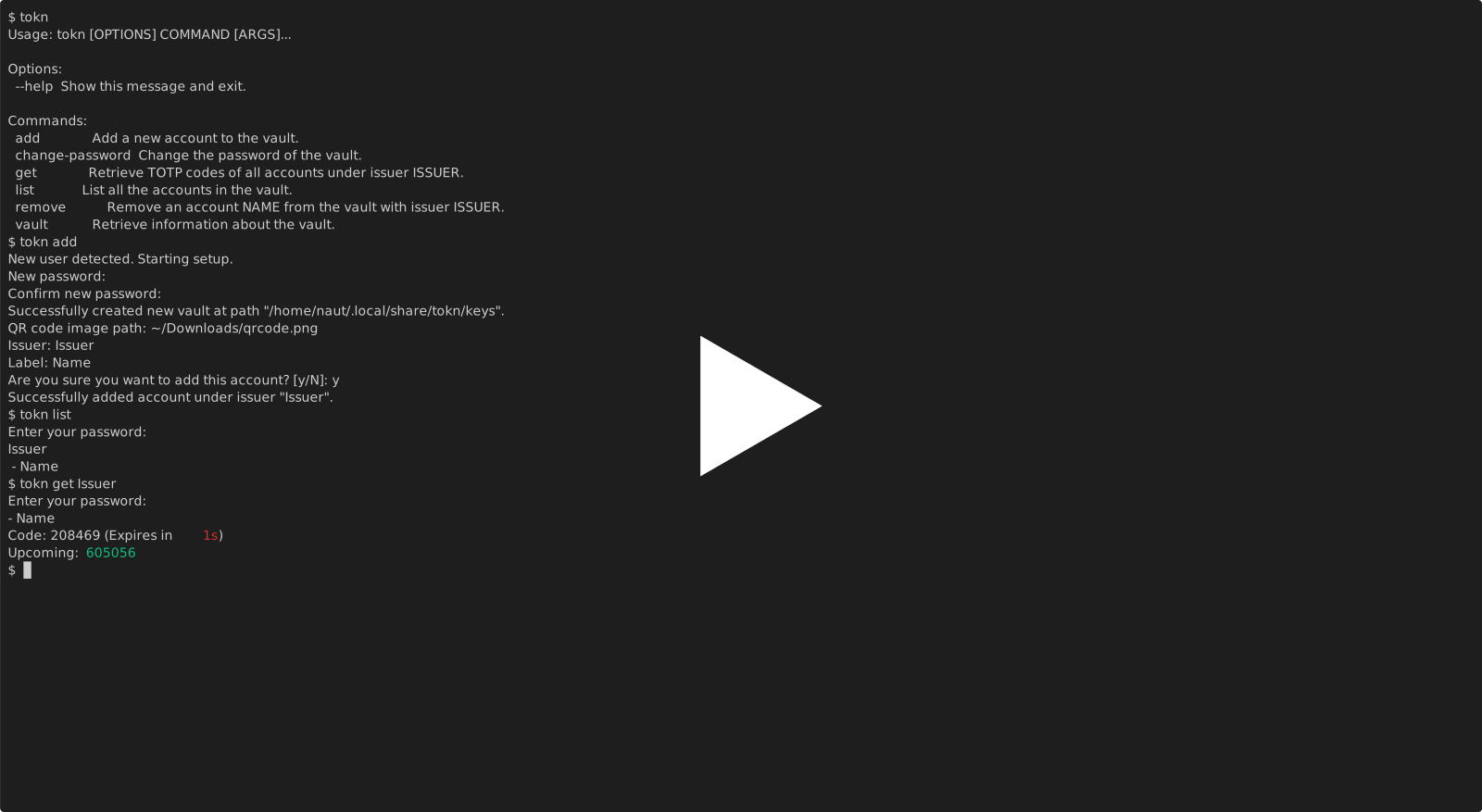
Installation
(Recommended)If you have pipx installed:
pipx install tokn-nautrw
Otherwise:
pip install tokn-nautrw
Try it
To do a quick test without a real account:
-
Download (or screenshot!) the QR code and copy the path:
-
Run
tokn addand follow the steps- When asked for a path, paste the copied path
- Accept the default values (press
yand hit enter)
-
Run
tokn get Issuer -
The code displayed on this website should be the same as one of the codes from the command

Features
- An encrypted vault file used to store keys
- Secret keys and passwords are never exposed
- Accounts can be added via QR code screenshots, raw codes, or URIs
- CLI is designed to be as ergonomic as possible
How It Works
Getting TOTP codes is quite tedious. Having to reach for a phone every time one wants to log in to an account they want to project can get annoying. Having a TOTP app on the CLI ideally makes this easier by not having to interact with a GUI, and on the same device but password-protected.
A brief description of TOTP:
- The app's server associates a secret key with the user's account
- The user gets the secret key, often in the form of a QR code, and stores it in an authenticator app like this one
- Both the server and the authenticator app use an algorithm that takes time as a variable (detailed in RFC 6238) to get a code
- The user inputs the code to the app when they want to log in, and the server authorizes it if its code and the user's code is the same
The Python cryptography library, specifically the Fernet module, allows for encrypting a file to store the secret keys. Argon2 can be used to hash a password, and the hash can be used as the key to encrypt and decrypt text in Fernet.
The vault file stores the secret keys and the random salt required by Argon2. It is stored in their best location depending on the operating system:
- Linux:
/home/USER/.local/share/tokn/keys - MacOS:
/Users/USER/Library/Application Support/tokn/keys - Windows:
C:\Users\USER\AppData\Local\nautrw\tokn/keys
Commands are split among several files in src/tokn/commands, and imported into src/tokn/cli.py to be added under the cli function/command group, allowing for many subcommands like tokn add. The cli function in src/tokn/cli.py is what gets run; it is specified in the [project.scripts] section in the file
Technologies/libraries used
- The
pyotplibrary is used to generate the TOTP codes as specified in RFC 6238 - The
cryptographylibrary, specially thefernetmodule, is used to encrypt files- Argon2, as implemented by the
cryptographylibrary, is used to generate password hashes that are used as keys forfernet
- Argon2, as implemented by the
- The
clicklibrary to make it a CLI app - The
zxingcppandopencvlibraries for QR code scanning
1 maintainer

Metadata
1 maintainer
Release files for tokn-nautrw 1.0.1
For a detailed explanation of source distributions (sdists) and built distributions (wheels), please see the package formats documentation.
Source distribution (sdist)
| File | Size | Uploaded | |
|---|---|---|---|
| tokn_nautrw-1.0.1.tar.gz | 9.8 kB | Details |
Built distribution (wheel)
| File | Interpreter | ABI | Platform | Reset |
|---|---|---|---|---|
| tokn_nautrw-1.0.1-py3-none-any.whl | Python 3 | none | any | Details |
Total release size: 19.6 kB
Release files / tokn_nautrw-1.0.1.tar.gz
| Download URL | tokn_nautrw-1.0.1.tar.gz |
|---|---|
| Size | 9.8 kB |
| Tags | Source |
|
SHA-256 checksum How to use checksums |
401a2246ea2658992ea32f517a43872b6bbb9650571e07a1864f9b327df0a5b2
|
|
BLAKE2b-256 checksum How to use checksums |
5bfc3f5249d985e0b45a420a670fbca4d6b8f3327e42afc1e781c052d8b4354b
|
| Upload date | |
|
Uploaded using Trusted Publishing? What is trusted publishing? |
No |
| Uploaded via |
twine/6.2.0 CPython/3.14.3
|
Release files / tokn_nautrw-1.0.1-py3-none-any.whl
| Download URL | tokn_nautrw-1.0.1-py3-none-any.whl |
|---|---|
| Size | 9.8 kB |
| Tags | Python 3 |
|
SHA-256 checksum How to use checksums |
8d02484cd2ca0685fb1b4abe4abfaea3e54d3bc0ad818c6ed9ae3b2c1f14a5e3
|
|
BLAKE2b-256 checksum How to use checksums |
124a41434e38f8d219e2284749f163aae14d8d560d375bbf138ce1e332609c34
|
| Upload date | |
|
Uploaded using Trusted Publishing? What is trusted publishing? |
No |
| Uploaded via |
twine/6.2.0 CPython/3.14.3
|














