
CLI tool to store TOTP secret keys and generate codes

Project description
tokn
Tokn is a CLI-based TOTP (time-based one-time password) code generator that uses encryption to store secret keys.
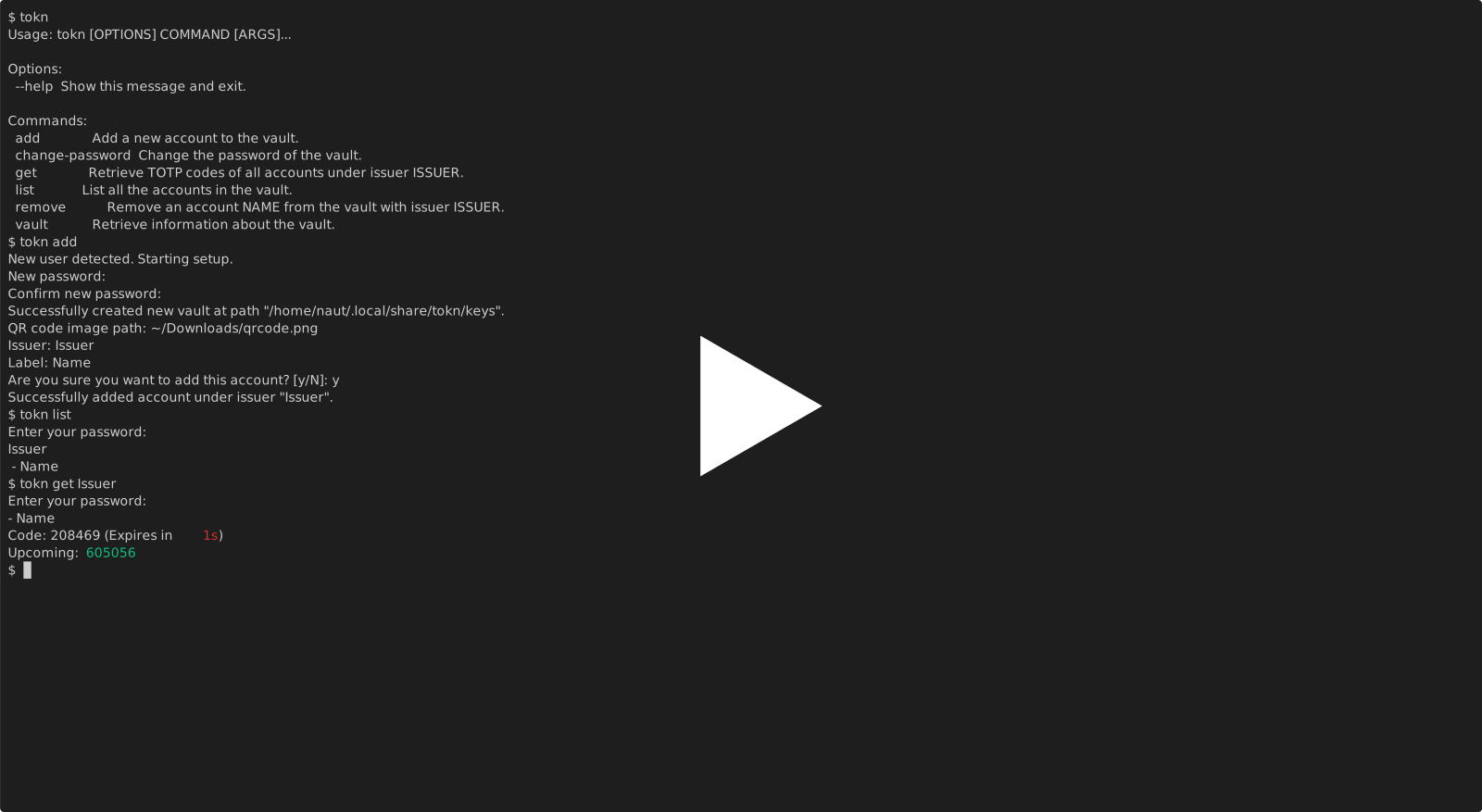
Quick Start/Installation
From GitHub
- Clone the GitHub repository or download the code (using the green button)
- Inside the directory, run the following command (you may need to add
python -morpython3 -mbefore it):
pip install -e .
Features
- An encrypted vault file used to store keys
- Secret keys and passwords are never exposed
- Accounts can be added via QR code screenshots, raw codes, or URIs
- CLI is designed to be as ergonomic as possible
Advanced
- The vault is stored in their best location depending on the operating system:
Linux: /home/USER/.local/share/tokn/keys
MacOS: /Users/USER/Library/Application Support/tokn/keys
Windows: C:\Users\USER\AppData\Local\nautrw\tokn/keys
- Commands are split among several files in
tokn/commands, and imported back intotokn/cli.pyto be added under theclicommand group, allowing for commands liketokn add - A
pyproject.tomlfile is used for treating the project as a package, allowing the use ofpip install -e .and uploading to PyPI in the future - The
clifunction intokn/cli.pyis what gets run; it is specified in the[project.scripts]section in the file
Technologies/libraries used
- The
pyotplibrary is used to generate the TOTP codes as specified in RFC 6238 - The
cryptographylibrary, speciallyfernet, is used to encrypt files - Argon2, as implemented by the
cryptographylibrary, is used to generate password hashes that are used as keys forfernet - The
clicklibrary to make it a CLI app - The
zxingcppandopencvlibraries for QR code scanning
Release history Release notifications | RSS feed


Download files
Download the file for your platform. If you're not sure which to choose, learn more about installing packages.
Source Distribution
Built Distribution
Filter files by name, interpreter, ABI, and platform.
If you're not sure about the file name format, learn more about wheel file names.
Copy a direct link to the current filters
File details
Details for the file tokn_nautrw-0.1.0.tar.gz.
File metadata
- Download URL: tokn_nautrw-0.1.0.tar.gz
- Upload date:
- Size: 8.2 kB
- Tags: Source
- Uploaded using Trusted Publishing? No
- Uploaded via: twine/6.2.0 CPython/3.14.3
File hashes
| Algorithm | Hash digest | |
|---|---|---|
| SHA256 |
f30c29f3c05dd97d904e6fbe938f4cc3f59d7b7b7b3d782270f22398ab0b36b6
|
|
| MD5 |
3c9d942bbd24e2a8fb73560253a736a9
|
|
| BLAKE2b-256 |
e40f84e058049d008d35fb5b3bd40da519ebd39b7cc5b13376d95260c5841d71
|
File details
Details for the file tokn_nautrw-0.1.0-py3-none-any.whl.
File metadata
- Download URL: tokn_nautrw-0.1.0-py3-none-any.whl
- Upload date:
- Size: 9.1 kB
- Tags: Python 3
- Uploaded using Trusted Publishing? No
- Uploaded via: twine/6.2.0 CPython/3.14.3
File hashes
| Algorithm | Hash digest | |
|---|---|---|
| SHA256 |
e436b310713e0c99c821f3e878498420020beab479bd6a5e805c51efbcae2206
|
|
| MD5 |
d0898d60cc5e2ff47dc8a303f337a78c
|
|
| BLAKE2b-256 |
969184a736a4c6ef64111cd77fc5764690479093b119952f87cb8b86aeb3063b
|






