
ToneSwiper
Transcription of Dutch Intonation (ToDI)
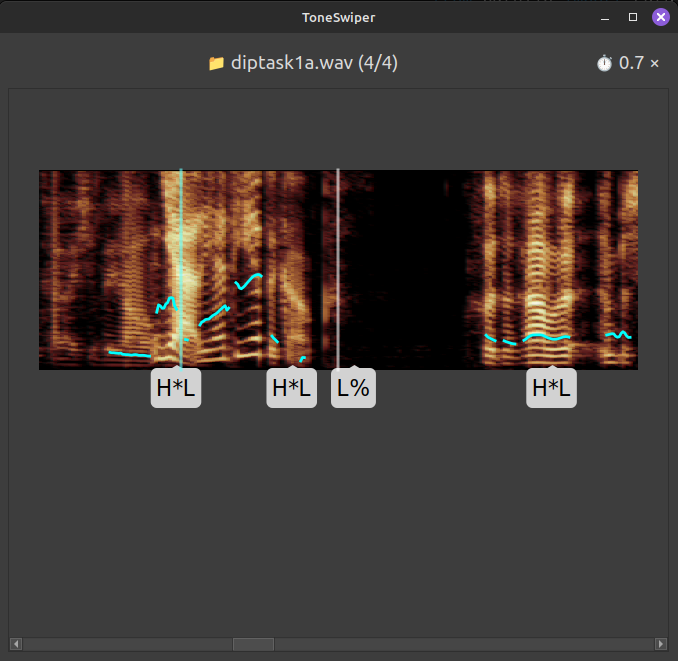
The ToDI framework describes intonation in the Dutch language as a series of prosodic events, such as rising (L*H) and falling (H*L) pitch accents, and high (H%) and low (L%) boundaries.
ToneSwiper facilitates manual transcription of intonation using this framework, by making it more efficient and more enjoyable. Specifically, it enables speedy transcription in real-time, in sync with the audio, through intuitive hotkey combinations.
Future versions of this program may support other ToDI/ToBI-like transcription frameworks, suitable for other languages.
Installation
You can install ToneSwiper from the Python Package Index:
pip install toneswiper
Or use pipx to install it in its own virtual environment (see pipx installation instructions).
To install the latest version potentially in development, install directly from the git repository (with pip or pipx):
pip install git+https://github.com/mwestera/toneswiper
Usage
On the command-line, a typical usage would be to navigate to a folder with one or more .wav-files (cd some/folder/with/wav/files) to be transcribed, and do:
toneswiper *.wav
This will start the gui app to let you annotate the selected sound files. It can be almost exclusively controlled by the keyboard; press F1 to open a help window explaining the keyboard controls.
If your folder also contains .TextGrid files (with names matching the .wav files), as exported from Praat, and/or you want to save your annotations to such files, you can do the following:
🌩 WARNING 🌩 This will modify your .TextGrid files by adding a 'ToDI' tier, and/or modifying it if the tier already exists. It may also destroy your files altogether, so best do this only on a duplicate of your 'real' files.
toneswiper *.wav --textgrid
You can also customize the tier to which the annotations are saved:
toneswiper *.wav --textgrid todi2
To measure annotation speed, hotkey usage etc., include --measure option. This will create a measurements folder containing a time-stamped .log file.
For more info, do:
toneswiper --help
1 maintainer

Release files for toneswiper 0.3.3
For a detailed explanation of source distributions (sdists) and built distributions (wheels), please see the package formats documentation.
Source distribution (sdist)
| File | Size | Uploaded | |
|---|---|---|---|
| toneswiper-0.3.3.tar.gz | 42.5 kB | Details |
Built distribution (wheel)
| File | Interpreter | ABI | Platform | Reset |
|---|---|---|---|---|
| toneswiper-0.3.3-py3-none-any.whl | Python 3 | none | any | Details |
Total release size: 85.5 kB
Release files / toneswiper-0.3.3.tar.gz
| Download URL | toneswiper-0.3.3.tar.gz |
|---|---|
| Size | 42.5 kB |
| Tags | Source |
|
SHA-256 checksum How to use checksums |
69879d8107f45238d23167cc8eeccacafc7d50eb491fd75e794a763f82ded8af
|
|
BLAKE2b-256 checksum How to use checksums |
4ad868f99958f9cbd259d20761b59d052041d3076b0a3ba0ed4b9bb1bde26b15
|
| Upload date | |
|
Uploaded using Trusted Publishing? What is trusted publishing? |
No |
| Uploaded via |
twine/6.2.0 CPython/3.10.12
|
Release files / toneswiper-0.3.3-py3-none-any.whl
| Download URL | toneswiper-0.3.3-py3-none-any.whl |
|---|---|
| Size | 43.0 kB |
| Tags | Python 3 |
|
SHA-256 checksum How to use checksums |
4e3bbe789c0866ba006782a3b2abd53f5b6f30a40940871722b2a9b2b6f6206c
|
|
BLAKE2b-256 checksum How to use checksums |
0e88048f71edd9f79a015ad5725ebbbdb2bb80c8e8138ce5441d928971f5514f
|
| Upload date | |
|
Uploaded using Trusted Publishing? What is trusted publishing? |
No |
| Uploaded via |
twine/6.2.0 CPython/3.10.12
|














