
A tool for manually annotating audio with ToDI-style prosody.

Project description
ToneSwiper
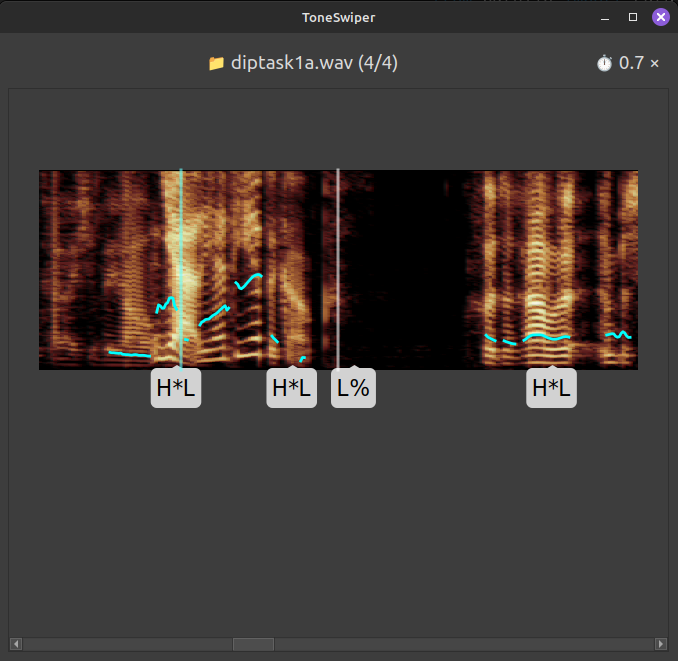
Transcription of Dutch Intonation (ToDI)
The ToDI framework describes intonation in the Dutch language as a series of prosodic events, such as rising (L*H) and falling (H*L) pitch accents, and high (H%) and low (L%) boundaries.
ToneSwiper facilitates manual transcription of intonation using this framework, by making it more efficient and more enjoyable. Specifically, it enables speedy transcription in real-time, in sync with the audio, through intuitive hotkey combinations.
Future versions of this program may support other ToDI/ToBI-like transcription frameworks, suitable for other languages.
Installation
You can install ToneSwiper from the Python Package Index:
pip install toneswiper
Or use pipx to install it in its own virtual environment (see pipx installation instructions).
To install the latest version potentially in development, install directly from the git repository (with pip or pipx):
pip install git+https://github.com/mwestera/toneswiper
Usage
On the command-line, a typical usage would be to navigate to a folder with one or more .wav-files (cd some/folder/with/wav/files) to be transcribed, and do:
toneswiper *.wav
This will start the gui app to let you annotate the selected sound files. It can be almost exclusively controlled by the keyboard; press F1 to open a help window explaining the keyboard controls.
If your folder also contains .TextGrid files (with names matching the .wav files), as exported from Praat, and/or you want to save your annotations to such files, you can do the following:
🌩 WARNING 🌩 This will modify your .TextGrid files by adding a 'ToDI' tier, and/or modifying it if the tier already exists. It may also destroy your files altogether, so best do this only on a duplicate of your 'real' files.
toneswiper *.wav --textgrid
You can also customize the tier to which the annotations are saved:
toneswiper *.wav --textgrid todi2
For more info, do:
toneswiper --help
Release history Release notifications | RSS feed


Download files
Download the file for your platform. If you're not sure which to choose, learn more about installing packages.
Source Distribution
Built Distribution
Filter files by name, interpreter, ABI, and platform.
If you're not sure about the file name format, learn more about wheel file names.
Copy a direct link to the current filters
File details
Details for the file toneswiper-0.3.0.tar.gz.
File metadata
- Download URL: toneswiper-0.3.0.tar.gz
- Upload date:
- Size: 44.5 kB
- Tags: Source
- Uploaded using Trusted Publishing? No
- Uploaded via: twine/6.2.0 CPython/3.10.12
File hashes
| Algorithm | Hash digest | |
|---|---|---|
| SHA256 |
e8a4a7da2d62fff75a2a40d142e602b23a19e57e546817313c5c545062524dcb
|
|
| MD5 |
eec8c4bd1de26a4c3ab589cb43e48dcf
|
|
| BLAKE2b-256 |
0c5ec3cd791320b56d83f8fca7e8ace7199018f8eff251462dfef15b81cdf9ce
|
File details
Details for the file toneswiper-0.3.0-py3-none-any.whl.
File metadata
- Download URL: toneswiper-0.3.0-py3-none-any.whl
- Upload date:
- Size: 61.4 kB
- Tags: Python 3
- Uploaded using Trusted Publishing? No
- Uploaded via: twine/6.2.0 CPython/3.10.12
File hashes
| Algorithm | Hash digest | |
|---|---|---|
| SHA256 |
1be83fa4de41a4407a13dd47d27482f08e8d7fab16e8e0dcf6560373e72ec523
|
|
| MD5 |
32abf88636e33f1bea9ccdc6aa7ab254
|
|
| BLAKE2b-256 |
955cdfe4767c1540a970e118f88182f34acb6171b0319d760a7bab8a63fcf9ad
|






