
Network Topology Scanner

Scans a network range, discovers active hosts, their open ports/services, vendor (via MAC) and device type, and generates an interactive HTML topology graph with icons per category (router, PC, NAS, printer, etc). Flags hosts with sensitive open ports in red (Telnet, SMB, RDP, FTP, VNC), stores every scan in SQLite to diff against the previous one (new/dropped hosts, ports that changed), and can export the inventory to CSV. Optionally queries your routers/switches over SNMP to draw the real topology (which host hangs from which switch port or access point) instead of an approximate star. Available as a CLI or as a local web interface (Streamlit, optional).
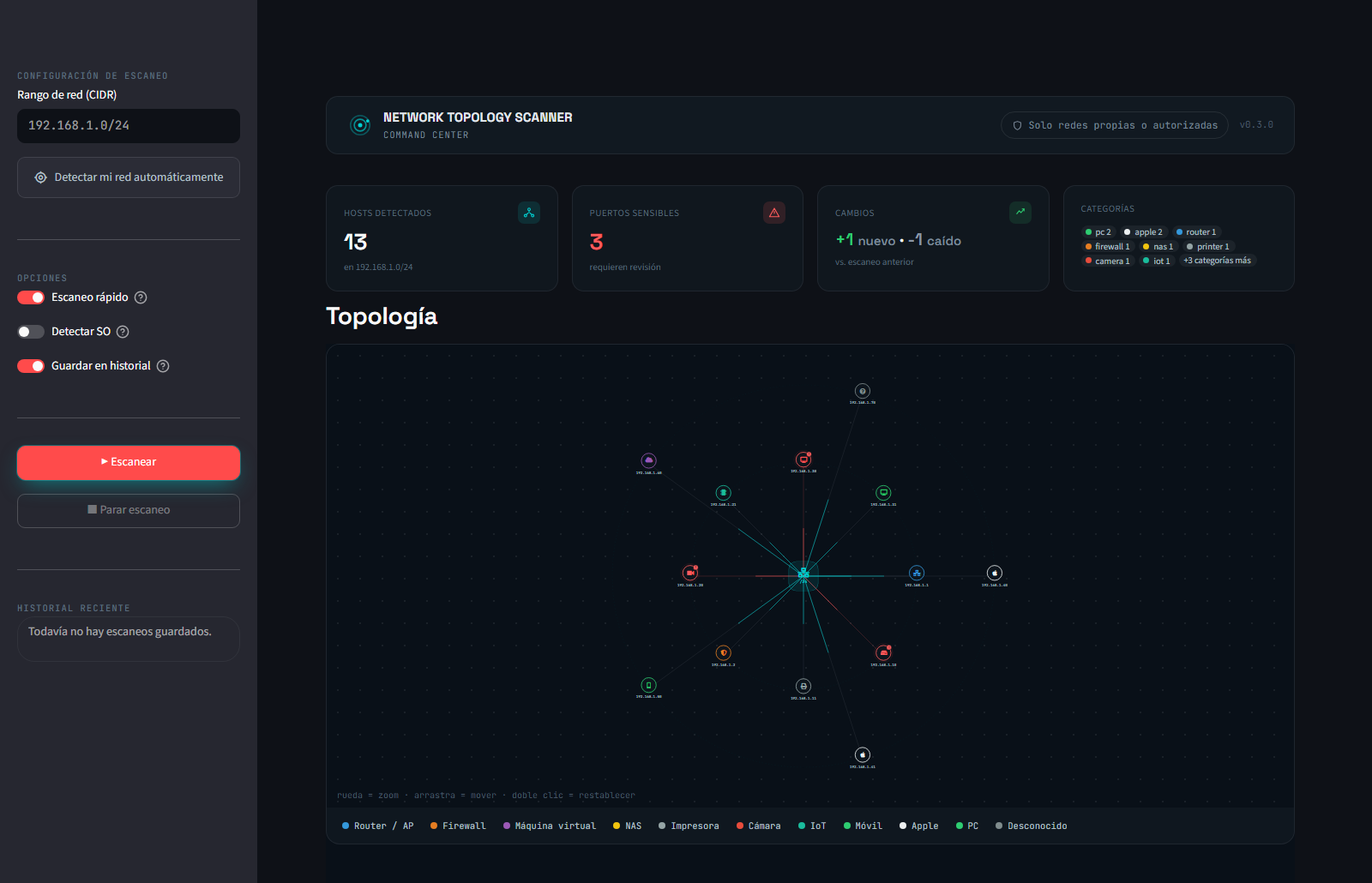
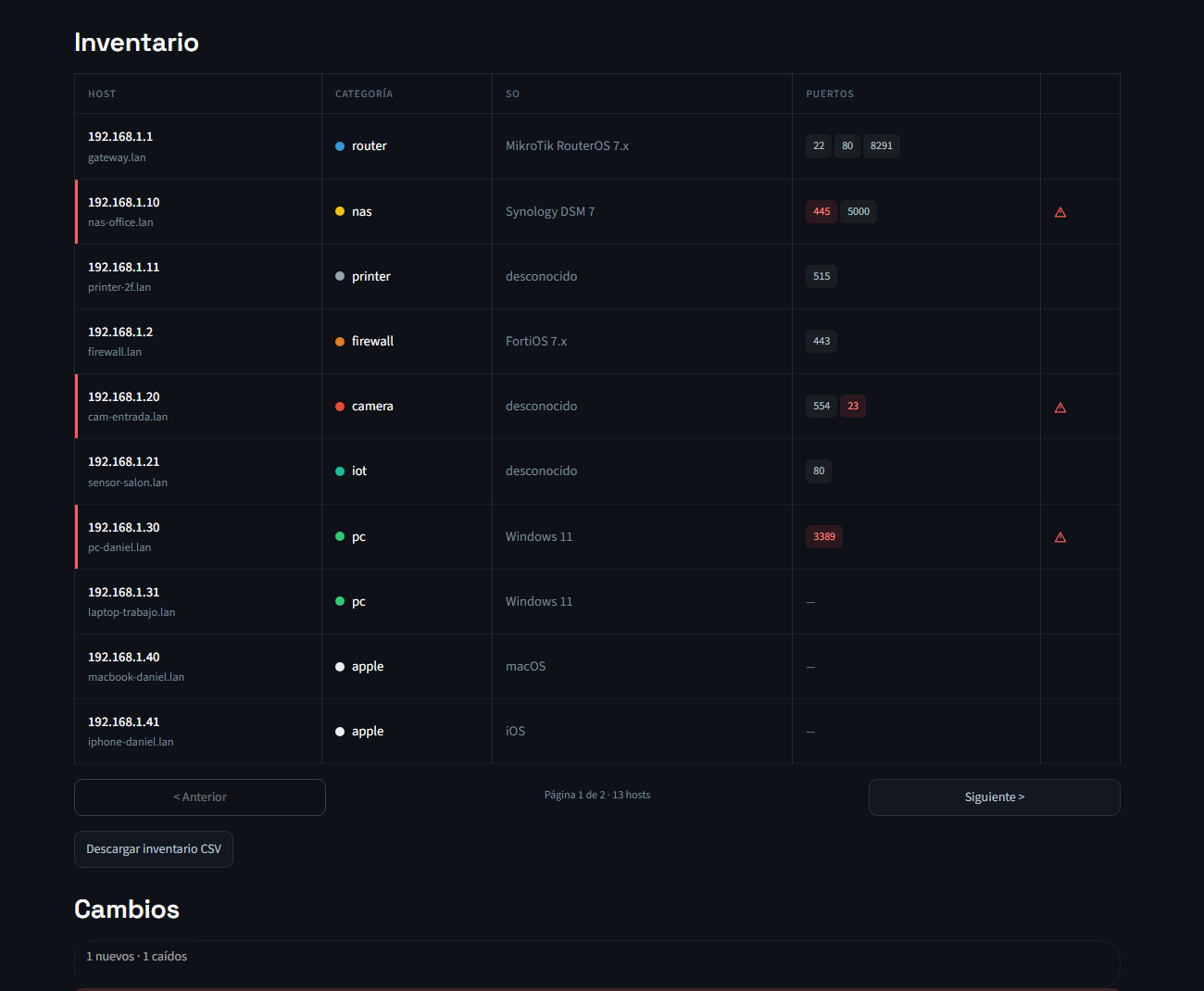
Screenshots use fictional demo data — no real network is exposed here.
⚠️ Legal notice
Only use this tool on networks you own or have explicit authorization to scan (your homelab, or your workplace's network if you have permission). Scanning networks without consent is illegal in most countries.
Project structure
network-topology-scanner/
├── src/topology_scanner/
│   ├── scanner.py        # nmap scanning (discovery + ports)
│   ├── classifier.py      # Device classification by MAC/vendor
│   ├── graph.py            # Graph construction (networkx)
│   ├── export.py           # HTML export (pyvis), text and CSV
│   ├── history.py          # Scan history in SQLite (diff vs. the previous scan)
│   ├── snmp.py             # Real topology via SNMP (ARP, routes, MAC table, neighbors)
│   ├── cli.py               # Command-line interface
│   └── webapp.py            # Web interface (Streamlit, optional)
├── scripts/demo_arbol.py    # Fictional SNMP tree for the README screenshot
├── tests/                   # pytest, with nmap mocks (no real network needed)
├── Dockerfile, compose.yaml # Container image (published to GHCR) and Compose example
└── pyproject.toml           # single source of dependencies (pip install -e ".[dev,web,snmp]")
Installation
Requires Python 3.10+.
# System dependency
sudo apt install nmap        # Linux
# On Windows: download the installer from nmap.org

# Virtual environment
python3 -m venv venv
source venv/bin/activate      # Linux/Mac
# venv\Scripts\Activate.ps1   # Windows PowerShell

# From PyPI
pip install topology-scanner
pip install "topology-scanner[web,snmp]"   # optional: web interface and real topology via SNMP
For development, from a clone of the repo:
pip install -e ".[dev,web,snmp]"
Docker
A multi-arch image (amd64 and arm64) is published to GHCR with every release. It runs as an unprivileged user and includes the web UI and SNMP support:
docker run --rm --network host --cap-add NET_RAW --cap-add NET_ADMIN \
    -v topology-data:/data ghcr.io/danielsm107/topology-scanner 192.168.1.0/24 --fast
Or with Docker Compose, using the compose.yaml in this repo:
docker compose up -d                                   # web UI on http://127.0.0.1:8501
docker compose run --rm scan 192.168.1.0/24 --fast     # one-off CLI scan
--network hostis required: on Docker's bridge network nmap can't see MACs or vendors on your LAN. It only works on Linux; Docker Desktop (Windows/macOS) can't reach your LAN at layer 2.NET_RAWandNET_ADMINare all nmap needs; no--privileged. Don't useno-new-privileges, or nmap can't start.- Results (
historial.db, HTML, CSV) are written to/data. A bind-mounted host folder must be writable by UID 10001. - The web UI has no authentication, so the compose file only exposes it on
127.0.0.1. Opening it to your LAN lets anyone on it run scans.
Details: docs/devops/runbooks/01-contenedor.md (in Spanish).
Usage
sudo topology-scanner 192.168.1.0/24
sudo topology-scanner 192.168.1.0/24 --fast
sudo topology-scanner 192.168.1.0/24 --os-detection --output my_network.html

# Several ranges at once (e.g. your LAN and a homelab subnet behind another router)
sudo topology-scanner 192.168.1.0/24 10.0.10.0/24

# Real topology: query the router(s) over SNMP (see below)
export TOPOLOGY_SNMP_COMMUNITY='your-read-only-community'
sudo -E topology-scanner 192.168.1.0/24 --snmp 192.168.1.1

# Alternative without the installed entry point:
sudo python3 -m topology_scanner 192.168.1.0/24
| Flag | Description | Default |
|---|---|---|
range |
CIDR range(s) to scan, space-separated; history is kept per range | (required) |
--ports |
Ports to scan (nmap format) | common ports |
--nmap-args |
Extra arguments passed to nmap | -sV -T4 |
--output |
Output HTML file name | network_topology.html |
--os-detection |
Enables OS detection (-O), the slowest option | disabled |
--no-discovery |
Disables the preliminary ping scan, scans the full range directly | disabled |
--fast |
Max-speed preset, ports only (incompatible with --os-detection/--nmap-args) |
disabled |
--csv |
Also exports a CSV inventory to the given path | disabled |
--history-db |
SQLite file where scan history is stored | historial.db |
--no-history |
Skips saving the scan to history / diffing against the previous one | disabled |
--snmp |
Routers/switches to query over SNMP v2c/v3 (comma-separated IPs) | disabled (star layout) |
The Spanish flags from v1.0 (--rapido, --con-so, --sin-2-fases,
--sin-historial) still work as hidden aliases.
Web interface
Requires the [web] extra (see Installation). Form with automatic detection
of your local network, real cancellable scanning (kills the actual nmap
process, not just the UI), results table, CSV download and the embedded
graph. Several ranges can be scanned at once by separating them with
spaces in the range field. The "Real topology via SNMP" switch in the sidebar draws the tree
described below, over SNMP v2c or v3 (community and keys are password
inputs; leave them empty to use the TOPOLOGY_SNMP_* environment variables).
topology-scanner-web
# or, without the installed entry point:
streamlit run src/topology_scanner/webapp.py
Real topology via SNMP
By default the graph is an approximate star: nmap knows which hosts are
alive, not how they are connected. With --snmp, the scanner reads a few
standard tables from your routers/switches and builds a tree instead:
| SNMP table | What it tells | Used for |
|---|---|---|
Routes (ipCidrRouteTable) |
"10.0.10.0/24 is behind 192.168.1.44" | Upstream gateway, downstream routers and their subnets |
Neighbors (MikroTik mtxrNeighborTable, MNDP/LLDP/CDP) |
"Access point X is on my ether2" | Links between network devices |
Neighbors (standard LLDP-MIB, any vendor) |
"Switch Y sees me on its port3" | Links, with the port on both ends (ether2 ↔ port3) |
MAC table (BRIDGE-MIB) |
"MAC aa:bb:… is on port wlan1" | Which port each host is on |
ARP (ipNetToMediaTable) |
"192.168.1.20 is aa:bb:…" | Matching MACs to the IPs nmap found |
Hosts seen on a port that leads to another network device hang from that device; hosts that only SNMP sees (not detected by nmap) are shown too — an unknown device on a switch port is exactly what you want to notice. If no device answers, the scan still finishes with the star layout.
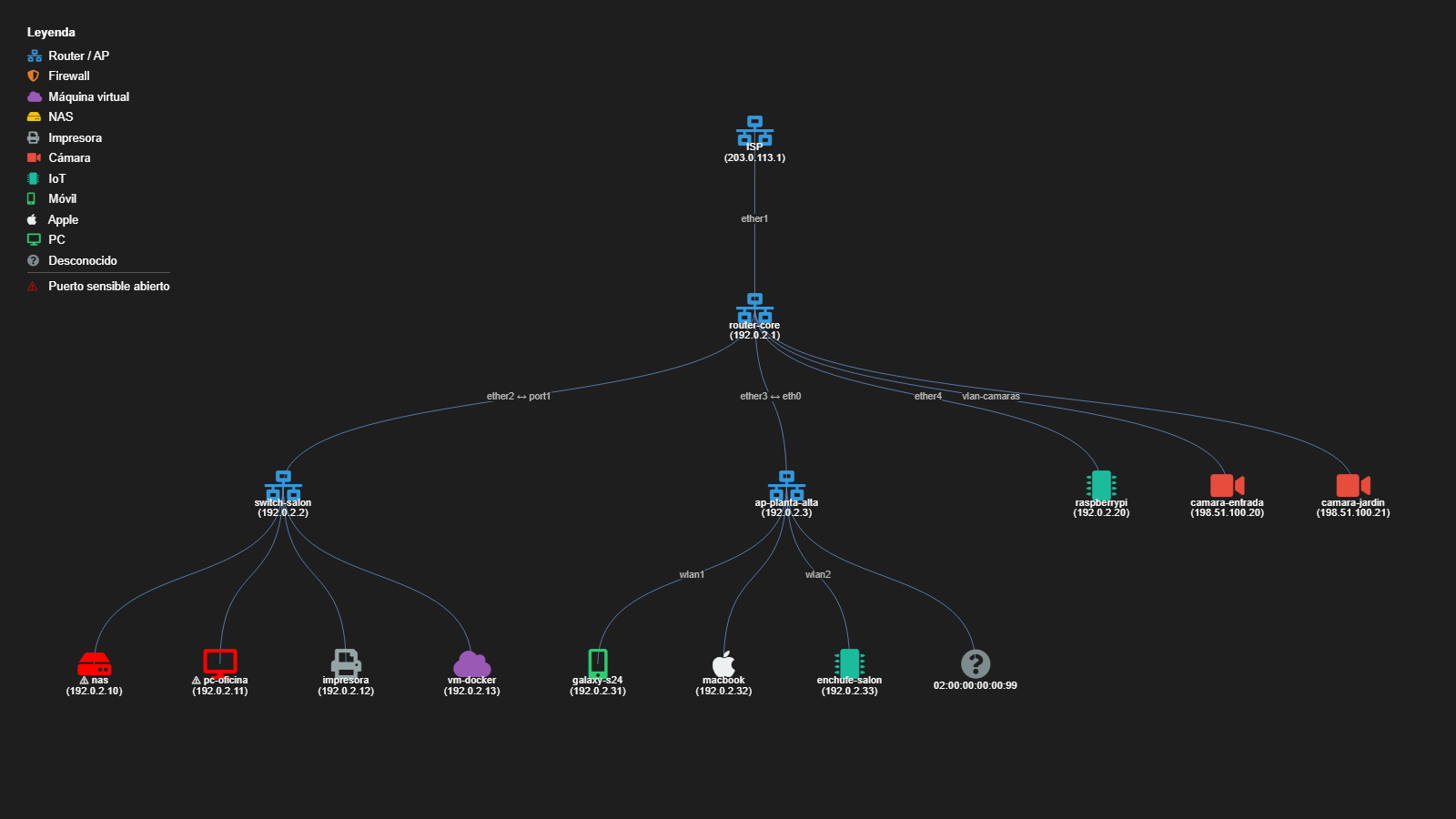
Fictional demo data, generated with python scripts/demo_arbol.py (no scan involved).
Setup (MikroTik RouterOS example — read-only, restricted to the scanning machine):
/snmp community add name=<long-random-string> addresses=<scanner-ip>/32 read-access=yes write-access=no
/snmp community set [find name=public] disabled=yes
/snmp set enabled=yes
The community is read from the TOPOLOGY_SNMP_COMMUNITY environment
variable, never from a command-line argument (arguments show up in ps and
in your shell history). On Windows PowerShell:
$env:TOPOLOGY_SNMP_COMMUNITY = "...".
SNMPv3 (recommended: v2c sends the community in clear text). In RouterOS
v6 the community name is the v3 user, and security=private means
authentication + encryption:
/snmp community add name=<user> addresses=<scanner-ip>/32 security=private \
    authentication-protocol=SHA1 authentication-password=<8+ chars> \
    encryption-protocol=AES encryption-password=<8+ chars> read-access=yes write-access=no
| Variable | Meaning | Default |
|---|---|---|
TOPOLOGY_SNMP_USER |
v3 user (if set, v3 is used and the community is ignored) | — |
TOPOLOGY_SNMP_AUTH_KEY |
Authentication key (8+ characters) | required |
TOPOLOGY_SNMP_PRIV_KEY |
Encryption key (8+ characters); empty = authenticate without encryption | — |
TOPOLOGY_SNMP_AUTH_PROTO |
MD5, SHA, SHA224, SHA256, SHA384, SHA512 |
SHA |
TOPOLOGY_SNMP_PRIV_PROTO |
DES, AES, AES192, AES256 |
AES |
Current limitations: links between network devices come from MikroTik's neighbor table and from the standard LLDP-MIB, so devices that don't run LLDP (or don't expose it over SNMP) are only placed by routes, ARP and the MAC table.
Device classification
Each host's MAC address is used to look up its vendor (via nmap's built-in database), which is then heuristically mapped to a category with its own icon: router, firewall, VM, NAS, printer, camera, IoT, mobile, Apple, PC.
Limitation: MAC resolution only works if the scanning machine is on the same L2 segment as the target host (ARP doesn't cross routers/VLANs). Hosts on other subnets will show up as category "unknown".
Tests
pytest tests/ -v
pytest tests/ --cov=topology_scanner   # with coverage
scanner.py tests use unittest.mock to simulate nmap's responses, so they
run without a real network or the nmap binary installed.
Roadmap
- Visual alerts for sensitive open ports (RDP, Telnet, SMB, FTP, VNC)
- Scan history in SQLite (new/dropped hosts, ports that change)
- CSV export for audits/inventory
- Visual icon/color legend in the HTML
- Web interface with Streamlit
- CI: run tests + ruff on every push
- Real topology via SNMP against routers/switches, CLI (instead of the approximate star layout)
- SNMP in the web interface
- Standard LLDP-MIB (links between devices from any vendor, with the port on both ends)
- SNMPv3 (authentication and encryption)
- v1.0 on PyPI, published by GitHub Actions from a tag (trusted publishing, no tokens)
See CHANGELOG.md for release notes.
1 maintainer

Metadata
1 maintainer
Release files for topology-scanner 1.2.1
For a detailed explanation of source distributions (sdists) and built distributions (wheels), please see the package formats documentation.
Source distribution (sdist)
| File | Size | Uploaded | Provenance | |
|---|---|---|---|---|
| topology_scanner-1.2.1.tar.gz | 114.6 kB | With provenance | Details |
Built distribution (wheel)
| File | Interpreter | ABI | Platform | Reset |
|---|---|---|---|---|
| topology_scanner-1.2.1-py3-none-any.whl | Python 3 | none | any | Details |
Total release size: 184.6 kB
Release files / topology_scanner-1.2.1.tar.gz
| Download URL | topology_scanner-1.2.1.tar.gz |
|---|---|
| Size | 114.6 kB |
| Tags | Source |
|
SHA-256 checksum How to use checksums |
c012bcda21b8effd1a9ee0ce367be40cc884d7c96fe78e0e72477bb2da725458
|
|
BLAKE2b-256 checksum How to use checksums |
4d1d7e6a96efb178970b0dcd6285b7d49f855a56c50301eda40202633a358503
|
| Upload date | |
|
Uploaded using Trusted Publishing? What is trusted publishing? |
Yes |
| Uploaded via |
twine/7.0.0 CPython/3.13.14
|
Provenance
Provenance describes where a file came from. On PyPI, provenance is shared via attestations, which provide a verifiable record of the build or publishing details. View details, limitations and caveats.


PyPI Publish Attestation
PyPI verified that this artifact, at this checksum, originated from the publisher listed below.
Signed by GitHub Actions, verified by PyPI on Oct 24, 2026.
Transparency logRelease files / topology_scanner-1.2.1-py3-none-any.whl
| Download URL | topology_scanner-1.2.1-py3-none-any.whl |
|---|---|
| Size | 70.1 kB |
| Tags | Python 3 |
|
SHA-256 checksum How to use checksums |
6b202d3a187f3b1c49f7727099765fea9c599420a8c267478f34541f92fd811b
|
|
BLAKE2b-256 checksum How to use checksums |
e78060a17902db7c8b83f18c9c182163ee656e47aecd5579d00b86652cb2b56e
|
| Upload date | |
|
Uploaded using Trusted Publishing? What is trusted publishing? |
Yes |
| Uploaded via |
twine/7.0.0 CPython/3.13.14
|
Provenance
Provenance describes where a file came from. On PyPI, provenance is shared via attestations, which provide a verifiable record of the build or publishing details. View details, limitations and caveats.
PyPI Publish Attestation
PyPI verified that this artifact, at this checksum, originated from the publisher listed below.
Signed by GitHub Actions, verified by PyPI on Oct 24, 2026.
Transparency logSecurity for topology-scanner 1.2.1
Provenance
Provenance describes where a file came from. On PyPI, provenance is shared via attestations, which provide a verifiable record of the build or publishing details. View details, limitations and caveats.
Full provenance
All 2 files in this release have been uploaded with provenance metadata.
Attestation for topology_scanner-1.2.1.tar.gz
PyPI Publish Attestation
PyPI verified that this artifact, at this checksum, originated from the publisher listed below.
Signed by GitHub Actions, verified by PyPI on Oct 24, 2026.
Transparency logA note on package security
PyPI is a repository for distributing packages, not a service for auditing them. While third-party security researchers and our staff do their best to detect and remove malicious packages, PyPI cannot guarantee the quality, security or suitability of any given package.
To learn more about protecting yourself from malicious actors, visit our package security documentation.














