
Protein-protein interaction interface mapping from 3D structures to 2D UV atlases.

Project description
TopoPPI
Release: This README targets
topoppi 1.1. The matching GitHub release tag isv1.1.
TopoPPI maps protein-protein interaction (PPI) interfaces from 3D structures into annotated 2D UV atlases. It is built for interactive inspection, reproducible figure export, and benchmark-style evaluation across structure sets.
The toolkit includes:
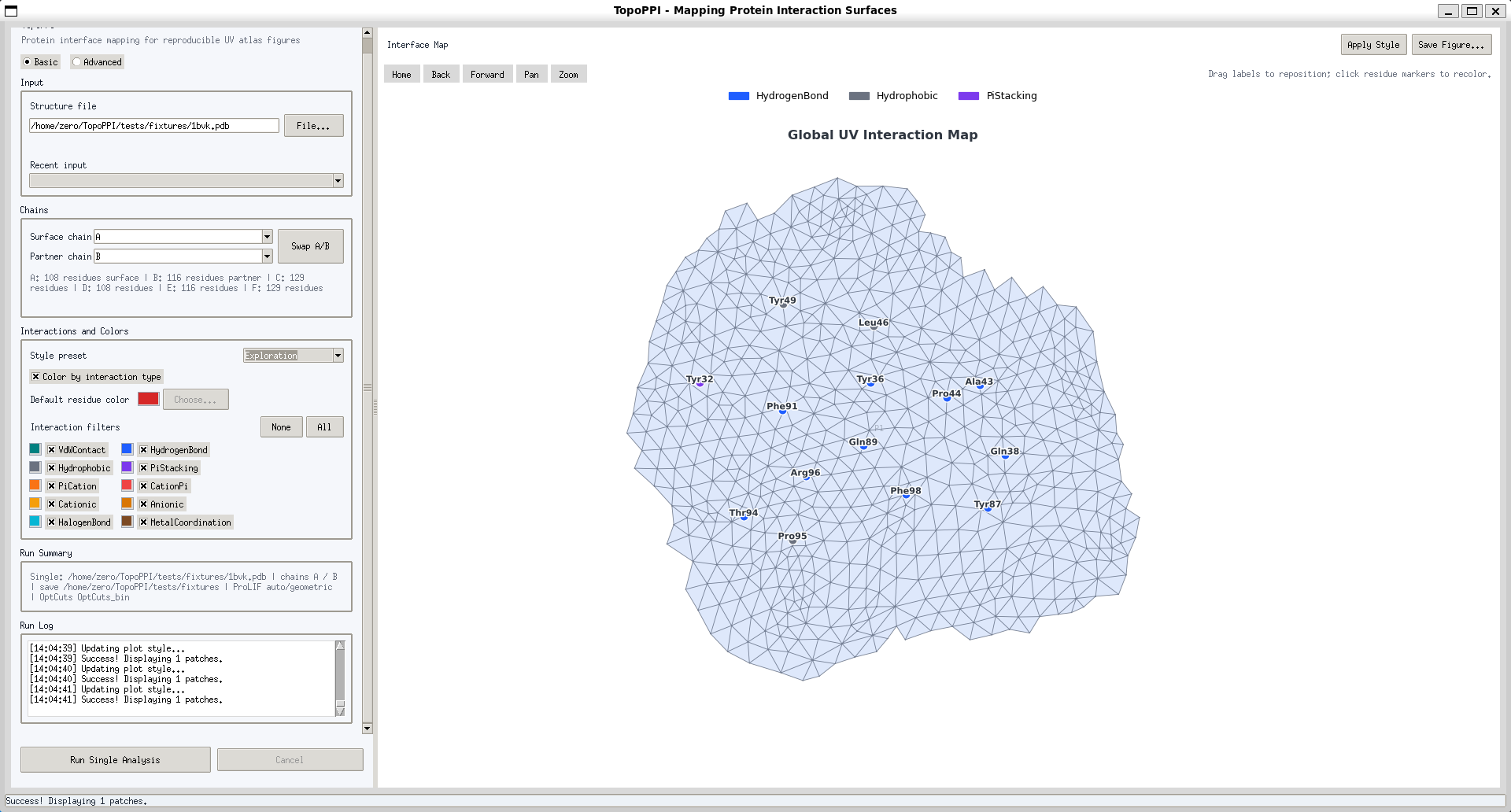
- a Basic/Advanced Tkinter GUI for single-structure analysis, interaction styling, benchmark launching, and reproducible export,
- a command-line pipeline for one-shot interface map generation,
- a benchmark framework for multi-structure evaluation with JSON/CSV reports,
- optional typed interaction annotation through ProLIF, with geometric fallback when no ProLIF data is available.
The pipeline loads protein chains from PDB/mmCIF files, builds a receptor surface, extracts interface patches against a partner chain, flattens patches to UV space, optimizes UVs with OptCuts, and renders annotated interface maps.
Quick Start (GUI, ~5 minutes)
If you only want to launch the GUI and run your first structure quickly:
- Create and activate the Conda environment:
conda env create -f environment.yml
conda activate bio3d
- Install TopoPPI in editable mode:
pip install -e ".[benchmark,interactions,meshio]"
- Install OptCuts into the active Conda environment:
topoppi-install-optcuts
which OptCuts_bin
Source checkout users can also install the bundled binary directly:
bash tools/OptCuts/install_optcuts.sh
- Launch GUI:
topoppi-gui
- In the GUI:
- Use Basic to load a
.pdb/.cifstructure file, - Review detected chains and use Swap A/B if the surface/partner assignment is reversed,
- Choose which interaction types to display and adjust colors if needed,
- Click Run Single Analysis to generate and auto-save the interface map.
- Use Basic to load a
Note: OptCuts is required by the current pipeline. Running without OptCuts is intentionally unsupported. PyPI wheels do not include the OptCuts binary, but the
topoppi-install-optcutscommand downloads the Linux x86-64 binary from the matching GitHub release and installs it into your active Conda environment or~/.local/bin.
Project Overview
Core workflow
- Load structure data for Chain A (receptor/surface chain) and Chain B (ligand chain).
- Generate molecular surface for Chain A.
- Extract interface patches using a distance cutoff to Chain B atoms.
- Parameterize patches with LSCM.
- Optimize UV patches with OptCuts (required in current pipeline).
- Visualize and export annotated 2D interface maps.
Main entry points
topoppi: installed command-line pipeline.topoppi-gui: installed Tkinter GUI.topoppi-install-optcuts: download and install the Linux x86-64 OptCuts binary from the matching GitHub release.topoppi.pipeline.run_interface_mapping: importable single-structure API.topoppi.benchmarking: benchmark engine, metrics, aggregation, and CSV/JSON reporting.
All user-facing defaults live in topoppi.config.
Installation & Requirements
System requirements
- Python 3.10 (recommended via Conda)
- OS with Tk support (for GUI mode)
- libigl Python bindings 2.6.x (package:
igl) - ProLIF + MDAnalysis are recommended for automatic typed interaction generation; the GUI can leave ProLIF blank and fall back to geometric heuristics if generation is unavailable
- OptCuts binary (
OptCuts_bin) must be installed and available in your PATH (or passed via--optcuts-bin)
Create environment from a source checkout
conda env create -f environment.yml
conda activate bio3d
pip install -e ".[benchmark,interactions,meshio]"
The repository includes pyproject.toml for standard Python packaging and PyPI publication.
Install from PyPI
conda create -n topoppi python=3.10
conda activate topoppi
pip install "topoppi[benchmark,interactions,meshio]"
topoppi-install-optcuts
which OptCuts_bin
For this release, topoppi-install-optcuts downloads from the matching GitHub release tag, for example v1.1. It currently supports Linux x86-64 release artifacts. On other platforms, build OptCuts manually and set TOPOPPI_OPTCUTS_BIN=/absolute/path/to/OptCuts_bin.
Install OptCuts binary
For PyPI installs, use the installed downloader:
topoppi-install-optcuts
From a source checkout, the repository also includes a helper script that installs tools/OptCuts/OptCuts_bin into your active Conda environment:
bash tools/OptCuts/install_optcuts.sh
After installation, verify:
which OptCuts_bin
Required: the current pipeline does not support running without OptCuts. You can also set
TOPOPPI_OPTCUTS_BIN=/absolute/path/to/OptCuts_bin. PyPI source and wheel distributions intentionally do not includetools/OptCuts;topoppi-install-optcutsdownloads the release-provided binary artifact instead.
Python dependencies
See environment.yml and pyproject.toml for the authoritative lists.
The full Conda environment includes ProLIF/MDAnalysis for automatic interaction generation.
Main dependencies include:
numpy,scipy,matplotlibbiopython,scikit-image,trimesh,igl(2.6.x)networkx,rtree,shapely,pillow- optional interaction extras:
MDAnalysis,prolif,rdkit
Usage
1) GUI mode
Launch the desktop app:
topoppi-gui
GUI supports:
- Basic single-file analysis with structure loading, chain preview, A/B swapping, interaction filters, and color controls,
- Advanced controls for chain IDs, cutoffs, surface parameters, OptCuts export, labels, layout, and output directories,
- folder-level benchmark runs with explicit
resume,new, andoverwritemodes, - interaction-type filtering, custom colors, and style presets (
Exploration,Publication,High contrast), - recent input/output path pickers,
- inline validation before launching a run,
- staged progress (
Load,Surface,Patch,OptCuts,Render) and cooperative cancellation, - optional OptCuts frame export,
- auto-saved figures and sidecar manifests for reproducibility.
2) Command-line mode
Run the full pipeline on a single PDB/mmCIF structure:
topoppi <input.pdb|input.cif> [options]
Example:
topoppi ./data/1abc.pdb -A A -B B -o interface_map.png --cutoff 9.0 --res 1.0 --sigma 1.5
3) Benchmark mode (via GUI workflow)
Select Benchmark, choose a folder containing .pdb files, select a run mode, and run Run Benchmark in GUI.
Benchmark preprocessing uses the configured surface/partner chain IDs for every file.
Outputs are written under:
benchmark_report.jsonbenchmark_summary.csvbenchmark_checkpoint.json(resume support)
4) Output artifacts (what gets written)
Single-run CLI / GUI outputs
- Main rendered interface image (default:
interface_map.png, or your-o/--outputvalue) - GUI single runs auto-save a figure to the selected save directory and write a
<figure>.topoppi.jsonsidecar manifest - Auto-generated ProLIF JSON when
--prolifis not provided (saved as<input_basename>.<chain_a>-<chain_b>.prolif.jsonbeside the input file)
Benchmark outputs
benchmark_report.json: full structured report with runtime worker count and config fingerprintbenchmark_summary.csv: tabular summary for all processed structuresbenchmark_checkpoint.json: resume/checkpoint state
Configuration
Command-line options (topoppi)
pdb_file: input structure file (.pdbor.cif)-A, --chain-a: receptor/surface chain ID-B, --chain-b: ligand chain ID--prolif(--arpeggioalias): optional ProLIF JSON path--cutoff: interface distance cutoff (Å)--res: surface grid resolution (Å)--sigma: Gaussian smoothing sigma-o, --output(defaultinterface_map.png): output image path--optcuts-bin(defaultOptCuts_bin): OptCuts executable path/name--patch-gap: minimum spacing between charts in global UV atlas--show: display the Matplotlib figure after saving-v, --verbose: verbose logging
CLI defaults are read from topoppi.config.DEFAULT_RUN_CONFIG.
Benchmark configuration (BenchmarkConfig)
topoppi.config.BenchmarkConfig defines reusable benchmark settings, including:
- input/output roots,
- chain IDs,
- nested surface/topology/parameterization/OptCuts configuration,
- parallelism (
max_workers), - resume behavior (
resume), - minimum patch validity thresholds.
ProLIF behavior
If --prolif is not provided (or the GUI ProLIF field is left blank), TopoPPI tries to auto-generate <input_basename>.<chain_a>-<chain_b>.prolif.json using MDAnalysis + ProLIF. If generation is unavailable or fails, visualization falls back to geometric interaction heuristics.
Examples
Test fixture: 1BVK
The repository includes tests/fixtures/1bvk.pdb for smoke tests and reproducible examples.
topoppi tests/fixtures/1bvk.pdb -A A -B C -o 1bvk_interface.png
CLI: basic run
topoppi ./data/complex.pdb -A A -B B -o complex_interface.png
CLI: custom OptCuts binary and tighter patch gap
topoppi ./data/complex.pdb -A A -B C \
  --optcuts-bin /usr/local/bin/OptCuts_bin \
  --patch-gap 0.05 \
  --output complex_interface_optcuts.png
CLI: use existing ProLIF interactions
topoppi ./data/complex.pdb -A A -B B \
  --prolif ./data/complex.prolif.json \
  --output complex_with_prolif.png
Python: run one interface map programmatically
from topoppi.config import TopoPPIRunConfig
from topoppi.pipeline import run_interface_mapping

result = run_interface_mapping(
    TopoPPIRunConfig(
        pdb_file="./data/complex.pdb",
        chain_a="A",
        chain_b="B",
        output_file="complex_interface.png",
    )
)
print(result.to_dict())
Python: run benchmark programmatically
from dataclasses import replace

from topoppi.config import BenchmarkConfig, DEFAULT_RUN_CONFIG
from topoppi.benchmarking import BenchmarkRunner

config = BenchmarkConfig(
    input_folder="./dataset",
    output_root="./benchmark_results",
    chain_a="A",
    chain_b="B",
    surface=replace(DEFAULT_RUN_CONFIG.surface, grid_resolution=1.0, sigma=1.0),
    topology=replace(DEFAULT_RUN_CONFIG.topology, distance_cutoff=9.0),
    optcuts=replace(DEFAULT_RUN_CONFIG.optcuts, optcuts_bin="OptCuts_bin").for_headless(),
    resume=True,
)

runner = BenchmarkRunner(config=config, log_fn=print)
report = runner.run()
print(report["summary"])
Project Structure
TopoPPI/
├─ pyproject.toml                 # Python package metadata and console scripts
├─ environment.yml                # Conda environment definition
├─ docs/                          # Release and reproducibility notes
├─ tests/                         # Lightweight smoke/unit tests
├─ tools/
│  └─ OptCuts/
│     ├─ OptCuts_bin              # Source-checkout convenience executable
│     ├─ install_optcuts.sh       # Installer script for Conda env
│     ├─ NOTICE.md                # Binary provenance and packaging policy
│     └─ LICENSE.txt              # OptCuts license
└─ src/
	   └─ topoppi/
	      ├─ cli.py                   # CLI entry point
	      ├─ config.py                # Central runtime, benchmark, GUI, and OptCuts configuration
	      ├─ install_optcuts.py       # Release artifact downloader for OptCuts
	      ├─ pipeline.py              # Importable single-run API
      ├─ io/                      # PDB/mmCIF loading and chain extraction
      ├─ mesh/                    # Surface generation, topology, parameterization
      ├─ optimization/            # OptCuts-based UV optimization
      ├─ interactions/            # ProLIF integration and interaction normalization
      ├─ visualization/           # 2D interface rendering
      ├─ atlas/                   # Atlas metrics
      ├─ gui_app/                 # GUI mixins and application orchestration
      └─ benchmarking/            # Benchmark runner, metrics, reporting
Troubleshooting
OptCuts_bin not found
Symptoms:
- CLI/GUI fails when entering optimization stage
which OptCuts_binreturns empty
Fix:
topoppi-install-optcuts
which OptCuts_bin
From a source checkout, this also works:
bash tools/OptCuts/install_optcuts.sh
which OptCuts_bin
If still missing, pass an explicit binary path:
topoppi <input.pdb|input.cif> -A <chainA> -B <chainB> --optcuts-bin /absolute/path/to/OptCuts_bin
ProLIF/MDAnalysis import errors
Symptoms:
- Import errors for
proliforMDAnalysis
Fix:
- Recreate environment from
environment.yml - Confirm packages are installed in the active env
conda env create -f environment.yml
conda activate bio3d
python -c "import MDAnalysis, prolif; print('ok')"
igl / libigl compatibility issues
Symptoms:
- Import failures or runtime issues in geometry/parameterization stages
Fix:
- Use the project environment and keep
iglin the documented2.6.xrange.
Changelog
- v1.1 adds improved GUI workflows, benchmark reporting, reproducibility manifests, PyPI packaging, and one-command Linux x86-64 OptCuts installation.
- v1.0.0 is the initial public release of TopoPPI.
See CHANGELOG.md for release history.
License
This project is distributed under the terms of the MIT License. See LICENSE.
The source checkout includes a Linux x86-64 OptCuts binary for convenience. It is not included in the Python package distribution; see tools/OptCuts/NOTICE.md and tools/OptCuts/LICENSE.txt before redistributing binary artifacts.
Release history Release notifications | RSS feed


Download files
Download the file for your platform. If you're not sure which to choose, learn more about installing packages.
Source Distribution
Built Distribution
Filter files by name, interpreter, ABI, and platform.
If you're not sure about the file name format, learn more about wheel file names.
Copy a direct link to the current filters
File details
Details for the file topoppi-1.1.tar.gz.
File metadata
- Download URL: topoppi-1.1.tar.gz
- Upload date:
- Size: 582.2 kB
- Tags: Source
- Uploaded using Trusted Publishing? No
- Uploaded via: twine/6.2.0 CPython/3.10.20
File hashes
| Algorithm | Hash digest | |
|---|---|---|
| SHA256 |
40f93b4b758ba06aff2a98e2b4087353566cc4a85237ed8b70b612ae42423ba3
|
|
| MD5 |
ee9911e6c39ffaa6b13035e993359f53
|
|
| BLAKE2b-256 |
4eae4c019e3e287a874dbabee357d5ea50b0e60b4a89689bb781a8ecfdbabbe1
|
File details
Details for the file topoppi-1.1-py3-none-any.whl.
File metadata
- Download URL: topoppi-1.1-py3-none-any.whl
- Upload date:
- Size: 87.2 kB
- Tags: Python 3
- Uploaded using Trusted Publishing? No
- Uploaded via: twine/6.2.0 CPython/3.10.20
File hashes
| Algorithm | Hash digest | |
|---|---|---|
| SHA256 |
5e73b74ef17b6700cacbe08237b4364836aa1cb87a192e17e092a8b6eb645908
|
|
| MD5 |
2923643a1571442146a0fd53a60b3d93
|
|
| BLAKE2b-256 |
784a93e3fe416197e0b8bb0819231befda4c8802121268deda3b6e145b84e9ca
|






