

Change files timestamp with a dialog window.
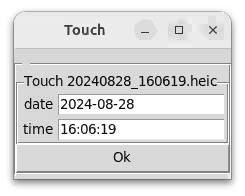
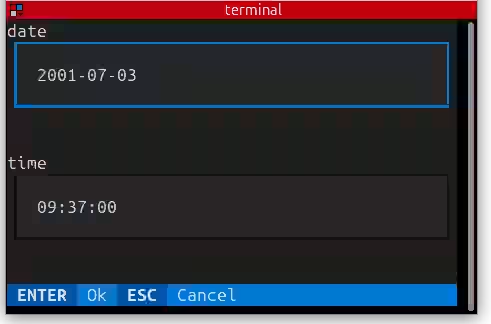
GUI automatically fallback to a text interface when display is not available.
Installation
Install with a single command from PyPi.
pip install touch-timestamp
touch-timestamp --integrate-to-system  # bash completion wizzard
Alternatively, to fetch dates from JPG and HEIC, use:
sudo apt install ffmpeg  # video support
pip install touch-timestamp[heic]  # heic support
Docs
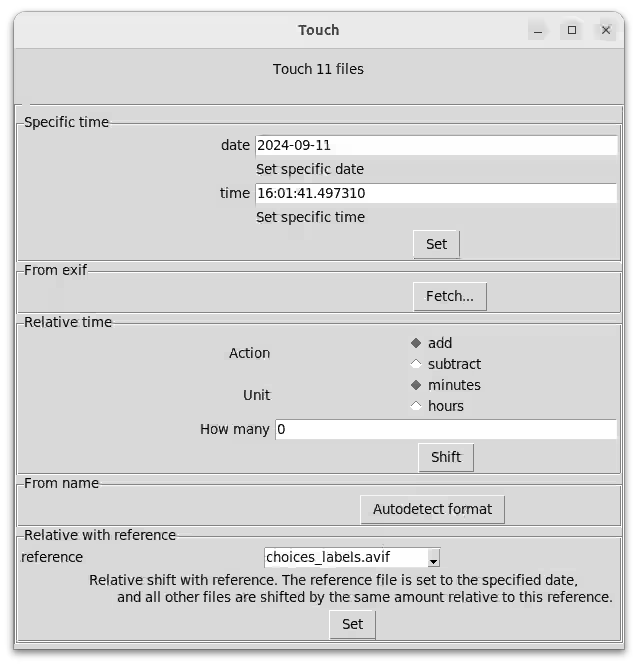
Methods to set the date
When invoked with file paths, you choose whether to set their modification times
- to the specified time
- to the date from the metadata (EXIF for JPG, HEIC, ffmpeg for videos)
- to a name auto-detected from the file name, ex:
IMG_20240101_010053.jpg→2024-01-01 01:00:53 - to a relative time
- to the specific time, set for a file, then shifts all the other relative to this
Full help
Everything can be achieved via CLI flag. See the --help.
Let's take fetching the time from the file name as an example.
Should you end up with files that keep the date in the file name, use the from-name command. In the help, you see that without setting format, it triggers an automatic detection of the time and date format.
$ touch-timestamp from-name 20240828_160619.heic
Changed 2001-01-01T12:00:00 → 2024-08-28T16:06:19: 20240828_160619.heic
Krusader user action
To change the file timestamps easily from Krusader, import this user action: touch-timestamp subcommand %aList("Selected")%
2 maintainers


Metadata
2 maintainers
Release files for touch-timestamp 0.5.1
For a detailed explanation of source distributions (sdists) and built distributions (wheels), please see the package formats documentation.
Source distribution (sdist)
| File | Size | Uploaded | |
|---|---|---|---|
| touch_timestamp-0.5.1.tar.gz | 17.4 kB | Details |
Built distribution (wheel)
| File | Interpreter | ABI | Platform | Reset |
|---|---|---|---|---|
| touch_timestamp-0.5.1-py3-none-any.whl | Python 3 | none | any | Details |
Total release size: 36.8 kB
Release files / touch_timestamp-0.5.1.tar.gz
| Download URL | touch_timestamp-0.5.1.tar.gz |
|---|---|
| Size | 17.4 kB |
| Tags | Source |
|
SHA-256 checksum How to use checksums |
77deaa07b2270a9795a73af2fe660dfb73dfb530bf61c6fcc42b152de31321d8
|
|
BLAKE2b-256 checksum How to use checksums |
318042c56b078ecbd33ee95aa1d3d6ec851a4e9b2d1782350adbd197d4767a3a
|
| Upload date | |
|
Uploaded using Trusted Publishing? What is trusted publishing? |
No |
| Uploaded via |
twine/6.1.0 CPython/3.13.7
|
Release files / touch_timestamp-0.5.1-py3-none-any.whl
| Download URL | touch_timestamp-0.5.1-py3-none-any.whl |
|---|---|
| Size | 19.4 kB |
| Tags | Python 3 |
|
SHA-256 checksum How to use checksums |
1ce6d3f6858d8a239bc87838ac12b51f0f47ee756d54f1d1eb9725f0ca1e4b1d
|
|
BLAKE2b-256 checksum How to use checksums |
be9578d6ae220db155ce5e72b9033b7b3a906b4b36b92ba89bd23c79c4f2ab59
|
| Upload date | |
|
Uploaded using Trusted Publishing? What is trusted publishing? |
No |
| Uploaded via |
twine/6.1.0 CPython/3.13.7
|














