
Change file timestamps with a dialog window.


Project description

Change files timestamp with a dialog window.
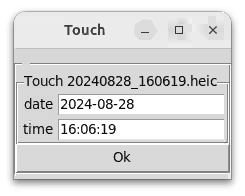
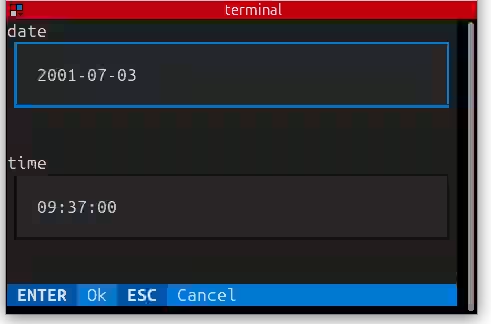
GUI automatically fallback to a text interface when display is not available.
Installation
Install with a single command from PyPi.
pip install touch-timestamp
touch-timestamp --integrate-to-system  # bash completion wizzard
Alternatively, to fetch dates from JPG and HEIC, use:
sudo apt install ffmpeg  # video support
pip install touch-timestamp[heic]  # heic support
Docs
Methods to set the date
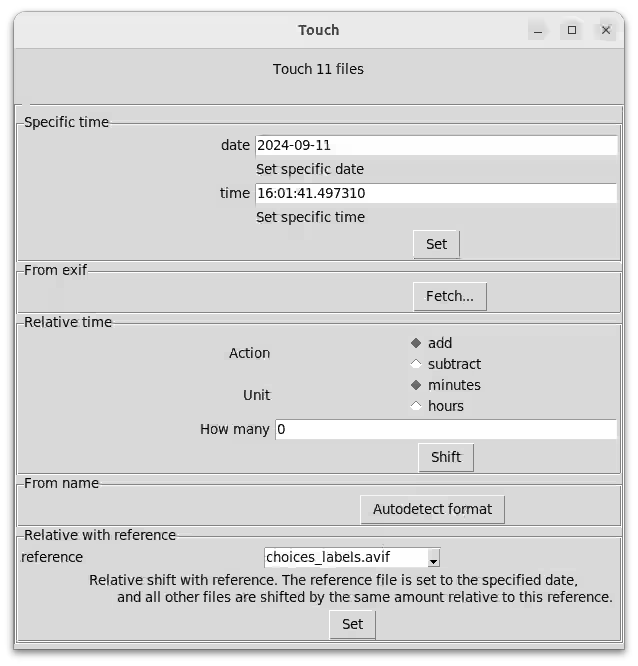
When invoked with file paths, you choose whether to set their modification times
- to the specified time
- to the date from the metadata (EXIF for JPG, HEIC, ffmpeg for videos)
- to a name auto-detected from the file name, ex:
IMG_20240101_010053.jpg→2024-01-01 01:00:53 - to a relative time
- to the specific time, set for a file, then shifts all the other relative to this
Full help
Everything can be achieved via CLI flag. See the --help.
Let's take fetching the time from the file name as an example.
Should you end up with files that keep the date in the file name, use the from-name command. In the help, you see that without setting format, it triggers an automatic detection of the time and date format.
$ touch-timestamp from-name 20240828_160619.heic
Changed 2001-01-01T12:00:00 → 2024-08-28T16:06:19: 20240828_160619.heic
Krusader user action
To change the file timestamps easily from Krusader, import this user action: touch-timestamp subcommand %aList("Selected")%
Release history Release notifications | RSS feed


Download files
Download the file for your platform. If you're not sure which to choose, learn more about installing packages.
Source Distribution
Built Distribution
Filter files by name, interpreter, ABI, and platform.
If you're not sure about the file name format, learn more about wheel file names.
Copy a direct link to the current filters
File details
Details for the file touch_timestamp-0.5.0.tar.gz.
File metadata
- Download URL: touch_timestamp-0.5.0.tar.gz
- Upload date:
- Size: 17.3 kB
- Tags: Source
- Uploaded using Trusted Publishing? No
- Uploaded via: twine/6.1.0 CPython/3.12.9
File hashes
| Algorithm | Hash digest | |
|---|---|---|
| SHA256 |
537af74f298e260d6e954fb10c8c809cee595f78ffbb47b994d7c70300db7202
|
|
| MD5 |
c1aa27e7e1831cc04c0f0851ab96db3e
|
|
| BLAKE2b-256 |
ba513d3e857f315fd471966289a22a4111d2a17a91a7ff1bdfcd87f0d95df906
|
File details
Details for the file touch_timestamp-0.5.0-py3-none-any.whl.
File metadata
- Download URL: touch_timestamp-0.5.0-py3-none-any.whl
- Upload date:
- Size: 19.4 kB
- Tags: Python 3
- Uploaded using Trusted Publishing? No
- Uploaded via: twine/6.1.0 CPython/3.12.9
File hashes
| Algorithm | Hash digest | |
|---|---|---|
| SHA256 |
c3b3c1b9fda05ceb72d21abcf46dffeafc787dc8c14a3a54d88faafa22952673
|
|
| MD5 |
01fa0f0dcbe7b782d20a60feade5d722
|
|
| BLAKE2b-256 |
b4e1bf7a8416c4c3307c62b2879c50202942f9819f7e13502cd0e3c99b590051
|






