
tqrex
A progress bar that lets you play the Chrome T-Rex game in your terminal.
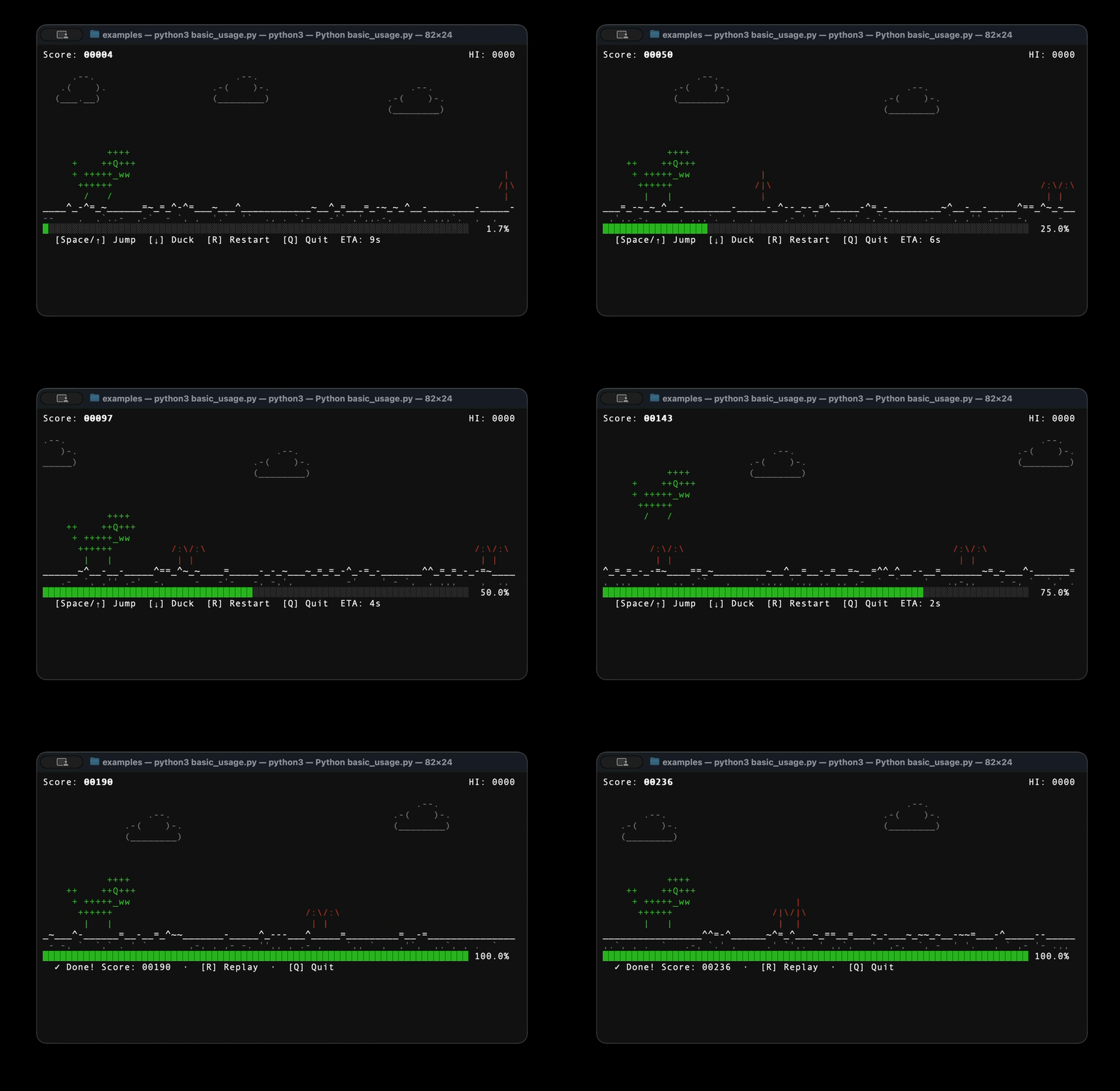
Your long-running script doesn't have to be boring. tqrex wraps any iterable in a full T-Rex side-scroller — jump cacti, dodge birds, rack up a high score — while your real work happens in the background. When the task finishes the game keeps running until you decide to quit.
Features
- Zero runtime dependencies — pure Python standard library
- Drop-in
tqdmreplacement —track()has the same call signature Progresscontext manager — for manual update control- 60 FPS physics — faithful gravity, jump arc, and speed curve from the original Chrome dino
- Autoplay AI — built-in geometric look-ahead controller (
autoplay=True) - Double-buffered renderer — flicker-free diff-based redraw, single write per frame
- Cross-platform — macOS, Linux, Windows (ANSI terminal required)
- Python 3.11+
Installation
pip install tqrex
Or for local development:
git clone https://github.com/mikhail-samoilov/tqrex
cd tqrex
pip install -e ".[dev]"
Quickstart
Drop-in replacement for tqdm
import tqrex
from playgress import track

for item in track(range(100), description="Processing"):
    tqrex.sleep(0.05)
Any iterable works
files = ["data_001.csv", "data_002.csv", ...]

for f in track(files, description="Crunching files"):
    crunch(f)
Manual control with the Progress context manager
from playgress import Progress

steps = ["Download", "Extract", "Build", "Install"]
with Progress(total=len(steps), description="Installing") as p:
    for step in steps:
        p.set_description(f"Step: {step}")
        run(step)
        p.update(1)
Let the AI play for you
for epoch in track(range(200), description="Training", autoplay=True):
    train_one_epoch(epoch)
Keyboard controls
| Key | Action |
|---|---|
Space / ↑ |
Jump |
↓ |
Duck on ground / fast-drop mid-air |
R |
Restart after game-over; replay after task completes |
Q / Ctrl-C |
Quit — unblocks the script |
Note: The game keeps running after all items are processed so you can finish your current run. Press Q when you're done.
1 maintainer

Metadata
1 maintainer
Release files for tqrex 0.1.2
For a detailed explanation of source distributions (sdists) and built distributions (wheels), please see the package formats documentation.
Source distribution (sdist)
| File | Size | Uploaded | Provenance | Actions |
|---|---|---|---|---|
| tqrex-0.1.2.tar.gz | 543.6 kB | Without provenance | Details for tqrex-0.1.2.tar.gz |
Built distribution (wheel)
| File | Interpreter | ABI | Platform | Actions Reset |
|---|---|---|---|---|
| tqrex-0.1.2-py3-none-any.whl | Python 3 | none | any | Details for tqrex-0.1.2-py3-none-any.whl |
Total release size: 558.9 kB
Release files / tqrex-0.1.2.tar.gz
| Download URL | tqrex-0.1.2.tar.gz |
|---|---|
| Size | 543.6 kB |
| Tags | Source |
|
SHA-256 checksum How to use checksums |
79e7baa533754b2c113e6728c006f7f0151c03b1b45f8f0ea07c1ea7ad2d8505
|
|
BLAKE2b-256 checksum How to use checksums |
c57b2b607fa9e29995e83febb486f001057c61b651ee555a16eba2b2c046190d
|
| Upload date | |
|
Uploaded using Trusted Publishing? What is trusted publishing? |
No |
| Uploaded via |
twine/6.2.0 CPython/3.13.12
|
Release files / tqrex-0.1.2-py3-none-any.whl
| Download URL | tqrex-0.1.2-py3-none-any.whl |
|---|---|
| Size | 15.4 kB |
| Tags | Python 3 |
|
SHA-256 checksum How to use checksums |
5a488234db9ff434d0d2ac07d2416e1e12e813dc6790a9a92945bcb1155950e5
|
|
BLAKE2b-256 checksum How to use checksums |
522dd3f8c717c71fe376b2db2d09d29bfdff2bae2db87e82ae9bab78068a262d
|
| Upload date | |
|
Uploaded using Trusted Publishing? What is trusted publishing? |
No |
| Uploaded via |
twine/6.2.0 CPython/3.13.12
|
Security for tqrex 0.1.2
Provenance
Provenance describes where a file came from. On PyPI, provenance is shared via attestations, which provide a verifiable record of the build or publishing details. View details, limitations and caveats.
No provenance found
None of the files in this release were uploaded with provenance metadata.
A note on package security
PyPI is a repository for distributing packages, not a service for auditing them. While third-party security researchers and our staff do their best to detect and remove malicious packages, PyPI cannot guarantee the quality, security or suitability of any given package.
To learn more about protecting yourself from malicious actors, visit our package security documentation.














