
A progress bar that lets you play the Chrome T-Rex game in your terminal

Project description
tqrex
A progress bar that lets you play the Chrome T-Rex game in your terminal.
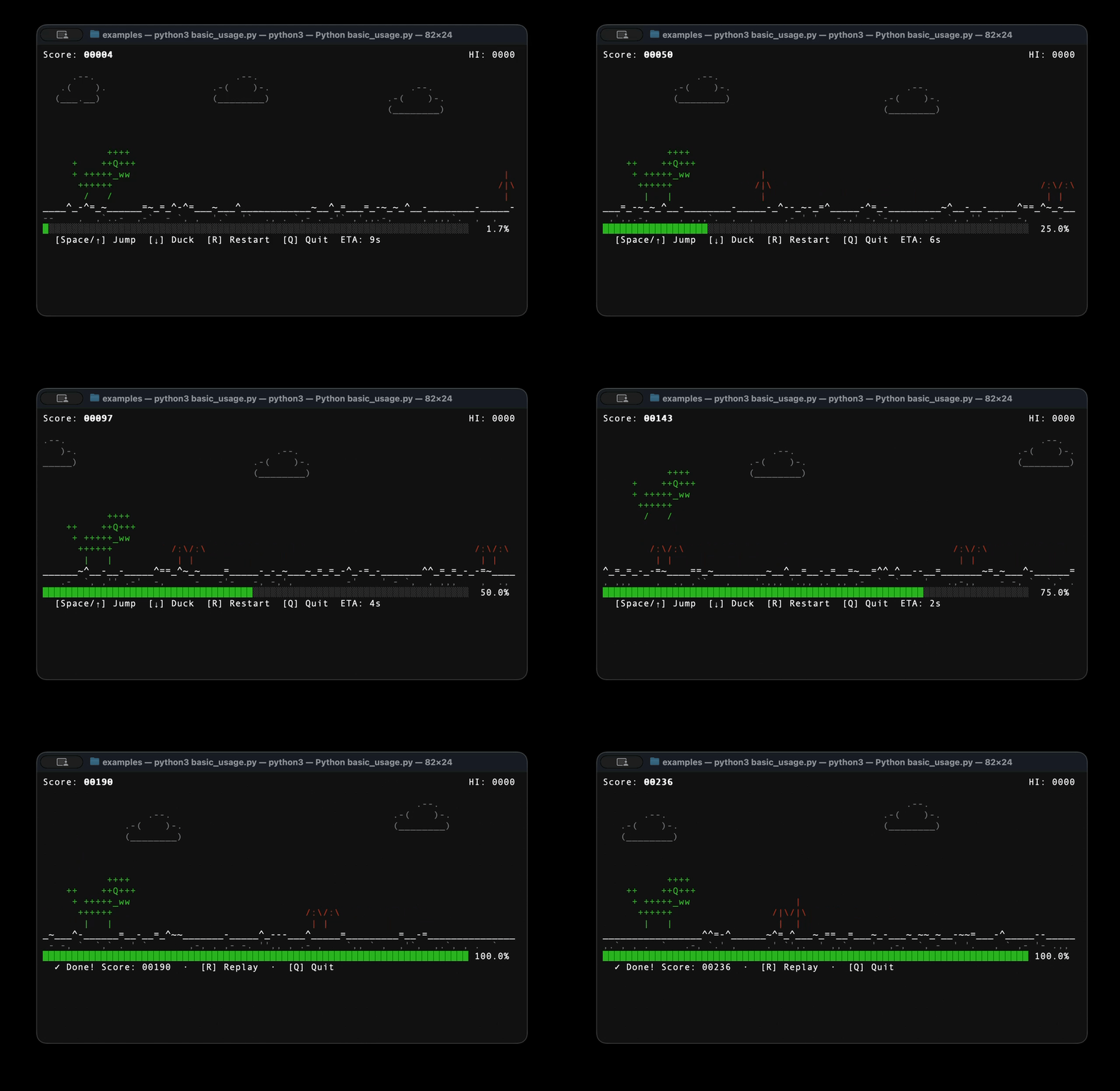
Your long-running script doesn't have to be boring. tqrex wraps any iterable in a full T-Rex side-scroller — jump cacti, dodge birds, rack up a high score — while your real work happens in the background. When the task finishes the game keeps running until you decide to quit.
Features
- Zero runtime dependencies — pure Python standard library
- Drop-in
tqdmreplacement —track()has the same call signature Progresscontext manager — for manual update control- 60 FPS physics — faithful gravity, jump arc, and speed curve from the original Chrome dino
- Autoplay AI — built-in geometric look-ahead controller (
autoplay=True) - Double-buffered renderer — flicker-free diff-based redraw, single write per frame
- Cross-platform — macOS, Linux, Windows (ANSI terminal required)
- Python 3.11+
Installation
pip install tqrex
Or for local development:
git clone https://github.com/mikhail-samoilov/tqrex
cd tqrex
pip install -e ".[dev]"
Quickstart
Drop-in replacement for tqdm
import tqrex
from playgress import track

for item in track(range(100), description="Processing"):
    tqrex.sleep(0.05)
Any iterable works
files = ["data_001.csv", "data_002.csv", ...]

for f in track(files, description="Crunching files"):
    crunch(f)
Manual control with the Progress context manager
from playgress import Progress

steps = ["Download", "Extract", "Build", "Install"]
with Progress(total=len(steps), description="Installing") as p:
    for step in steps:
        p.set_description(f"Step: {step}")
        run(step)
        p.update(1)
Let the AI play for you
for epoch in track(range(200), description="Training", autoplay=True):
    train_one_epoch(epoch)
Keyboard controls
| Key | Action |
|---|---|
Space / ↑ |
Jump |
↓ |
Duck on ground / fast-drop mid-air |
R |
Restart after game-over; replay after task completes |
Q / Ctrl-C |
Quit — unblocks the script |
Note: The game keeps running after all items are processed so you can finish your current run. Press Q when you're done.
Release history Release notifications | RSS feed


Download files
Download the file for your platform. If you're not sure which to choose, learn more about installing packages.
Source Distribution
Built Distribution
Filter files by name, interpreter, ABI, and platform.
If you're not sure about the file name format, learn more about wheel file names.
Copy a direct link to the current filters
File details
Details for the file tqrex-0.1.2.tar.gz.
File metadata
- Download URL: tqrex-0.1.2.tar.gz
- Upload date:
- Size: 543.6 kB
- Tags: Source
- Uploaded using Trusted Publishing? No
- Uploaded via: twine/6.2.0 CPython/3.13.12
File hashes
| Algorithm | Hash digest | |
|---|---|---|
| SHA256 |
79e7baa533754b2c113e6728c006f7f0151c03b1b45f8f0ea07c1ea7ad2d8505
|
|
| MD5 |
0e5402af4a1a2f69961655e65d2798a6
|
|
| BLAKE2b-256 |
c57b2b607fa9e29995e83febb486f001057c61b651ee555a16eba2b2c046190d
|
File details
Details for the file tqrex-0.1.2-py3-none-any.whl.
File metadata
- Download URL: tqrex-0.1.2-py3-none-any.whl
- Upload date:
- Size: 15.4 kB
- Tags: Python 3
- Uploaded using Trusted Publishing? No
- Uploaded via: twine/6.2.0 CPython/3.13.12
File hashes
| Algorithm | Hash digest | |
|---|---|---|
| SHA256 |
5a488234db9ff434d0d2ac07d2416e1e12e813dc6790a9a92945bcb1155950e5
|
|
| MD5 |
f71b81884405a9aaafd8b445fea49c9c
|
|
| BLAKE2b-256 |
522dd3f8c717c71fe376b2db2d09d29bfdff2bae2db87e82ae9bab78068a262d
|






