
Translation-Gummy















Translation Gummy is a magical gadget which enables user to be able to speak and understand other languages. ※ Supported journals are listed here.
Installation
- Install
Translation-Gummy(There are two ways to install):- Install from PyPI (recommended):
$ sudo pip install Translation-Gummy
- Alternatively: install
Translation-Gummyfrom the GitHub source:$ git clone https://github.com/iwasakishuto/Translation-Gummy.git # If you want to use the latest version (under development) $ git clone -b develop https://github.com/iwasakishuto/Translation-Gummy.git $ cd Translation-Gummy $ sudo python setup.py install
- Install from PyPI (recommended):
- Install
wkhtmltopdf- Debian/Ubuntu:
$ sudo apt-get install wkhtmltopdf
- macOS:
$ brew install homebrew/cask/wkhtmltopdf
- Debian/Ubuntu:
- Install driver for
selenium:Seleniumrequires a driver to interface with the chosen browser, so please visit the documentation to install it.# Example: Chrome # visit "chrome://settings/help" to check your chrome version. # visit "https://chromedriver.chromium.org/downloads" to check <Suitable.Driver.Version> for your chrome. $ wget https://chromedriver.storage.googleapis.com/<Suitable.Driver.Version>/chromedriver_mac64.zip $ unzip chromedriver_mac64.zip $ mv chromedriver /usr/local/bin/chromedriver $ chmod +x /usr/local/bin/chromedriver
※ See
Pyenv + Poetry
I recommend you to use these tools to avoid the chaos of the python environment. See other sites for how to install these tools.
$ pyenv install 3.8.9
$ pyenv local 3.8.9
$ python -V
Python 3.8.9
# For Windows
$ poetry install -E windows
# For the other platform
$ poetry install
$ poetry run gummy-translate "This is a pen." --from-lang en --to-lang ja
$ poetry run gummy-journal "https://www.nature.com/articles/ncb0800_500"
Quick example
- example notebooks
- Translation:
- Python Module:
>>> from gummy import TranslationGummy
>>> model = TranslationGummy(translator="deepl", from_lang="en", to_lang="ja")
[success] local driver can be built.
[failure] remote driver can't be built.
DRIVER_TYPE: local
>>> model.en2ja("This is a pen.")
DeepLTranslator (query1) 02/30[#-------------------]  6.67% - 2.144[s]   translated: これはペン
'これはペンです。'
- Command line:
$ gummy-translate "This is a pen." --from-lang en --to-lang ja
[success] local driver can be built.
[failure] remote driver can't be built.
DRIVER_TYPE: local
DeepLTranslator (query1) 02/30[#-------------------]  6.67% - 2.185[s]   translated: これはペン
これはペンです。
- Output
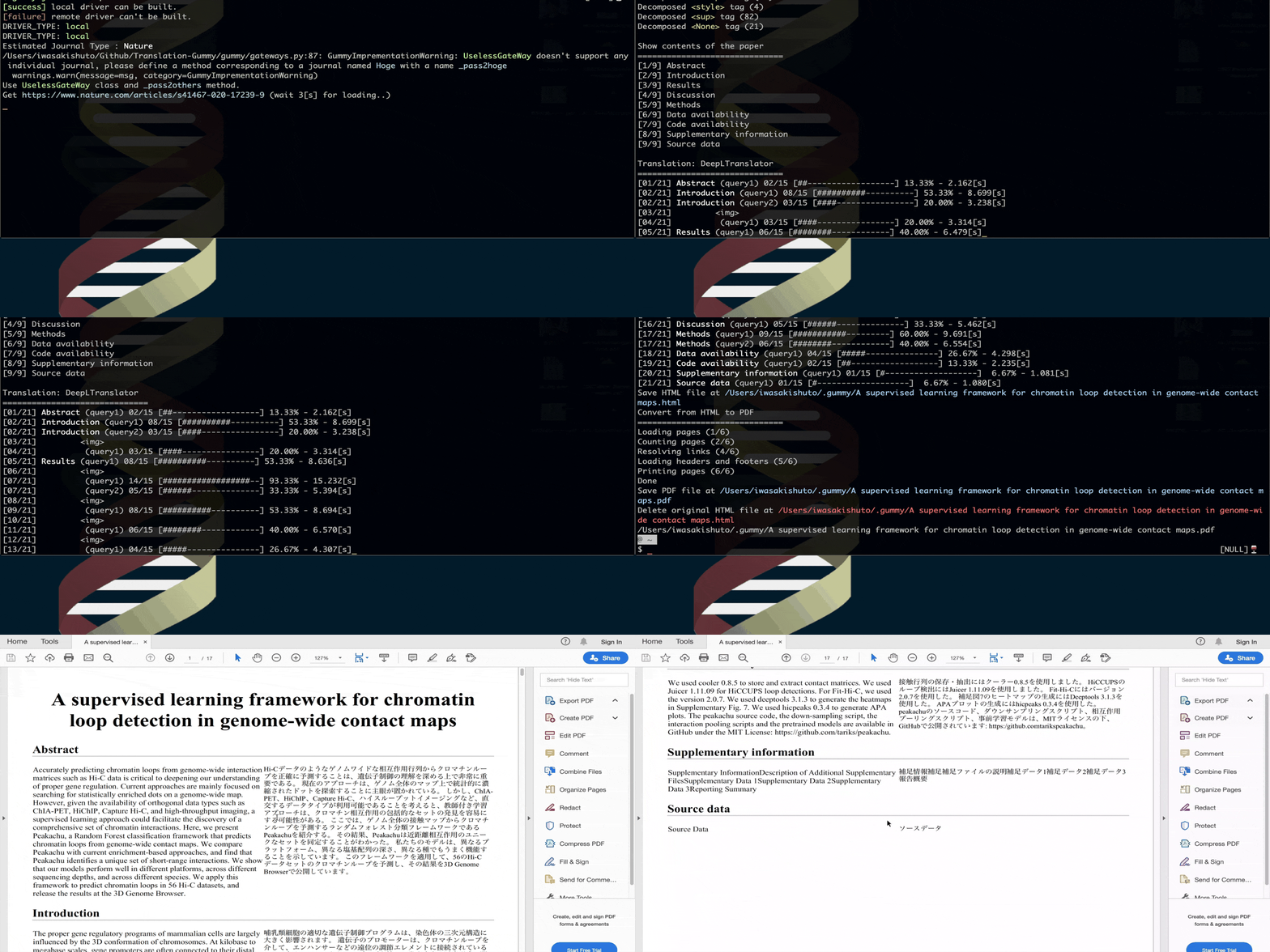
- Create PDF (with translation)
- Python Module:
>>> from gummy import TranslationGummy
>>> model = TranslationGummy(gateway="utokyo", translator="deepl")
>>> pdfpath = model.toPDF(url="https://www.nature.com/articles/ncb0800_500", delete_html=True)
- Command line:
$ gummy-journal "https://www.nature.com/articles/ncb0800_500"
- Output

1 maintainer

Release files for translation-gummy 4.0.1
For a detailed explanation of source distributions (sdists) and built distributions (wheels), please see the package formats documentation.
Source distribution (sdist)
| File | Size | Uploaded | |
|---|---|---|---|
| Translation-Gummy-4.0.1.tar.gz | 73.5 kB | Details |
Built distribution (wheel)
| File | Interpreter | ABI | Platform | Reset |
|---|---|---|---|---|
| Translation_Gummy-4.0.1-py3-none-any.whl | Python 3 | none | any | Details |
Total release size: 157.9 kB
Release files / Translation-Gummy-4.0.1.tar.gz
| Download URL | Translation-Gummy-4.0.1.tar.gz |
|---|---|
| Size | 73.5 kB |
| Tags | Source |
|
SHA-256 checksum How to use checksums |
acdd4196b42923f7cc39b815a193ac6284fd8d1b71aaf263005416bd48ddfb79
|
|
BLAKE2b-256 checksum How to use checksums |
3421281d217c3566daeb51dafd40530d806b9d56d6b8f5bcfb66cfade74346f8
|
| Upload date | |
|
Uploaded using Trusted Publishing? What is trusted publishing? |
No |
| Uploaded via |
poetry/1.1.6 CPython/3.8.12 Linux/5.13.0-1022-azure
|
Release files / Translation_Gummy-4.0.1-py3-none-any.whl
| Download URL | Translation_Gummy-4.0.1-py3-none-any.whl |
|---|---|
| Size | 84.4 kB |
| Tags | Python 3 |
|
SHA-256 checksum How to use checksums |
a8afaafefa8eb6ffd298b184557d7c40cc1be9294384031994537789506a737d
|
|
BLAKE2b-256 checksum How to use checksums |
1de950d1bcd4813f21cb8ede017ca6d56d5ce83094c9f833f267b9e667e1d93f
|
| Upload date | |
|
Uploaded using Trusted Publishing? What is trusted publishing? |
No |
| Uploaded via |
poetry/1.1.6 CPython/3.8.12 Linux/5.13.0-1022-azure
|














