
Trapster Daemon

Project description

Trapster Community



Trapster Community is a low-interaction honeypot designed to be deployed on internal networks or to capture credentials. It is built to monitor and detect suspicious activities, providing a deceptive layer to network security.
Visit the Trapster website to learn more about our commercial version, which includes advanced features like pre-configured hardened OS, automatic deployment, webhook, SIEM integration and much more...
Features
- Deceptive Security: Mimics network services to lure and detect potential intruders.
- Asynchronous Framework: Utilizes Python's
asynciofor efficient, non-blocking operations. - Configuration Management: Easily configurable through
trapster.conf. - Expandable Services: Add and configure as many services as needed with minimal effort.
- HTTP Honeypot Engine with AI capabilities: Clone any website using YAML configuration, and use AI to generate responses to some HTTP requests.
Supported Protocols
| Protocol | Notes |
|---|---|
| DNS | Works as a proxy to a real DNS server |
| HTTP/HTTPS | Features custom YAML configuration templating engine |
| FTP | Capture FTP login attempts |
| LDAP | Capture LDAP login attempts |
| MSSQL | Capture MSSQL login attempts |
| POSTGRES | Capture POSTGRES login attempts |
| RDP | Capture RDP login attempts |
| SNMP | Capture SNMP login attempts |
| SSH | Capture SSH login attempts |
| TELNET | Capture Telnet login attempts |
| VNC | Capture VNC login attempts |
| RSYNC | Capture RSYNC login attempts |
Documentation and installation guide
https://docs.trapster.cloud/community/
Logs
Format
Each module can generate up to 4 types of logs: connection, data, login, and query.
connection: Indicates that a connection has been made to the module.data: Represents raw data that has been sent, logged in HEX format. This data is unprocessed.login: Captures login attempts to the module. The data field is in JSON format and contains processed information.query: Logs data that has been processed and does not correspond to an authentication attempt. The data field is in JSON format and contains processed information.
You can then filter log type you don't need.
HTTP Engine with AI capabilities
Configuration
The HTTP module can emulate any website. It works with YAML configuration files to match requests using regular expressions, and can generate responses using either a template or an AI model.
The configuration are stored in trapster/data/http, each folder represent a website. An example of the functionnalities can be found at trapster/data/http/demo_api/config.yaml
Structure:
- config.yaml: contains the configuration for the website.
- files/: contains the static files for the website.
- templates/: contains the templates for the website, it supports jinja2 syntax.
Documentation : https://docs.trapster.cloud/community/modules/web/
Example: Fortigate
The default HTTPS server shows a fortigate login page:
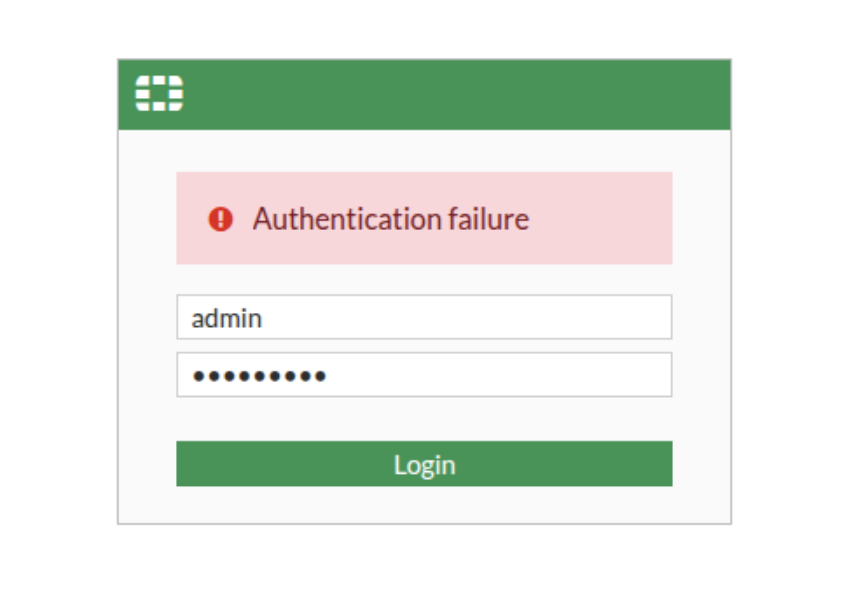
If someone tries to login, you will get a log like this one:
{
   "device":"trapster-1",
   "logtype":"https.login",
   "dst_ip":"127.0.0.1",
   "dst_port":8443,
   "src_ip":"127.0.0.1",
   "src_port":45182,
   "timestamp":"2025-02-28 18:53:18.498008",
   "data":"616a61783d3126757365726e616d653d61646d696e267365637265746b65793d61646d696e2672656469723d253246",
   "extra":{
      "method":"POST",
      "target":"/logincheck",
      "headers":{
         "host":"127.0.0.1:8443",
         "connection":"keep-alive",
         "content-length":"47",
         "cache-control":"no-store, no-cache, must-revalidate",
         "sec-ch-ua-platform":"\"Linux\"",
         "pragma":"no-cache",
         "sec-ch-ua":"\"Not(A:Brand\";v=\"99\", \"Google Chrome\";v=\"133\", \"Chromium\";v=\"133\"",
         "sec-ch-ua-mobile":"?0",
         "user-agent":"Mozilla/5.0 (Windows NT 10.0; Win64; x64) AppleWebKit/537.36 (KHTML, like Gecko) Chrome/132.0.0.0 Safari/537.3",
         "if-modified-since":"Sat, 1 Jan 2000 00:00:00 GMT",
         "content-type":"text/plain;charset=UTF-8",
         "accept":"*/*",
         "origin":"https://127.0.0.1:8443",
         "sec-fetch-site":"same-origin",
         "sec-fetch-mode":"cors",
         "sec-fetch-dest":"empty",
         "referer":"https://127.0.0.1:8443/login?redir=%2F",
         "accept-encoding":"gzip, deflate, br, zstd",
         "accept-language":"en-US,en;q=0.9"
      },
      "status_code":200,
      "username":"admin",
      "password":"admin"
   }
}
AI ALPHA support
To generate responses, you can use the ai field in the configuration. For now, it uses OVHCloud AI Endpoints as it is still free, and in beta.
The file trapster/modules/libs/ai.py contains the code to generate responses using the AI model. It is still very basic, and will be improved in the near future.
For example, this image show a request to capture SQLi attempts, and the response generated by the AI model.

Contributing
Contributions are welcome! Please follow these steps:
- Fork the repository.
- Create a new branch (git checkout -b feature-branch).
- Make your changes.
- Commit your changes (git commit -m 'Add new feature').
- Push to the branch (git push origin feature-branch).
- Create a pull request.
License
Trapster is licensed under the GNU Affero General Public License v3 or later (AGPLv3+). See the LICENSE file for more details.
Release history Release notifications | RSS feed


Download files
Download the file for your platform. If you're not sure which to choose, learn more about installing packages.
Source Distribution
Built Distribution
Filter files by name, interpreter, ABI, and platform.
If you're not sure about the file name format, learn more about wheel file names.
Copy a direct link to the current filters
File details
Details for the file trapster-1.0.23.tar.gz.
File metadata
- Download URL: trapster-1.0.23.tar.gz
- Upload date:
- Size: 54.3 kB
- Tags: Source
- Uploaded using Trusted Publishing? Yes
- Uploaded via: twine/6.1.0 CPython/3.12.9
File hashes
| Algorithm | Hash digest | |
|---|---|---|
| SHA256 |
e783847c9486145205df5ff4697f79f2430e8f920ebea6c57220c4ee20ed793d
|
|
| MD5 |
bbd6ea9091d598faf189795021d50bce
|
|
| BLAKE2b-256 |
676d7bb5168e1a82612311802ee977df102838f4470935a01de30bb9dc896e46
|
Provenance
The following attestation bundles were made for trapster-1.0.23.tar.gz:
Publisher:
publish.yml on 0xBallpoint/trapster-community
-
Statement:
-
Statement type:
https://in-toto.io/Statement/v1 -
Predicate type:
https://docs.pypi.org/attestations/publish/v1 -
Subject name:
trapster-1.0.23.tar.gz -
Subject digest:
e783847c9486145205df5ff4697f79f2430e8f920ebea6c57220c4ee20ed793d - Sigstore transparency entry: 175507483
- Sigstore integration time:
-
Permalink:
0xBallpoint/trapster-community@9ba90ac46d42ff3e8518f99842d7b779811a04a5 -
Branch / Tag:
refs/tags/v1.0.23 - Owner: https://github.com/0xBallpoint
-
Access:
public
-
Token Issuer:
https://token.actions.githubusercontent.com -
Runner Environment:
github-hosted -
Publication workflow:
publish.yml@9ba90ac46d42ff3e8518f99842d7b779811a04a5 -
Trigger Event:
release
-
Statement type:
File details
Details for the file trapster-1.0.23-py3-none-any.whl.
File metadata
- Download URL: trapster-1.0.23-py3-none-any.whl
- Upload date:
- Size: 60.3 kB
- Tags: Python 3
- Uploaded using Trusted Publishing? Yes
- Uploaded via: twine/6.1.0 CPython/3.12.9
File hashes
| Algorithm | Hash digest | |
|---|---|---|
| SHA256 |
a37956df145e13c32db79bd7e714bd0d729f65858abc6d06fd087881bc92c1a1
|
|
| MD5 |
9c063811872e415d52d0fc5fccf82909
|
|
| BLAKE2b-256 |
3b6ffaf0cd3c72ca9673cda051aa11fdcce3dd5845da5aa0d6b58a24657883ee
|
Provenance
The following attestation bundles were made for trapster-1.0.23-py3-none-any.whl:
Publisher:
publish.yml on 0xBallpoint/trapster-community
-
Statement:
-
Statement type:
https://in-toto.io/Statement/v1 -
Predicate type:
https://docs.pypi.org/attestations/publish/v1 -
Subject name:
trapster-1.0.23-py3-none-any.whl -
Subject digest:
a37956df145e13c32db79bd7e714bd0d729f65858abc6d06fd087881bc92c1a1 - Sigstore transparency entry: 175507485
- Sigstore integration time:
-
Permalink:
0xBallpoint/trapster-community@9ba90ac46d42ff3e8518f99842d7b779811a04a5 -
Branch / Tag:
refs/tags/v1.0.23 - Owner: https://github.com/0xBallpoint
-
Access:
public
-
Token Issuer:
https://token.actions.githubusercontent.com -
Runner Environment:
github-hosted -
Publication workflow:
publish.yml@9ba90ac46d42ff3e8518f99842d7b779811a04a5 -
Trigger Event:
release
-
Statement type:






