
Optical Character Recoginition Model

Project description
TrorYongOCR Model
TrorYongOCR, is an Optical Character Recognition Model designed by Dr. Kimang KHUN.
TrorYong (ត្រយ៉ង) is Khmer word for giant ibis, the bird that symbolises Cambodia.
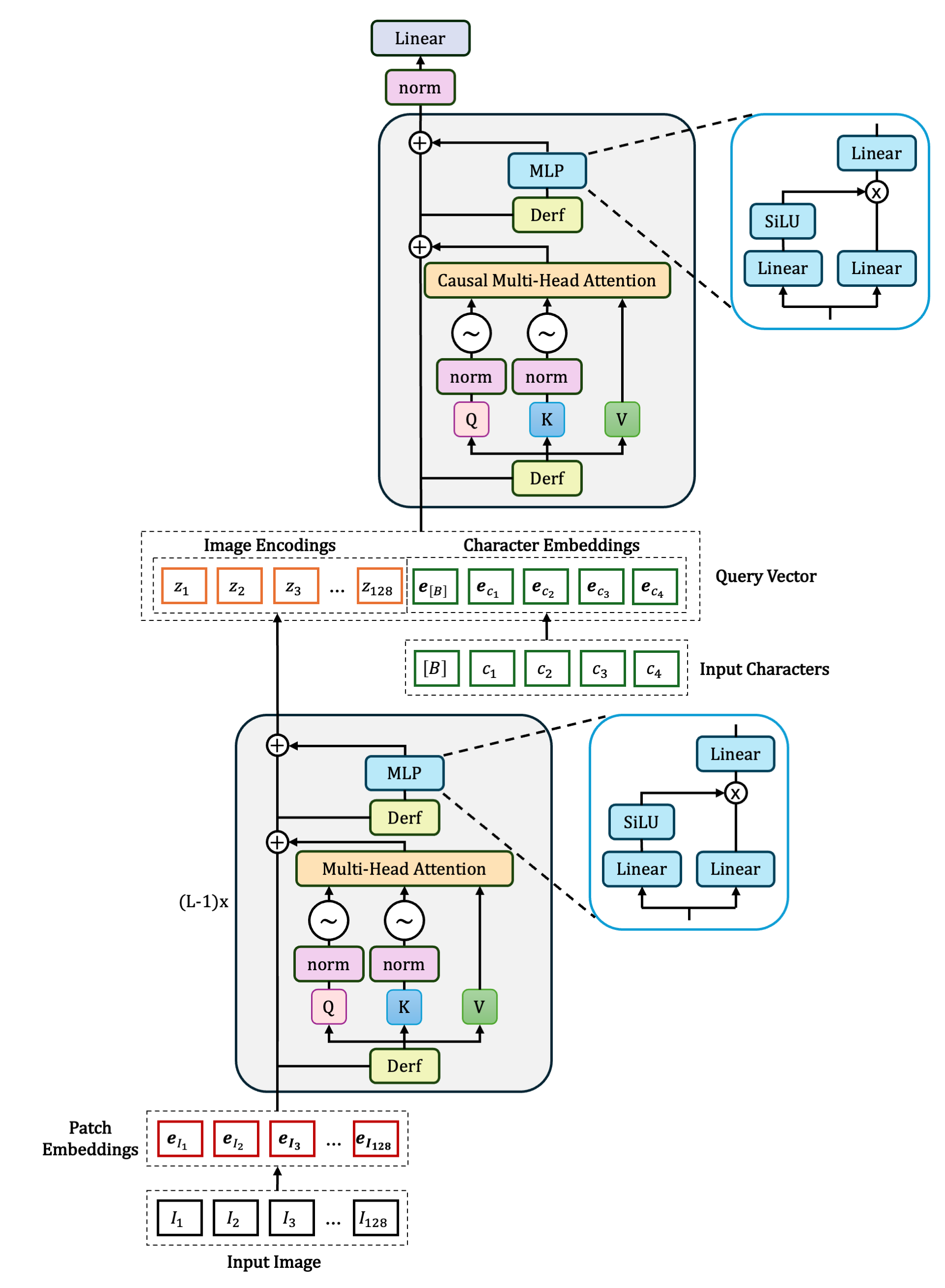
TrorYongOCR is designed as the following: given $L$ transformer blocks
- $L-1$ are encoding blocks that encode a given image
- the last block is a single decoding block without cross-attention mechanism
- each transformer is implemented with exclusive self-attention style and SwiGLU in MLP
For the single decoding block,
- the latent state of an image (the output of encoding blocks) is concatenated with the input character embedding (token embedding including bos token) to create context vector, i.e. key and value vectors (think of it like a prefill prompt)
The architecture of TrorYongOCR can be found in Figure 1 below.
Compared to PARSeq
For PARSeq model which is an encoder-decoder architecture, text decoder uses position embedding as query vector, character embedding (token embedding plus position embedding) as context vector, and the latent state from image encoder as memory for the cross-attention mechanism (see Figure 3 of their paper).
Compared to DTrOCR
For DTrOCR which is a decoder-only architecture, the image embedding (patch embedding plus position embedding) is concatenated with input character embedding (a [SEP] token is added at the beginning of input character embedding to indicate sequence separation. [SEP] token is equivalent to bos token in TrorYongOCR), and causal self-attention mechanism is applied to the concatenation from layer to layer to generate text autoregressively (see Figure 2 of their paper).
Support My Work
While this work comes truly from the heart, each project represents a significant investment of time -- from deep-dive research and code preparation to the final narrative and editing process. I am incredibly passionate about sharing this knowledge, but maintaining this level of quality is a major undertaking. If you find my work helpful and are in a position to do so, please consider supporting my work with a donation. You can click here to donate or scan the QR code below. Your generosity acts as a huge encouragement and helps ensure that I can continue creating in-depth, valuable content for you.

Installation
You can easily install tror-yong-ocr using pip command as the following:
pip install tror-yong-ocr
Usage
Loading tokenizer
TrorYongOCR is a small optical character recognition model that you can train from scratch.
With this goal, you can use your own tokenizer to pair with TrorYongOCR.
Just make sure that the tokenizer used for training and the tokenizer used for inference is the same.
Your tokenizer must contain begin of sequence (bos), end of sequence (eos) and padding (pad) tokens.
bos token id and eos token id are used in decoding function.
pad token id is used during training.
I also provide a tokenizer that supports Khmer and English.
from tror_yong_ocr import get_tokenizer

tokenizer = get_tokenizer(charset=None)
print(len(tokenizer)) # you should receive 185
text = 'Amazon បង្កើនការវិនិយោគជិត១'
print(tokenizer.decode(tokenizer.encode(data[0]['text'], add_special_tokens=True), ignore_special_tokens=False))
# this should print <s>Amazon បង្កើនការវិនិយោគជិត១</s>
When preparing a dataset to train TrorYongOCRModel, you just need to transform the text into token ids using the tokenizer
sentence = 'Cambodia needs peace.'
token_ids = tokenizer.encode(sentence, add_special_tokens=True)
NOTE: My tokenizer works at character level.
Loading TrorYongOCRModel
Get started with the code below
import torch
from torchvision.transforms import v2 as transforms
from PIL import Image # pip install pillow
from tror_yong_ocr import get_tokenizer, TrorYongOCRModel

img = Image.open("your/file/image").convert('RGB')

processor = transforms.Compose(
    [
        transforms.Resize((32, 128)),
        transforms.ToImage(),
        transforms.ToDtype(torch.float32, scale=True),
        transforms.Normalize(mean=[0.485, 0.456, 0.406], std=[0.229, 0.224, 0.225]),
    ]
)

img_tensor = processor(img)

tokenizer = get_tokenizer()
model = TrorYongOCRModel.from_pretrained('KrorngAI/TrorYongOCR')
model.eval()

pred_ids = model.decode(img_tensor, 192, temperature=0.01, top_k=25)
print(tokenizer.decode(pred_ids[0].tolist(), ignore_special_tokens=True))
Fine-tuning TrorYongOCR
You can check the notebook below to fine-tune TrorYongOCRModel for your custom dataset.

I also have a video about training TrorYongOCR explained in Khmer language below
TODO:
- implement model with KV cache
TrorYongOCRModel - notebook colab for fine-tuning
TrorYongOCRModel - benchmarking
Release history Release notifications | RSS feed


Download files
Download the file for your platform. If you're not sure which to choose, learn more about installing packages.
Source Distribution
File details
Details for the file tror_yong_ocr-0.2.5.tar.gz.
File metadata
- Download URL: tror_yong_ocr-0.2.5.tar.gz
- Upload date:
- Size: 15.8 kB
- Tags: Source
- Uploaded using Trusted Publishing? No
- Uploaded via: twine/6.2.0 CPython/3.12.10
File hashes
| Algorithm | Hash digest | |
|---|---|---|
| SHA256 |
5a616840a94d7eea3af2a38081722ec913aae92dba63d67c6d2aa6010e85ce8d
|
|
| MD5 |
bb72b4f966ab543511a5e1fec4da9747
|
|
| BLAKE2b-256 |
81d61b794eb66fa75da4c5e4127ed933e916e5d316620c3adbe997264bc877ae
|






