
Isolated Docker-based development environments for AI coding agents

Project description
trusty-cage
Isolated Docker-based development environments for AI coding agents. Run Claude Code (or any agent) with full autonomy inside a disposable container — no risk to your host machine, no credentials exposed, no accidental pushes.
Installation
pip install trusty-cage
Or with pipx for isolated CLI installs:
pipx install trusty-cage
tc is available as a shorthand for trusty-cage (e.g. tc create ..., tc attach ...).
Quick Start
# One-time setup: create config directory and default .env file
trusty-cage init

# Create an environment from any git repo
trusty-cage create https://github.com/octocat/Hello-World

# You're now inside a tmux session (prefix: Ctrl-a) with:
#   Left pane (60%)  — Neovim at the project root
#   Top-right pane   — Claude Code running with --dangerously-skip-permissions
#   Bottom-right pane — plain shell
#
# If you configured TRUSTY_CAGE_DOTFILES_REPO, your shell config, aliases,
# tmux settings, and Neovim config are already applied — the container
# should feel like your own machine.

# Switch panes with Ctrl-a <arrow>, detach with Ctrl-a d

# When done, export your work back to the host:
trusty-cage export hello-world

# Review and push from the host clone:
cd ~/.trusty-cage/envs/hello-world/repo/
git diff
git add -A && git commit -m "work from trusty-cage"
git push

# Or copy into an existing clone (don't forget the trailing /):
cd ~/projects/hello-world
cp -R ~/.trusty-cage/envs/hello-world/repo/ .
Demo
Here's a real workflow using trusty-cage to build an Obsidian plugin from scratch.
1. Give instructions inside the cage
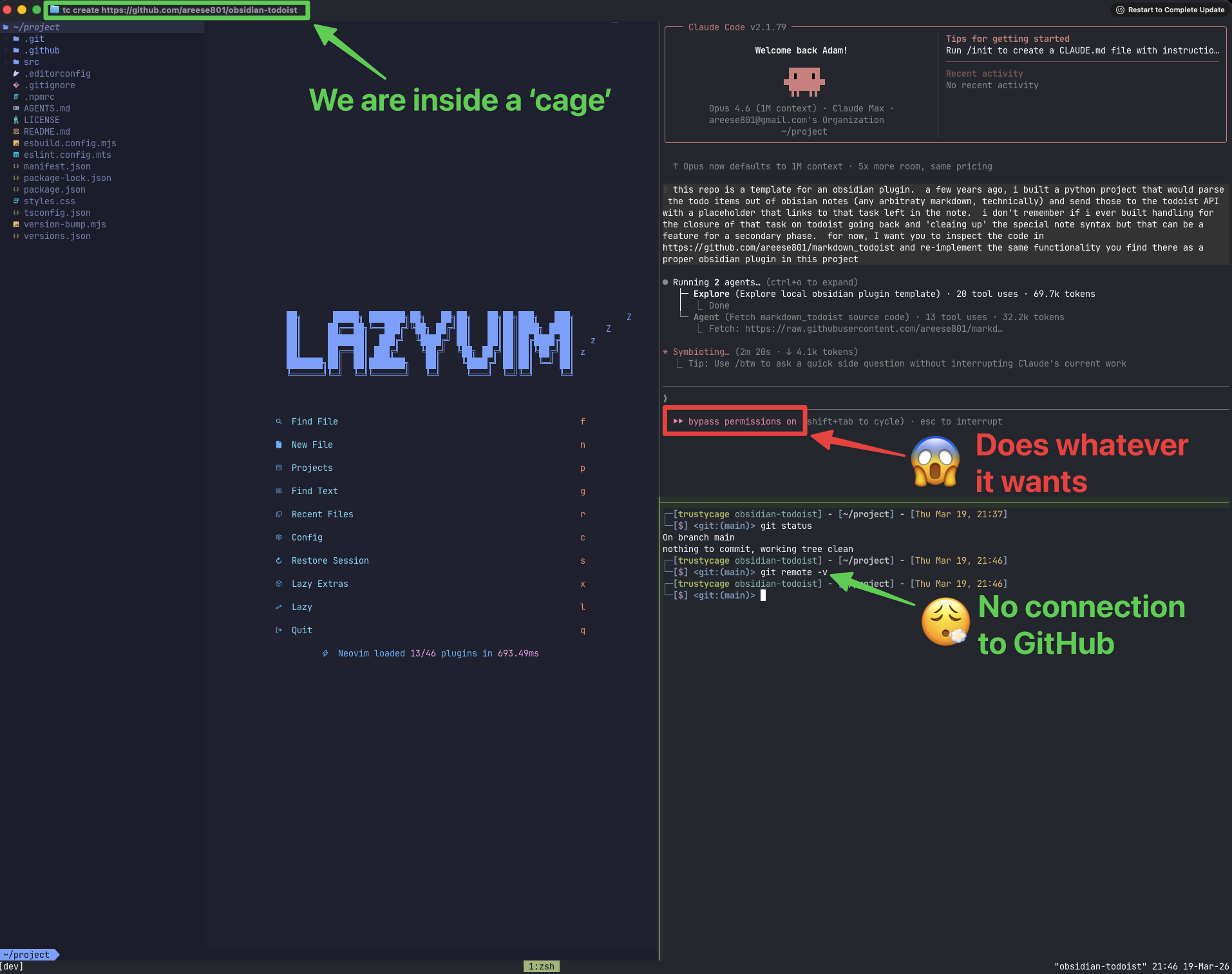
The terminal title bar shows the tc create command that built this environment. Inside, Claude Code runs with full autonomy (bypass permissions on) in a tmux session alongside Neovim. The container's git repo has no remotes — the agent can commit locally but has no way to push anywhere.
2. Let the agent work autonomously
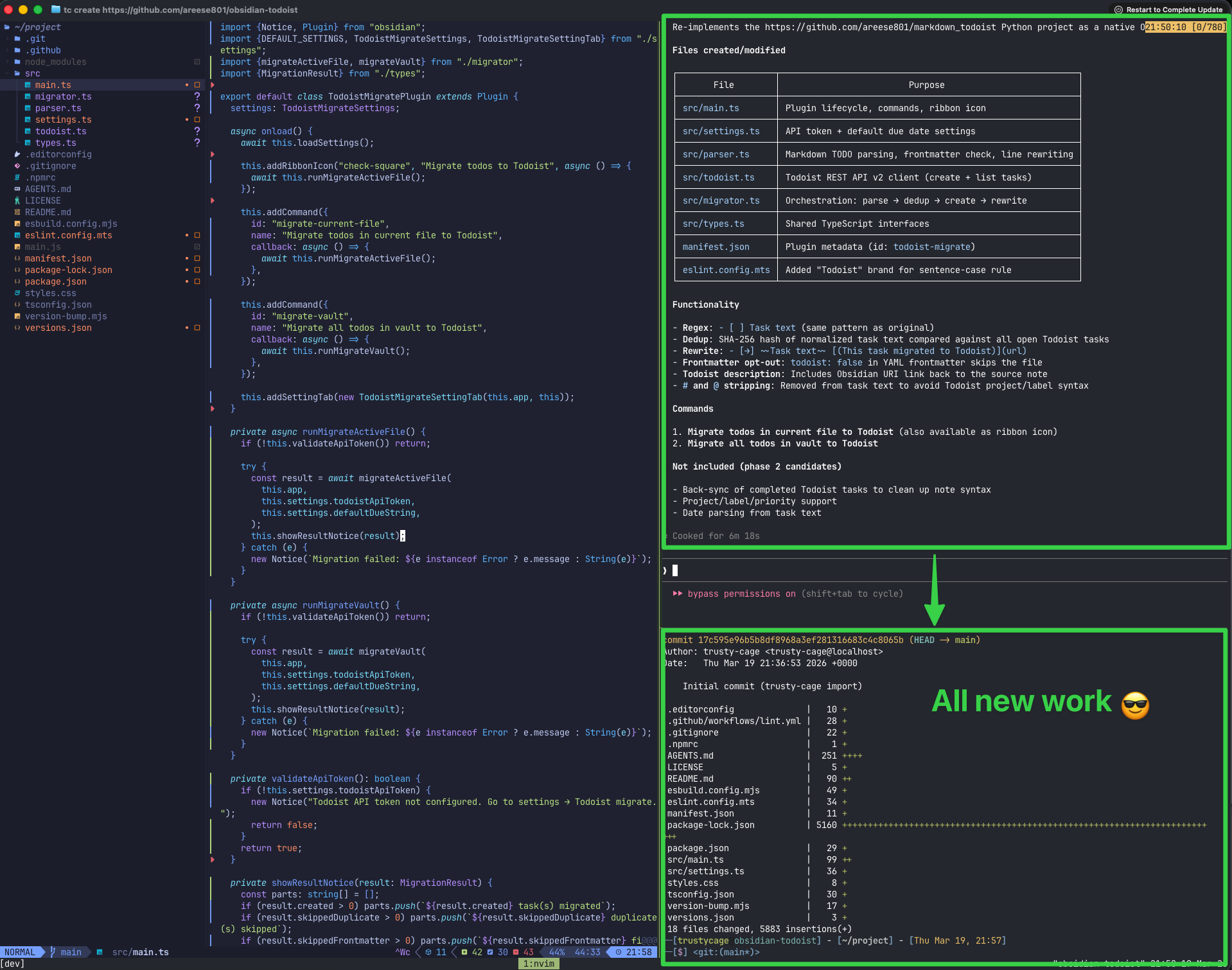
Claude Code explored a reference project, designed an architecture, wrote the full plugin (TypeScript, settings UI, API client, parser), and committed everything — all without any human intervention. The agent had full control inside the container: installing packages, creating files, running builds. If anything went wrong, the host machine would be completely unaffected.
3. Export and review on the host
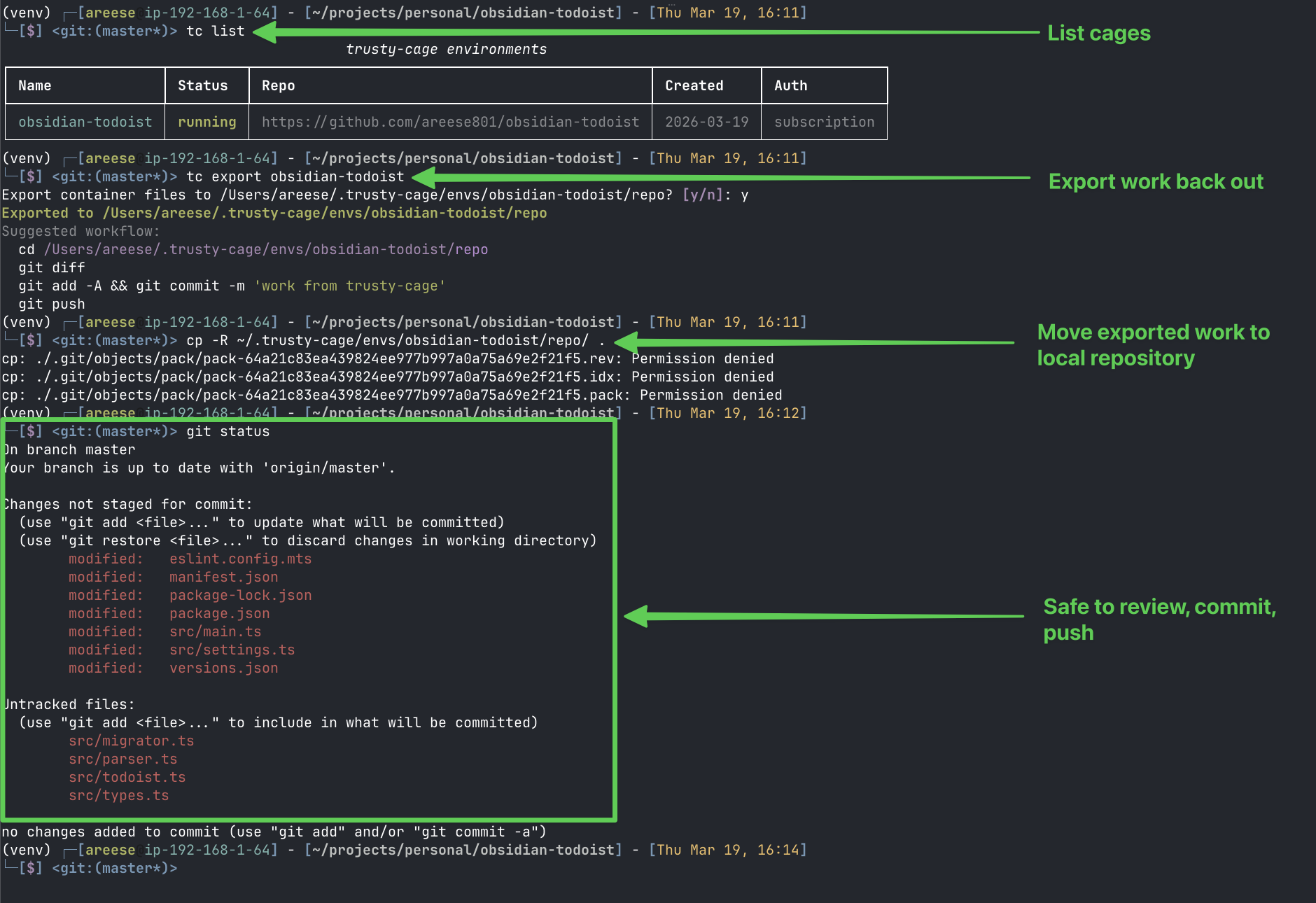
Back on the host, tc export copies the container's work into the host clone at ~/.trusty-cage/envs/<name>/repo/. From there, you review the diff, commit, and push — the human stays in the loop for all git operations that touch a remote.
To work from the exported repository:
cd ~/.trusty-cage/envs/obsidian-todoist/repo/
git diff
git add -A && git commit -m "work from trusty-cage"
git push
To copy exported code into your own cloned repository:
If you already have the repo cloned elsewhere (e.g. ~/projects/personal/obsidian-todoist), you can copy the exported files into it instead. Make sure you're cd'd into your clone first, and don't forget the trailing / on the source path — on macOS (BSD cp), the trailing / copies the contents of the directory rather than the directory itself:
cd ~/projects/personal/obsidian-todoist
cp -R ~/.trusty-cage/envs/obsidian-todoist/repo/ .
git status   # review what changed
git diff
git add -A && git commit -m "work from trusty-cage"
git push
Linux note: GNU cp ignores the trailing / and always copies the directory itself. On Linux, use cp -RT or rsync -a instead:
cp -RT ~/.trusty-cage/envs/obsidian-todoist/repo .
rsync -a ~/.trusty-cage/envs/obsidian-todoist/repo/ .
The
Permission deniederrors on.git/objects/packfiles are expected and harmless — your host.git/is preserved and those locked pack files don't need to be overwritten.
Example: Hello World
# Create (environment name is derived as lowercase: "hello-world")
trusty-cage create https://github.com/octocat/Hello-World --no-attach

# Verify
trusty-cage list
docker ps -a | grep isolated-dev

# Attach — drops you into tmux inside the container
trusty-cage attach hello-world

# Inside the container:
#   Ctrl-a <arrow>    — switch tmux panes
#   git remote -v     — empty (no remotes, by design)
#   curl example.com  — works (outbound web allowed)
#   Ctrl-a d          — detach

# Export work back to host
trusty-cage export hello-world

# Clean up
trusty-cage destroy hello-world
Commands
| Command | Description |
|---|---|
trusty-cage --version |
Show version and exit |
trusty-cage init [--force] |
Create config directory and default .env file |
trusty-cage create <url> [--name] [--no-attach] [--auth-mode] [--dockerfile] |
Create a new environment from a git repo |
trusty-cage attach <name> |
Attach to an existing environment |
trusty-cage stop <name> |
Stop a container (preserves work) |
trusty-cage list [--json] |
List all environments with status |
trusty-cage exists <name> |
Check if an environment exists (exit code 0/1) |
trusty-cage export <name> [--yes] [--output-dir] |
Copy work back to host clone |
trusty-cage destroy <name> [--yes] |
Remove container and volume (keeps host clone) |
trusty-cage rebuild-image [--dockerfile] |
Force rebuild the Docker image |
trusty-cage auth <name> [--login] |
Refresh or verify credentials for an environment |
trusty-cage launch <name> --prompt|--prompt-file|--test [--background] |
Launch Claude Code inside a cage |
trusty-cage logs [name] [-f] [--raw] |
Stream inner Claude's reasoning (pretty-printed by default) |
Configuration
Configuration is resolved in order: CLI flags > environment variables > ~/.trusty-cage/.env > defaults.
| Variable | Default | Description |
|---|---|---|
TRUSTY_CAGE_DOTFILES_REPO |
(empty) | HTTPS URL of dotfiles repo to clone into containers |
TRUSTY_CAGE_PYTHON_VERSION |
3.12 |
Python version installed via pyenv |
TRUSTY_CAGE_DEFAULT_SHELL |
zsh |
Default shell inside the container |
TRUSTY_CAGE_DEFAULT_AUTH_MODE |
api_key |
Auth mode: api_key or subscription |
TRUSTY_CAGE_TMUX_PREFIX |
C-a |
tmux prefix key inside containers (default Ctrl-a to avoid conflict with host Ctrl-b) |
ANTHROPIC_API_KEY |
(none) | API key for Claude Code (required for api_key auth mode) |
Run trusty-cage init to create ~/.trusty-cage/.env with a commented template you can customize.
Dotfiles
If you set TRUSTY_CAGE_DOTFILES_REPO, your dotfiles are automatically applied to every new container at create time. The repo is cloned on the host, .git/ is stripped, and the files are copied into the container's home directory. If an install script is found (install.sh, setup.sh, bootstrap.sh, etc.), it runs automatically. GNU Stow layouts are detected and handled (files are copied from common/ if present).
This means your shell config, tmux settings, Neovim config, aliases, and other personalizations carry over — the container feels like your own machine.
Without dotfiles, the container ships with sensible defaults: oh-my-zsh (robbyrussell theme), LazyVim starter config, pyenv on PATH, and vim/vi aliased to nvim. Everything works out of the box, just without your personal customizations.
Authentication
Chosen at create time via --auth-mode:
- api_key — Reads
ANTHROPIC_API_KEYfrom your host shell at attach/launch time. Injected viadocker exec -e, never written to disk. Best for API billing users. - subscription — Copies
~/.claude/,~/.claude.json, and OAuth tokens from macOS Keychain into the container at create time. Persists in the volume. Best for Claude Pro/Max subscribers — no API key needed.
Refresh credentials at any time with trusty-cage auth <name>. For subscription mode, use --login to open an interactive Claude session for /login if tokens have expired.
Orchestration
trusty-cage can be used programmatically to run an inner Claude autonomously while an outer Claude (or script) monitors and coordinates.
# Create a cage (subscription auth, no interactive attach)
tc create https://github.com/user/repo --name myproject --auth-mode subscription --no-attach

# Verify Claude can start
tc launch myproject --test

# Send a task
tc launch myproject --prompt "Implement feature X" --background

# Watch the inner Claude work in real-time (pretty-printed)
tc logs myproject -f

# Or get raw stream-json
tc logs myproject -f --raw

# When done, export and overlay onto your working directory
tc export myproject --yes --output-dir .
The container includes a messaging system for structured communication between the inner and outer Claude. Messages are JSON files in well-known directories:
- Outbox (
~/.cage/outbox/) — Inner Claude writes status updates here - Inbox (
~/.cage/inbox/) — Outer Claude writes responses here
Message types: task_complete, progress_update, info_request, error, info_response, ack.
This enables the cage-orchestrator skill to dispatch tasks, monitor progress, handle information requests, and export results — all without human intervention inside the cage.
Security Model
The container is the blast radius. If an agent does something destructive, your host is unaffected.
What agents can do inside:
- Clone/fetch public repos over HTTPS
- Browse the web, read docs, hit public APIs
- Install packages (pip, apt, npm)
- Full read/write access to the project directory
What agents cannot do:
- Push to any git remote (no credentials present)
- Use SSH (port 22 blocked)
- Pull Docker images from Docker Hub (blocked)
- Access any host files (no bind mounts)
Protection is enforced by credential absence, not network blocking. The container has no SSH keys, no .netrc, no GH_TOKEN, no git credential helper.
Requirements
- Docker (Docker Desktop, OrbStack, or Docker Engine)
- Python 3.11+
- Git
- rsync (pre-installed on macOS and most Linux distros; used by
export)
Development
git clone https://github.com/areese801/trusty-cage.git
cd trusty-cage
python -m venv venv
source venv/bin/activate
pip install -e ".[dev]"

# Available make targets
make help
License
MIT
Release history Release notifications | RSS feed


Download files
Download the file for your platform. If you're not sure which to choose, learn more about installing packages.
Source Distribution
Built Distribution
Filter files by name, interpreter, ABI, and platform.
If you're not sure about the file name format, learn more about wheel file names.
Copy a direct link to the current filters
File details
Details for the file trusty_cage-0.5.0.tar.gz.
File metadata
- Download URL: trusty_cage-0.5.0.tar.gz
- Upload date:
- Size: 1.3 MB
- Tags: Source
- Uploaded using Trusted Publishing? No
- Uploaded via: twine/6.2.0 CPython/3.14.3
File hashes
| Algorithm | Hash digest | |
|---|---|---|
| SHA256 |
13d68da92e62dd06ec0d2c369ca0096f4172d0da52edee35e5d5fa1e5078e43d
|
|
| MD5 |
2554f46741e87c9b59c922f9e271f634
|
|
| BLAKE2b-256 |
e123dfd7cb471fa26289d9714a235b8ab21e1f86f834e555330a6983156a41d7
|
File details
Details for the file trusty_cage-0.5.0-py3-none-any.whl.
File metadata
- Download URL: trusty_cage-0.5.0-py3-none-any.whl
- Upload date:
- Size: 32.3 kB
- Tags: Python 3
- Uploaded using Trusted Publishing? No
- Uploaded via: twine/6.2.0 CPython/3.14.3
File hashes
| Algorithm | Hash digest | |
|---|---|---|
| SHA256 |
37e7f48e4b1785e974c537c182baa72c863a54ce7ccdd43cd2cf07dab3a28703
|
|
| MD5 |
67f4d10c02515aaa90666bbe8031e1d3
|
|
| BLAKE2b-256 |
44c839a05cd8de988474874af5b965b0ca9ff226afdddd6a7ffefa4c17824f9e
|






