
A Python library for generating synthetic time series data

Project description
Synthetic Time Series Data Generator


A Python library for generating synthetic time series data
Special thanks to: Nike-Inc repo
Installation
PyPi (recommended)
You can install with pip directly by
pip install ts-data-generator
Repo
After cloning this repo and creating a virtual environment, run the following command:
pip install --editable .
Usage
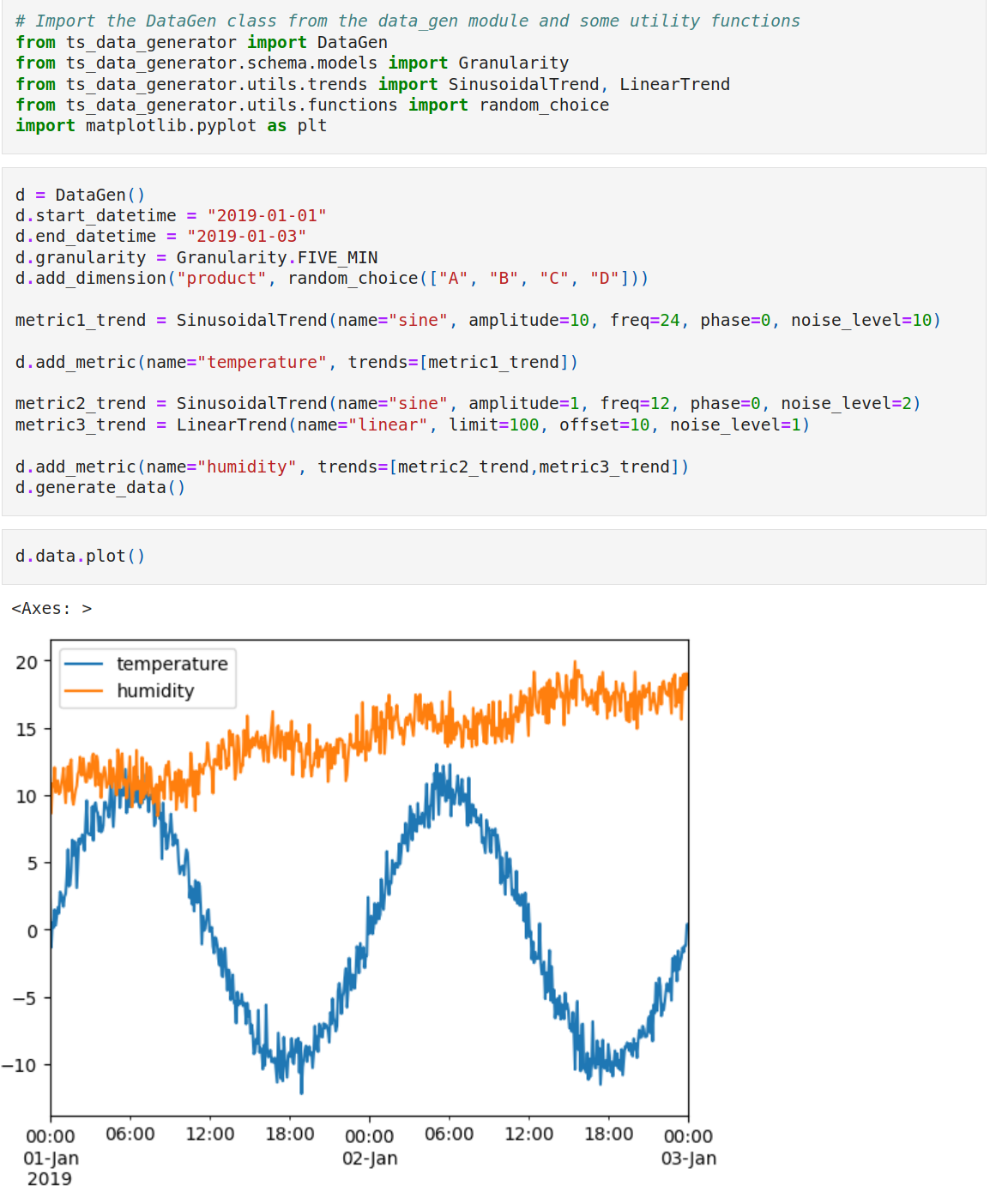
- To check out constructing for time series data, check the sample notebook here
- To extract the trends from an existing data, check this sample notebook here
UV
You can easily run it using uv
uvx --python 3.11 --from ts-data-generator tsdata generate \
    --start "2019-01-01" \
    --end "2019-01-12" \
    --granularity "5min" \
    --dims "product_id:random_float:1,4" \
    --dims "const:constant:5"
    --mets "sales:LinearTrend(limit=500)+WeekendTrend(weekend_effect=50)"
    --mets "trend:LinearTrend(limit=10)"
    --output "data.csv"
CLI
You can also use the command line utility tsdata to generate the data.
~/G/ts-data-generator on main! 🐍 (ts-data-generator) $ tsdata
Usage: tsdata [OPTIONS] COMMAND [ARGS]...
CLI tool for generating time series data.
Options:
--help Show this message and exit.
Commands:
dimensions List all available dimension functions in ts_data_generator.utils.functions.
generate Generate time series data and save it to a CSV file.
metrics List all available metric trends in ts_data_generator.utils.trends.
~/G/ts-data-generator on main! 🐍 (ts-data-generator) $
~/G/ts-data-generator on main! 🐍 (ts-data-generator) $ tsdata dimensions
Available dimension functions are:
- auto_generate_name(category: str) -> str
Example: name:auto_generate_name:mycat
- constant(value: Union[int, str, float, list])
Example: name:constant:10
- ordered_choice(iterable)
Example: name:ordered_choice:A,B,C
- random_choice(iterable: Iterable[~T]) -> Generator[~T, NoneType, NoneType]
Example: name:random_choice:A,B,C
- random_float(start: float, end: float)
Example: name:random_float:0.0,1.0
- random_int(start: int, end: int) -> Generator[int, NoneType, NoneType]
Example: name:random_int:1,100
~/G/ts-data-generator on main! 🐍 (ts-data-generator) $
~/G/ts-data-generator on main! 🐍 (ts-data-generator) $ tsdata metrics
Available metric trends & parameters are:
- LinearTrend(name: str = 'default', offset: float = 0.0, noise_level: float = 0.0, limit: float = 2.0)
Example: sales:LinearTrend(offset=0,noise_level=1,limit=10)
- SinusoidalTrend(name: str = 'default', amplitude: float = 1, freq: float = 1, phase: float = 0, noise_level: float = 0)
Example: sales:SinusoidalTrend(amplitude=1,freq=24,phase=0,noise_level=0)
- StockTrend(name: str = 'default', amplitude: float = 15.0, direction: Literal['up', 'down'] = 'up', noise_level: float = 0.0)
Example: sales:StockTrend(amplitude=15.0,direction='up',noise_level=0.0)
- WeekendTrend(name: str = 'default', weekend_effect: float = 1.0, direction: Literal['up', 'down'] = 'up', noise_level: float = 0.0, limit: float = 10.0)
Example: sales:WeekendTrend(weekend_effect=10,direction='up',noise_level=0.5,limit=10)
~/G/ts-data-generator on main! 🐍 (ts-data-generator) $
~/G/ts-data-generator on main! 🐍 (ts-data-generator) $ tsdata generate
Usage: tsdata generate [OPTIONS]
Generate time series data and save it to a CSV file.
Options:
--start TEXT Start datetime 'YYYY-MM-DD'
--end TEXT End datetime 'YYYY-MM-DD'
--granularity [s|min|5min|h|D|W|ME|Y]
Granularity of the time series data
--dims TEXT + separated list of dimensions definition of format 'name:function:values'
--mets TEXT + separated list of metrics definition trends of format 'name:trend(*params)'
--output TEXT Output file name
--help Show this message and exit.
~/G/ts-data-generator on main! 🐍 (ts-data-generator) $
For example you can call this cli tool like below to generate data
tsdata generate \
  --start "2019-01-01" \
  --end "2019-01-12" \
  --granularity "5min" \
  --dims "product:random_choice:A,B,C,D" \
  --dims "product_id:random_float:1,4" \
  --dims "const:constant:5" \
  --mets "sales:LinearTrend(limit=500)+WeekendTrend(weekend_effect=50)" \
  --mets "trend:LinearTrend(limit=10)" \
  --output "data.csv"
Release method
git tag <x.x.x>git push origin <x.x.x>
Release history Release notifications | RSS feed


Download files
Download the file for your platform. If you're not sure which to choose, learn more about installing packages.
Source Distribution
Built Distribution
Filter files by name, interpreter, ABI, and platform.
If you're not sure about the file name format, learn more about wheel file names.
Copy a direct link to the current filters
File details
Details for the file ts_data_generator-0.2.4.tar.gz.
File metadata
- Download URL: ts_data_generator-0.2.4.tar.gz
- Upload date:
- Size: 804.9 kB
- Tags: Source
- Uploaded using Trusted Publishing? Yes
- Uploaded via: twine/6.1.0 CPython/3.13.7
File hashes
| Algorithm | Hash digest | |
|---|---|---|
| SHA256 |
6a8ea0a7cf66b59a9f05924319c569ab5525ea7253cf04a3366f04ffa2a69219
|
|
| MD5 |
0c579e346ed552d59ca6439a954ce4a7
|
|
| BLAKE2b-256 |
2aaaf90a46da5a0c8f14e303a79ac54d61a90a9c200ade6f895688c60eeb256b
|
Provenance
The following attestation bundles were made for ts_data_generator-0.2.4.tar.gz:
Publisher:
ci.yaml on manojmanivannan/ts-data-generator
-
Statement:
-
Statement type:
https://in-toto.io/Statement/v1 -
Predicate type:
https://docs.pypi.org/attestations/publish/v1 -
Subject name:
ts_data_generator-0.2.4.tar.gz -
Subject digest:
6a8ea0a7cf66b59a9f05924319c569ab5525ea7253cf04a3366f04ffa2a69219 - Sigstore transparency entry: 731661999
- Sigstore integration time:
-
Permalink:
manojmanivannan/ts-data-generator@988f45a3f011d9168fd30b768cf18d591278a677 -
Branch / Tag:
refs/tags/0.2.4-a2 - Owner: https://github.com/manojmanivannan
-
Access:
public
-
Token Issuer:
https://token.actions.githubusercontent.com -
Runner Environment:
github-hosted -
Publication workflow:
ci.yaml@988f45a3f011d9168fd30b768cf18d591278a677 -
Trigger Event:
workflow_dispatch
-
Statement type:
File details
Details for the file ts_data_generator-0.2.4-py3-none-any.whl.
File metadata
- Download URL: ts_data_generator-0.2.4-py3-none-any.whl
- Upload date:
- Size: 20.0 kB
- Tags: Python 3
- Uploaded using Trusted Publishing? Yes
- Uploaded via: twine/6.1.0 CPython/3.13.7
File hashes
| Algorithm | Hash digest | |
|---|---|---|
| SHA256 |
f1a5e4564f95da21dafde4cc00eb732123c6f6ae4b3c29e067680b8f4c21211e
|
|
| MD5 |
b9e32f252f9d14ea17957a8c7ffbd976
|
|
| BLAKE2b-256 |
ecab73da93741e02985a74e77b152a06a7f352b4c58a4572a31a6a55061df537
|
Provenance
The following attestation bundles were made for ts_data_generator-0.2.4-py3-none-any.whl:
Publisher:
ci.yaml on manojmanivannan/ts-data-generator
-
Statement:
-
Statement type:
https://in-toto.io/Statement/v1 -
Predicate type:
https://docs.pypi.org/attestations/publish/v1 -
Subject name:
ts_data_generator-0.2.4-py3-none-any.whl -
Subject digest:
f1a5e4564f95da21dafde4cc00eb732123c6f6ae4b3c29e067680b8f4c21211e - Sigstore transparency entry: 731662000
- Sigstore integration time:
-
Permalink:
manojmanivannan/ts-data-generator@988f45a3f011d9168fd30b768cf18d591278a677 -
Branch / Tag:
refs/tags/0.2.4-a2 - Owner: https://github.com/manojmanivannan
-
Access:
public
-
Token Issuer:
https://token.actions.githubusercontent.com -
Runner Environment:
github-hosted -
Publication workflow:
ci.yaml@988f45a3f011d9168fd30b768cf18d591278a677 -
Trigger Event:
workflow_dispatch
-
Statement type:






