
A Python library for generating synthetic time series data
Verified details
These details have been verified by PyPIProject links
GitHub Statistics
Maintainers

Project description

Synthetic Time Series Data Generator


Generate realistic synthetic time series datasets with configurable dimensions,
metrics, composable trend functions, and injectable anomalies — via a Python API
or the tsdata CLI.
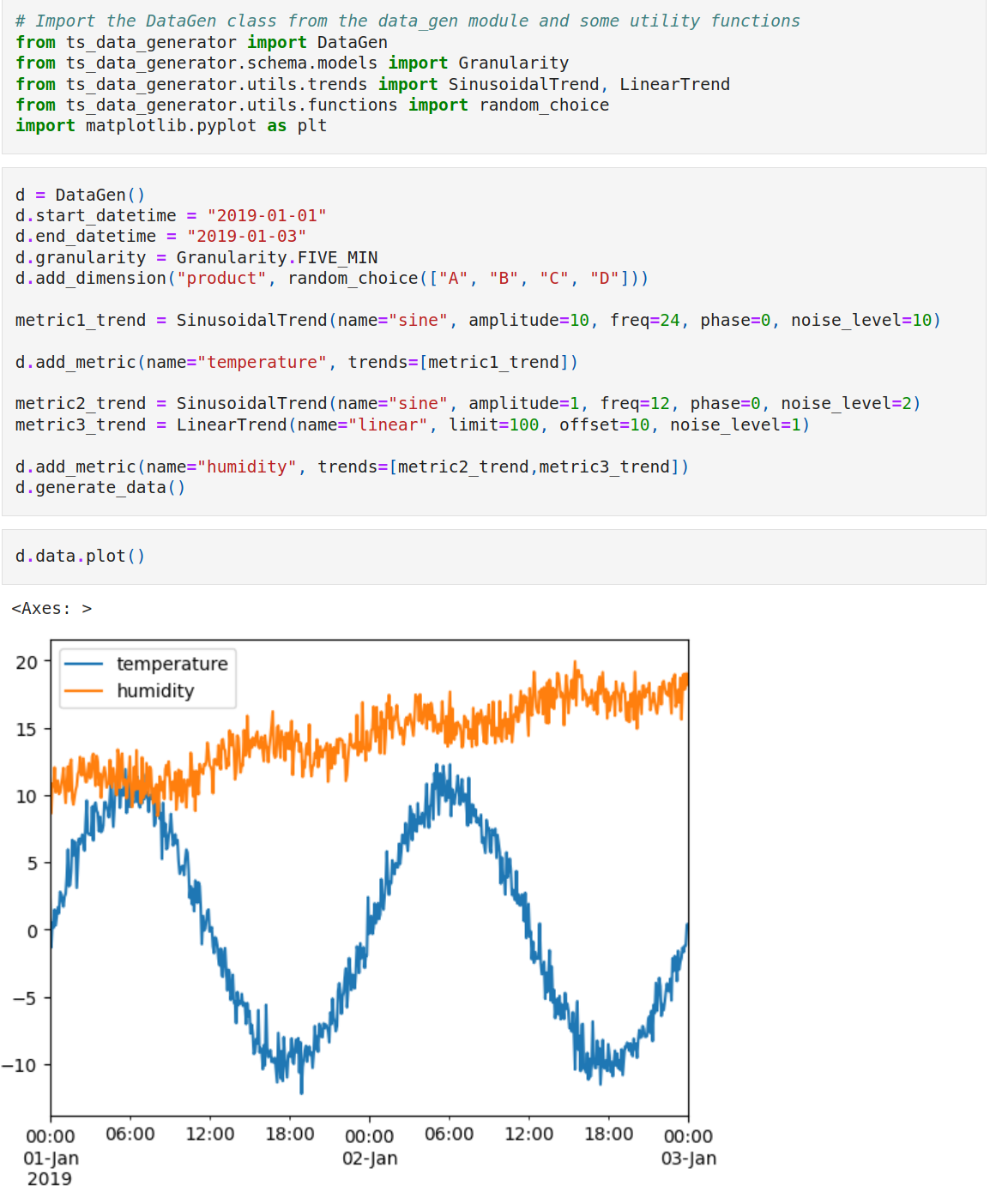
Table of Contents
- Synthetic Time Series Data Generator
Features
- Realistic Data: Generate data that mimics real-world time series data with trends, seasonality, and noise.
- Configurable: Control the data generation process with a rich set of parameters.
- Composable: Combine multiple trend functions to create complex patterns.
- Injectable Anomalies: Inject point anomalies, missing data, and concept drift to test your models.
- Python API and CLI: Use the Python API for programmatic control or the CLI for quick and easy data generation.
- Deterministic: Generate reproducible datasets for consistent experiments.
- Extensible: Easily add your own trend functions and anomaly types.
Quickstart
CLI (no install)
uvx --python 3.11 --from ts-data-generator tsdata generate \
    --preset daily-sales --output sales.csv
With anomalies and a fixed seed for reproducibility:
uvx --python 3.11 --from ts-data-generator tsdata generate \
    --start 2024-01-01 --end 2024-01-07 --granularity h \
    --dims "region:US,EU,AP" \
    --mets "temperature:SinusoidalTrend(amplitude=10,freq=24)" \
    --anomalies "temperature:PointAnomaly(probability=0.01,magnitude=5)" \
    --seed 42 --output weather.csv
Python API
from ts_data_generator import DataGen
from ts_data_generator.utils.trends import SinusoidalTrend
from ts_data_generator.utils.functions import random_choice
from ts_data_generator.anomalies import PointAnomaly, MissingData

dg = DataGen(seed=42)
dg.start_datetime = "2024-01-01"
dg.end_datetime = "2024-01-07"
dg.to_granularity("h")

dg.add_dimension("region", random_choice(["US", "EU", "AP"]))
dg.add_metric(
    "temperature",
    {SinusoidalTrend(amplitude=10, freq=24)},
    anomalies=[PointAnomaly(probability=0.01, magnitude=5)],
)

print(dg.data.head())
dg.data.to_csv("weather.csv", index_label="datetime")
Installation
pip install ts-data-generator
With optional extras:
# Schema imputing (requires scipy)
pip install "ts-data-generator[imputer]"

# Holiday trend support (requires holidays)
pip install "ts-data-generator[holidays]"

# All optional features
pip install "ts-data-generator[all]"
For local development:
git clone https://github.com/manojmanivannan/ts-data-generator.git
cd ts-data-generator
uv sync --extra dev
Core Concepts
Dimensions
Categorical or continuous columns generated by an infinite generator function.
| Function | Description | CLI shorthand |
|---|---|---|
random_choice |
Random element from a collection | name:random_choice:A,B,C |
random_int |
Random integer in [start, end] |
name:random_int:1,100 |
random_float |
Random float in [start, end) |
name:random_float:0.0,1.0 |
constant |
Fixed value or cycle | name:constant:10 |
ordered_choice |
Sequential cycle | name:ordered_choice:A,B,C |
auto_generate_name |
Auto-generated column name | name:auto_generate_name:cat |
Shorthand: name:values defaults to random_choice. Example: --dims "product:A,B,C".
Metrics
Numeric columns built by additively composing one or more trends.
| Trend | Description | Key parameters |
|---|---|---|
SinusoidalTrend |
Sine wave with optional noise | amplitude, freq, phase, noise_level |
LinearTrend |
Linear ramp with optional noise | limit, offset, noise_level |
WeekendTrend |
Spikes on Saturday/Sunday | weekend_effect, direction, limit |
HolidayTrend |
Ramp around holidays | country, effect, pre_window, post_window |
ARNoiseTrend |
Autoregressive AR(p) noise | coefficients or decay+order, noise_std |
MarkovTrend |
Discrete-state Markov chain | states, values, stickiness or transition_matrix |
StockTrend |
Random walk + multi-scale sine | amplitude, direction, noise_level |
Trends combine with +: metric_name:Trend1(...)+Trend2(...).
Anomalies
Inject realistic irregularities into metric values. Anomalies are applied per-metric after trend composition and run in order (PointAnomaly → MissingData last, so NaN values are never overwritten).
| Anomaly | Description | Key parameters |
|---|---|---|
PointAnomaly |
Isolated value spikes | probability, mode (additive/replacement), magnitude |
MissingData |
NaN gaps | mode (random/burst), probability, min_length, max_length |
ConceptDrift |
Gradual regime shifts | segments (list of DriftSegment) |
PointAnomaly supports two modes:
additive— adds the magnitude to the trend value at anomalous timestamps.replacement— replaces the trend value with the magnitude. Magnitude can be a fixed scalar or a(min, max)tuple for uniform sampling.
MissingData supports three modes:
random— each timestamp independently becomes NaN with the given probability.burst— consecutive blocks of NaN of configurable length, non-overlapping.patterned— NaN wherever a schedule callable(pd.Timestamp) -> boolreturns True (e.g. every Sunday). Patterned mode composes with random/burst via separate MissingData instances in the anomalies list.
ConceptDrift applies gradual distribution-level shifts using DriftSegment:
from ts_data_generator.anomalies import ConceptDrift, DriftSegment

ConceptDrift(segments=[
    DriftSegment(start_timestamp="2024-01-15T06:00:00",
                 transition_window=1800, target_mean=50, target_std=5,
                 hold_duration=7200, restore=True),
])
Each segment alpha-blends from baseline into N(target_mean, target_std) over transition_window seconds, holds for hold_duration seconds, and optionally transitions back.
Drift positions are specified by absolute start_timestamp. Multi-segment sequences are built by repeating --anomalies for the same metric in the CLI, or by passing a list of segments in the API.
Anomalies combine with + and are scoped to a metric:
metric_name:PointAnomaly(...)+MissingData(...)
Deterministic generation
Pass seed to DataGen(seed=42) or --seed 42 in the CLI for reproducible output. The seed initializes a PCG64-backed SeedableRNG that is threaded through trend generation and anomaly injection, replacing global np.random calls.
Multi-Items
Linked columns generated from a single function — useful when columns have
dependencies (e.g. col3 = col1 + col2).
def linked_gen():
    while True:
        a, b = random.randint(1, 100), random.randint(1, 100)
        yield (a, b, a + b)

dg.add_multi_items(names=["val1", "val2", "val3"], function=linked_gen())
Aggregation
Data can be resampled to a coarser granularity with per-metric aggregation
methods (sum, mean, min, max):
dg.add_metric("sales", {LinearTrend(limit=50)}, aggregation_type=AggregationType.SUM)
hourly = dg.aggregate("h")  # from 5min -> hourly
CLI Reference
tsdata [OPTIONS] COMMAND [ARGS]
generate — create a CSV dataset
tsdata generate \
    --start "2024-01-01" \
    --end "2024-01-31" \
    --granularity "D" \
    --dims "product:A,B,C,D" \
    --dims "region:X,Y,Z" \
    --mets "sales:LinearTrend(limit=1000)+WeekendTrend(weekend_effect=100)" \
    --output "daily_sales.csv"
Options:
| Option | Description |
|---|---|
--start |
Start datetime (YYYY-MM-DD) |
--end |
End datetime (YYYY-MM-DD) |
--granularity |
s, min, 5min, h, D, W, ME, Y |
--dims |
Dimension spec (repeatable) |
--mets |
Metric spec (repeatable) |
--anomalies |
Anomaly spec keyed by metric name (repeatable) |
--seed |
Integer seed for deterministic generation |
--output |
Output CSV path (must end in .csv) |
--preset |
Use a built-in preset |
--config |
Path to a JSON config file |
Presets — daily-sales, hourly-metrics, minute-stock, weekly-revenue,
monthly-recurring. List with tsdata presets.
Anomaly examples
# Point anomalies
tsdata generate ... --anomalies "sales:PointAnomaly(probability=0.01,magnitude=5)"

# Missing data (random mode)
tsdata generate ... --anomalies "sales:MissingData(probability=0.05)"

# Missing data (burst mode)
tsdata generate ... --anomalies "sales:MissingData(mode=burst,burst_probability=0.02,min_length=3,max_length=10)"

# Missing data (patterned mode — NaN every Sunday)
tsdata generate ... --anomalies "sales:MissingData(mode=patterned,schedule=weekday==6)"

# Concept drift
tsdata generate ... --anomalies "sales:ConceptDrift(start_timestamp=2024-01-15T06:00:00,target_mean=50,target_std=5,hold_duration=7200)"

# Multiple anomaly types on one metric
tsdata generate ... --anomalies "sales:PointAnomaly(probability=0.01,magnitude=5)+MissingData(probability=0.05)"

# Multi-segment concept drift (repeat --anomalies for the same metric)
tsdata generate ... \
    --anomalies "sales:ConceptDrift(start_timestamp=2024-01-01T00:00:00,transition_window=1800,target_mean=50,hold_duration=7200)" \
    --anomalies "sales:ConceptDrift(start_timestamp=2024-01-02T00:00:00,transition_window=3600,target_mean=100,hold_duration=7200,restore=true)"

# Deterministic generation
tsdata generate ... --seed 42
Other commands
tsdata dimensions    # List available dimension functions
tsdata metrics       # List available trend functions
tsdata presets       # List preset configurations
tsdata presets <name>  # Show details for a specific preset
Environment variables
Any option can be set via environment variables prefixed with TSDATA_:
export TSDATA_START="2024-01-01"
export TSDATA_GRANULARITY="h"
tsdata generate --end "2024-01-02" --dims "id:A,B" --mets "val:LinearTrend(limit=10)" --output out.csv
JSON config file
{
  "start": "2024-01-01",
  "end": "2024-01-12",
  "granularity": "5min",
  "dimensions": ["product:A,B,C", "region:X,Y,Z"],
  "metrics": [
    "sales:LinearTrend(limit=500)+WeekendTrend(weekend_effect=50)",
    "orders:LinearTrend(limit=200)"
  ],
  "anomalies": [
    "sales:PointAnomaly(probability=0.01,magnitude=5)+MissingData(probability=0.05)"
  ],
  "seed": 42,
  "output": "data.csv"
}
CLI arguments override config file values.
Schema Imputing
Reverse-engineer trend parameters from existing CSV data (requires pip install "ts-data-generator[imputer]"):
from ts_data_generator.schema.converter import SchemaConverter

converter = SchemaConverter("data.csv", index_col=0)
schema = converter.impute_schema()
trends = converter.analyze_numeric_trends(columns=["sales"], top_freq=2)
converter.construct_trend_column("sales", trends["sales"])
See the imputer notebook for a full walkthrough.
Example Notebooks
| Notebook | Description |
|---|---|
| sample.ipynb | End-to-end: dimensions, metrics, trends, multi-items, plotting |
| aggregate.ipynb | Aggregation with multi-items and custom aggregation types |
| imputer.ipynb | Reverse-engineering schema and trends from existing CSV |
Package Structure
ts_data_generator/
├── __init__.py            # Public API: DataGen
├── exceptions.py          # Custom exception hierarchy
├── _version.py            # Package version
├── data_gen.py            # DataGen engine (orchestrator)
├── cli.py                 # Click CLI (tsdata command)
├── random.py              # SeedableRNG wrapper (PCG64-backed)
├── anomalies/
│   ├── __init__.py        # Anomaly, PointAnomaly, MissingData, ConceptDrift, DriftSegment
│   ├── base.py            # Abstract Anomaly base class
│   ├── point.py           # PointAnomaly (isolated spikes)
│   ├── missing.py         # MissingData (NaN gaps: random, burst, patterned)
│   └── drift.py           # ConceptDrift + DriftSegment (regime shifts)
├── core/
│   └── dataframe_builder.py  # DataFrame generation logic
├── schema/
│   ├── models.py          # Granularity, AggregationType, Metrics, Dimensions
│   └── converter.py       # CSV schema analysis & trend imputing
├── utils/
│   ├── functions.py       # Dimension generator functions
│   └── trends.py          # Trend generators (Sine, Linear, Weekend, Holiday, ARNoise, Markov, Stock)
└── transforms/
    └── normalizer.py      # Min-max & standard normalization strategies
License
MIT — see LICENSE.
Project details
Verified details
These details have been verified by PyPIProject links
GitHub Statistics
Maintainers
Release history Release notifications | RSS feed


Download files
Download the file for your platform. If you're not sure which to choose, learn more about installing packages.
Source Distribution
Built Distribution
Filter files by name, interpreter, ABI, and platform.
If you're not sure about the file name format, learn more about wheel file names.
Copy a direct link to the current filters
File details
Details for the file ts_data_generator-0.4.1.tar.gz.
File metadata
- Download URL: ts_data_generator-0.4.1.tar.gz
- Upload date:
- Size: 1.1 MB
- Tags: Source
- Uploaded using Trusted Publishing? Yes
- Uploaded via: twine/6.1.0 CPython/3.13.12
File hashes
| Algorithm | Hash digest | |
|---|---|---|
| SHA256 |
d33310199092545d3a4270c0fadb91f9218cbc4539abddf66f4ae8b59f53f0bb
|
|
| MD5 |
46c712b59345647b99c0eb75c67e7a5f
|
|
| BLAKE2b-256 |
777770438beacbddf0bdeb6e76d996080b04575d7ced6f6d134a9a3f60443818
|
Provenance
The following attestation bundles were made for ts_data_generator-0.4.1.tar.gz:
Publisher:
ci.yaml on manojmanivannan/ts-data-generator
-
Statement:
-
Statement type:
https://in-toto.io/Statement/v1 -
Predicate type:
https://docs.pypi.org/attestations/publish/v1 -
Subject name:
ts_data_generator-0.4.1.tar.gz -
Subject digest:
d33310199092545d3a4270c0fadb91f9218cbc4539abddf66f4ae8b59f53f0bb - Sigstore transparency entry: 1569260670
- Sigstore integration time:
-
Permalink:
manojmanivannan/ts-data-generator@a8bfcb4defc4d71d1f1df7abce015e815ae2c014 -
Branch / Tag:
refs/tags/0.4.1 - Owner: https://github.com/manojmanivannan
-
Access:
public
-
Token Issuer:
https://token.actions.githubusercontent.com -
Runner Environment:
github-hosted -
Publication workflow:
ci.yaml@a8bfcb4defc4d71d1f1df7abce015e815ae2c014 -
Trigger Event:
push
-
Statement type:
File details
Details for the file ts_data_generator-0.4.1-py3-none-any.whl.
File metadata
- Download URL: ts_data_generator-0.4.1-py3-none-any.whl
- Upload date:
- Size: 43.6 kB
- Tags: Python 3
- Uploaded using Trusted Publishing? Yes
- Uploaded via: twine/6.1.0 CPython/3.13.12
File hashes
| Algorithm | Hash digest | |
|---|---|---|
| SHA256 |
d0bd21a8b602118004c00e554d47d5a5396c62b6d4da9ff4167daaea9c0a9deb
|
|
| MD5 |
0871067d23b02b73c196746733bc3cae
|
|
| BLAKE2b-256 |
46234f71918da8c69a907672f467593f67045f5497c5b9160825785776e9189f
|
Provenance
The following attestation bundles were made for ts_data_generator-0.4.1-py3-none-any.whl:
Publisher:
ci.yaml on manojmanivannan/ts-data-generator
-
Statement:
-
Statement type:
https://in-toto.io/Statement/v1 -
Predicate type:
https://docs.pypi.org/attestations/publish/v1 -
Subject name:
ts_data_generator-0.4.1-py3-none-any.whl -
Subject digest:
d0bd21a8b602118004c00e554d47d5a5396c62b6d4da9ff4167daaea9c0a9deb - Sigstore transparency entry: 1569260740
- Sigstore integration time:
-
Permalink:
manojmanivannan/ts-data-generator@a8bfcb4defc4d71d1f1df7abce015e815ae2c014 -
Branch / Tag:
refs/tags/0.4.1 - Owner: https://github.com/manojmanivannan
-
Access:
public
-
Token Issuer:
https://token.actions.githubusercontent.com -
Runner Environment:
github-hosted -
Publication workflow:
ci.yaml@a8bfcb4defc4d71d1f1df7abce015e815ae2c014 -
Trigger Event:
push
-
Statement type:






