




tSplit the TE-splitter
Extract terminal repeats from retrotransposons (LTRs) or DNA transposons (TIRs). Returns compontent segments of the element for use with transposon mapping tools.
Optionally, tsplit TIR can also compose synthetic MITES from complete DNA transposons.
Table of contents
Algorithm overview
tSplit attempts to identify terminal repeats in transposable elements by
first aligning each element to itself using blastn or nucmer, and then applying a set of
tuneable heuristics to select an alignment pair most likely to represent an LTR or TIR, as follows:
- Exclude all diagonal/self-matches
- If
tsplit LTR: Retain only alignment pairs on the same strand (tandem repeats) - If
tsplit TIR: Retain only alignment pairs on opposite strands (inverse repeats) - Retain pairs for which the 5' match begins within x bases of element start and whose 3' match ends within x bases of element end
- If multiple candidates remain select alignment pair with largest internal segment (i.e. closest to element ends)
Options and usage
Installing tSplit
Requirements:
You can create a Conda environment with these dependencies using the YAML file in this repo.
conda env create -f environment.yml

conda activate tsplit
After activating the tsplit environment you can use pip to install the latest version of tsplit.
Installation options:
- Install from PyPi. This will get you the latest stable release.
pip install tsplit
- Pip install directly from this git repository.
This is the best way to ensure you have the latest development version.
pip install git+https://github.com/Adamtaranto/tSplit.git
Example usage
tSplit can be run in two modes: tsplit LTR and tsplit TIR, for extracting long terminal repeats or terminal inverted repeats, respectively.
Options are the same for each.
tsplit TIR
For each element in TIR_element.fa split into internal and external (TIR) segments.
Split segments will be written to TIR_split_tsplit_output.fasta with suffix "_I" for internal or "_TIR" for external segments.
TIRs must be at least 10bp in length and share 80% identity and occur within 10bp of each end of the input element.
tsplit TIR -i tests/data/TIR_element.fa -p TIR_split

# Equivalet to defaults
tsplit TIR -i tests/data/TIR_element.fa -p TIR_split --maxdist 10 --minid 80.0 --minterm 10 --method blastn --splitmode split
# Use '--both' if you want to report both left and right TIRs
Output: TIR_split_tsplit_output.fasta
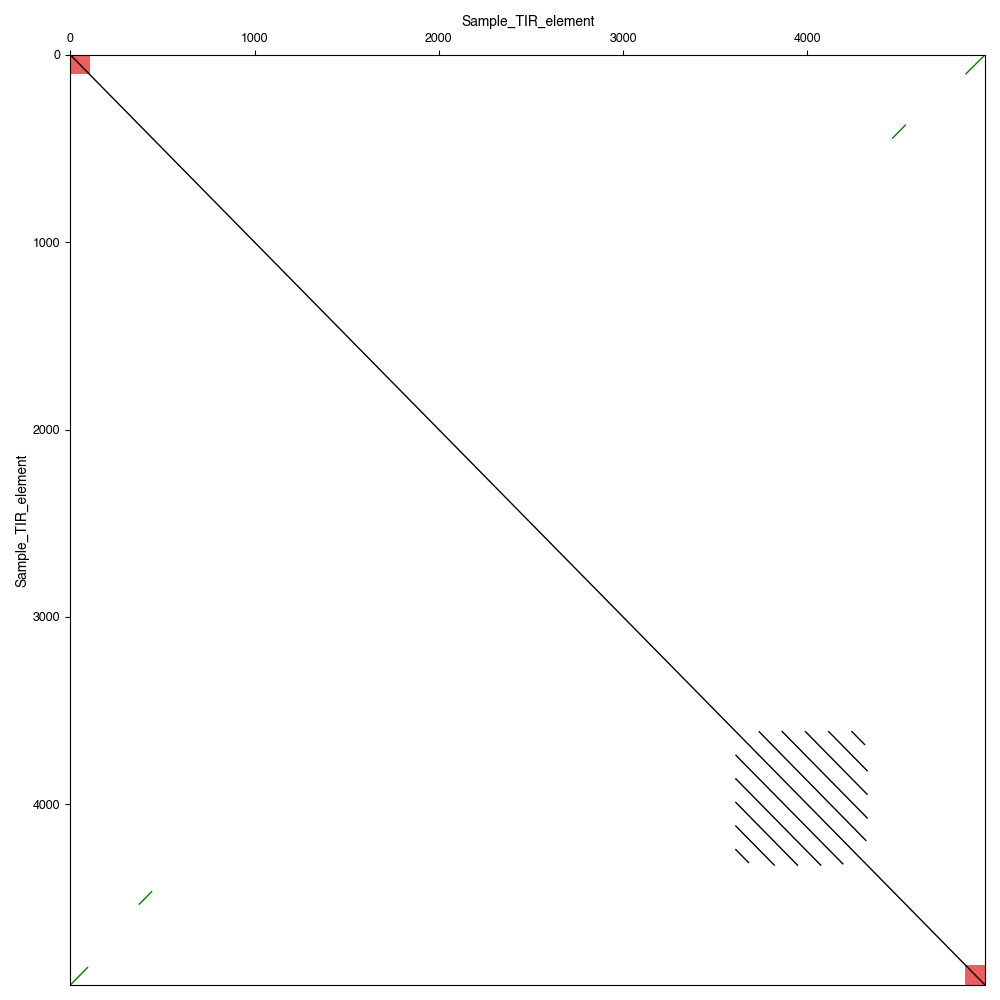
Visualise annotated dotplot
tsplit TIR -i tests/data/TIR_element.fa -d results --splitmode split --paf --gff

flexidot -i tests/data/TIR_element.fa -a results/TIR_element.paf -m 2 -o results/blast_dotplot --gff results/TIR_element.gff3
Output:
tsplit LTR
For each element in LTR_retrotransposon.fa split into internal and external segments.
Split segments will be written to LTR_split_tsplit_output.fasta with suffix "_I" for internal or "_LTR" for external segments.
LTRs must be at least 10bp in length and share 80% identity and occur within 10bp of each end of the input element.
tsplit LTR -i tests/data/LTR_retrotransposon.fa -p LTR_split
Output: LTR_split_tsplit_output.fasta
License
Software provided under GPL-3 license.
1 maintainer

Metadata
1 maintainer
Release files for tsplit 0.3.0
For a detailed explanation of source distributions (sdists) and built distributions (wheels), please see the package formats documentation.
Source distribution (sdist)
| File | Size | Uploaded | |
|---|---|---|---|
| tsplit-0.3.0.tar.gz | 89.8 kB | Details |
Built distribution (wheel)
| File | Interpreter | ABI | Platform | Reset |
|---|---|---|---|---|
| tsplit-0.3.0-py3-none-any.whl | Python 3 | none | any | Details |
Total release size: 126.4 kB
Release files / tsplit-0.3.0.tar.gz
| Download URL | tsplit-0.3.0.tar.gz |
|---|---|
| Size | 89.8 kB |
| Tags | Source |
|
SHA-256 checksum How to use checksums |
5837537108f52b8605921bda527a328cb58f7e691c4f666b8e15f64302175f1c
|
|
BLAKE2b-256 checksum How to use checksums |
25bbb0945c6e436fb84a96c14806db9079b5740c763b0df16c97091a911e3828
|
| Upload date | |
|
Uploaded using Trusted Publishing? What is trusted publishing? |
Yes |
| Uploaded via |
twine/6.1.0 CPython/3.13.7
|
Provenance
Provenance describes where a file came from. On PyPI, provenance is shared via attestations, which provide a verifiable record of the build or publishing details. View details, limitations and caveats.


PyPI Publish Attestation
PyPI verified that this artifact, at this checksum, originated from the publisher listed below.
Signed by GitHub Actions, verified by PyPI on Jan 28, 2026.
Transparency logRelease files / tsplit-0.3.0-py3-none-any.whl
| Download URL | tsplit-0.3.0-py3-none-any.whl |
|---|---|
| Size | 36.6 kB |
| Tags | Python 3 |
|
SHA-256 checksum How to use checksums |
fad832e05f123a9f88b261d6e68b97ee5a2587ff3ad3678821c50d63c0d072e2
|
|
BLAKE2b-256 checksum How to use checksums |
911b912e1cf569c9cf72ce3f7201dda3e4edbca8e013159c482637efc297e15e
|
| Upload date | |
|
Uploaded using Trusted Publishing? What is trusted publishing? |
Yes |
| Uploaded via |
twine/6.1.0 CPython/3.13.7
|
Provenance
Provenance describes where a file came from. On PyPI, provenance is shared via attestations, which provide a verifiable record of the build or publishing details. View details, limitations and caveats.
PyPI Publish Attestation
PyPI verified that this artifact, at this checksum, originated from the publisher listed below.
Signed by GitHub Actions, verified by PyPI on Jan 28, 2026.
Transparency log













