
Text-to-Speech API Client with OpenAI compatibility
Verified details
These details have been verified by PyPIProject links
GitHub Statistics
Maintainers

Project description
TTSFM - Text-to-Speech API Client




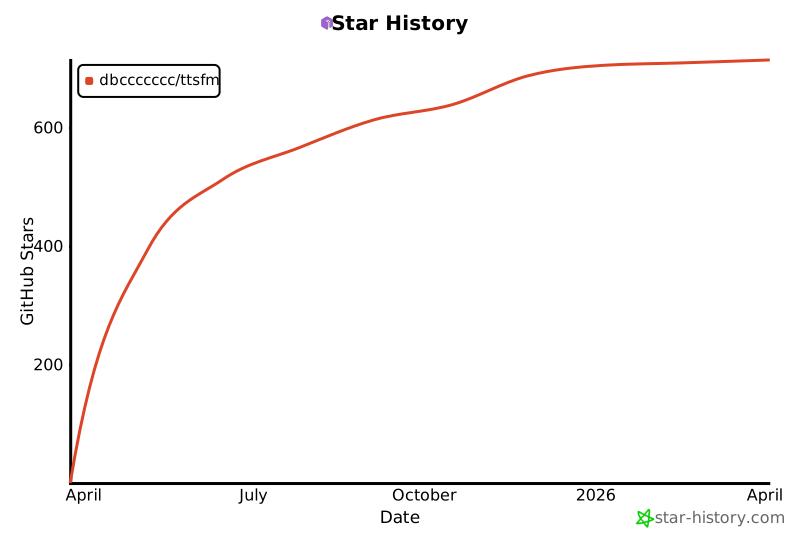
Star History
Overview
TTSFM is a free, OpenAI-compatible text-to-speech stack powered by the openai.fm backend. It ships with Python clients, a REST API, and a web playground.
Installation
Python package
pip install ttsfm        # core client
pip install ttsfm[web]   # client + Flask web app
Docker image
TTSFM offers two Docker image variants to suit different needs:
Full variant (recommended)
docker run -p 8000:8000 dbcccc/ttsfm:latest
Includes ffmpeg for advanced features:
- ✅ MP3 auto-combine for long text
- ✅ Speed adjustment (0.25x - 4.0x)
- ✅ Additional audio formats (AAC, FLAC, OPUS)
Slim variant
docker run -p 8000:8000 dbcccc/ttsfm:v3.4.0-alpha1-slim
Minimal image without ffmpeg:
- ✅ Basic TTS (MP3/WAV)
- ✅ WAV auto-combine (simple concatenation)
- ❌ No MP3 auto-combine
- ❌ No speed adjustment
- ❌ No format conversion
The container exposes the web playground at http://localhost:8000 and an OpenAI-style endpoint at /v1/audio/speech.
Quick start
Python client
from ttsfm import TTSClient, AudioFormat, Voice

client = TTSClient()

# Basic usage
response = client.generate_speech(
    text="Hello from TTSFM!",
    voice=Voice.ALLOY,
    response_format=AudioFormat.MP3,
)
response.save_to_file("hello")  # -> hello.mp3

# With speed adjustment (requires ffmpeg)
response = client.generate_speech(
    text="This will be faster!",
    voice=Voice.NOVA,
    response_format=AudioFormat.MP3,
    speed=1.5,  # 1.5x speed (0.25 - 4.0)
)
response.save_to_file("fast")  # -> fast.mp3
CLI
ttsfm "Hello, world" --voice nova --format mp3 --output hello.mp3
REST API
curl -X POST http://localhost:8000/v1/audio/speech -H "Content-Type: application/json" -d '{"model":"gpt-4o-mini-tts","input":"Hello world!","voice":"alloy"}' --output speech.mp3
Learn more
- Browse the full API reference and operational notes in the web documentation (or see
ttsfm-web/templates/docs.html). - Read the architecture overview for component diagrams.
- Contributions are welcome—see CONTRIBUTING.md for guidelines.
License
TTSFM is released under the MIT License.
Project details
Verified details
These details have been verified by PyPIProject links
GitHub Statistics
Maintainers
Release history Release notifications | RSS feed


Download files
Download the file for your platform. If you're not sure which to choose, learn more about installing packages.
Source Distribution
Built Distribution
Filter files by name, interpreter, ABI, and platform.
If you're not sure about the file name format, learn more about wheel file names.
Copy a direct link to the current filters
File details
Details for the file ttsfm-3.4.0a4.tar.gz.
File metadata
- Download URL: ttsfm-3.4.0a4.tar.gz
- Upload date:
- Size: 289.1 kB
- Tags: Source
- Uploaded using Trusted Publishing? Yes
- Uploaded via: twine/6.1.0 CPython/3.13.7
File hashes
| Algorithm | Hash digest | |
|---|---|---|
| SHA256 |
d58799aedbdcda6e7d62a08f3654dcab2d0645b846a3e9ec8e9e5e1fe9c3a705
|
|
| MD5 |
e8629c87c07963ef990c9e4b341d02d0
|
|
| BLAKE2b-256 |
349202f14a2799cd9c92528b43c2776348bd452a3b5389a33e114e47c1fe104f
|
Provenance
The following attestation bundles were made for ttsfm-3.4.0a4.tar.gz:
Publisher:
release.yml on dbccccccc/ttsfm
-
Statement:
-
Statement type:
https://in-toto.io/Statement/v1 -
Predicate type:
https://docs.pypi.org/attestations/publish/v1 -
Subject name:
ttsfm-3.4.0a4.tar.gz -
Subject digest:
d58799aedbdcda6e7d62a08f3654dcab2d0645b846a3e9ec8e9e5e1fe9c3a705 - Sigstore transparency entry: 647427148
- Sigstore integration time:
-
Permalink:
dbccccccc/ttsfm@f6c8c5182cbb790855d784829def0bb995586f84 -
Branch / Tag:
refs/tags/v3.4.0-alpha4 - Owner: https://github.com/dbccccccc
-
Access:
public
-
Token Issuer:
https://token.actions.githubusercontent.com -
Runner Environment:
github-hosted -
Publication workflow:
release.yml@f6c8c5182cbb790855d784829def0bb995586f84 -
Trigger Event:
push
-
Statement type:
File details
Details for the file ttsfm-3.4.0a4-py3-none-any.whl.
File metadata
- Download URL: ttsfm-3.4.0a4-py3-none-any.whl
- Upload date:
- Size: 34.7 kB
- Tags: Python 3
- Uploaded using Trusted Publishing? Yes
- Uploaded via: twine/6.1.0 CPython/3.13.7
File hashes
| Algorithm | Hash digest | |
|---|---|---|
| SHA256 |
0675aa0b462fca76f89e9d841c289d1f38c3d162d9177d230a866caf60d3fffd
|
|
| MD5 |
2e5e6b84ec65512344a6c3a784aef778
|
|
| BLAKE2b-256 |
92a9770b94d2f5c2abd8a245e809f100a7235cf758fab961cf0c5f69202f288d
|
Provenance
The following attestation bundles were made for ttsfm-3.4.0a4-py3-none-any.whl:
Publisher:
release.yml on dbccccccc/ttsfm
-
Statement:
-
Statement type:
https://in-toto.io/Statement/v1 -
Predicate type:
https://docs.pypi.org/attestations/publish/v1 -
Subject name:
ttsfm-3.4.0a4-py3-none-any.whl -
Subject digest:
0675aa0b462fca76f89e9d841c289d1f38c3d162d9177d230a866caf60d3fffd - Sigstore transparency entry: 647427157
- Sigstore integration time:
-
Permalink:
dbccccccc/ttsfm@f6c8c5182cbb790855d784829def0bb995586f84 -
Branch / Tag:
refs/tags/v3.4.0-alpha4 - Owner: https://github.com/dbccccccc
-
Access:
public
-
Token Issuer:
https://token.actions.githubusercontent.com -
Runner Environment:
github-hosted -
Publication workflow:
release.yml@f6c8c5182cbb790855d784829def0bb995586f84 -
Trigger Event:
push
-
Statement type:






