

TUI-Tasker
A modern task manager with Terminal User Interface and REST API
Built with Python, Textual, and FastAPI


Features
TUI
- Create, edit, delete tasks
- Mark as done or in progress
- Due dates with automatic overdue detection
- Visual statistics (progress bars)
- Real-time activity log
- Keyboard and mouse navigation
REST API
- Full CRUD (
GET,POST,PATCH,DELETE) - Secured by API Key
- Auto documentation (Swagger)
- Data validation (Pydantic)
Business logic
- Hexagonal architecture
- Validation: title max 30 chars, description max 115 chars
- 3 statuses:
IN_PROGRESS,DONE,OVERDUE - Automatic notifications (notifications.txt)
- SQLite database
Images
-
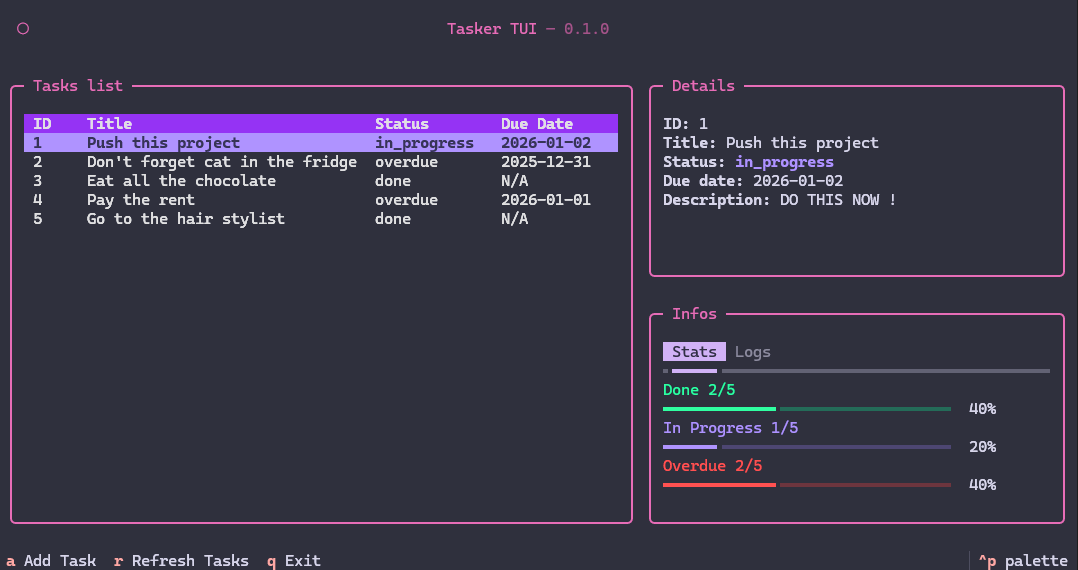
Main screen
-
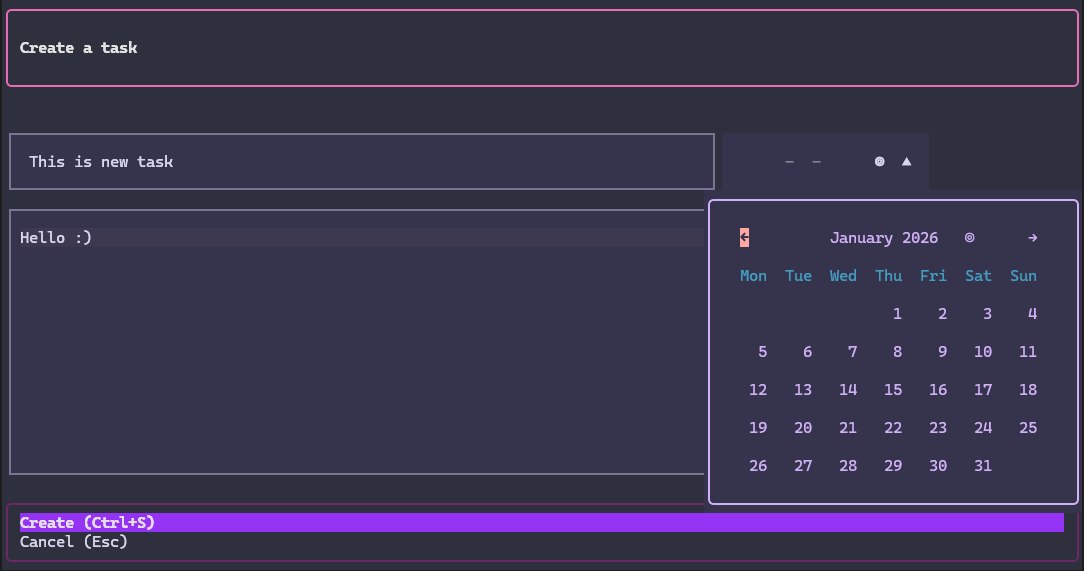
Create task
-
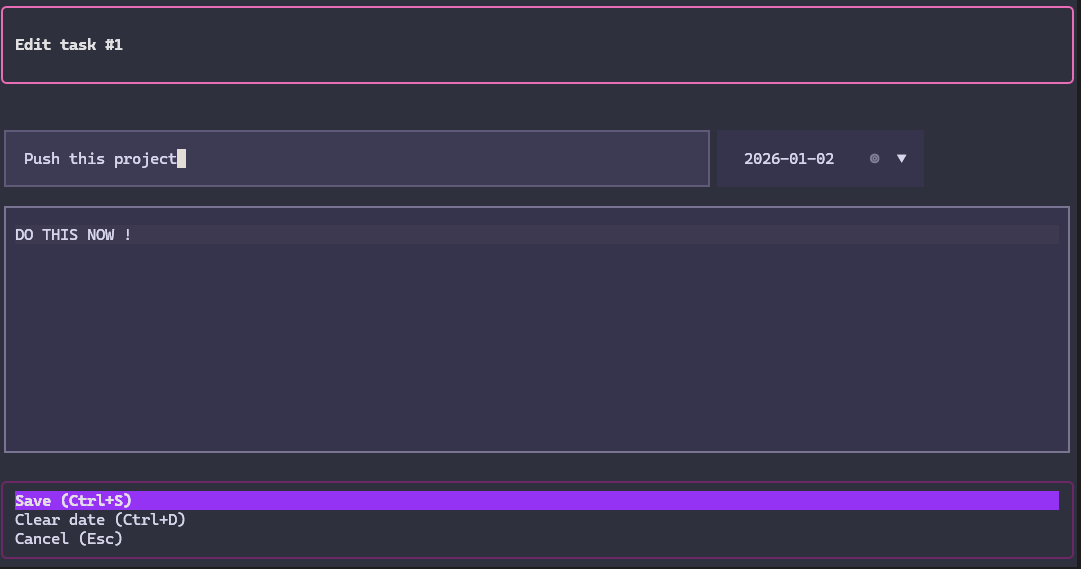
Edit task
-
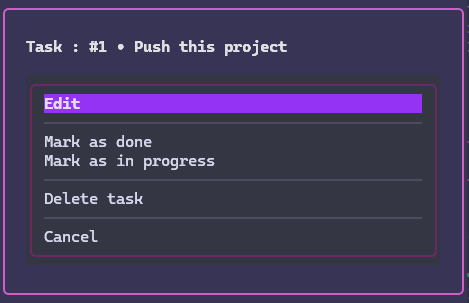
Actions menu
Installation
Via pip (recommended)
pip install tui-tasker
Via Poetry (development)
User mode
poetry install
Dev mode
poetry install --with dev
Usage
Launch TUI
# If installed via pip
tui-tasker

# If using Poetry
poetry run python -m todo.adapters.tui.app
Launch API
# Create a .env file at the root
echo "API_KEY=your-secret-key-here" > .env

# Start the server
poetry run uvicorn todo.adapters.api.api:app --reload

# Access Swagger documentation
# http://localhost:8000/docs
# (Don't forget to set the API key in the top right if you want to test endpoints on the doc)
Tests
# All tests
poetry run pytest

# With details
poetry run pytest -v
Test API
With Bruno (provided collection)
cd bruno-coll/TUI-tasker
# Open with Bruno Desktop (don't forget to configure the API Key in the collection Headers)
Dependencies
Production
| Package | Role |
|---|---|
| sqlalchemy | ORM for SQLite |
| fastapi | REST API framework |
| pydantic | Data validation |
| uvicorn | Server to run FastAPI |
| rich | Terminal rendering (used by Textual) |
| textual | Modern TUI framework |
| textual-timepiece | DatePicker widget for Textual |
| python-dotenv | Environment variables management (.env) |
Development
| Package | Role |
|---|---|
| textual-dev | Textual DevTools (debug console, reload) |
| pytest | Unit testing framework |
| pytest-cov | Test code coverage |
Design & Technical choices
Why Textual?
- Inspiration: Posting application briefly seen in class and which uses textual.
- Advantages:
- Modern framework based on Rich
- CSS-like for styling
- Widgets (DataTable, ProgressBar, TabbedContent)
- Live reload in dev
- Good documentation: Textual Docs
Color palette
Also inspired by the posting theme.
Textual theme: Rose Pine Moon
| Color | Hex | Usage |
|---|---|---|
| Background | #20212f |
Background |
| Primary | #d563a8 |
Headers, borders, titles |
| Secondary | #9775DC |
Accents, highlights |
| Violet | #892DE1 |
Table headers, scrollbars |
| Success | #1EFB9D |
Completed tasks |
| Warning | #A187F0 |
In progress tasks |
| Error | #FC4949 |
Overdue tasks |
Architecture
Hexagonal (Ports & Adapters)
src/todo/
├── domain/              # Business entities (Task)
├── application/         # Use cases + Ports (interfaces)
└── adapters/            # Implementations
    ├── api/             # REST Adapter (FastAPI)
    ├── tui/             # Terminal Adapter (Textual)
    ├── persistence/     # SQLite Adapter
    └── notifications/   # Notifications file Adapter
Project structure
tui-tasker/
├── src/todo/                    # Source code
│   ├── domain/                  # Entities (Task, TaskStatus)
│   ├── application/             # Use cases (business logic)
│   └── adapters/                # Interfaces (API, TUI, DB)
├── tests/                       # Unit tests
│   └── test_use_cases.py        # Business logic tests
├── bruno-coll/                  # Bruno collection (API tests)
├── .env                         # Environment variables (API_KEY)
├── pyproject.toml               # Poetry configuration
├── todo.db                      # SQLite database (auto-created)
└── notifications.txt            # Action log (auto-created)
Security
- API Key: Simple protection for external access
- Validation: Pydantic + use cases to prevent invalid data
TUI Shortcuts
| Key | Action |
|---|---|
a |
Add a task |
r |
Refresh the list |
Enter |
Open actions menu |
Ctrl+S |
Save (in modals) |
Ctrl+D |
Clear date (editing) |
Escape |
Cancel |
q |
Quit |
ctrl+p |
Open textual panel |
Future improvements
- JWT Authentication: Replace simple API Key with JWT tokens for better security
- User management: Add user registration, login, and task ownership
- Task sharing: Enable collaboration between users
- Priority levels: Add task prioritization (low, medium, high)
Author
This project was built by Kylian Project
License
This project is licensed under the MIT License.
Resources
Built with ❤️ by Kylian Project
1 maintainer

Metadata
1 maintainer
Release files for tui-tasker 1.0.2
For a detailed explanation of source distributions (sdists) and built distributions (wheels), please see the package formats documentation.
Source distribution (sdist)
| File | Size | Uploaded | |
|---|---|---|---|
| tui_tasker-1.0.2.tar.gz | 15.3 kB | Details |
Built distribution (wheel)
| File | Interpreter | ABI | Platform | Reset |
|---|---|---|---|---|
| tui_tasker-1.0.2-py3-none-any.whl | Python 3 | none | any | Details |
Total release size: 32.2 kB
Release files / tui_tasker-1.0.2.tar.gz
| Download URL | tui_tasker-1.0.2.tar.gz |
|---|---|
| Size | 15.3 kB |
| Tags | Source |
|
SHA-256 checksum How to use checksums |
dfcabc57300aad09848f2c7f986d255e20bd0e8c7f1ccc421d1097a6ded25fe6
|
|
BLAKE2b-256 checksum How to use checksums |
2cb4e69ccef966deae097ca781649497ad636823a42758a9c2db647bce195d53
|
| Upload date | |
|
Uploaded using Trusted Publishing? What is trusted publishing? |
No |
| Uploaded via |
poetry/2.2.1 CPython/3.10.6 Windows/10
|
Release files / tui_tasker-1.0.2-py3-none-any.whl
| Download URL | tui_tasker-1.0.2-py3-none-any.whl |
|---|---|
| Size | 16.9 kB |
| Tags | Python 3 |
|
SHA-256 checksum How to use checksums |
9c7ac79876d3a7a363e264b98f684cfebf7849d78bc2315a4cd982336e069820
|
|
BLAKE2b-256 checksum How to use checksums |
8da43f8f384410b0922629eaef334f0717be4f88662381f8b373f830f50c5809
|
| Upload date | |
|
Uploaded using Trusted Publishing? What is trusted publishing? |
No |
| Uploaded via |
poetry/2.2.1 CPython/3.10.6 Windows/10
|














