
A lightweight TUI application for managing tasks directly from the terminal.

Project description

TUI-Tasker
A modern task manager with Terminal User Interface and REST API
Built with Python, Textual, and FastAPI


Features
TUI
- Create, edit, delete tasks
- Mark as done or in progress
- Due dates with automatic overdue detection
- Visual statistics (progress bars)
- Real-time activity log
- Keyboard and mouse navigation
REST API
- Full CRUD (
GET,POST,PATCH,DELETE) - Secured by API Key
- Auto documentation (Swagger)
- Data validation (Pydantic)
Business logic
- Hexagonal architecture
- Validation: title max 30 chars, description max 115 chars
- 3 statuses:
IN_PROGRESS,DONE,OVERDUE - Automatic notifications (notifications.txt)
- SQLite database
Images
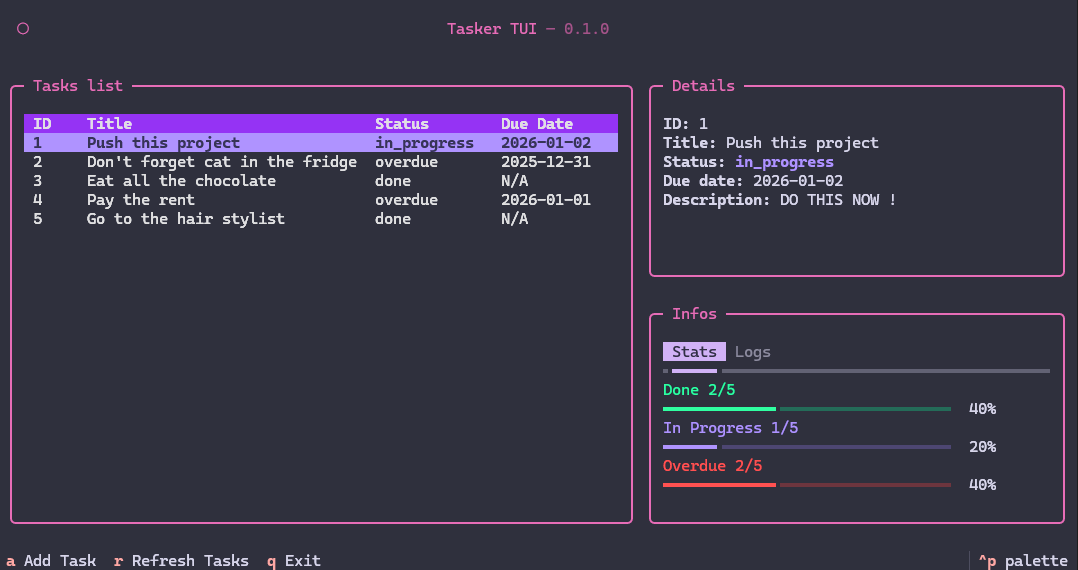
-
Main screen
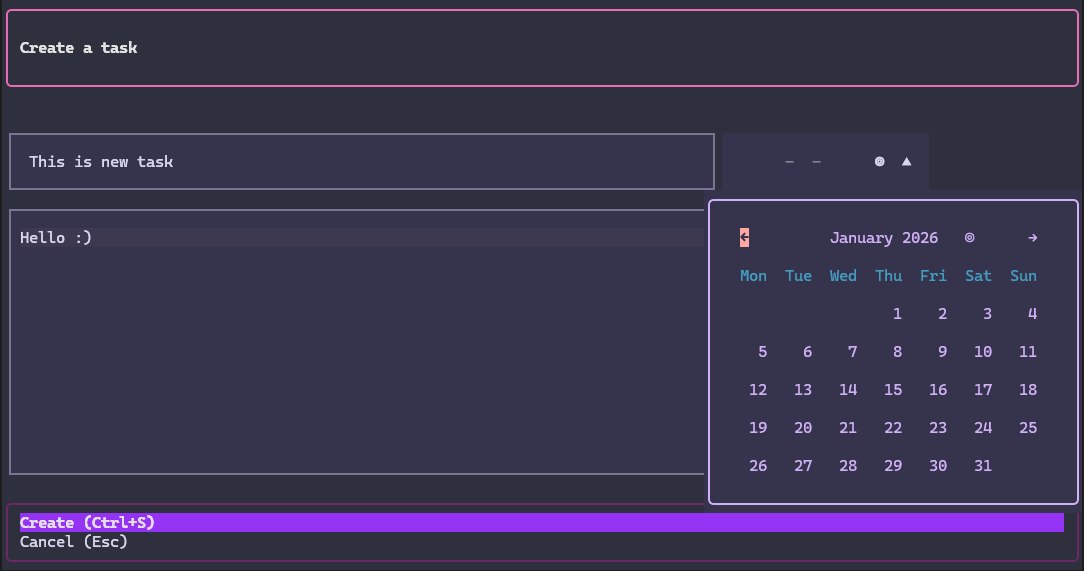
-
Create task
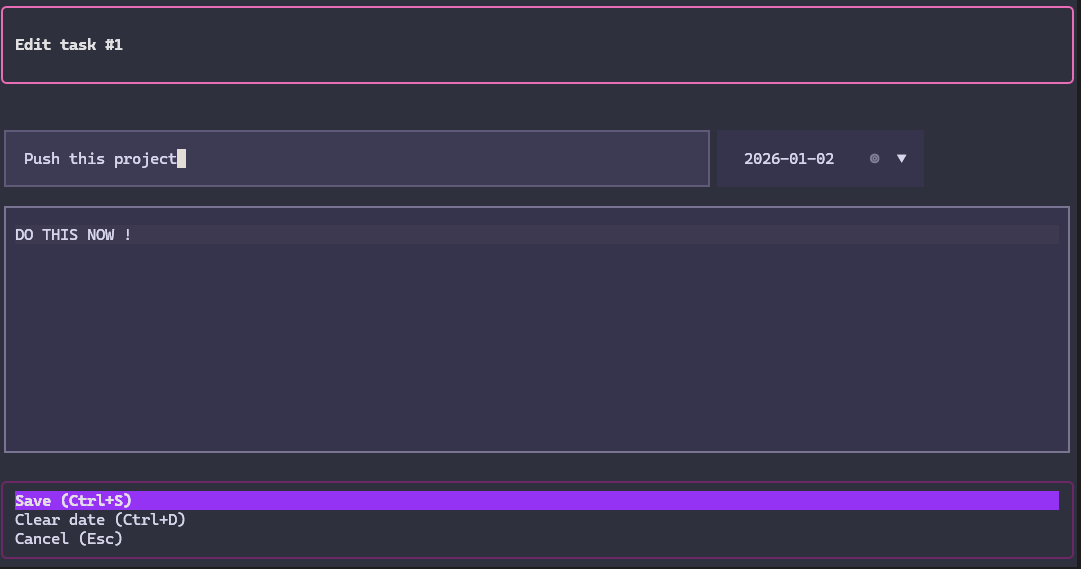
-
Edit task
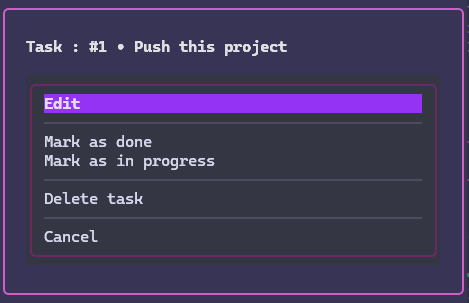
-
Actions menu
Installation
User mode
poetry install
Dev mode
poetry install --with dev
Usage
Launch TUI
poetry run python -m todo.adapters.tui.app
Launch API
# Create a .env file at the root
echo "API_KEY=your-secret-key-here" > .env

# Start the server
poetry run uvicorn todo.adapters.api.api:app --reload

# Access Swagger documentation
# http://localhost:8000/docs
# (Don't forget to set the API key in the top right if you want to test endpoints on the doc)
Tests
# All tests
poetry run pytest

# With details
poetry run pytest -v
Test API
With Bruno (provided collection)
cd bruno-coll/TUI-tasker
# Open with Bruno Desktop (don't forget to configure the API Key in the collection Headers)
Dependencies
Production
| Package | Role |
|---|---|
| sqlalchemy | ORM for SQLite |
| fastapi | REST API framework |
| pydantic | Data validation |
| uvicorn | Server to run FastAPI |
| rich | Terminal rendering (used by Textual) |
| textual | Modern TUI framework |
| textual-timepiece | DatePicker widget for Textual |
| python-dotenv | Environment variables management (.env) |
Development
| Package | Role |
|---|---|
| textual-dev | Textual DevTools (debug console, reload) |
| pytest | Unit testing framework |
| pytest-cov | Test code coverage |
Design & Technical choices
Why Textual?
- Inspiration: Posting application briefly seen in class and which uses textual.
- Advantages:
- Modern framework based on Rich
- CSS-like for styling
- Widgets (DataTable, ProgressBar, TabbedContent)
- Live reload in dev
- Good documentation: Textual Docs
Color palette
Also inspired by the posting theme.
Textual theme: Rose Pine Moon
| Color | Hex | Usage |
|---|---|---|
| Background | #20212f |
Background |
| Primary | #d563a8 |
Headers, borders, titles |
| Secondary | #9775DC |
Accents, highlights |
| Violet | #892DE1 |
Table headers, scrollbars |
| Success | #1EFB9D |
Completed tasks |
| Warning | #A187F0 |
In progress tasks |
| Error | #FC4949 |
Overdue tasks |
Architecture
Hexagonal (Ports & Adapters)
src/todo/
├── domain/              # Business entities (Task)
├── application/         # Use cases + Ports (interfaces)
└── adapters/            # Implementations
    ├── api/             # REST Adapter (FastAPI)
    ├── tui/             # Terminal Adapter (Textual)
    ├── persistence/     # SQLite Adapter
    └── notifications/   # Notifications file Adapter
Project structure
tui-tasker/
├── src/todo/                    # Source code
│   ├── domain/                  # Entities (Task, TaskStatus)
│   ├── application/             # Use cases (business logic)
│   └── adapters/                # Interfaces (API, TUI, DB)
├── tests/                       # Unit tests
│   └── test_use_cases.py        # Business logic tests
├── bruno-coll/                  # Bruno collection (API tests)
├── .env                         # Environment variables (API_KEY)
├── pyproject.toml               # Poetry configuration
├── todo.db                      # SQLite database (auto-created)
└── notifications.txt            # Action log (auto-created)
Security
- API Key: Simple protection for external access
- Validation: Pydantic + use cases to prevent invalid data
TUI Shortcuts
| Key | Action |
|---|---|
a |
Add a task |
r |
Refresh the list |
Enter |
Open actions menu |
Ctrl+S |
Save (in modals) |
Ctrl+D |
Clear date (editing) |
Escape |
Cancel |
q |
Quit |
ctrl+p |
Open textual panel |
Future improvements
- JWT Authentication: Replace simple API Key with JWT tokens for better security
- User management: Add user registration, login, and task ownership
- Task sharing: Enable collaboration between users
- Priority levels: Add task prioritization (low, medium, high)
Author
This project was built by Kylian Project
License
This project is licensed under the MIT License.
Resources
Release history Release notifications | RSS feed


Download files
Download the file for your platform. If you're not sure which to choose, learn more about installing packages.
Source Distribution
Built Distribution
Filter files by name, interpreter, ABI, and platform.
If you're not sure about the file name format, learn more about wheel file names.
Copy a direct link to the current filters
File details
Details for the file tui_tasker-1.0.1.tar.gz.
File metadata
- Download URL: tui_tasker-1.0.1.tar.gz
- Upload date:
- Size: 15.1 kB
- Tags: Source
- Uploaded using Trusted Publishing? No
- Uploaded via: poetry/2.2.1 CPython/3.10.6 Windows/10
File hashes
| Algorithm | Hash digest | |
|---|---|---|
| SHA256 |
23e65b5d0faee317d7c04a644b1abdcf45432eb07b9295f171cc07c4a104bc44
|
|
| MD5 |
e49d26dc0e006e2854c32b55649cc0b6
|
|
| BLAKE2b-256 |
77d28f9a7b3b7d86e16514c38d75aedd34572d455e7ce4b3af6596f103c79868
|
File details
Details for the file tui_tasker-1.0.1-py3-none-any.whl.
File metadata
- Download URL: tui_tasker-1.0.1-py3-none-any.whl
- Upload date:
- Size: 16.8 kB
- Tags: Python 3
- Uploaded using Trusted Publishing? No
- Uploaded via: poetry/2.2.1 CPython/3.10.6 Windows/10
File hashes
| Algorithm | Hash digest | |
|---|---|---|
| SHA256 |
532d52807a4316aee99500ae70993db6b320fb4a63b9f285736a578f04371ed2
|
|
| MD5 |
1d8771dc66df0267058880916cfe7f2e
|
|
| BLAKE2b-256 |
68b462dfbae4346289f9f6b8f4680cc349a0358b1088c84273000e6cf5dbd28d
|






