
TulgaTTS
TulgaTTS - A library for synthesizing text-to-speech (TTS) with various popular voices in Kazakhstan.
Installation
# Via pip (in the future)

pip install tulgatts

# For audio playback (optional):

pip install -e .[audio]
Getting Started
-
Obtain your token:
-
⚠️ DO NOT SHARE YOUR TOKEN! It is required to send requests from your account.
-
Open link https://character.ai/chat/2WPyJRflV_4nTx6_-tuNrhkiiqhDyOsn9O25BR1sDO8
-
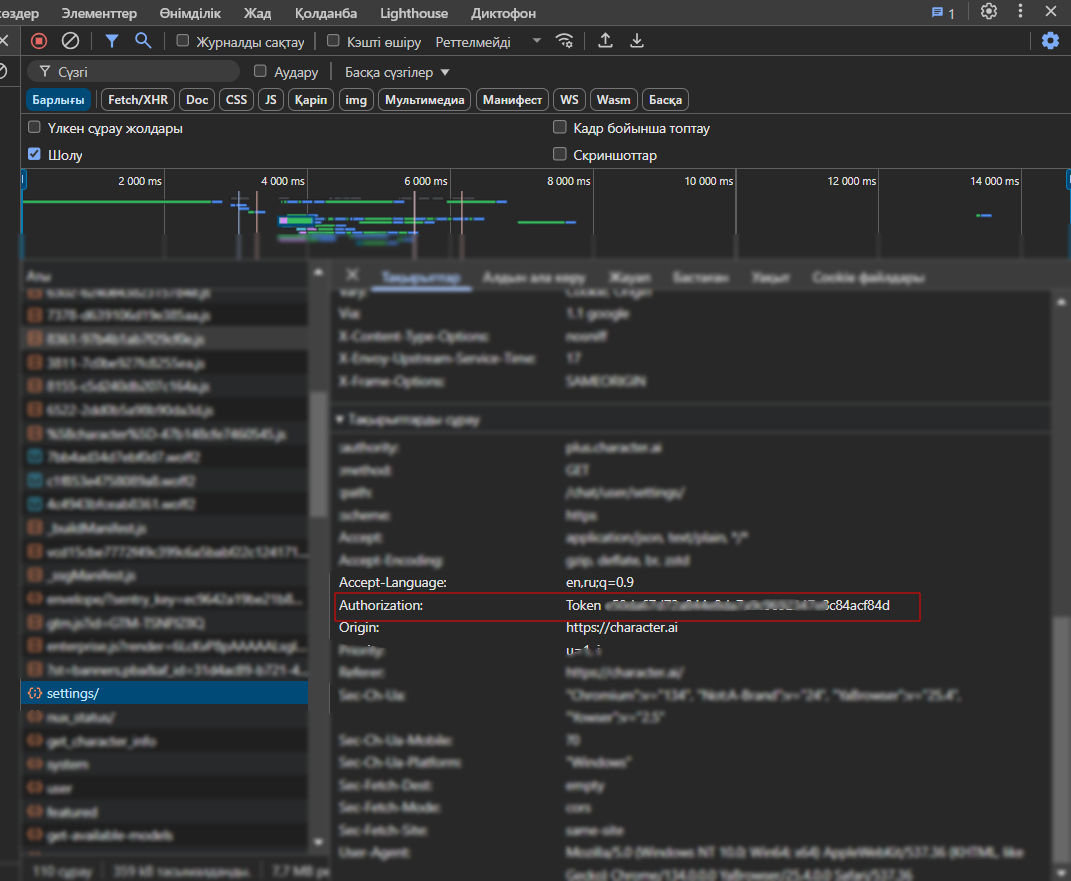
Open Developer Tools in your browser (usually F12).
-
Go to the Network tab.
-
Refresh the page or send a message to any character.
-
In the list of network requests, click on any request (for example, to
/settings).
-
Go to the Headers section.
-
Find the Authorization header. It will look like:
Authorization: Token <your_token_here> -
Copy only the token part (after
Token). -
Set the
CHARACTER_AI_TOKENenvironment variable or create a.envfile in the project root and addCHARACTER_AI_TOKEN=your_copied_token.
-
-
Use the library.
Usage Examples
You can use the library in several ways. For simple scripts, use the synchronous method; for async applications, use the async/await method.
1. The simplest usage
from tulgatts import TulgaTTS


# Create a client (default voice – Tokaev)

client = TulgaTTS(api_token="CHARACTER_AI_TOKEN", voice="Tokaev")


# 1. Speak with the default voice and save to file

client.say("This is an example created with this class")
2. Synchronous usage
import os

from tulgatts import TulgaTTS

from dotenv import load_dotenv


# Load token from .env

load_dotenv()

api_token = os.getenv("CHARACTER_AI_TOKEN")


def sync_say_usage():

    if not api_token:

        print("❌ No token!")

        return


    try:

        tts_client = TulgaTTS(api_token=api_token, voice='Tokaev')

        print(f"✅ Client ready with voice '{tts_client.voice}'.")


        tts_client.say("Synchronous example.", output_file="sync_example.mp3")

        print("🎧 File ready: sync_example.mp3")


    except Exception as e:

        print(f"⚠️ Error occurred: {e}")


if __name__ == "__main__":

    print("2. Synchronous example...")

    sync_say_usage()

    print("-" * 20)
3. Asynchronous usage
import os, asyncio

from tulgatts import TulgaTTS

from dotenv import load_dotenv


# Load token from .env

load_dotenv()

api_token = os.getenv("CHARACTER_AI_TOKEN")


async def advanced_async_say():

    if not api_token: return print("No token!")


    try:

        tts_client = TulgaTTS(api_token=api_token)

        print(f"Client ready with voice '{tts_client.voice}'.")

        await tts_client.say_async("Third example, part one.", voice="Tokaev", output_file="advanced_async1.mp3", play_audio=True)

    except Exception as e: print(f"Error: {e}")


if __name__ == "__main__":

    print("\n3. More advanced async example...")

    asyncio.run(advanced_async_say())

    print("All examples completed.")
Available Voices
The library comes with the following pre-configured voices:
-
Nursultan Nazarbaev
-
Tokaev
-
Pavel Durov
-
Nurlan Saburov
-
Putin
-
Skriptonit
-
Elon Musk
-
Albert E
-
Yandex Alica
-
J.A.R.V.I.S
-
Tony Stark
Note: Sometimes TulgaTTS may not synthesize your expected text. This issue is being worked on.
Special thanks to PyCharacterAI for enabling TTS with Character AI voices.
Authors
-
David Suragan (TulgaTTS)
-
Gemini AI
License
MIT
1 maintainer

Metadata
1 maintainer
Release files for tulgatts 0.1.3
For a detailed explanation of source distributions (sdists) and built distributions (wheels), please see the package formats documentation.
Source distribution (sdist)
| File | Size | Uploaded | |
|---|---|---|---|
| tulgatts-0.1.3.tar.gz | 9.8 kB | Details |
Built distribution (wheel)
| File | Interpreter | ABI | Platform | Reset |
|---|---|---|---|---|
| tulgatts-0.1.3-py3-none-any.whl | Python 3 | none | any | Details |
Total release size: 18.2 kB
Release files / tulgatts-0.1.3.tar.gz
| Download URL | tulgatts-0.1.3.tar.gz |
|---|---|
| Size | 9.8 kB |
| Tags | Source |
|
SHA-256 checksum How to use checksums |
2c17a9b933db081e020a3734fe4d27d9032a8b3a503f9e544e069a07a5976a25
|
|
BLAKE2b-256 checksum How to use checksums |
48ee5b52059f7fe5c06ebf35732736f475c24527907bcccb98019be3923a4c32
|
| Upload date | |
|
Uploaded using Trusted Publishing? What is trusted publishing? |
No |
| Uploaded via |
twine/6.1.0 CPython/3.11.4
|
Release files / tulgatts-0.1.3-py3-none-any.whl
| Download URL | tulgatts-0.1.3-py3-none-any.whl |
|---|---|
| Size | 8.4 kB |
| Tags | Python 3 |
|
SHA-256 checksum How to use checksums |
a1221dc5e8be76806cb17609a2120947a22c46b1d1852505b8457a26bb571f06
|
|
BLAKE2b-256 checksum How to use checksums |
db7cfef31c7baae620049d30c45cde062ee39f8899c88815011dbe9c2dbc7e2c
|
| Upload date | |
|
Uploaded using Trusted Publishing? What is trusted publishing? |
No |
| Uploaded via |
twine/6.1.0 CPython/3.11.4
|














