
TulgaTTS is an AI-based TTS library for generating speech with various voices popular in the region of Kazakhstan

Project description
TulgaTTS
TulgaTTS - A library for synthesizing text-to-speech (TTS) with various popular voices in Kazakhstan.
Installation
# Via pip (in the future)

pip install tulgatts

# For audio playback (optional):

pip install -e .[audio]
Getting Started
-
Obtain your token:
-
⚠️ DO NOT SHARE YOUR TOKEN! It is required to send requests from your account.
-
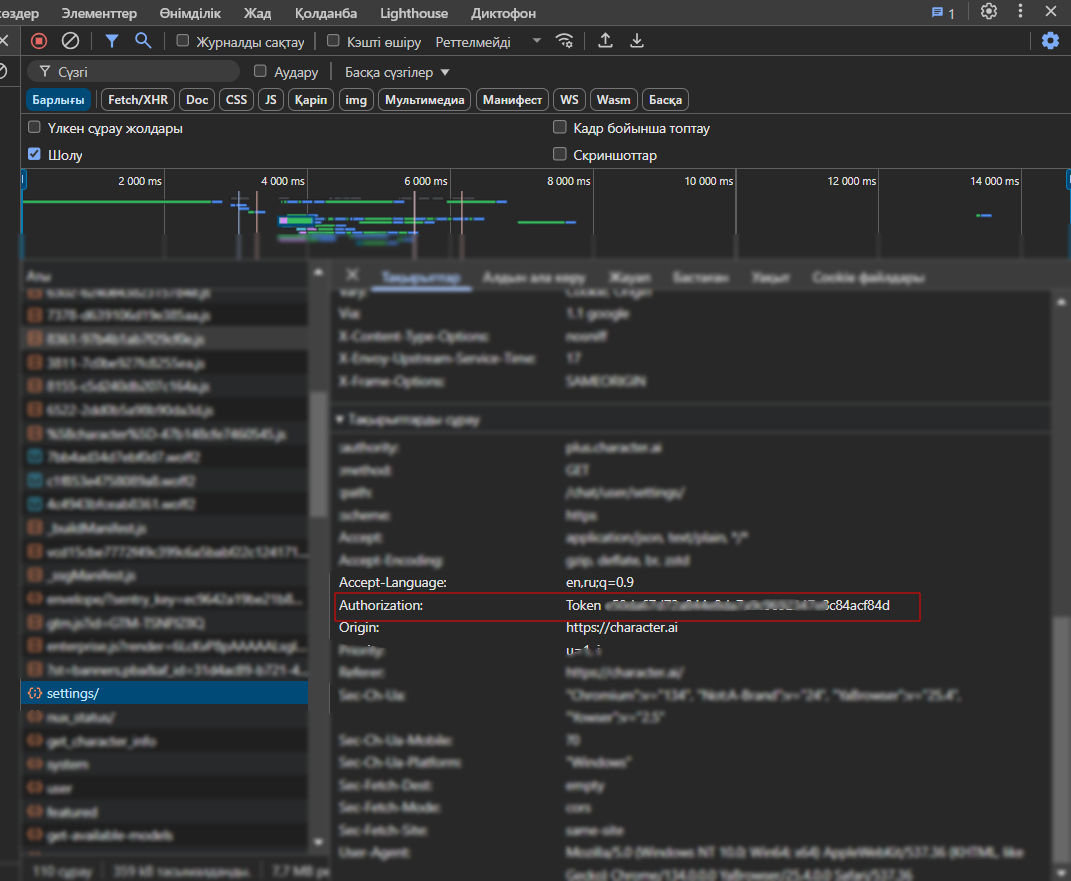
Open Developer Tools in your browser (usually F12).
-
Go to the Network tab.
-
Refresh the page or send a message to any character.
-
In the list of network requests, click on any request (for example, to
/settings).
-
Go to the Headers section.
-
Find the Authorization header. It will look like:
Authorization: Token <your_token_here> -
Copy only the token part (after
Token). -
Set the
CHARACTER_AI_TOKENenvironment variable or create a.envfile in the project root and addCHARACTER_AI_TOKEN=your_copied_token.
-
-
Use the library.
Usage Examples
You can use the library in several ways. For simple scripts, use the synchronous method; for async applications, use the async/await method.
1. The simplest usage
from tulgatts import TulgaTTS


# Create a client (default voice – Tokaev)

client = TulgaTTS(api_token="CHARACTER_AI_TOKEN", voice="Tokaev")


# 1. Speak with the default voice and save to file

client.say("This is an example created with this class")
2. Synchronous usage
import os

from tulgatts import TulgaTTS

from dotenv import load_dotenv


# Load token from .env

load_dotenv()

api_token = os.getenv("CHARACTER_AI_TOKEN")


def sync_say_usage():

    if not api_token:

        print("❌ No token!")

        return


    try:

        tts_client = TulgaTTS(api_token=api_token, voice='Tokaev')

        print(f"✅ Client ready with voice '{tts_client.voice}'.")


        tts_client.say("Synchronous example.", output_file="sync_example.mp3")

        print("🎧 File ready: sync_example.mp3")


    except Exception as e:

        print(f"⚠️ Error occurred: {e}")


if __name__ == "__main__":

    print("2. Synchronous example...")

    sync_say_usage()

    print("-" * 20)
3. Asynchronous usage
import os, asyncio

from tulgatts import TulgaTTS

from dotenv import load_dotenv


# Load token from .env

load_dotenv()

api_token = os.getenv("CHARACTER_AI_TOKEN")


async def advanced_async_say():

    if not api_token: return print("No token!")


    try:

        tts_client = TulgaTTS(api_token=api_token)

        print(f"Client ready with voice '{tts_client.voice}'.")

        await tts_client.say_async("Third example, part one.", voice="Tokaev", output_file="advanced_async1.mp3", play_audio=True)

    except Exception as e: print(f"Error: {e}")


if __name__ == "__main__":

    print("\n3. More advanced async example...")

    asyncio.run(advanced_async_say())

    print("All examples completed.")
Available Voices
The library comes with the following pre-configured voices:
-
Nursultan Nazarbaev
-
Tokaev
-
Pavel Durov
-
Nurlan Saburov
-
Putin
-
Skriptonit
-
Elon Musk
-
Albert E
-
Yandex Alica
-
J.A.R.V.I.S
-
Tony Stark
Note: Sometimes TulgaTTS may not synthesize your expected text. This issue is being worked on.
Special thanks to PyCharacterAI for enabling TTS with Character AI voices.
Authors
-
David Suragan (TulgaTTS)
-
Gemini AI
License
MIT
Release history Release notifications | RSS feed


Download files
Download the file for your platform. If you're not sure which to choose, learn more about installing packages.
Source Distribution
Built Distribution
Filter files by name, interpreter, ABI, and platform.
If you're not sure about the file name format, learn more about wheel file names.
Copy a direct link to the current filters
File details
Details for the file tulgatts-0.1.2.tar.gz.
File metadata
- Download URL: tulgatts-0.1.2.tar.gz
- Upload date:
- Size: 9.7 kB
- Tags: Source
- Uploaded using Trusted Publishing? No
- Uploaded via: twine/6.1.0 CPython/3.11.4
File hashes
| Algorithm | Hash digest | |
|---|---|---|
| SHA256 |
f90c2f35c6ef56e8bbed8e8316ccf2d002b016443a5b7bbe58954f240daae18c
|
|
| MD5 |
e9c5ab507b12bb337371a47632e3fa73
|
|
| BLAKE2b-256 |
506057d65b6369b718d9785b18821d53b4cc4b1c128ede24300163adfe3b79c7
|
File details
Details for the file tulgatts-0.1.2-py3-none-any.whl.
File metadata
- Download URL: tulgatts-0.1.2-py3-none-any.whl
- Upload date:
- Size: 8.4 kB
- Tags: Python 3
- Uploaded using Trusted Publishing? No
- Uploaded via: twine/6.1.0 CPython/3.11.4
File hashes
| Algorithm | Hash digest | |
|---|---|---|
| SHA256 |
b00a2e53637718526835984f5ccb0705660600a65b9f998914d0ec0283787482
|
|
| MD5 |
db3b2a6b44bf4653551aa1df3c9e304c
|
|
| BLAKE2b-256 |
9cdba35d9e2304ecfb7ee6b5c7e9a4f5ccc2e665c4685ecb03d179978e37aac8
|






