


Overview
This is a Tutor plugin that provides complete WordPress integration with your Open edX instance. It includes:
Full WordPress installation and management
Integration with the Open edX Commerce WordPress Plugin
If you need help installing the WordPress plugin, check out this installation guide.
Prerequisites
Installation of Tutor version >= 15.0.0
MySQL database (can use the same one as Open edX)
Installation
Ensure you are using Tutor v15+ (Olive onwards). First, install the plugin by running:
pip install -U tutor-contrib-wordpress
# or with tutor
tutor plugins install wordpress
Enable the plugin and run the launch command:
tutor plugins enable wordpress
tutor dev|local|k8s launch
Alternatively, if you already have a running Open edX instance, just run the necessary jobs:
tutor dev|local|k8s do init --limit=wordpress
tutor dev|local|k8s start wordpress
Configuration
The plugin automatically installs WordPress with the Open edX Commerce and Woocommerce plugins. Inside your WordPress admin panel, go to Settings -> Open edX Sync plugin, and configure:
Open edX Domain
Client ID
Client Secret
To verify the connection, click on “Generate JWT Token”. If the process is successful, a new token will be generated.
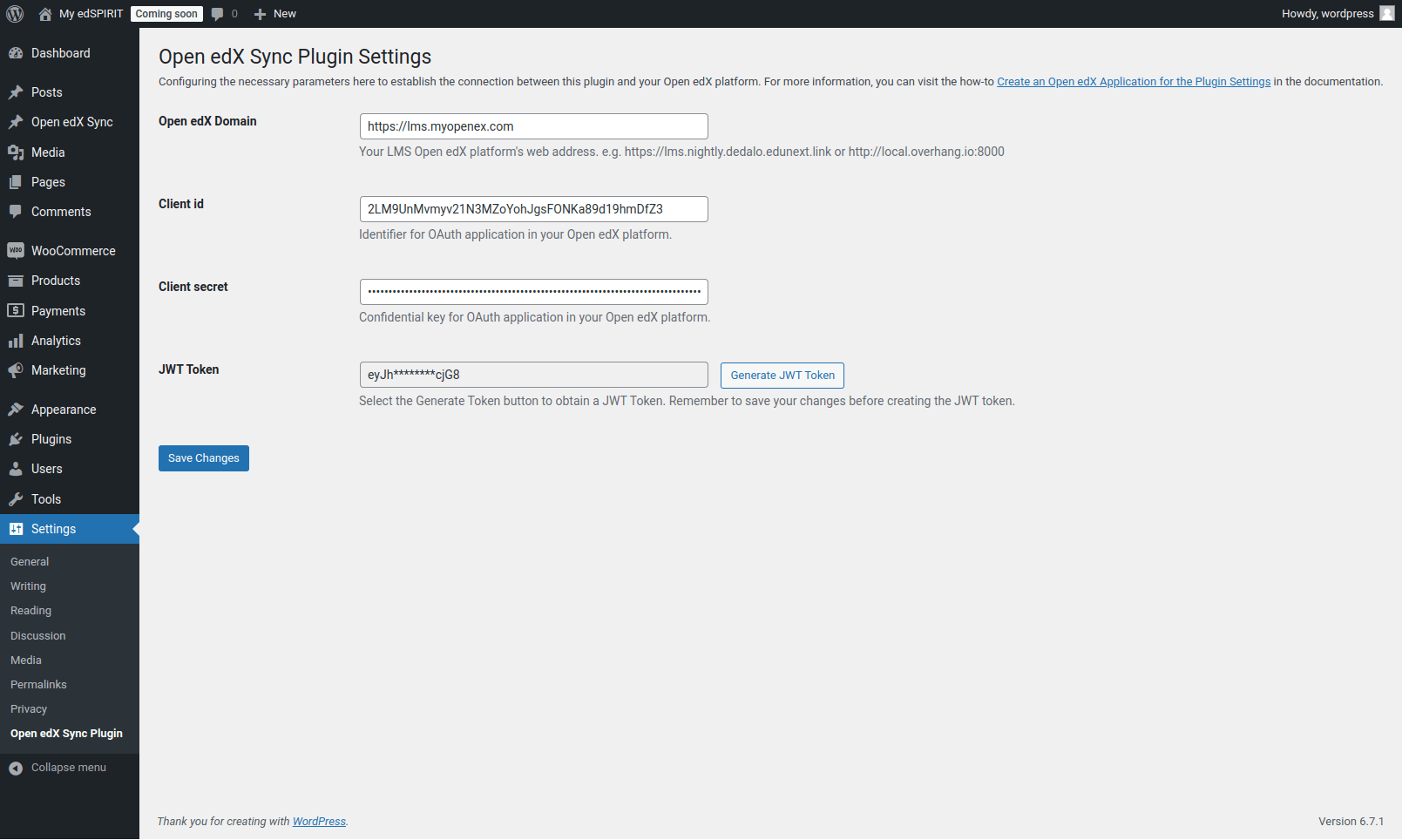
You can retrieve these configuration values by running:
tutor dev|local|k8s do wordpress configThis command will output the current configurations, including the Client ID, Client Secret, Open edX Domain, and WordPress Domain. Here is an example of the output:
===============================================
    WordPress Plugin Configurations
===============================================

Client ID: vvpTamiepPwjZhr0uOQGr5PhYBzp2hQw
Client ID (dev): MlbXk1V3wB7nWPAAyLF3McyfBBMqExa4
Client Secret: MdrgbtU8Q94He3gejF6Zf5MDookoeozO

Open edX Domain: http://local.edly.io:8000
Wordpress Domain: http://site.local.edly.io:8080
Variables
The plugin supports the following configuration variables:
WORDPRESS_VERSION: Plugin version
WORDPRESS_HOST: WordPress site hostname
WORDPRESS_PORT: WordPress port (default: 8080)
WORDPRESS_DOCKER_IMAGE: Docker image for WordPress
WORDPRESS_OPENEDX_PLUGIN: URL to the Open edX Commerce plugin
WORDPRESS_WOOCOMMERCE_PLUGIN: (default: “https://downloads.wordpress.org/plugin/woocommerce.9.4.2.zip”) The WooCommerce plugin zip file URL. You can specify a different version if needed.
WORDPRESS_OFFICIAL_IMAGE: (default: “wordpress:6.8.0-php8.1”) The official WordPress Docker image used as the base for building the plugin’s custom image. This image includes PHP and Apache server. You can specify a different version or PHP variant if needed.
Database Settings
WORDPRESS_MYSQL_HOST: MySQL host
WORDPRESS_MYSQL_PORT: MySQL port
WORDPRESS_MYSQL_DATABASE: Database name (default: wordpress)
WORDPRESS_MYSQL_USERNAME: Database username
WORDPRESS_MYSQL_PASSWORD: Database password (auto-generated)
WORDPRESS_TABLE_PREFIX: Table prefix (default: wp_)
Storage Settings
WORDPRESS_DATA_VOLUME_SIZE: Size of WordPress persistent volume (default: 5Gi)
OAuth2 Settings
WORDPRESS_OAUTH2_SECRET: OAuth2 secret key (auto-generated)
WORDPRESS_OAUTH2_KEY_SSO: OAuth2 client ID (auto-generated)
WORDPRESS_OAUTH2_KEY_SSO_DEV: OAuth2 development client ID (auto-generated)
Contributing
We welcome all contributions! Feel free to open a Pull Request or an Issue.
License
This software is licensed under the terms of the AGPLv3.
1 maintainer

Metadata
1 maintainer
Release files for tutor-contrib-wordpress 1.2.0
For a detailed explanation of source distributions (sdists) and built distributions (wheels), please see the package formats documentation.
Source distribution (sdist)
| File | Size | Uploaded | |
|---|---|---|---|
| tutor_contrib_wordpress-1.2.0.tar.gz | 19.2 kB | Details |
Built distribution (wheel)
| File | Interpreter | ABI | Platform | Reset |
|---|---|---|---|---|
| tutor_contrib_wordpress-1.2.0-py3-none-any.whl | Python 3 | none | any | Details |
Total release size: 42.9 kB
Release files / tutor_contrib_wordpress-1.2.0.tar.gz
| Download URL | tutor_contrib_wordpress-1.2.0.tar.gz |
|---|---|
| Size | 19.2 kB |
| Tags | Source |
|
SHA-256 checksum How to use checksums |
6515ef93f10415d15db76261f742071ed799914bd08e79e19ad7b301a35b4800
|
|
BLAKE2b-256 checksum How to use checksums |
4c36716b6b15d38c388b24fc0578984b7d323a9d195782f5643ca211a821a6fc
|
| Upload date | |
|
Uploaded using Trusted Publishing? What is trusted publishing? |
No |
| Uploaded via |
python-httpx/0.27.2
|
Release files / tutor_contrib_wordpress-1.2.0-py3-none-any.whl
| Download URL | tutor_contrib_wordpress-1.2.0-py3-none-any.whl |
|---|---|
| Size | 23.7 kB |
| Tags | Python 3 |
|
SHA-256 checksum How to use checksums |
aeddb2649ad9481f952d7335dbf3979fee0c579cb20326c617132405fc5a6382
|
|
BLAKE2b-256 checksum How to use checksums |
417f13e57bd44e17e9bf6a7878c8421c79c24bb1148fe9288ad7be8955fe7523
|
| Upload date | |
|
Uploaded using Trusted Publishing? What is trusted publishing? |
No |
| Uploaded via |
python-httpx/0.27.2
|














