
WordPress Plugin for Tutor


Overview
This is a Tutor plugin that provides complete WordPress integration with your Open edX instance. It includes:
Full WordPress installation and management
Integration with the Open edX Commerce WordPress Plugin
If you need help installing the WordPress plugin, check out this installation guide.
Prerequisites
Tutor 20 (Teak) to 22 and Python 3.10 or newer
MySQL database (can use the same one as Open edX)
Installation
First, install the plugin by running:
pip install -U tutor-contrib-wordpress
# or with tutor
tutor plugins install wordpress
Enable the plugin and run the launch command:
tutor plugins enable wordpress
tutor dev|local|k8s launch
Alternatively, if you already have a running Open edX instance, just run the necessary jobs:
tutor dev|local|k8s do init --limit=wordpress
tutor dev|local|k8s start wordpress
Configuration
The plugin automatically installs WordPress with the Open edX Commerce and Woocommerce plugins. Inside your WordPress admin panel, go to Settings -> Open edX Sync plugin, and configure:
Open edX Domain
Client ID
Client Secret
To verify the connection, click on “Generate JWT Token”. If the process is successful, a new token will be generated.
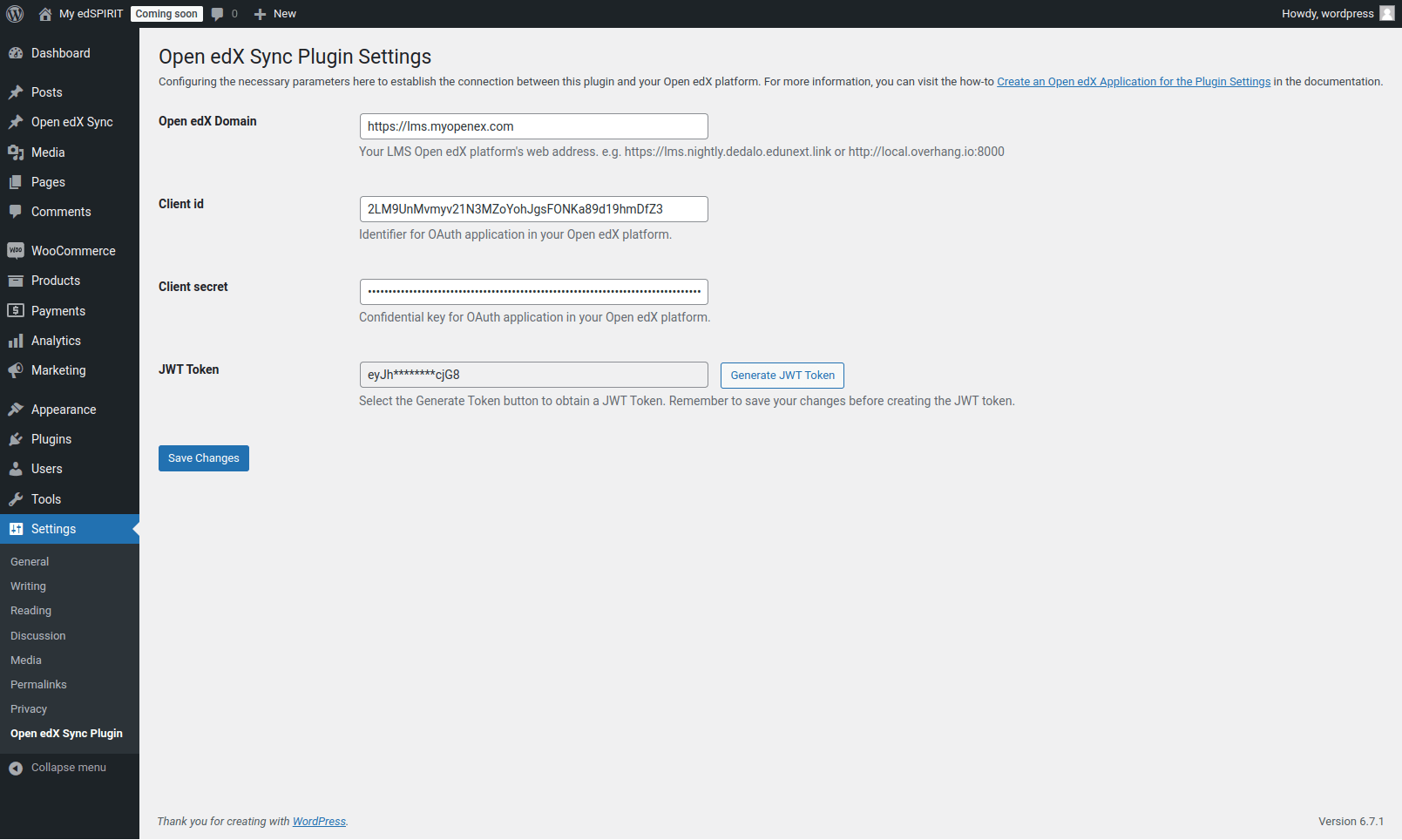
You can retrieve these configuration values by running:
tutor wordpress configThis command will output the current configurations, including the Client ID, Client Secret, Open edX Domain, and WordPress Domain. Here is an example of the output:
===============================================
    WordPress Plugin Configurations
===============================================

Client ID: vvpTamiepPwjZhr0uOQGr5PhYBzp2hQw
Client ID (dev): MlbXk1V3wB7nWPAAyLF3McyfBBMqExa4
Client Secret: MdrgbtU8Q94He3gejF6Zf5MDookoeozO

Open edX Domain: http://local.openedx.io:8000
Wordpress Domain: http://site.local.openedx.io:8080
Using an existing WordPress site
The plugin does two jobs: it runs a WordPress container, and it creates the OAuth2 applications in Open edX that the WordPress plugin needs. If your WordPress site is hosted elsewhere (another server, a managed host), you only need the second one:
tutor config save --set WORDPRESS_RUN_LOCAL=false --set WORDPRESS_HOST=shop.example.com
tutor dev|local|k8s do init --limit=wordpress
tutor wordpress config
With WORDPRESS_RUN_LOCAL=false Tutor does not run, route to or create a database for a WordPress container. Then, on your external site:
Install and activate the Open edX Commerce WordPress Plugin and WooCommerce (no migration of your site is needed).
Go to Settings -> Open edX Sync plugin and enter the values printed by tutor wordpress config.
Make sure the site can reach your LMS over HTTPS.
To go the other way and move an existing site into Tutor, keep WORDPRESS_RUN_LOCAL=true and restore your files into $(tutor config printroot)/data/wordpress and your database into the WORDPRESS_MYSQL_DATABASE database.
Variables
The plugin supports the following configuration variables:
WORDPRESS_VERSION: Plugin version
WORDPRESS_HOST: WordPress site hostname
WORDPRESS_RUN_LOCAL: (default: true) Run WordPress inside Tutor. Set to false to only configure Open edX for an external WordPress site.
WORDPRESS_PORT: (default: 8080) Host port published in dev mode. The container itself always listens on 8080.
WORDPRESS_DEBUG: (default: true) Dev mode only: enable WP_DEBUG and debug logging.
WORDPRESS_CONFIG_EXTRA: (default: empty) PHP code appended to wp-config.php. It is only read when WordPress first generates wp-config.php, so edit the file in the data volume for an existing install.
WORDPRESS_PHP_MEMORY_LIMIT: (default: 256M) PHP memory_limit. Requires an image rebuild.
WORDPRESS_UPLOAD_MAX_FILESIZE: (default: 64M) PHP upload_max_filesize and post_max_size. Requires an image rebuild.
WORDPRESS_EXTRA_PLUGINS: (default: []) List of plugin zip URLs to install in the image. Requires an image rebuild.
WORDPRESS_K8S_RESOURCES: (default: {}) Kubernetes resources (requests/limits) for the WordPress container.
WORDPRESS_DOCKER_IMAGE: Docker image for WordPress
WORDPRESS_OPENEDX_PLUGIN: URL to the Open edX Commerce plugin
WORDPRESS_WOOCOMMERCE_PLUGIN: (default: “https://downloads.wordpress.org/plugin/woocommerce.11.3.1.zip”) The WooCommerce plugin zip file URL. You can specify a different version if needed.
WORDPRESS_OFFICIAL_IMAGE: (default: “wordpress:7.1.5-php8.4”) The official WordPress Docker image used as the base for building the plugin’s custom image. This image includes PHP and Apache server. You can specify a different version or PHP variant if needed.
Database Settings
WORDPRESS_MYSQL_HOST: MySQL host
WORDPRESS_MYSQL_PORT: MySQL port
WORDPRESS_MYSQL_DATABASE: Database name (default: wordpress)
WORDPRESS_MYSQL_USERNAME: Database username
WORDPRESS_MYSQL_PASSWORD: Database password (auto-generated)
WORDPRESS_TABLE_PREFIX: Table prefix (default: wp_)
Storage Settings
WORDPRESS_DATA_VOLUME_SIZE: Size of WordPress persistent volume (default: 5Gi)
OAuth2 Settings
WORDPRESS_OAUTH2_SECRET: OAuth2 secret key (auto-generated)
WORDPRESS_OAUTH2_KEY_SSO: OAuth2 client ID (auto-generated)
WORDPRESS_OAUTH2_KEY_SSO_DEV: OAuth2 development client ID (auto-generated)
Contributing
We welcome all contributions! Feel free to open a Pull Request or an Issue.
License
This software is licensed under the terms of the AGPLv3.
1 maintainer

Metadata
1 maintainer
Release files for tutor-contrib-wordpress 2.0.0
For a detailed explanation of source distributions (sdists) and built distributions (wheels), please see the package formats documentation.
Source distribution (sdist)
| File | Size | Uploaded | Provenance | Actions |
|---|---|---|---|---|
| tutor_contrib_wordpress-2.0.0.tar.gz | 20.4 kB | With provenance | Details for tutor_contrib_wordpress-2.0.0.tar.gz |
Built distribution (wheel)
| File | Interpreter | ABI | Platform | Actions Reset |
|---|---|---|---|---|
| tutor_contrib_wordpress-2.0.0-py3-none-any.whl | Python 3 | none | any | Details for tutor_contrib_wordpress-2.0.0-py3-none-any.whl |
Total release size: 44.9 kB
Release files / tutor_contrib_wordpress-2.0.0.tar.gz
| Download URL | tutor_contrib_wordpress-2.0.0.tar.gz |
|---|---|
| Size | 20.4 kB |
| Tags | Source |
|
SHA-256 checksum How to use checksums |
83d158ef26617fef287f69e85c5506384d4e056abad4c373f6d6b6c7a194c94c
|
|
BLAKE2b-256 checksum How to use checksums |
1aa49b9bdf48e7b73f0ef0029328b853a087619b140b1956ef46ee955dedbdf6
|
| Upload date | |
|
Uploaded using Trusted Publishing? What is trusted publishing? |
Yes |
| Uploaded via |
twine/7.0.0 CPython/3.13.16
|
Provenance
Provenance describes where a file came from. On PyPI, provenance is shared via attestations, which provide a verifiable record of the build or publishing details. View details, limitations and caveats.


PyPI Publish Attestation
PyPI verified that this artifact, at this checksum, originated from the publisher listed below.
Signed by GitHub Actions, verified by PyPI on Nov 23, 2026.
Transparency logRelease files / tutor_contrib_wordpress-2.0.0-py3-none-any.whl
| Download URL | tutor_contrib_wordpress-2.0.0-py3-none-any.whl |
|---|---|
| Size | 24.5 kB |
| Tags | Python 3 |
|
SHA-256 checksum How to use checksums |
2c4974acab06d9c90fdd15e04e954cce437ccc5f1f3f7579ec231753832bac70
|
|
BLAKE2b-256 checksum How to use checksums |
702d14f307c2fc83bfb3f83d0ee811781bfe19418b43cf2bba87a105db34f845
|
| Upload date | |
|
Uploaded using Trusted Publishing? What is trusted publishing? |
Yes |
| Uploaded via |
twine/7.0.0 CPython/3.13.16
|
Provenance
Provenance describes where a file came from. On PyPI, provenance is shared via attestations, which provide a verifiable record of the build or publishing details. View details, limitations and caveats.
PyPI Publish Attestation
PyPI verified that this artifact, at this checksum, originated from the publisher listed below.
Signed by GitHub Actions, verified by PyPI on Nov 23, 2026.
Transparency logSecurity for tutor-contrib-wordpress 2.0.0
Provenance
Provenance describes where a file came from. On PyPI, provenance is shared via attestations, which provide a verifiable record of the build or publishing details. View details, limitations and caveats.
Full provenance
Both files in this release have been uploaded with provenance metadata.
Attestation for tutor_contrib_wordpress-2.0.0.tar.gz
PyPI Publish Attestation
PyPI verified that this artifact, at this checksum, originated from the publisher listed below.
Signed by GitHub Actions, verified by PyPI on Nov 23, 2026.
Transparency logA note on package security
PyPI is a repository for distributing packages, not a service for auditing them. While third-party security researchers and our staff do their best to detect and remove malicious packages, PyPI cannot guarantee the quality, security or suitability of any given package.
To learn more about protecting yourself from malicious actors, visit our package security documentation.














