
TuxWhisper
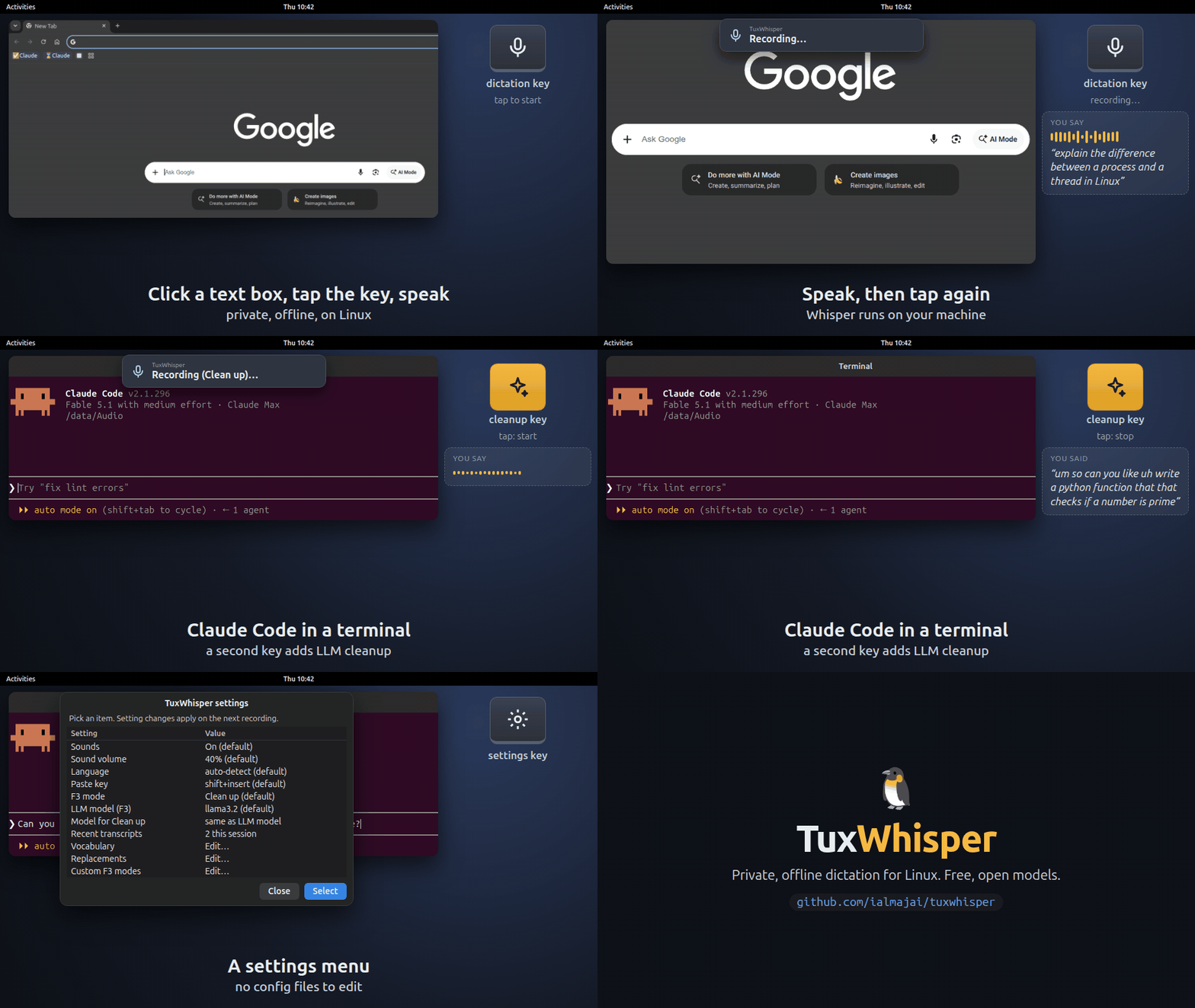
Private, offline dictation for Linux. Press a key, speak, and your words are typed wherever your cursor is: a browser text box, an LLM chat prompt, your editor or your terminal. Speech recognition (faster-whisper) and the optional LLM cleanup (Ollama) run on your own machine with free, open models.
Install
uv tool install tuxwhisper        # NVIDIA GPU: uv tool install 'tuxwhisper[cuda]'
tuxwhisper setup
tuxwhisper setup installs the system packages it needs (Debian, Ubuntu, Fedora, Arch and
openSUSE), sets up the background service and, on GNOME, binds the keys. It says what each step
does and asks before anything that needs your password. On an AMD or Intel GPU, it builds the
Vulkan engine for you.
Then click into any text box, press the dictation key, wait for the start sound, speak, and press it again.
| Key | Action |
|---|---|
| Dictation key | Tap to start and stop, or hold to talk |
| Cleanup key | The same, with local LLM cleanup |
| Save key | Check and save the last recording for fine-tuning |
| Correct key | Fix the last transcript in place |
| Settings key | Settings menu |
On GNOME, setup binds them to F5, F3, F4, F6 and Alt+F9; change them under Keys in the settings menu.
Documentation, other desktops and troubleshooting: https://github.com/ialmajai/tuxwhisper
1 maintainer

Metadata
1 maintainer
Release files for tuxwhisper 0.2.12
For a detailed explanation of source distributions (sdists) and built distributions (wheels), please see the package formats documentation.
Source distribution (sdist)
| File | Size | Uploaded | Provenance | Actions |
|---|---|---|---|---|
| tuxwhisper-0.2.12.tar.gz | 63.0 kB | Without provenance | Details for tuxwhisper-0.2.12.tar.gz |
Built distribution (wheel)
| File | Interpreter | ABI | Platform | Actions Reset |
|---|---|---|---|---|
| tuxwhisper-0.2.12-py3-none-any.whl | Python 3 | none | any | Details for tuxwhisper-0.2.12-py3-none-any.whl |
Total release size: 128.5 kB
Release files / tuxwhisper-0.2.12.tar.gz
| Download URL | tuxwhisper-0.2.12.tar.gz |
|---|---|
| Size | 63.0 kB |
| Tags | Source |
|
SHA-256 checksum How to use checksums |
36fa0dd5df694f4c6dcae4c06b6dd25af0321fb773e384d31f90e416bd0b44ac
|
|
BLAKE2b-256 checksum How to use checksums |
7386adae686169efc4559e20932c9b505e787dea5caa9c76a4b82651a76663e7
|
| Upload date | |
|
Uploaded using Trusted Publishing? What is trusted publishing? |
Yes |
| Uploaded via |
uv/0.13.1 {"installer":{"name":"uv","version":"0.13.1","subcommand":["publish"]},"python":null,"implementation":{"name":null,"version":null},"distro":{"name":"Ubuntu","version":"24.04","id":"noble","libc":null},"system":{"name":null,"release":null},"cpu":null,"openssl_version":null,"setuptools_version":null,"rustc_version":null,"ci":true}
|
Release files / tuxwhisper-0.2.12-py3-none-any.whl
| Download URL | tuxwhisper-0.2.12-py3-none-any.whl |
|---|---|
| Size | 65.5 kB |
| Tags | Python 3 |
|
SHA-256 checksum How to use checksums |
055172db8d61266edecf07d90f34592b7d7245024892ab9bac301ec1e53bb524
|
|
BLAKE2b-256 checksum How to use checksums |
250fb3a72d2bf0fc2bf024fe93185121545d69dfabbb043d2fba7f6330b3f832
|
| Upload date | |
|
Uploaded using Trusted Publishing? What is trusted publishing? |
Yes |
| Uploaded via |
uv/0.13.1 {"installer":{"name":"uv","version":"0.13.1","subcommand":["publish"]},"python":null,"implementation":{"name":null,"version":null},"distro":{"name":"Ubuntu","version":"24.04","id":"noble","libc":null},"system":{"name":null,"release":null},"cpu":null,"openssl_version":null,"setuptools_version":null,"rustc_version":null,"ci":true}
|
Security for tuxwhisper 0.2.12
Provenance
Provenance describes where a file came from. On PyPI, provenance is shared via attestations, which provide a verifiable record of the build or publishing details. View details, limitations and caveats.
No provenance found
None of the files in this release were uploaded with provenance metadata.
A note on package security
PyPI is a repository for distributing packages, not a service for auditing them. While third-party security researchers and our staff do their best to detect and remove malicious packages, PyPI cannot guarantee the quality, security or suitability of any given package.
To learn more about protecting yourself from malicious actors, visit our package security documentation.














