
TVthe(k)Index
Generates an index of tvthek/mediathek downloaded content and queries TMDB for the meta data

Example
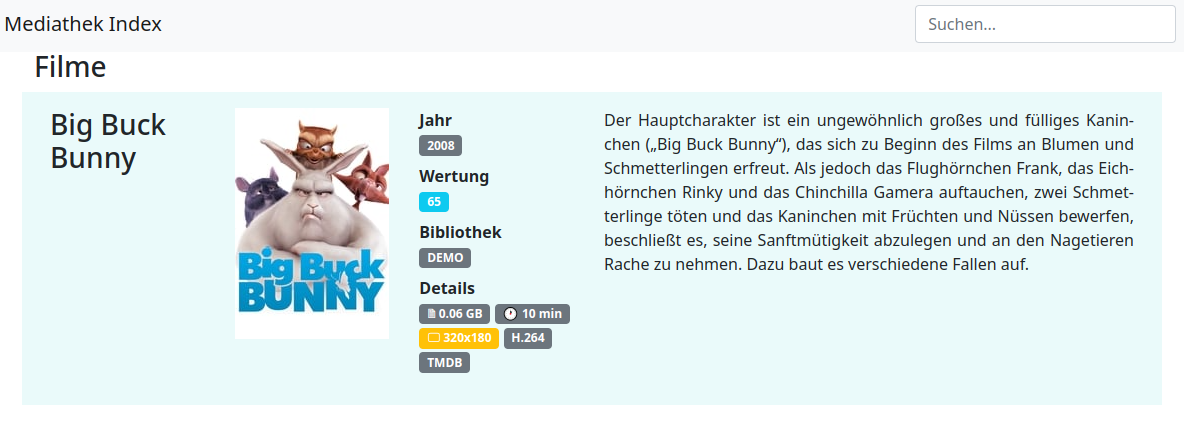
Usage (version 0.6.0)
Prerequisites
- Python 3.9 or newer
ffmpegandffprobeinstalled and on thePATH(used for video metadata and screenshots). On Windows, download a build from ffmpeg.org and add itsbinfolder to thePATH;ffprobe -versionshould work in a new console.- Register at TMDB and get an API key.
from PyPI
- install
pip install tvthekidx
- create database
tvthekidx -v maintenance -d tvthek.db -a createdb
- run the indexer
tvthekidx -v index -k "APIKEY" -d tvthek.db -t movies -c "TVthek" -p /mnt/TVThek/ --recursive
To index TV shows:
tvthekidx -v index -k "APIKEY" -d tvthek.db -t tvshows -c "TVthek" -p /mnt/TVThek/ --recursive
(insert your TMDB API key instead of APIKEY)
- generate the html file
tvthekidx export -d tvthek.db -c "TVthek" -f html --title "TVthek" --output tvthek.html
-
if you add or remove content run steps 3 + 4 again
-
occasionally run database maintenance
tvthekidx -v maintenance -d tvthek.db -a compressdb
from python source
-
download source code from tags
-
install requirements
pip install -e .
- create database
tvthekidx -v maintenance -d tvthek.db -a createdb
- run the indexer
tvthekidx -v index -k "APIKEY" -d tvthek.db -t movies -c "TVthek" -p /mnt/TVThek/ --recursive
To index TV shows:
tvthekidx -v index -k "APIKEY" -d tvthek.db -t tvshows -c "TVthek" -p /mnt/TVThek/ --recursive
(insert your TMDB API key instead of APIKEY)
- generate the html file
tvthekidx export -d tvthek.db -c "TVthek" -f html --title "TVthek" --output tvthek.html
-
if you add or remove content run steps 4 + 5 again
-
occasionally run database maintenance
tvthekidx -v maintenance -d tvthek.db -a compressdb
Upgrading from 0.5.0
pip install --upgrade tvthekidx
- Back up your database file first. The first command that opens it (
index,export,maintenanceortags) upgrades the schema from version 8 to 15. - The stable id column is renamed from
oidtoguid.oidis a reserved alias in SQLite, and SQLite 3.54 and newer refuse to create such a column, which broke new databases. Existing values are kept, so exported page URLs stay the same. - Movies that were indexed twice under different file names (same TMDB id) are merged into one entry during the upgrade. Run with
-vto see which ones. - Each upgrade step either completes or is rolled back. If a step fails, the command stops with an error that names the step, and the database stays at the previous version.
moviepyandffmpeg-pythonare no longer used;ffmpegandffprobemust be on thePATHinstead (see Prerequisites).
Global arguments
-q,--quietquiet (set verbose to 0)-v,--verboseincrease verbosity (stackable)
index arguments
-d,--databaseSQLite database file-p,--pathpath to scan for video files-k,--keyTMDB API key-t,--typecontent type:movies(default) ortvshows-c,--collectioncollection name-r,--recursivescan subdirectories recursively
Filename convention: By default, video files must be named
Title (YYYY).ext(e.g.Metropolis (1927).mkv). An optional{StationKey}tag anywhere after the year is also captured (e.g.News (2024) {ARD}.mkv). TV show files must additionally include a season/episode tag, e.g.Show Title (2022) S01E03.mkv. Custom per-collection regexes can be stored with thesetcollectionregexmaintenance action.
export arguments
-d,--databaseSQLite database file-c,--collectioncomma-separated list of collections to include-f,--formatexport format plugin (html,text,streamer); defaulthtml
HTML plugin arguments (passed after export)
--titlepage title--output,-ooutput file (defaulttvthek.html)--graphicsimage handling:embed(default, base64 inline),reference(external files),disable--skip-actorsomit the actors/crew section--skip-headeromit the top-rated and newest-additions header sections--urlhyperlink prefix for video file links (default./)
Text plugin arguments (passed after export)
--output,-ooutput file (default: standard output)
Streamer plugin arguments (passed after export)
Generates a multi-file, streaming-service-style site (Netflix/Prime aesthetic) as a directory tree. All images are embedded in the pages.
--targetpathoutput directory (required; must not exist unless--overwriteis given)--titlesite title (defaultTVThek Index)--jellyfinJellyfin base URL, e.g.http://10.1.2.3:8096- adds a play button on each movie page--overwritewrite into an existing output directory
Output structure:
<targetpath>/
├── index.html              search + carousels (Zufall, Neu, Top, per-genre, Serien, Personen, Tags, TV-Sender)
├── new.html, top.html      250 newest / 250 best-rated movies
├── random.html             250 random movies, sortable
├── assets/
│   ├── style.css
│   ├── app.js
│   └── search.js           search index (generated, not static)
├── media/
│   └── <x>/                sharded by first character of the guid
│       └── <guid>.html     movie page
├── shows/
│   └── <x>/
│       ├── <guid>.html     show page (hero + cast + seasons overview)
│       └── <guid>_s<n>.html season page (episode list)
├── persons/
│   └── <x>/
│       └── <guid>.html     actor / director page
├── genres/
│   ├── <guid>.html         one page per genre
│   └── <d>/<year>.html     one page per release year, sharded by first digit
├── tags/                   one .html per tag
└── tvstations/             one .html per TV station
Each movie page includes an "Ähnliche Filme" carousel of the 20 most similar movies, scored by genres (50 %), shared persons (20 %), tags (15 %), and score proximity (15 %), plus an "Ähnliche Serien" carousel.
Each season page lists the episodes: green has a local file, yellow is known to TMDB but missing locally, orange is a local file that TMDB does not know, red is a gap in TMDB's own episode numbering.
Example:
tvthekidx export -d tvthek.db -c "TVthek" -f streamer \
  --targetpath /var/www/html --jellyfin http://10.1.2.3:8096
maintenance arguments
-d,--databaseSQLite database file-a,--actionone of:createdb- create a new databaseupgradedb- run schema migrations on an existing database (every command also does this automatically)compressdb- deduplicate movies and VACUUMdetecttvstations- run ML-based TV station detection on stored screenshots (needspip install "tvthekidx[tvstation]")cleartvstations- remove all TV station assignmentsgetscreenshots- capture/backfill screenshots for files (requires-p)clearscreenshots- delete all stored screenshotsbackfillgenres- fetch genres from TMDB for all movies that don't have them yet (requires-k, optional-l)backfilltvgenres- fetch genres from TMDB for all TV shows that don't have them yet (requires-k, optional-l)refreshmovie- re-fetch metadata for one movie (with--tmdb-id) or run a bulk refresh of top-10 by score + 10 random + 10 oldest-refreshed movies (without--tmdb-id); stores a refresh timestamp per movie; requires-krefreshtvshow- re-fetch metadata for one TV show (with--tmdb-id) or run a bulk refresh (without--tmdb-id); requires-kresetcounters- reset cast, genre, and season error counters to zero for all movies and TV showssetcollectionregex- store a custom filename regex for a collection (requires-c; at least one of--movie-regexor--tvshow-regex); regex must use named groups(?P<name>...)and(?P<year>...)(movie), plus(?P<season>...)and(?P<episode>...)(tvshow);(?P<tvstation>...)is optional in both
-p,--pathpath to video files (required forgetscreenshots)-c,--collectioncollection name (required forsetcollectionregex; optional forgetscreenshots)-k,--keyTMDB API key (required forbackfillgenres,backfilltvgenres,refreshmovieandrefreshtvshow)--tmdb-idTMDB movie or TV show ID (optional forrefreshmovie/refreshtvshow; omit for bulk refresh)-l,--limitmaximum number of movies or TV shows to process per run (forbackfillgenres/backfilltvgenres, to stay within TMDB API rate limits)--movie-regexcustom movie filename regex with named groups (forsetcollectionregex)--tvshow-regexcustom TV-show filename regex with named groups (forsetcollectionregex)
tags arguments
-d,--databaseSQLite database file-a,--actionone of:list,add,delete,export-t,--tagtag name-r,--regexregular expression pattern matched against filenames--alldelete all tags (use with--action delete)
Troubleshooting
- See what it is doing: add
-vbefore the subcommand (tvthekidx -v index ...). It logs every file and every TMDB lookup. - A file or request hangs: probing a video and grabbing a screenshot give up after 60 s and 120 s, TMDB requests after 30 s. The file is logged as failed and the scan continues.
- Running tvthekidx from another program (a script that reads its output through a pipe): output is written line by line. Set
PYTHONIOENCODING=utf-8for tvthekidx and decode its output as UTF-8. Otherwise umlauts appear as two characters (üinstead ofü), and on Windows titles with characters outside the code page can stop the run.
Development
pip install -e ".[dev]"              # runtime + dev tools (pytest, flake8, pylint, build, pyinstaller)
pip install -e ".[tvstation]"        # optional: TV station detection (ultralytics)
pytest                               # run unit tests
flake8 src/tvthekidx/*.py --ignore=E501,E722,W503,W504
pylint --errors-only --disable import-error src/tvthekidx/*.py
python -m build                      # build sdist + wheel
pyinstaller tvthekidx.spec           # build the single-file binary
1 maintainer

Metadata
1 maintainer
Release files for tvthekidx 0.6.0
For a detailed explanation of source distributions (sdists) and built distributions (wheels), please see the package formats documentation.
Source distribution (sdist)
| File | Size | Uploaded | Provenance | |
|---|---|---|---|---|
| tvthekidx-0.6.0.tar.gz | 6.0 MB | Without provenance | Details |
Built distribution (wheel)
| File | Interpreter | ABI | Platform | Reset |
|---|---|---|---|---|
| tvthekidx-0.6.0-py3-none-any.whl | Python 3 | none | any | Details |
Total release size: 11.8 MB
Release files / tvthekidx-0.6.0.tar.gz
| Download URL | tvthekidx-0.6.0.tar.gz |
|---|---|
| Size | 6.0 MB |
| Tags | Source |
|
SHA-256 checksum How to use checksums |
7bcb3b19b997aec9055953837554b1a79fc064bb978c6af707b429f310e7aabe
|
|
BLAKE2b-256 checksum How to use checksums |
c8198947d2a1cacfa1c3c0ac3cb8a6c3261a72f1d5554bbe249d1f7fed982e06
|
| Upload date | |
|
Uploaded using Trusted Publishing? What is trusted publishing? |
No |
| Uploaded via |
twine/7.0.0 CPython/3.12.3
|
Release files / tvthekidx-0.6.0-py3-none-any.whl
| Download URL | tvthekidx-0.6.0-py3-none-any.whl |
|---|---|
| Size | 5.8 MB |
| Tags | Python 3 |
|
SHA-256 checksum How to use checksums |
beebb8fe5a1b03f5b8f3749c1bfd1b53cda710da9fac41175343266619ac1a5a
|
|
BLAKE2b-256 checksum How to use checksums |
02f8d3afb771ea39558ba6fb659d3d75661e2f5a6007f3ca737a69e8d3876b4e
|
| Upload date | |
|
Uploaded using Trusted Publishing? What is trusted publishing? |
No |
| Uploaded via |
twine/7.0.0 CPython/3.12.3
|
Security for tvthekidx 0.6.0
Provenance
Provenance describes where a file came from. On PyPI, provenance is shared via attestations, which provide a verifiable record of the build or publishing details. View details, limitations and caveats.
No provenance found
None of the files in this release were uploaded with provenance metadata.
A note on package security
PyPI is a repository for distributing packages, not a service for auditing them. While third-party security researchers and our staff do their best to detect and remove malicious packages, PyPI cannot guarantee the quality, security or suitability of any given package.
To learn more about protecting yourself from malicious actors, visit our package security documentation.














