
TwiCC
The Web Interface for Claude and Codex
One self-hosted web interface for both Claude Code (Anthropic) and Codex (OpenAI): browse your projects and sessions, run agents and follow them live, track costs and quotas, and stay in control of your AI coding work — from your desktop or your phone.
Screenshots
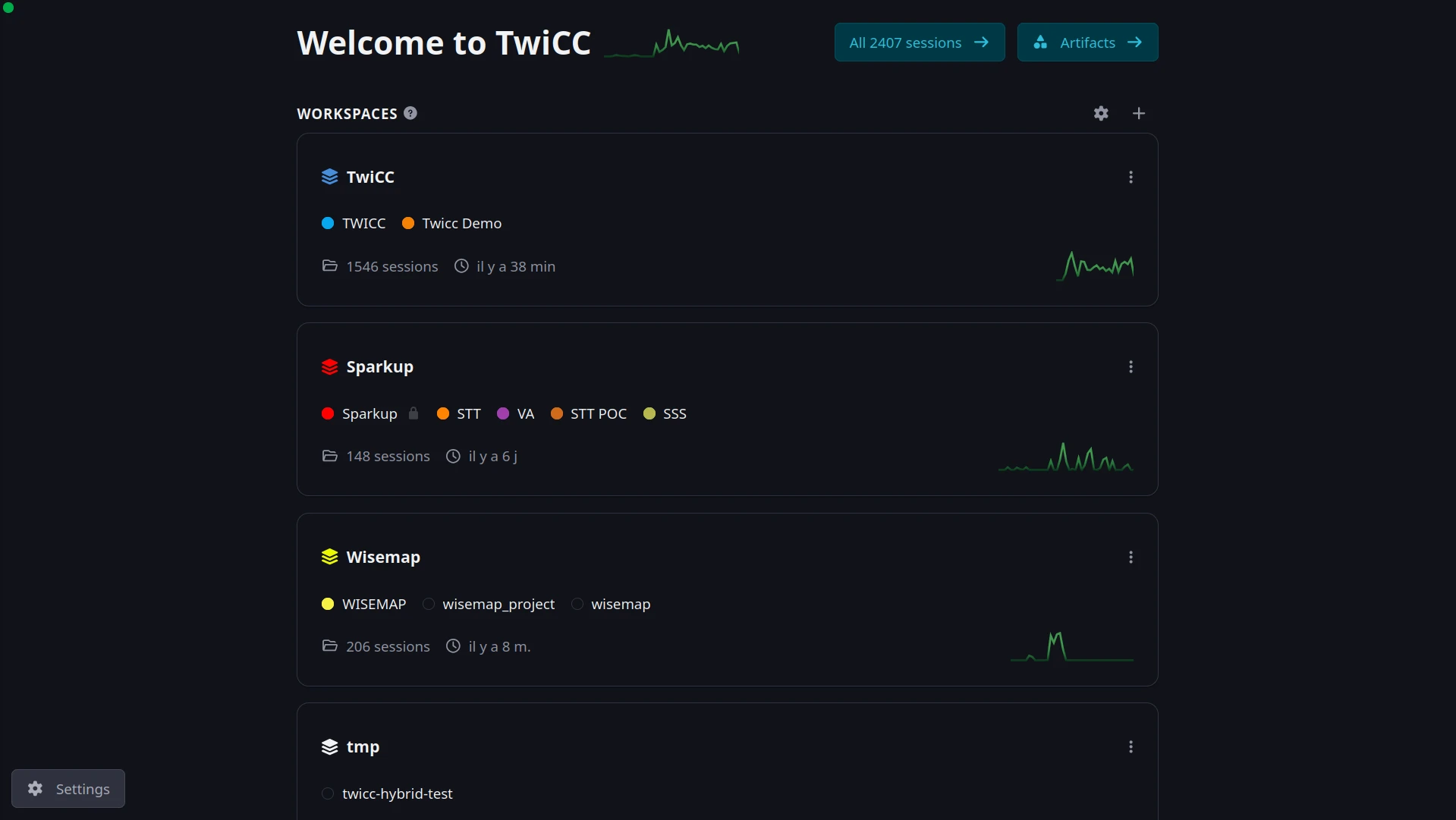
Home — your workspaces, each grouping related projects, with live activity and session counts at a glance:
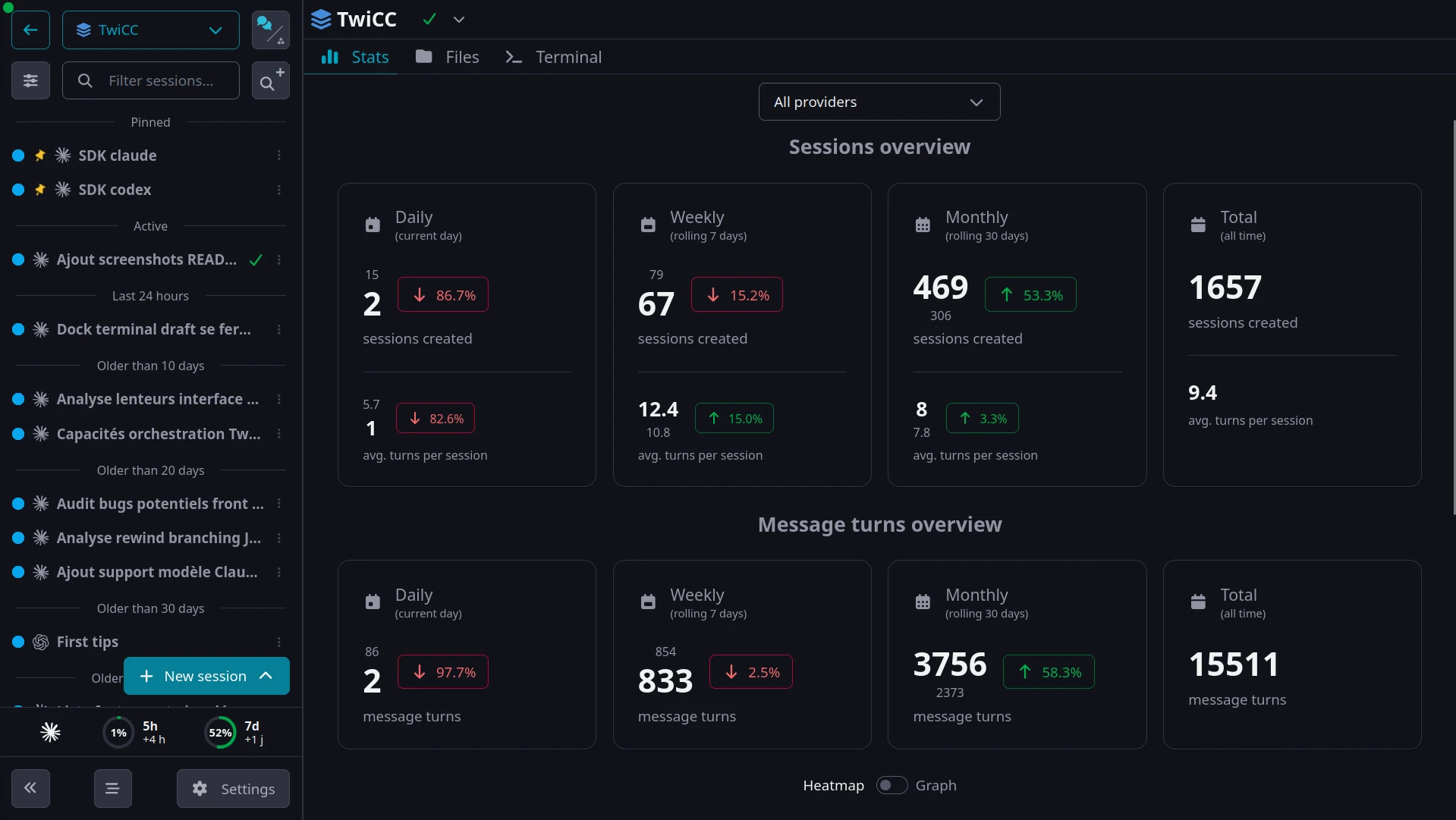
Workspace overview — sessions in the sidebar, plus stats on sessions, message turns and costs:
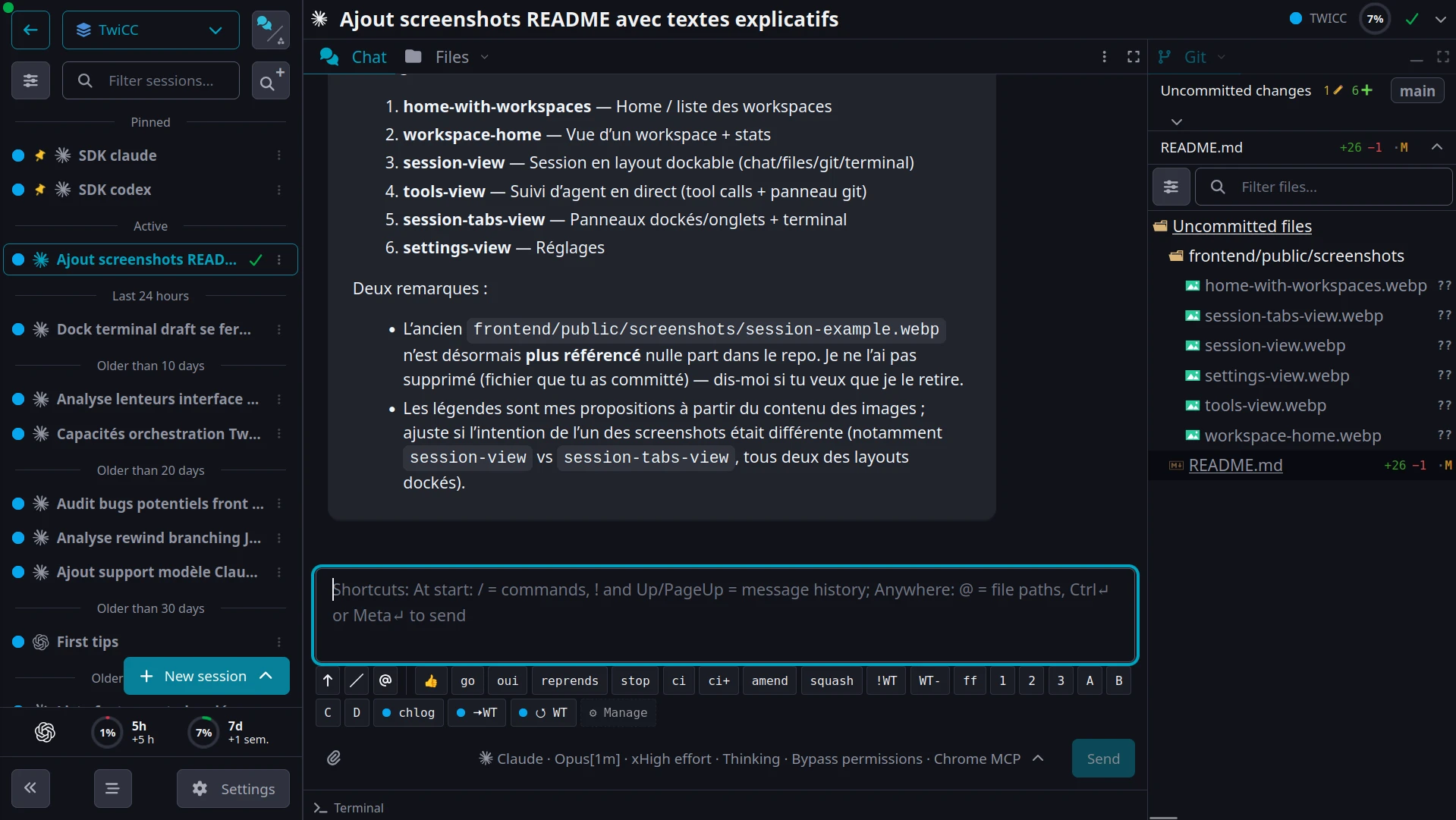
A session in a custom dockable layout: chat, files, git and terminal, side by side:
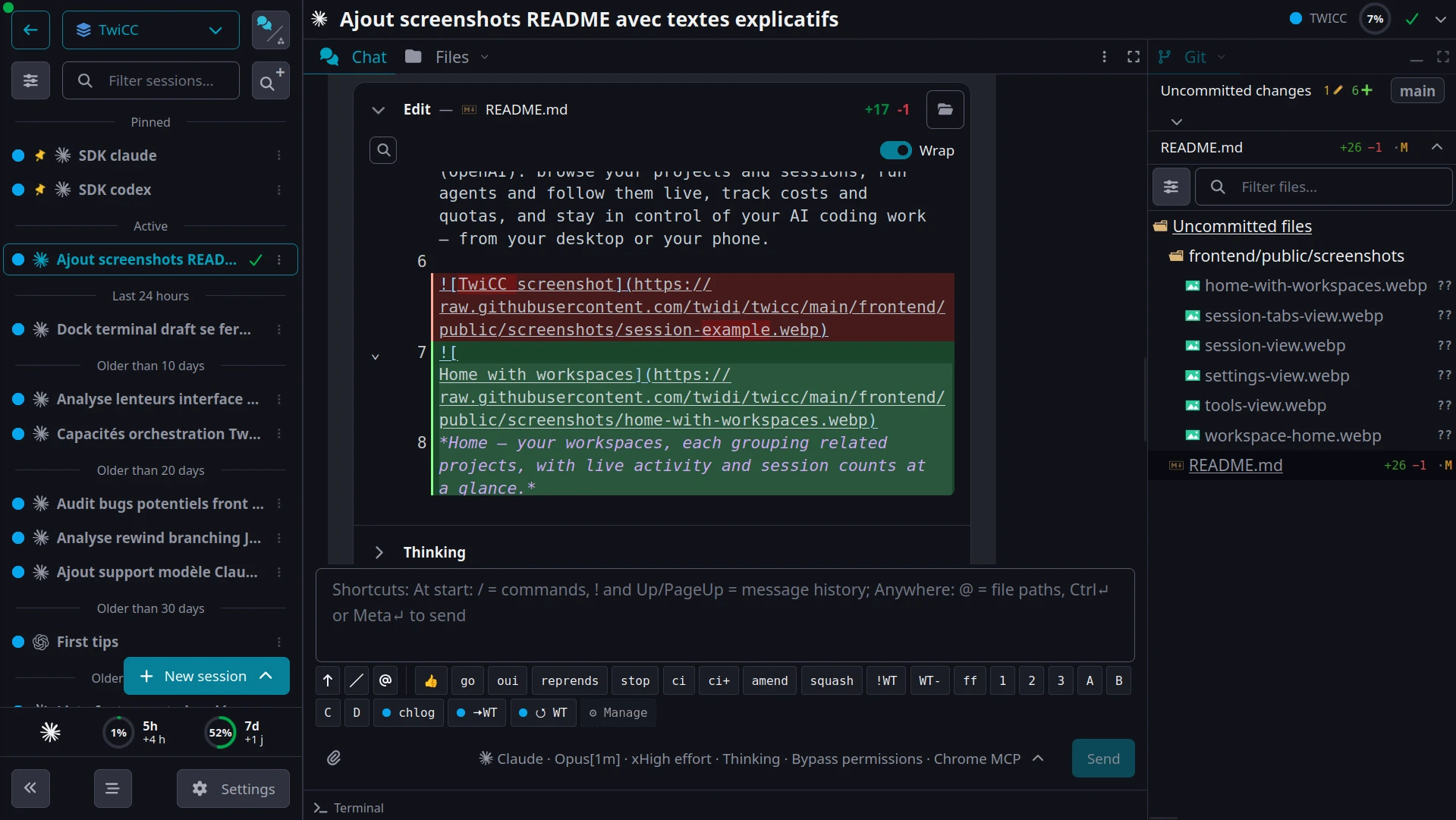
Follow an agent live — every tool call, thinking step and diff, with the git panel alongside:
Dock and tab panes as you like — here a file editor next to an integrated terminal:
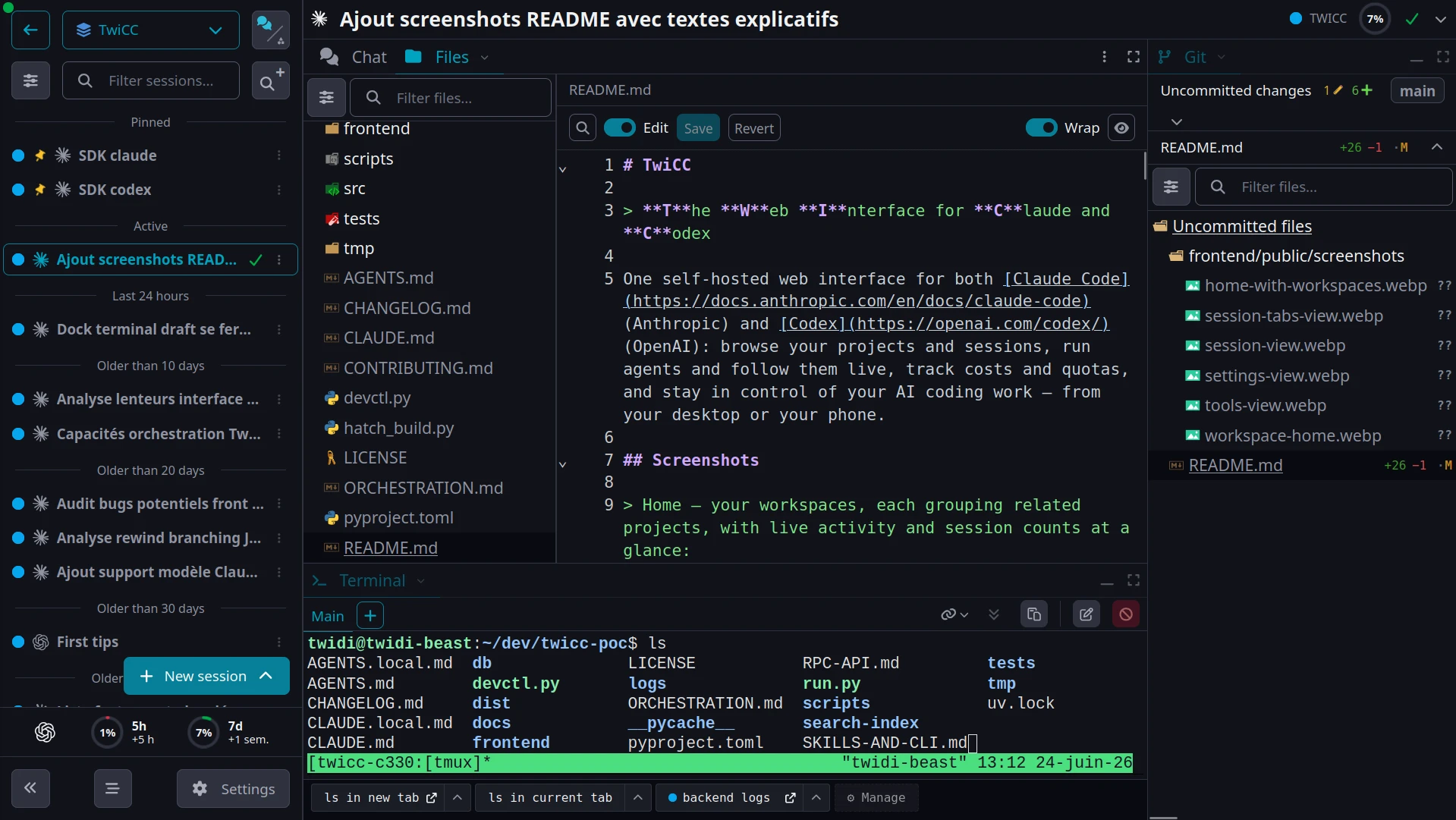
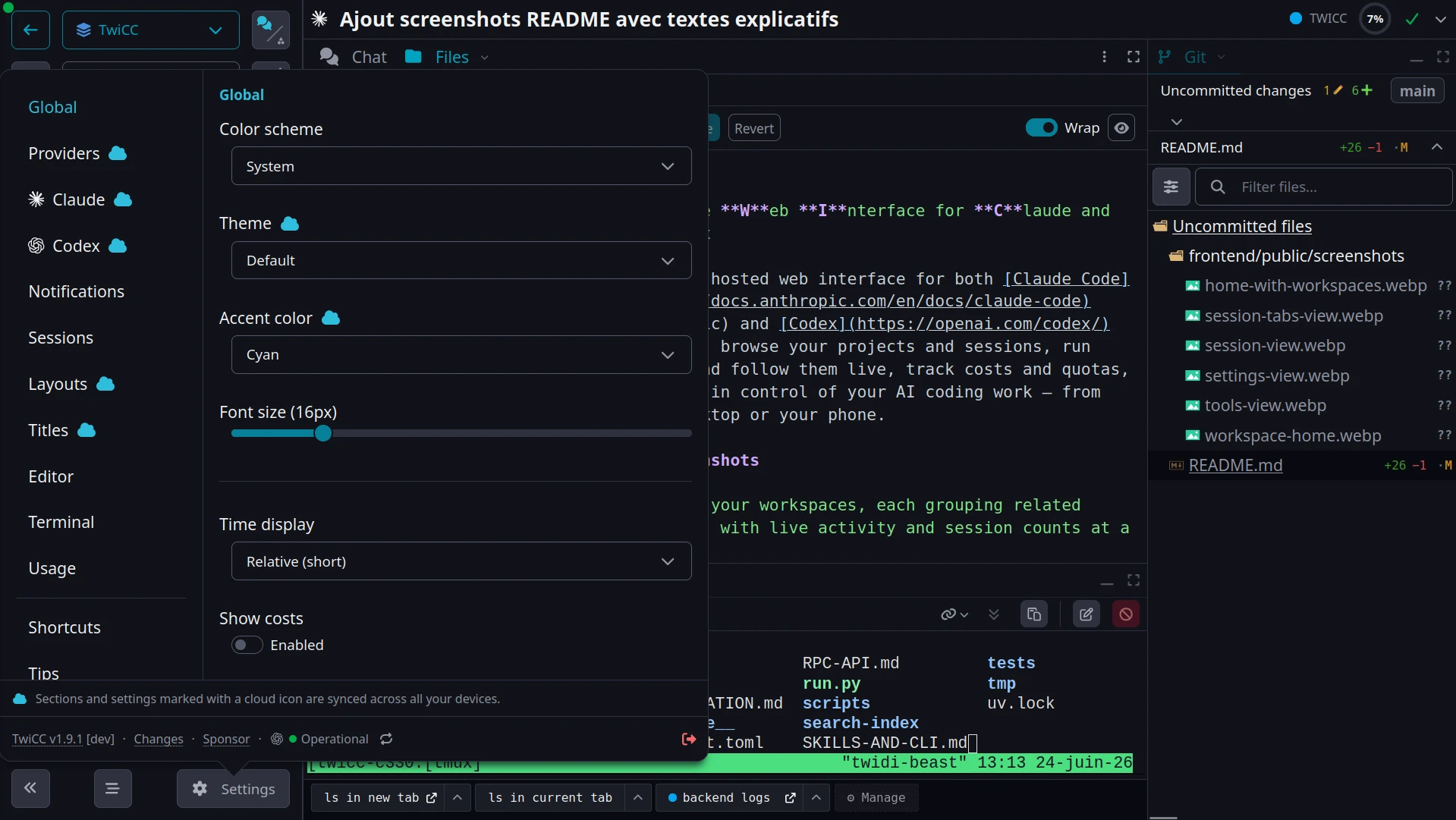
Settings, synced across your devices: theme, providers, layouts, notifications and more:
Pick a model and reasoning effort in seconds:
https://github.com/user-attachments/assets/65033859-ed67-42fc-8b64-fa13204659da






Disclaimer
TwiCC started as a personal project Twidi built for his own needs — but it's shared in the genuine hope that others find it useful too. It's freely available; use it however you see fit.
That said, no support is guaranteed. Suggestions, issues, and pull requests are welcome, but there's no commitment to address them.
Note: TwiCC is almost entirely vibe-coded. The author keeps a general eye on it, but reviews far less now than in the early days — so expect the occasional rough edge.
Quick start
uvx twicc@latest
Then open http://localhost:3500.
Don't have
uvx? It comes with uv, a fast Python package manager:curl -LsSf https://astral.sh/uv/install.sh | shA plain
pip install twiccin your own virtualenv also works.
Permanent install
If you use TwiCC regularly, install it as a persistent tool:
uv tool install twicc
twicc
Update with:
uv tool upgrade twicc
See the CHANGELOG.md for the full release history.
Features
Claude Code and Codex, side by side
- Both providers in one UI, using your existing credentials — nothing extra to set up, and TwiCC walks you through logging in if you haven't
- Per-session agent control: choose the model, reasoning effort, permissions, fast mode, and provider-specific options for every Claude Code or Codex session; reuse configurations with presets and per-project defaults, and stop a run at any time
- Interactive tool approvals and provider questions, answered directly from the browser
- Persistent Claude Code cron jobs: scheduled tasks survive restarts and auto-renew before their 7-day expiry
- Provider status monitoring (Anthropic and OpenAI) with in-app outage notifications
Mobile-first, work from anywhere
- Fully responsive UI, designed for touch from the start
- Mobile-friendly terminal: touch selection, paste, proper scrollbar, scroll/select toggle, tmux and alternate-screen apps — and several at once with an optional custom
tmux.conf - Extra keys bar (Essentials / More / F-keys) with modifiers, arrow keys, special characters, and function keys
- User-defined key combos and reusable text snippets for the terminal
- Settings sync: your settings, snippets, layouts, and presets follow you across devices
- Tunnel-ready: pair with a tunnel (Cloudflare Tunnel, ngrok, Tailscale Funnel, …) to use TwiCC from your phone — see Remote access
The conversation
- Live conversation: full tool-use details, real-time streaming of text and thinking, rich rendering (markdown, code, Mermaid, images with pan/zoom), and image/file attachments
- Plan, Tasks and Workflows tabs: dedicated panels for the plan-like documents a session touched (plans, specs, handoffs…, read-only), its task/todo list, and — for Claude — its workflow runs, live as they execute
- Session goal: set a standing objective a Claude or Codex session keeps working toward, and refine or clear it anytime
- Display modes: collapse tool-call groups, switch between a simplified and a full view, and optionally show message timestamps and day dividers
- Slash commands and file references:
/for Claude Code,$for Codex,@for files — from the message input - Snippets and history: reusable text snippets with placeholders (global or per-project), plus a picker to reuse earlier messages
- Drafts: unsent messages and new sessions are saved locally and survive a reload
- Artifacts: agents produce rendered artifacts — images, reports, interactive HTML playgrounds (with network calls you approve per host, and a per-artifact
data/store so a page can save your choices for the agent to read back) — shown inside TwiCC in the session's Artifacts tab, and bookmarkable in a dedicated view - Public sharing: publish revocable, read-only links to session transcripts or bookmarked artifacts, with optional password protection, expiry, view controls, and live or frozen modes — see Sharing
Code and files
- File browser and editor: browse, view, and edit project files right in the browser
- Git integration: log, diffs (including side-by-side image diff), commit details
- Inline code comments: click a line number to annotate, then send a formatted review back to the agent
- Selection comments: select text in Chat, Files, Git, or Terminal to quote it or attach a note for the agent
Stay on top of your sessions
- Unread tracking: new assistant content is flagged per session and rolled up to the project
- Notifications: get pinged when a session needs you — a turn finishes, or an approval or question is waiting — via sound and browser notifications
- External notifications: push to your devices via Apprise (ntfy, Pushover, Telegram, 130+ services), with an "only when away" option
- Always show active sessions: surface running and unread sessions from other scopes, so you never lose track
Organizing your sessions
- Pinned sessions: pin to a project, a workspace, or everywhere — pinned sessions stay on top in each context
- Session switcher: hold Ctrl and tap the key above Tab to flip between recent sessions
- Batch actions: multi-select sessions to pin, mark read/unread, or archive at once
- Automatic titles: each session gets a suggested title on its own
- Archiving: archive projects and sessions, including bulk archive of old ones
Layout
- Dockable layout: arrange a session's tabs into a multi-pane workspace — dock, tab, resize, and maximize panes, and save named layouts with per-project and global defaults
- Session tabs, in order:
- Chat — the live conversation with the agent; each subagent you open gets its own tab alongside it
- Files — browse, view, and edit the project's files
- Git — log, diffs, and commit details, when the project is a Git repo
- Terminal — a full integrated terminal
- Tasks — the session's task/todo list, when it has one
- Plan — the plan-like documents the session touched, read-only
- Artifacts — the rendered artifacts the agent produced
- Orchestration — the tree of sessions this one spawned or was spawned by
- Workflows — Claude Code workflow runs, live as they execute
- Browser — an embedded web browser
- Themes: light/dark color scheme and several visual themes with a customizable accent color
Search and navigation
- Command palette (Ctrl+K / Cmd+K): jump to any project, session, or workspace, change settings, and trigger actions
- Full-text search across all sessions (Ctrl+Shift+F), plus in-session search (Ctrl+F)
- Bookmarkable URLs: the open tab, file, and commit live in the URL — Back/Forward, reload, and open-in-new-tab all work
Costs, usage and activity
- Cost tracking per session and per project
- Quota graphs and burn rate for the Claude Code and Codex 5h / 7-day windows
- Quota wake-up: open your 5-hour quota window at a set time each day, so an early start fits more windows into your working hours
- Extra usage alerts when a provider starts drawing on your paid extra-usage credits
- Activity heatmaps and stats — daily and weekly, per project, per workspace, and across all projects
Workspaces and projects
- Workspaces: group projects into named, color-coded buckets, with optional auto-add by directory pattern
- Workspace scoping: session list, search, snippets, and aggregated stats, all per workspace
- Workspace-level tabs: Files, Git, and Terminal, in addition to the per-project ones
- Git worktree support: create one in a couple of clicks; existing ones are detected and surfaced, with their sessions, cost, and activity rolling up to the main repo
- Per-project trust: builds on Claude Code's and Codex's own trust into a single per-project level that gates what your sessions can do
Self-aware: agent skills and CLI
TwiCC exposes a full twicc command-line interface — and a Claude Code / Codex plugin (auto-installed) whose skills wrap the same commands, so an agent can drive TwiCC from inside a running session. Either way you can inspect projects, workspaces, and sessions, run a full-text search, check usage and cost, and create, reply to, update, and control sessions and their live processes — every list/inspect command outputs JSON for scripting.
The same surface is also exposed as native MCP tools: TwiCC runs a built-in MCP server and wires it into every session on both providers automatically, so an agent gets the full command set as first-class tools with nothing to set up.
See SKILLS-AND-CLI.md for the full reference, or run twicc --help.
External MCP access
The same MCP tools can also be handed to an MCP client outside TwiCC — a desktop assistant, a hosted agent — so it can inspect your projects, search your history, and create or drive sessions. You approve every connection: the connecting browser shows a verification code, TwiCC notifies your connected devices, and you type that code to authorize it. Connections are listed, named, and revoked one by one in Settings → MCP. TwiCC stays single-user — approving a client does not create a second account.
Like sharing, external MCP is served on a dedicated hostname, separate from the app you log into, and protected by OAuth with PKCE. That host serves only MCP and its OAuth endpoints; the TwiCC interface is never reachable there. Leave it empty, or turn external access off, to keep TwiCC's MCP server internal — Claude Code and Codex sessions running inside TwiCC keep their automatic local access either way.
HTTP RPC API
The same CLI is also exposed over HTTP under /rpc/, so one TwiCC instance — or any HTTP client — can drive another over the network. Every command is auto-generated as a route from the CLI itself, so there is no separate API to keep in sync.
See RPC-API.md for authentication, the request/response shape, and the few HTTP-specific limitations (server-side absolute paths, base64 attachments, blocking waits).
Orchestration
A session can spawn other sessions, which can spawn their own, forming a tree of cooperating agents. A leader/manager/worker skill family lets one agent split a task into sub-tasks across spawned sessions (optionally hidden from the UI), coordinate them through a shared scratch space, and aggregate the results — without a human in the loop for each step.
See ORCHESTRATION.md.
Peer messaging
Pair your TwiCC instance with another person's instance so your agents can exchange titled messages and attachments. Every incoming message requires human review: the recipient can refuse it, or place it in a session's composer for review and editing before sending. Pairing never shares projects, sessions, files, settings, or agent control.
Sharing
Publish a read-only public link to a session transcript or a bookmarked artifact. Each link is an opaque capability URL (the token is the credential); you can optionally add a per-link password and an expiry, choose how much detail viewers see (conversation / simplified / normal / debug, with or without subagents, costs, timestamps), share a live-following view or a frozen snapshot, and revoke at any time. Viewers get a clean, dependency-free reader — no TwiCC account, no access to your app.
Sharing is served on a dedicated share host, separate from the app you log into: a second hostname that points at the same TwiCC (for example, a second Cloudflare Tunnel hostname routed to the same service). Set it in Settings → Sharing. The working origin never serves /share/, and the share host serves only /share/ — so you can put the share host behind its own provider-side access rules if you want. A different port on the same hostname is intentionally not enough (browser cookies aren't port-scoped, so it wouldn't isolate your working session). Leave the share host empty to keep sharing off.
How it works
TwiCC reads the JSONL data files written by each provider and indexes them into a local SQLite database (~/.twicc/db/data.sqlite). By default, Claude Code sessions are read from ~/.claude/projects/ and Codex sessions from ~/.codex/sessions/ (see Configuration to point TwiCC at other provider homes). Provider data files remain the source of truth — TwiCC never modifies them. Whether you use Claude Code or Codex directly from the terminal or through TwiCC, everything shows up in the same place. On each startup it re-syncs any changes, and while running it keeps watching for new and updated sessions.
When you start a session or send messages through TwiCC, it uses the provider SDK under the hood: the Claude Agent SDK for Claude Code and OpenAI's vendored Codex SDK for Codex. This means it uses your existing provider credentials and configuration — there is nothing extra to set up. The conversation data written by the provider is then picked up by TwiCC's file watcher and broadcast to the UI in real time over WebSocket.
Remote access
The interface is fully usable from a mobile browser. Combined with a tunnel service like Cloudflare Tunnel, ngrok, or Tailscale Funnel, you can access TwiCC from anywhere and interact with Claude Code or Codex from your phone.
Important: by default, when no password is set, TwiCC only accepts connections from the machine it runs on. To reach it from another device — through a tunnel or over your LAN — set a password (see Configuration). Even then, prefer a tunnel service with its own access control: TwiCC has no built-in access control beyond optional password protection.
Tip: on Android, the author uses Unexpected Keyboard for an even better terminal experience — it natively exposes Ctrl, Esc, Tab, and other keys that complement TwiCC's built-in keys bar.
Requirements
- Claude Code and/or Codex already configured locally
- For existing history: a
~/.claude/projects/directory created by Claude Code and/or a~/.codex/sessions/directory created by Codex (by default — see Configuration for relocated provider homes)
TwiCC needs Python 3.13+. If you install through uvx or uv tool install (recommended, see Quick start), uv will download and manage the right Python version for you — nothing to install by hand. If you go the pip install route, install Python 3.13 yourself first.
Configuration
All configuration goes through environment variables, set in ~/.twicc/.env:
| Variable | Default | Description |
|---|---|---|
TWICC_PORT |
3500 |
Server port |
TWICC_PASSWORD_HASH |
(empty) | Password hash to enable password protection (managed by twicc password set) |
CLAUDE_CONFIG_DIR |
~/.claude |
Claude Code home (sessions, settings, plugins…) — the CLI's own variable, absolute path |
CLAUDE_SECURESTORAGE_CONFIG_DIR |
(follows CLAUDE_CONFIG_DIR) |
Where Claude Code keeps its credentials; leave it empty (CLAUDE_SECURESTORAGE_CONFIG_DIR=) to keep the default credentials next to a relocated home |
CODEX_HOME |
~/.codex |
Codex home (sessions, auth.json, config.toml…) — the CLI's own variable, absolute path |
A key defined in the .env wins over the process environment. The three provider home keys are read only from the .env: an inherited CLAUDE_CONFIG_DIR / CODEX_HOME exported in your shell is ignored (with a warning at startup) — write it in the .env as a plain KEY=VALUE line. TWICC_DATA_DIR is the one variable read only from the environment, because it locates the .env: TWICC_DATA_DIR=<dir> (default ~/.twicc/) moves the data directory (database, logs, settings).
Password protection
Set, clear, or check the password interactively. Use the same invocation prefix as for launching TwiCC — twicc if you installed it permanently, uvx twicc for a one-off run, or uv run twicc from a source checkout:
twicc password set      # prompt for a password (with confirmation) and write it to .env
twicc password clear    # disable password protection
twicc password status   # show whether password protection is enabled
Restart TwiCC after setting or clearing the password for the change to take effect.
Platform support
TwiCC runs on Linux and macOS. There is no native Windows support — the codebase relies on Unix-specific APIs (PTY, process signals, process groups) that would require significant work to adapt, and the author does not have access to a Windows machine for development and testing.
WSL (Windows Subsystem for Linux) is the recommended path for Windows users. TwiCC has been reported to work correctly under WSL2. If you hit issues, please open an issue or a pull request.
Anonymous telemetry
TwiCC sends anonymous usage statistics by default: counters, booleans, enums, and buckets, never content, titles, or paths. You can inspect the exact payload, disable telemetry, or reset its anonymous instance identifier in Settings → General. See the telemetry transparency page for the complete schema.
FAQ
Can I use TwiCC while Claude Code or Codex is running?
Yes. TwiCC only reads provider data files and never modifies them.
Where is my data stored?
By default in ~/.twicc/. This includes the SQLite database, logs, and user settings. Set TWICC_DATA_DIR to change the location.
Can I point TwiCC at another Claude Code / Codex home?
Yes. Set CLAUDE_CONFIG_DIR and/or CODEX_HOME in the .env (absolute paths, see Configuration). TwiCC then reads sessions from those homes and hands the same variables to every process it launches — agents, the embedded terminals, twicc claude / twicc codex — so nothing touches the default homes. A new home starts empty: Claude Code creates its directory on first use and TwiCC creates the Codex one; log in once from a terminal of that instance (twicc codex login, or a Claude session). To keep your existing Claude credentials with a relocated CLAUDE_CONFIG_DIR, add CLAUDE_SECURESTORAGE_CONFIG_DIR= (empty).
Where are the logs?
In ~/.twicc/logs/backend.log for the backend. This is the first file to check when troubleshooting.
How do I reset the database?
Delete ~/.twicc/db/data.sqlite* and restart TwiCC. It will rebuild from the provider source files.
Is this allowed by Anthropic?
For Claude Code sessions, TwiCC uses the official Claude Agent SDK with the Claude Code system prompt. This is permitted by Anthropic's terms of service.
Billing change (announced, then postponed): Anthropic had announced that, starting June 15, 2026, SDK usage would move to a separate, plan-specific credits quota instead of sharing the regular Claude Code plan quota. That change has since been postponed, so for now SDK usage is still billed against the same plan quota as the Claude Code CLI. Either way, TwiCC is ready: it ships a hybrid mode (currently dormant) that runs your Claude sessions through the real claude CLI instead of the SDK — keeping them on your plan's subscription quota while preserving every TwiCC feature. If the change ever lands, the hybrid mode can simply be switched on.
Is this allowed by OpenAI?
For Codex sessions, TwiCC uses OpenAI's Codex SDK (vendored — see docs/codex-vendoring.md) and the Codex CLI. OpenAI does not document any limitation on this kind of usage, and TwiCC sessions draw from the same plan quota as the regular Codex CLI.
How can I support this project?
If you find TwiCC useful, consider sponsoring me on GitHub — it means a lot and helps keep the project going.
Development
See CONTRIBUTING.md for development setup, devctl.py usage, building, and the release process. Conventions, architecture notes, and patterns live in AGENTS.md and CLAUDE.md. The Codex SDK vendoring is documented in docs/codex-vendoring.md.
License
MIT
1 maintainer

Release files for twicc 1.94.3
For a detailed explanation of source distributions (sdists) and built distributions (wheels), please see the package formats documentation.
Source distribution (sdist)
| File | Size | Uploaded | |
|---|---|---|---|
| twicc-1.94.3.tar.gz | 25.0 MB | Details |
Built distribution (wheel)
| File | Interpreter | ABI | Platform | Reset |
|---|---|---|---|---|
| twicc-1.94.3-py3-none-any.whl | Python 3 | none | any | Details |
Total release size: 39.4 MB
Release files / twicc-1.94.3.tar.gz
| Download URL | twicc-1.94.3.tar.gz |
|---|---|
| Size | 25.0 MB |
| Tags | Source |
|
SHA-256 checksum How to use checksums |
caa4870c88610b4b82186d2965cc59857f12a9a1508cb4a5f8c502e508f97a76
|
|
BLAKE2b-256 checksum How to use checksums |
1a5f63bad0cc940486e72daed5e0cd55a9b0438c963afca1fa1f556f26ce2047
|
| Upload date | |
|
Uploaded using Trusted Publishing? What is trusted publishing? |
No |
| Uploaded via |
uv/0.11.31 {"installer":{"name":"uv","version":"0.11.31","subcommand":["publish"]},"python":null,"implementation":{"name":null,"version":null},"distro":{"name":"Ubuntu","version":"26.04","id":"resolute","libc":null},"system":{"name":null,"release":null},"cpu":null,"openssl_version":null,"setuptools_version":null,"rustc_version":null,"ci":null}
|
Release files / twicc-1.94.3-py3-none-any.whl
| Download URL | twicc-1.94.3-py3-none-any.whl |
|---|---|
| Size | 14.5 MB |
| Tags | Python 3 |
|
SHA-256 checksum How to use checksums |
3c0d99cdfbbfbf366cde0accb3bc27f2559d74e88b4c5ee80f3acb004916b64c
|
|
BLAKE2b-256 checksum How to use checksums |
dfabda50934821c7dd7e05d0222180761520ca061e77ba5ca923f49bf1471b2d
|
| Upload date | |
|
Uploaded using Trusted Publishing? What is trusted publishing? |
No |
| Uploaded via |
uv/0.11.31 {"installer":{"name":"uv","version":"0.11.31","subcommand":["publish"]},"python":null,"implementation":{"name":null,"version":null},"distro":{"name":"Ubuntu","version":"26.04","id":"resolute","libc":null},"system":{"name":null,"release":null},"cpu":null,"openssl_version":null,"setuptools_version":null,"rustc_version":null,"ci":null}
|














