
Claude Code Web UI

Project description
TWICC
The Web Interface for Claude Code
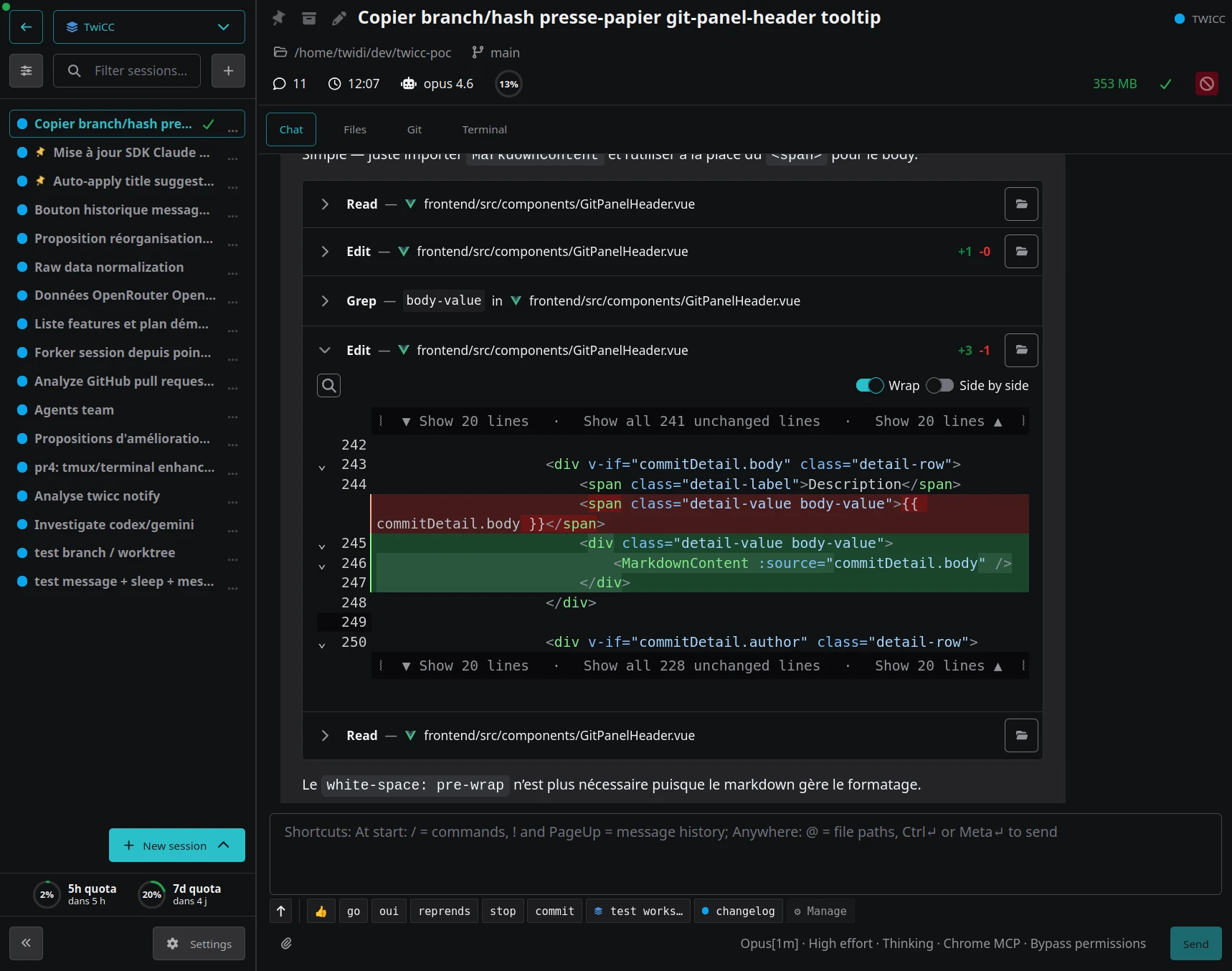
A web UI to browse and interact with your Claude Code sessions. View projects, sessions, conversation history, costs, and run Claude agents — all from your browser.






Disclaimer
This is a personal project made by Twidi for his own needs. It is freely available and you are welcome to use it however you see fit.
That said, no support is guaranteed. I am open to suggestions, improvements, and contributions, but there is no commitment to address issues or review pull requests.
Note: The project was almost entirely vibe-coded, with general oversight from the author.
Quick start
Note: TWICC supports Linux and macOS only — see Platform support.
uvx twicc@latest
Then open http://localhost:3500.
Don't have
uvx? It comes with uv, a fast Python package manager. Install it with:curl -LsSf https://astral.sh/uv/install.sh | shIf you prefer using
pip install twiccin your own virtualenv, that works too.
Permanent install
If you use TWICC regularly, you can install it as a persistent tool:
uv tool install twicc
Then simply run:
twicc
To update to the latest version:
uv tool upgrade twicc
Features
- Projects & sessions: browse all your Claude Code projects and sessions
- Conversation history: view full history with tool use details
- Interactive agents: start and interact with Claude agents from the browser
- Tool approvals: handle tool approvals and answer Claude's questions interactively
- Session control: full control of model, context window (200K / 1M), effort, thinking and permissions
- Command palette: quick access via Ctrl+K (Cmd+K on Mac), slash commands (
/), and file references (@) - Inline code comments: click a line number in code blocks to annotate, then send formatted review comments to Claude — human review of AI-generated code, right from the browser
- Message snippets: reusable text snippets with placeholder support, scoped globally or per-project
- Multiple terminals: simultaneous terminal sessions with custom snippets, scoped globally or per-project
- Costs & usage: track costs and token usage per session
- Activity & quotas: daily activity heatmaps and graphs, and usage history graphs (utilization & burn rate for 5h and 7-day quotas)
- Git integration: log, diffs, file browser
- Full-text search: across all sessions (Ctrl+Shift+F) with in-session search (Ctrl+F)
- Workspaces: organize projects into named, color-coded groups to focus your workflow — scoped session list, search, snippets, aggregated activity stats, and auto-add projects via directory patterns
- Self-aware: TwiCC ships a Claude Code plugin (with skills) that lets Claude query your projects, sessions, costs, and search history — Claude knows about itself
- CLI: JSON-output subcommands for scripting (projects, sessions, search, usage…, run
twiccwith--helpfor details) - Cron job persistence: scheduled tasks survive TwiCC restarts and are automatically renewed before expiry — unlike Claude Code's CLI where they are lost on restart and expire after 7 days
- Status monitoring: Claude Code status monitoring via status.claude.com
- Password protection: optional password protection
- Real-time updates: via WebSocket
- Mobile-friendly: fully responsive interface
Remote access
The interface is fully usable on mobile. Combined with a tunnel service like Cloudflare Tunnel or ngrok, you can access TWICC from anywhere and interact with Claude Code on the go.
Important: If you expose TWICC over the internet, make sure to enable password protection (see Configuration below) and/or use a tunnel service proposing access control features. TWICC does not have built-in access control beyond optional password protection, so securing it properly is crucial when exposed to the internet.
Mobile usage
The interface is designed to work well on mobile devices. The terminal includes touch-based text selection (drag to select, auto-copied to clipboard), scrollbar support, and several mobile-specific features:
- Extra keys bar: a tabbed bar (Essentials / More / F-keys) with modifier keys (tap for one-shot, double-tap to lock), arrow keys, special characters, paste, and function keys
- Custom combos: define your own key combinations and sequences for quick access
- Custom snippets: reusable text snippets (with placeholder support) for the terminal, scoped globally or per-project
- Context-aware scroll: smooth scrolling across all modes (normal, tmux, alternate screen)
Tip: The author uses Unexpected Keyboard on Android for an even better terminal experience — it natively supports Ctrl, Esc, Tab, and other keys that complement TWICC's built-in keys bar.
How it works
TWICC reads the JSONL data files that Claude Code stores in ~/.claude/projects/ and indexes them into a local SQLite database (~/.twicc/db/data.sqlite). These data files remain the source of truth for everything displayed in the interface — TWICC never modifies them. Whether you use Claude Code directly from the terminal or interact through TWICC, everything shows up in the same place.
When you start a session or send messages through TWICC, it uses the Claude Agent SDK to run real Claude Code processes under the hood. This means it uses your existing Claude Code credentials and configuration — there is nothing extra to set up. The conversation data written by Claude Code is then picked up by TWICC's file watcher and displayed in real time.
On each startup, TWICC detects changes and updates its database accordingly. While running, it watches the filesystem for new sessions and updates in real time.
Requirements
- Python 3.13+
- A
~/.claude/projects/directory (created by Claude Code)
Configuration
All configuration is via environment variables, set in ~/.twicc/.env:
| Variable | Default | Description |
|---|---|---|
TWICC_PORT |
3500 |
Server port |
TWICC_PASSWORD_HASH |
(empty) | SHA-256 hash to enable password protection |
TWICC_DATA_DIR |
~/.twicc/ |
Data directory (database, logs) |
Generate a password hash:
python -c "import hashlib; print(hashlib.sha256(b'your_password').hexdigest())"
Development
git clone https://github.com/twidi/twicc.git
cd twicc
cd frontend && npm install && cd ..
Two ways to run in development:
With devctl.py (recommended) — runs Vite dev server with hot-reload, no build step needed:
./devctl.py start
Run ./devctl.py --help for all available commands and configuration options.
With run.py — runs the backend only, requires a frontend build first:
cd frontend && npm run build && cd ..
uv run run.py
Optionally, install dev tools (django-extensions, ipython):
uv sync --group dev
Building and publishing
uv build        # Build sdist + wheel → dist/
uv publish      # Publish to PyPI
The build automatically runs npm ci + npm run build in frontend/ via a hatch build hook — no manual frontend build step needed.
Tech stack
- Backend: Django 6, Uvicorn, Django Channels (WebSocket)
- Frontend: Vue.js 3, Vite
- Database: SQLite (with WAL mode)
- Process management: Claude Agent SDK
Platform support
TWICC runs on Linux and macOS. There is no Windows support — the codebase relies on Unix-specific system APIs (PTY, process signals, process groups) that would require significant work to adapt, and the author does not have access to a Windows machine for development and testing.
WSL (Windows Subsystem for Linux) is the most realistic path for Windows users. TWICC should work unmodified under WSL2, though this has not been tested. If you are a Windows user and would like to help with testing or contributing WSL compatibility fixes, feel free to open an issue or a pull request.
FAQ
Can I use TWICC while Claude Code is running? Yes. TWICC only reads Claude Code's data files and never modifies them.
Where is my data stored?
By default in ~/.twicc/. This includes the SQLite database and log files. Set TWICC_DATA_DIR to change the location.
Where are the logs?
In ~/.twicc/logs/backend.log. This file is useful for troubleshooting startup or runtime issues.
How do I reset the database?
Delete ~/.twicc/db/data.sqlite* and restart TWICC. It will rebuild from Claude Code's source files.
Is this allowed by Anthropic? TWICC uses the Claude Agent SDK with the official Claude Code system prompt. As of April 2026, this is permitted by Anthropic's terms of service.
How can I support this project? If you find TWICC useful, consider sponsoring me on GitHub — it means a lot and helps keep the project going!
License
MIT
Release history Release notifications | RSS feed


Download files
Download the file for your platform. If you're not sure which to choose, learn more about installing packages.
Source Distribution
Built Distribution
Filter files by name, interpreter, ABI, and platform.
If you're not sure about the file name format, learn more about wheel file names.
Copy a direct link to the current filters
File details
Details for the file twicc-1.5.4.tar.gz.
File metadata
- Download URL: twicc-1.5.4.tar.gz
- Upload date:
- Size: 10.9 MB
- Tags: Source
- Uploaded using Trusted Publishing? No
- Uploaded via: uv/0.8.11
File hashes
| Algorithm | Hash digest | |
|---|---|---|
| SHA256 |
ecf99de6d1d7b58d776454b49019f731d36e8b286440e2ee4451aa8879235ff5
|
|
| MD5 |
51a0738ec4492abb2a625f735d0a97c8
|
|
| BLAKE2b-256 |
7455b2759fc91e6473837644a9683edb475a929d46eae39bc8a83fea78b1d801
|
File details
Details for the file twicc-1.5.4-py3-none-any.whl.
File metadata
- Download URL: twicc-1.5.4-py3-none-any.whl
- Upload date:
- Size: 6.6 MB
- Tags: Python 3
- Uploaded using Trusted Publishing? No
- Uploaded via: uv/0.8.11
File hashes
| Algorithm | Hash digest | |
|---|---|---|
| SHA256 |
9c35eb2bdf61d7b7ba6ddc8424b337f760064fc2d3b28a85f35520d5286979dc
|
|
| MD5 |
93d43e77dd38cee5716ae51345214b5f
|
|
| BLAKE2b-256 |
a6acf8cea7eb46f7400f89f74e3aec4e115b5946d001eaafa7982c01359d82c2
|






