
A tool to design and run dynamic, customizable dashboards directly inside your terminal.
Verified details
These details have been verified by PyPIProject links
GitHub Statistics
Maintainers

Project description
🖥 Terminal Widgets
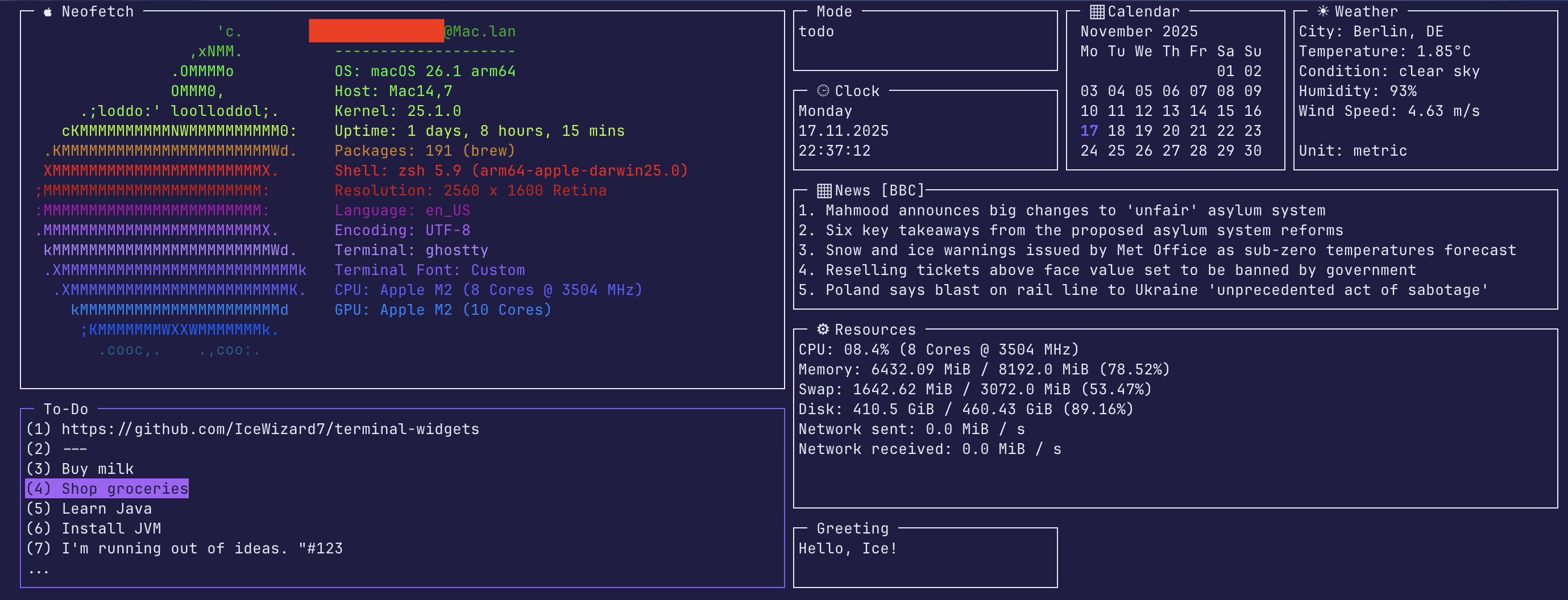
This tool lets you design and run dynamic, customizable dashboards directly inside your terminal.
It combines modular widgets, real-time data updates, and flexible layout management for a highly
interactive CLI experience.
Getting started •
Configuration •
Adding new widgets •
License





🚀 1. Getting started
Installation from PyPI
- Install:
pip install twidgets - Initialize:
twidgets init - Run:
twidgets
⚠️ Requires Python Version 3.10+
Installation from Source
- Clone this repository
- Install dependencies:
pip install -r requirements.txt - Initialize configuration:
python -m twidgets init - Run:
python -m twidgets
⚠️ Requires Python Version 3.10+
For full documentation see Setup Guide
✨ 2. Configuration
2.1 Changing standard colors and configuration in ~/.config/twidgets/base.yaml
If you remove anything or let anything blank, it will just fall back to the standard configuration.
However, you will get warned.
Example:
use_standard_terminal_background: False

background_color:
  r: 31  # Red value
  g: 29  # Green value
  b: 67  # Blue value

...
2.2 Configure your secrets in: ~/.config/twidgets/secrets.env
Example:
WEATHER_API_KEY='your_api_key'
WEATHER_CITY='Berlin,DE'
WEATHER_UNITS='metric'
NEWS_FEED_URL='https://feeds.bbci.co.uk/news/rss.xml?edition=uk'
NEWS_FEED_NAME='BCC'
2.3 Adjust widgets and layouts in: ~/.config/twidgets/widgets/*.yaml
Example:
name: 'clock'
title: ' ⏲ Clock'
enabled: True
interval: 1
height: 5
width: 30
y: 4
x: 87

weekday_format: '%A'  # day of the week
date_format: '%d.%m.%Y'  # us: '%m.%d.%Y', international: '%Y-%m-%d'
time_format: '%H:%M:%S'  # time
For full documentation see [Configuration Guide] (https://github.com/IceWizard7/terminal-widgets/blob/main/docs/configuration_guide.md)
⭐ 3. Adding new widgets
Adding a new widget to terminal-widgets is very easy—just create two files!
For a simple widget, that does not require heavy loading (no update function)
you only need to define a configuration and a single Python function.
3.1. ⚙️ Define Configuration (.yaml)
Create the configuration file at ~/.config/twidgets/widgets/custom.yaml and set interval = 0 for simple widgets:
name: custom
title: My Custom Widget
enabled: true
interval: 0 # For simple content
height: 7
width: 30
y: 1
x: 1
3.2. 🐍 Write the Widget Logic (.py)
Note: Make sure to name the
.yamland.pyfiles the same way (excluding suffixes)
Create the widget's Python file at ~/.config/twidgets/py_widgets/custom_widget.py
For a simple widget, you primarily need to define the draw function and use add_widget_content
Example:
from twidgets.core.base import Widget, draw_widget, add_widget_content, Config, UIState, BaseConfig
import typing

# 1. Define the draw function for content
def draw(widget: Widget, ui_state: UIState, base_config: BaseConfig) -> None:
    # Initialize the widget title, borders, etc.
    draw_widget(widget, ui_state, base_config)

    # Add your content (list of strings)
    content: list[str] = [
        'Welcome to my new widget!',
        'This is a test.',
        'It was very easy to create.'
    ]
    add_widget_content(widget, content)

# 2. Define the build function
def build(stdscr: CursesWindowType, config: Config) -> Widget:
    return Widget(
        config.name, config.title, config, draw, config.interval, config.dimensions, stdscr,
        update_func=None,
        mouse_click_func=None,
        keyboard_func=None,
        init_func=None
    )
For full documentation see Widget Guide
🧩 4. Contributing
Help the project grow: create an issue or pull request!
📜 5. License
See License
Project details
Verified details
These details have been verified by PyPIProject links
GitHub Statistics
Maintainers
Release history Release notifications | RSS feed


Download files
Download the file for your platform. If you're not sure which to choose, learn more about installing packages.
Source Distribution
Built Distribution
Filter files by name, interpreter, ABI, and platform.
If you're not sure about the file name format, learn more about wheel file names.
Copy a direct link to the current filters
File details
Details for the file twidgets-1.2.tar.gz.
File metadata
- Download URL: twidgets-1.2.tar.gz
- Upload date:
- Size: 30.5 kB
- Tags: Source
- Uploaded using Trusted Publishing? Yes
- Uploaded via: twine/6.1.0 CPython/3.13.7
File hashes
| Algorithm | Hash digest | |
|---|---|---|
| SHA256 |
9a90c8f3fc31ae93ba80901cde3dda704658e9778ecc12c4dc343b1b05ff832b
|
|
| MD5 |
7ec91fc7bde948123f5576c0c7e9faca
|
|
| BLAKE2b-256 |
941d2fcd28a19d39efd6a56bddd7a53be025ea73b061d1d899261e3318281646
|
Provenance
The following attestation bundles were made for twidgets-1.2.tar.gz:
Publisher:
publish.yml on IceWizard7/terminal-widgets
-
Statement:
-
Statement type:
https://in-toto.io/Statement/v1 -
Predicate type:
https://docs.pypi.org/attestations/publish/v1 -
Subject name:
twidgets-1.2.tar.gz -
Subject digest:
9a90c8f3fc31ae93ba80901cde3dda704658e9778ecc12c4dc343b1b05ff832b - Sigstore transparency entry: 731903727
- Sigstore integration time:
-
Permalink:
IceWizard7/terminal-widgets@11624c7a71d6cba6453b81ca516f8c71735c334a -
Branch / Tag:
refs/tags/v1.2 - Owner: https://github.com/IceWizard7
-
Access:
public
-
Token Issuer:
https://token.actions.githubusercontent.com -
Runner Environment:
github-hosted -
Publication workflow:
publish.yml@11624c7a71d6cba6453b81ca516f8c71735c334a -
Trigger Event:
release
-
Statement type:
File details
Details for the file twidgets-1.2-py3-none-any.whl.
File metadata
- Download URL: twidgets-1.2-py3-none-any.whl
- Upload date:
- Size: 36.5 kB
- Tags: Python 3
- Uploaded using Trusted Publishing? Yes
- Uploaded via: twine/6.1.0 CPython/3.13.7
File hashes
| Algorithm | Hash digest | |
|---|---|---|
| SHA256 |
bdc76bbe0a2a0dd2f7ab2c96482311cf0f9cdc92be964068cdb73c507e5d9afd
|
|
| MD5 |
35a61bfb6b1005101393722911494165
|
|
| BLAKE2b-256 |
5dcd832f9ce5ce537d99c27bdaa2c1a101a7b275ab0edeb2afc219f038b442ad
|
Provenance
The following attestation bundles were made for twidgets-1.2-py3-none-any.whl:
Publisher:
publish.yml on IceWizard7/terminal-widgets
-
Statement:
-
Statement type:
https://in-toto.io/Statement/v1 -
Predicate type:
https://docs.pypi.org/attestations/publish/v1 -
Subject name:
twidgets-1.2-py3-none-any.whl -
Subject digest:
bdc76bbe0a2a0dd2f7ab2c96482311cf0f9cdc92be964068cdb73c507e5d9afd - Sigstore transparency entry: 731903728
- Sigstore integration time:
-
Permalink:
IceWizard7/terminal-widgets@11624c7a71d6cba6453b81ca516f8c71735c334a -
Branch / Tag:
refs/tags/v1.2 - Owner: https://github.com/IceWizard7
-
Access:
public
-
Token Issuer:
https://token.actions.githubusercontent.com -
Runner Environment:
github-hosted -
Publication workflow:
publish.yml@11624c7a71d6cba6453b81ca516f8c71735c334a -
Trigger Event:
release
-
Statement type:






