
Twitter OpenAPI

Project description
twitter_openapi_python
Twitter scraping with data validation by pydantic.
Setup
pip install twitter-openapi-python
Usage
import json
import datetime
from pathlib import Path
from tweepy_authlib import CookieSessionUserHandler
from twitter_openapi_python import TwitterOpenapiPython
# login by tweepy_authlib
if Path("cookie.json").exists():
with open("cookie.json", "r") as f:
cookies_dict = json.load(f)
if isinstance(cookies_dict, list):
cookies_dict = {k["name"]: k["value"] for k in cookies_dict}
else:
auth_handler = CookieSessionUserHandler(
screen_name=input("screen_name: "),
password=input("password: "),
)
cookies_dict = auth_handler.get_cookies().get_dict()
# To extract cookies from Windows (Linux by default)
# If you use tweepy_authlib, you must be on Windows
client = TwitterOpenapiPython()
client.additional_api_headers = {
"sec-ch-ua-platform": '"Windows"',
}
client.additional_browser_headers = {
"sec-ch-ua-platform": '"Windows"',
}
# get client from cookies
撫 = client.get_client_from_cookies(cookies=cookies_dict)
# tweet "Hello World!!" with current time
time = datetime.datetime.now().strftime("%Y-%m-%dT%H:%M:%SZ")
撫.get_post_api().post_create_tweet(tweet_text=f"Hello World!!{time}")
# get user info
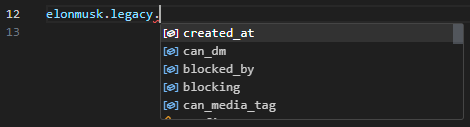
response = 撫.get_user_api().get_user_by_screen_name("elonmusk")
Login
from twitter_openapi_python import TwitterOpenapiPython
# guest client
撫 = TwitterOpenapiPython().get_guest_client()
tweet = 撫.get_default_api().get_tweet_result_by_rest_id("1349129669258448897")
assert tweet.data is not None
assert tweet.data.tweet.legacy is not None
print(tweet.data.tweet.legacy.full_text)
Multiple OS
The Token can only be used on the same OS that issued the Token In other words, if the sec-ch-ua-platform does not match, the Token cannot be used. This library uses the Linux Chrome header by default. To use Token issued by Windows, do the following.
client = TwitterOpenapiPython()
client.additional_api_headers = {
  "sec-ch-ua-platform": '"Windows"',
};
License
This project is dual licensed. You can choose one of the following licenses:
Release history Release notifications | RSS feed


Download files
Download the file for your platform. If you're not sure which to choose, learn more about installing packages.
Source Distribution
Built Distribution
Filter files by name, interpreter, ABI, and platform.
If you're not sure about the file name format, learn more about wheel file names.
Copy a direct link to the current filters
File details
Details for the file twitter_openapi_python-0.0.43.tar.gz.
File metadata
- Download URL: twitter_openapi_python-0.0.43.tar.gz
- Upload date:
- Size: 27.5 kB
- Tags: Source
- Uploaded using Trusted Publishing? No
- Uploaded via: twine/6.2.0 CPython/3.14.5
File hashes
| Algorithm | Hash digest | |
|---|---|---|
| SHA256 |
1ed0205c604f53395810ddeeb01a8b3fecec0829f9acd721ef12d3c546b02940
|
|
| MD5 |
3bb26a9627c992dcda144be9123baf39
|
|
| BLAKE2b-256 |
07e3c9ebc9c4e6867d26088efd966ad5c2ba7ae30dde4eb53ab04ec927c95177
|
File details
Details for the file twitter_openapi_python-0.0.43-py3-none-any.whl.
File metadata
- Download URL: twitter_openapi_python-0.0.43-py3-none-any.whl
- Upload date:
- Size: 34.9 kB
- Tags: Python 3
- Uploaded using Trusted Publishing? No
- Uploaded via: twine/6.2.0 CPython/3.14.5
File hashes
| Algorithm | Hash digest | |
|---|---|---|
| SHA256 |
a6b6a419b300f14cac8ad51a0cc8640e7fbca5fca66c0a86f36fac4e0f6da286
|
|
| MD5 |
55ee636bd52c9dc5a1b232c93adc51c5
|
|
| BLAKE2b-256 |
6d3b68304f21fca001243c1c90bfbc0d53b108d4897f750e31f73d2935cfa5de
|






