
Two-dimensional colormaps for Matplotlib-friendly Python workflows
Verified details
These details have been verified by PyPIProject links
GitHub Statistics
Maintainers

Project description
cmap2d
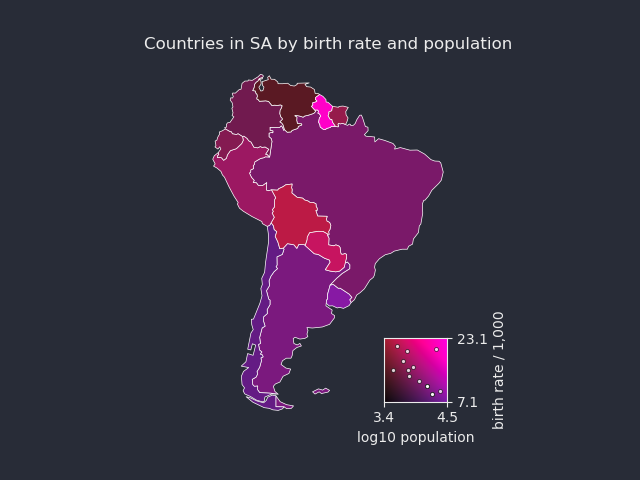
cmap2d is a small Matplotlib-friendly Python package for building, transforming, inspecting, and applying two-dimensional colormaps.
A normal colormap maps one scalar value to color. A cmap2d colormap maps two scalar values, usually called U and V, to RGB/RGBA colors:
colors = cmap(U, V)
This is useful when each point, pixel, polygon, cell, or region has two quantities that should be visualized together.
Installation
Once published on PyPI:
pip install twoD-cmaps
For local development from a cloned repository:
pip install -e ".[dev]"
Basic usage
The core workflow is:
- prepare or load two scalar arrays,
UandV; - choose a 2D colormap;
- call the colormap to obtain RGB/RGBA colors;
- use those colors in Matplotlib.
import matplotlib.pyplot as plt
import cmap2d as c2d

# Replace this with your own data loading.
# U and V should be broadcast-compatible arrays with the quantities to encode.
U, V = load_my_two_scalar_fields()

# Get a 2D colormap from the registry.
cmap = c2d.get_2d_cmap("RG")

# Map the two scalar fields to colors.
extent = c2d.extent_from_data(U, V, pad_u="5%", pad_v="5%")
colors = cmap(U, V,
    umin=extent[0], umax=extent[1],
    vmin=extent[2], vmax=extent[3],
)

# Use the colors in a normal Matplotlib plot.
fig, ax = plt.subplots()
ax.imshow(colors)

# Add a 2D colorbar showing how U and V map to color.
c2d.add_2d_colorbar(ax, cmap, extent=extent,
                    xlabel="U", ylabel="V" )
For a fully runnable version with synthetic data, see examples/basic_usage.py.
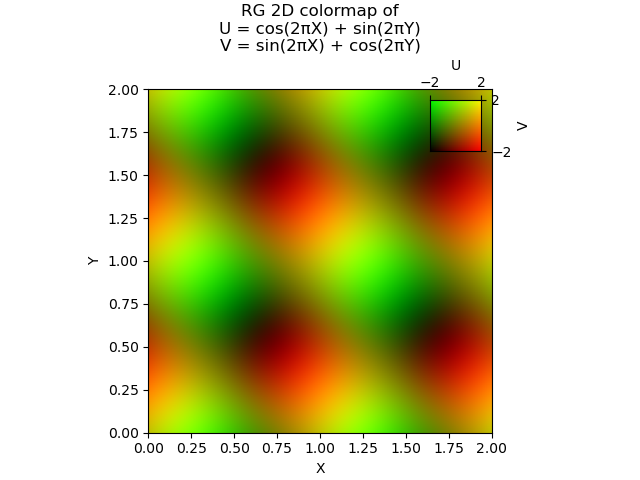
Inspecting colormaps
Use show_2d_cmap to display one colormap, or show_2d_cmaps to display several:
import cmap2d as c2d

c2d.show_2d_cmap("RG")
c2d.show_2d_cmaps(["RG", "CM", "teuling_fig2"])
You can also inspect the registry:
c2d.list_2d_cmaps()
c2d.list_2d_cmap_categories()
c2d.list_2d_cmaps(category="RGB")
c2d.list_2d_cmaps(kind="sampled")

info = c2d.cmap_info("teuling_fig2")
print(info.display_name)
print(info.source)
print(info.reference)
Available colormap families
cmap2d includes analytic colormaps, custom constructors, and a curated set of image-based colormaps.
| Category | What it contains | Example |
|---|---|---|
RGB |
Analytic maps made from pairs of RGB channels. | c2d.cm.RG |
CMY |
Analytic maps made from pairs of cyan, magenta, and yellow channels. | c2d.cm.CM |
RGB-CMY |
Analytic maps combining one RGB channel with one CMY channel. | c2d.cm.RY |
ColorMap Explorer |
Curated sampled 2D colormaps derived from the ColorMap Explorer project. | c2d.cm.teuling_fig2 |
All registered maps can be accessed either by name:
cmap = c2d.get_2d_cmap("RG")
or through the lazy cm namespace:
cmap = c2d.cm.RG
Custom colormaps
Two-color constructor
Use make_two_colors_cmap to build a map from two perceptual color vectors, one for the U axis and one for the V axis:
cmap = c2d.make_two_colors_cmap(
    color_u="tab:blue",
    color_v="tab:orange",
    background="black",
)
Four-corner constructor
Use make_four_corners_cmap to specify the colors at the four corners of the U/V plane. Colors are interpolated in CIELab space.
cmap = c2d.make_four_corners_cmap(
    c00="black",      # U=0, V=0
    c10="tab:red",    # U=1, V=0
    c01="tab:blue",   # U=0, V=1
    c11="white",      # U=1, V=1
)
Image-based colormaps
A 2D colormap can also be backed by an image:
cmap = c2d.make_cmap_from_image("my_2d_colormap.png", origin="upper")
This is also how curated image-based colormaps are loaded internally.
Transforming colormaps
Colormap objects are immutable. Transformations return new colormap objects and can be chained:
cmap = c2d.cm.RG

swapped = cmap.swapped()
reversed_u = cmap.reversed_u()
reversed_v = cmap.reversed_v()

lighter = cmap.lightened(0.4)
darker = cmap.darkened(0.4)
desaturated = cmap.desaturated(0.7)

custom = cmap.reversed_v().lightened(0.25).desaturated(0.2)
You can export any colormap, including transformed or custom maps, to an image:
c2d.save_cmap_image(custom, "my_cmap.png", n=512)
This is useful for sharing colormaps, using them in figure workflows, or inspecting them in external tools.
Showing colormaps in use
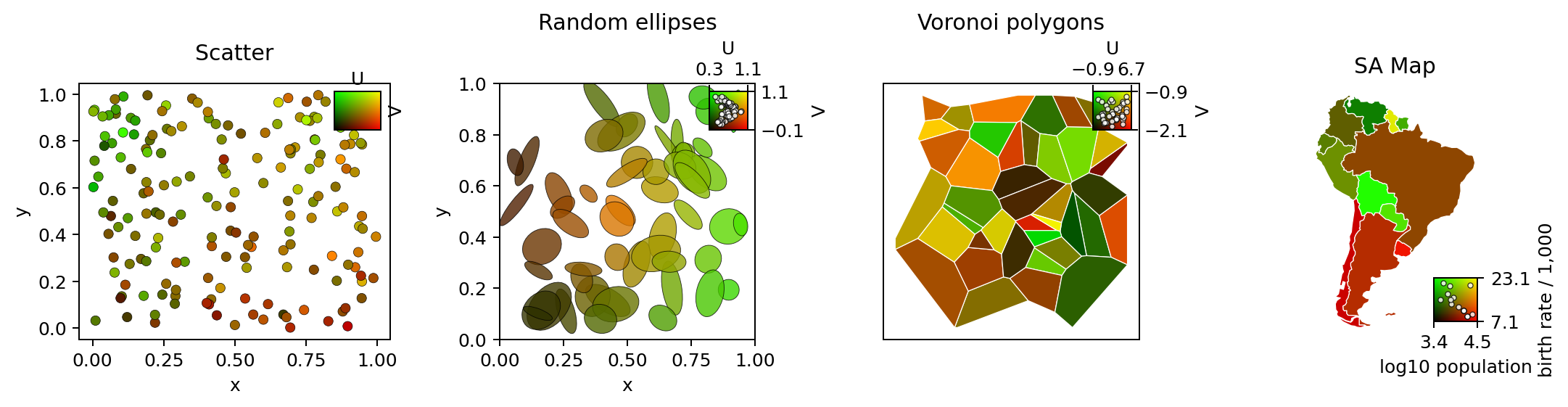
For quick demonstrations, show_cmap_in_use applies a colormap to lightweight example datasets:
fig, ax, cbar_ax = c2d.show_cmap_in_use("RG", kind="voronoi")
Supported demo kinds include scatter-like data, random ellipses, Voronoi-like polygons, and a map-like polygon example. See examples/show_cmap_in_use.py.
ColorMap Explorer colormaps and credits
cmap2d includes a small curated set of sampled 2D colormaps generated from ColorMap Explorer, a Fraunhofer IGD / IVA project for exploring, comparing, and evaluating 2D colormaps.
ColorMap Explorer is licensed under Apache-2.0. It collects and implements 2D colormaps from the visualization literature. The image-based maps included in cmap2d are loaded through the same registry as the analytic maps, and their source, license, and reference metadata can be inspected with cmap_info.
Colormaps created with cmap2d can be exported with save_cmap_image(...) and then analyzed with ColorMap Explorer or other image/LUT-based colormap tools.
Examples
Runnable examples live in examples/:
| Example | What it shows |
|---|---|
basic_usage.py |
Applying a registered 2D colormap to synthetic data. |
show_all_cmaps.py |
Displaying registered colormaps grouped by category. |
show_cmap_in_use.py |
Applying maps to demo datasets. |
two_color_construction.py |
Building a custom two-color map. |
four_corners_construction.py |
Building a custom four-corner map. |
mutators.py |
Lightening, darkening, desaturating, and reversing maps. |
sampled_cmap.py |
Loading and using an image-backed colormap. |
Most examples save figures to examples/output/.
License
cmap2d is distributed under the license included in LICENSE.
Selected image-based colormaps derived from ColorMap Explorer retain their own attribution and source metadata. Use cmap_info(name) for source, license, and reference details for a specific colormap.
Project details
Verified details
These details have been verified by PyPIProject links
GitHub Statistics
Maintainers
Release history Release notifications | RSS feed

Download files
Download the file for your platform. If you're not sure which to choose, learn more about installing packages.
Source Distribution
Built Distribution
Filter files by name, interpreter, ABI, and platform.
If you're not sure about the file name format, learn more about wheel file names.
Copy a direct link to the current filters
File details
Details for the file twod_cmaps-0.1.3.tar.gz.
File metadata
- Download URL: twod_cmaps-0.1.3.tar.gz
- Upload date:
- Size: 1.5 MB
- Tags: Source
- Uploaded using Trusted Publishing? Yes
- Uploaded via: twine/6.1.0 CPython/3.13.12
File hashes
| Algorithm | Hash digest | |
|---|---|---|
| SHA256 |
ccab2df9a19ba6b196bb65caec674af5010cf44f4110fc503e718a1e4aae176c
|
|
| MD5 |
2180e14dcdb4a193091af5153df5c3d4
|
|
| BLAKE2b-256 |
8c836e13ae919d45007845ca304d3b81a7d87b157fe02b0efbbad4c250497376
|
Provenance
The following attestation bundles were made for twod_cmaps-0.1.3.tar.gz:
Publisher:
publish-pypi.yml on mwappner/cmap2d
-
Statement:
-
Statement type:
https://in-toto.io/Statement/v1 -
Predicate type:
https://docs.pypi.org/attestations/publish/v1 -
Subject name:
twod_cmaps-0.1.3.tar.gz -
Subject digest:
ccab2df9a19ba6b196bb65caec674af5010cf44f4110fc503e718a1e4aae176c - Sigstore transparency entry: 2172987911
- Sigstore integration time:
-
Permalink:
mwappner/cmap2d@e5a4ccc22a2d932a1cf083af8bbcba3ccbc330b8 -
Branch / Tag:
refs/tags/v0.1.3 - Owner: https://github.com/mwappner
-
Access:
public
-
Token Issuer:
https://token.actions.githubusercontent.com -
Runner Environment:
github-hosted -
Publication workflow:
publish-pypi.yml@e5a4ccc22a2d932a1cf083af8bbcba3ccbc330b8 -
Trigger Event:
push
-
Statement type:
File details
Details for the file twod_cmaps-0.1.3-py3-none-any.whl.
File metadata
- Download URL: twod_cmaps-0.1.3-py3-none-any.whl
- Upload date:
- Size: 1.5 MB
- Tags: Python 3
- Uploaded using Trusted Publishing? Yes
- Uploaded via: twine/6.1.0 CPython/3.13.12
File hashes
| Algorithm | Hash digest | |
|---|---|---|
| SHA256 |
94f889d935b9c07b97d54d229070f29ba95b6fd99325944a019252b488ba6e53
|
|
| MD5 |
724976f13e3142092f83045e07a976f1
|
|
| BLAKE2b-256 |
7beb91a016c673737586447e945da24b7cfaff4b2637c362df1e76dbf0c3c811
|
Provenance
The following attestation bundles were made for twod_cmaps-0.1.3-py3-none-any.whl:
Publisher:
publish-pypi.yml on mwappner/cmap2d
-
Statement:
-
Statement type:
https://in-toto.io/Statement/v1 -
Predicate type:
https://docs.pypi.org/attestations/publish/v1 -
Subject name:
twod_cmaps-0.1.3-py3-none-any.whl -
Subject digest:
94f889d935b9c07b97d54d229070f29ba95b6fd99325944a019252b488ba6e53 - Sigstore transparency entry: 2172987922
- Sigstore integration time:
-
Permalink:
mwappner/cmap2d@e5a4ccc22a2d932a1cf083af8bbcba3ccbc330b8 -
Branch / Tag:
refs/tags/v0.1.3 - Owner: https://github.com/mwappner
-
Access:
public
-
Token Issuer:
https://token.actions.githubusercontent.com -
Runner Environment:
github-hosted -
Publication workflow:
publish-pypi.yml@e5a4ccc22a2d932a1cf083af8bbcba3ccbc330b8 -
Trigger Event:
push
-
Statement type:






