
twopy
Two-photon imaging analysis tool for the Clark Lab output format.
Getting Started
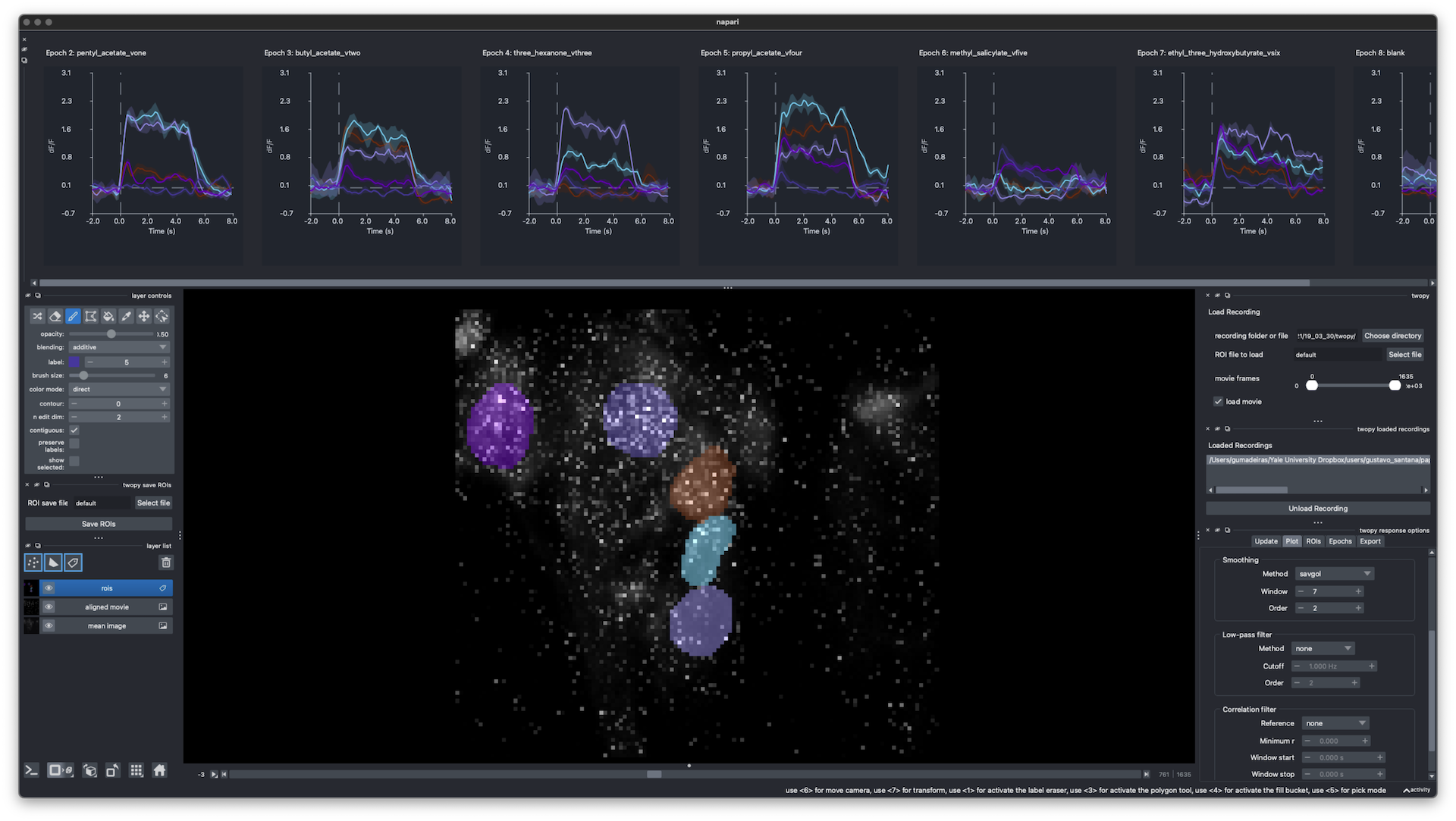
twopy lets you open two-photon recordings, draw ROIs, plot responses in real time, process and analyze them, and save them.
When you first load a recording, twopy converts it to HDF5 files that it owns. These files contain the aligned movie, mean image, stimulus tables, photodiode signals, and recording metadata. Analysis and the GUI use only the converted files. Thus, the original source files stay separate from twopy outputs. By default, twopy uses ~/.cache/twopy/recordings as a local cache. When you save ROIs and analysis, twopy copies changed files to analysis_output in the background.
Install
Examples use micromamba, but any conda-compatible environment manager should work.
micromamba create -n twopy -c conda-forge python=3.13 pip -y
micromamba run -n twopy python -m pip install twopy
Verify the install:
micromamba run -n twopy python -c 'import twopy; print(twopy.__name__)'
Create the config template in your user folder:
twopy config setup
twopy prints the config path that it wrote. The default path on macOS and Linux is ~/.config/twopy/config.yml. On Windows, the path is under %APPDATA%\twopy\config.yml. Before you start twopy, add your database, data, and output paths to that file. If the config does not exist, twopy creates the template and prints its path. Then, twopy stops so you can edit it.
Validate the active config and show its path and file contents:
twopy config
Start
micromamba activate twopy
twopy
twopy validates the config before opening napari. It does not require lab data folders or network drives to be mounted at launch.
Open a source recording or converted recording directly:
twopy /path/to/source/recording
twopy /path/to/recording_data.h5
Basic GUI flow:
- Search the database or load a recording manually.
- Draw or edit ROIs in the
roisLabels layer. - Update response plots from the current ROIs.
- Click Save ROIs + analysis in Export when the plots look right.
When a source recording has not been converted yet, twopy converts it first. Converted data includes the aligned movie, mean image, stimulus tables, photodiode signals, and recording metadata.
Docs
- Full documentation
- Getting started: install, configure, launch, and save your first analysis.
- GUI guide: one page per task — loading, ROIs, plots, custom workflows, group matching, saving.
- Python API guide: find recordings, convert data, extract traces, fit kernels, and open napari from scripts.
- Writing custom workflows: add your own analysis to the napari Custom tab.
- Development guide: source setup and local checks.
- Input data spec: short recording folder contract.
- Recording file reference: detailed source and converted file schema.
Check
micromamba run -n twopy pre-commit run --all-files
1 maintainer

Metadata
1 maintainer
Release files for twopy 0.4.2
For a detailed explanation of source distributions (sdists) and built distributions (wheels), please see the package formats documentation.
Source distribution (sdist)
| File | Size | Uploaded | Provenance | Actions |
|---|---|---|---|---|
| twopy-0.4.2.tar.gz | 1.7 MB | With provenance | Details for twopy-0.4.2.tar.gz |
Built distribution (wheel)
| File | Interpreter | ABI | Platform | Actions Reset |
|---|---|---|---|---|
| twopy-0.4.2-py3-none-any.whl | Python 3 | none | any | Details for twopy-0.4.2-py3-none-any.whl |
Total release size: 3.2 MB
Release files / twopy-0.4.2.tar.gz
| Download URL | twopy-0.4.2.tar.gz |
|---|---|
| Size | 1.7 MB |
| Tags | Source |
|
SHA-256 checksum How to use checksums |
47eba0aef7e5961a28be6e5163dfd366271629bbc5f29acc6b14c0a98b1f45c8
|
|
BLAKE2b-256 checksum How to use checksums |
f668d03c95920152e1bac62a3c1074fe94f984bb0023deda68112a5434d042dd
|
| Upload date | |
|
Uploaded using Trusted Publishing? What is trusted publishing? |
Yes |
| Uploaded via |
twine/7.0.0 CPython/3.13.16
|
Provenance
Provenance describes where a file came from. On PyPI, provenance is shared via attestations, which provide a verifiable record of the build or publishing details. View details, limitations and caveats.


PyPI Publish Attestation
PyPI verified that this artifact, at this checksum, originated from the publisher listed below.
Signed by GitHub Actions, verified by PyPI on Nov 4, 2026.
Transparency logRelease files / twopy-0.4.2-py3-none-any.whl
| Download URL | twopy-0.4.2-py3-none-any.whl |
|---|---|
| Size | 1.5 MB |
| Tags | Python 3 |
|
SHA-256 checksum How to use checksums |
77631aa4c7bf32a369159b30bedf8a15fe7a034459f3ad1e4c73f20ac7e2bbe6
|
|
BLAKE2b-256 checksum How to use checksums |
3c1bf016da063d0dc91026682b6b9b8213dcd457749e11c6fafb5b8b6cfe9f28
|
| Upload date | |
|
Uploaded using Trusted Publishing? What is trusted publishing? |
Yes |
| Uploaded via |
twine/7.0.0 CPython/3.13.16
|
Provenance
Provenance describes where a file came from. On PyPI, provenance is shared via attestations, which provide a verifiable record of the build or publishing details. View details, limitations and caveats.
PyPI Publish Attestation
PyPI verified that this artifact, at this checksum, originated from the publisher listed below.
Signed by GitHub Actions, verified by PyPI on Nov 4, 2026.
Transparency logSecurity for twopy 0.4.2
Provenance
Provenance describes where a file came from. On PyPI, provenance is shared via attestations, which provide a verifiable record of the build or publishing details. View details, limitations and caveats.
Full provenance
Both files in this release have been uploaded with provenance metadata.
Attestation for twopy-0.4.2.tar.gz
PyPI Publish Attestation
PyPI verified that this artifact, at this checksum, originated from the publisher listed below.
Signed by GitHub Actions, verified by PyPI on Nov 4, 2026.
Transparency logA note on package security
PyPI is a repository for distributing packages, not a service for auditing them. While third-party security researchers and our staff do their best to detect and remove malicious packages, PyPI cannot guarantee the quality, security or suitability of any given package.
To learn more about protecting yourself from malicious actors, visit our package security documentation.














