
twopy
Two-photon imaging analysis tool for the Clark Lab output format.
Getting Started
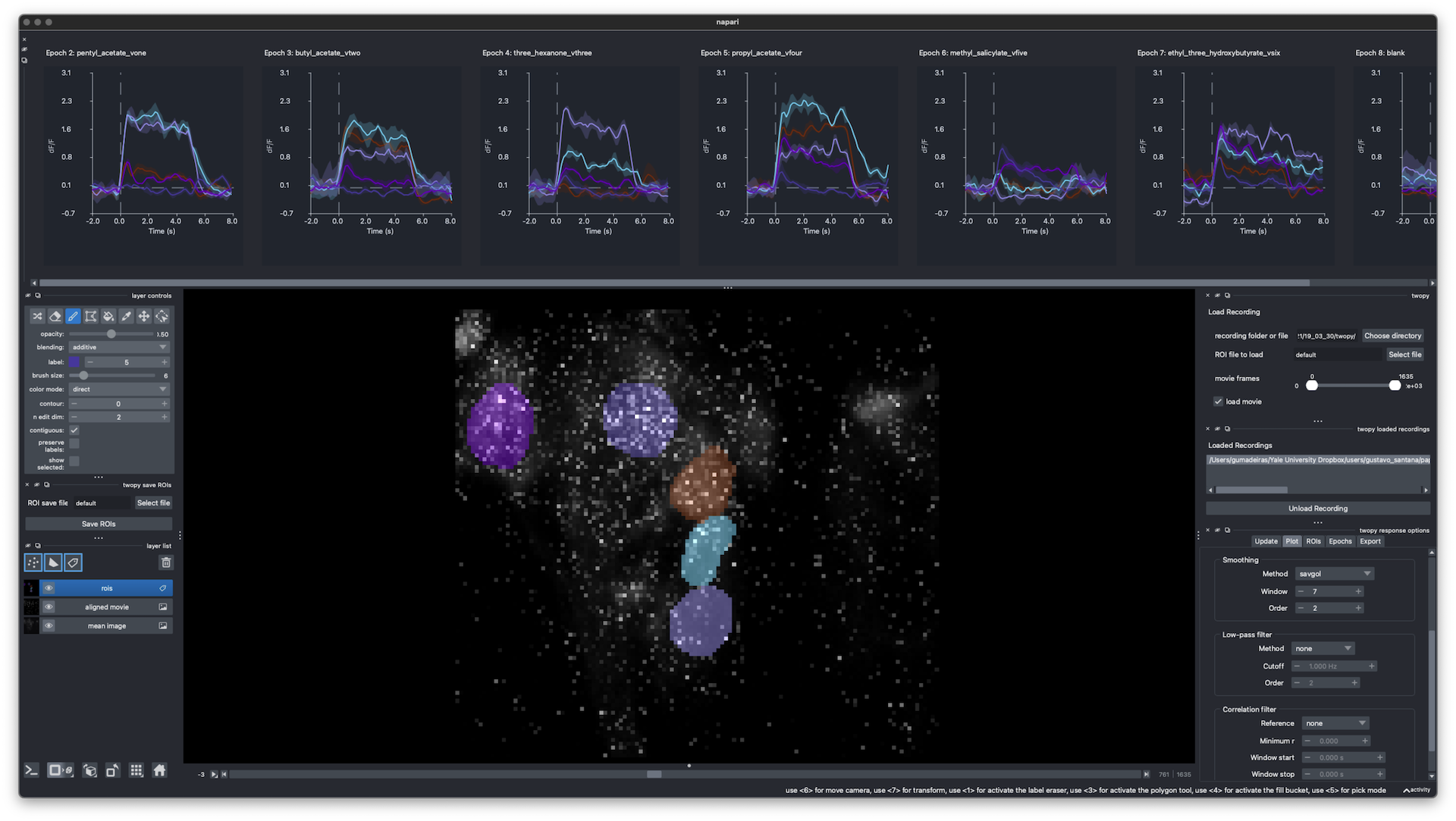
twopy lets you open two-photon recordings, draw ROIs, plot responses in real time, process and analyze them, and save them.
When you first load a recording, twopy converts it to HDF5 files that it owns. These files contain the aligned movie, mean image, stimulus tables, photodiode signals, and recording metadata. Analysis and the GUI use only the converted files. Thus, the original source files stay separate from twopy outputs. By default, twopy uses ~/.cache/twopy/recordings as a local cache. When you save ROIs and analysis, twopy copies changed files to analysis_output in the background.
Install
Examples use micromamba, but any conda-compatible environment manager should work.
micromamba create -n twopy -c conda-forge python=3.13 pip -y
micromamba run -n twopy python -m pip install twopy
Verify the install:
micromamba run -n twopy python -c 'import twopy; print(twopy.__name__)'
Create the config template in your user folder:
twopy config setup
twopy prints the config path that it wrote. The default path on macOS and Linux is ~/.config/twopy/config.yml. On Windows, the path is under %APPDATA%\twopy\config.yml. Before you start twopy, add your database, data, and output paths to that file. If the config does not exist, twopy creates the template and prints its path. Then, twopy stops so you can edit it.
Validate the active config and show its path and file contents:
twopy config
Start
micromamba activate twopy
twopy
twopy validates the config before opening napari. It does not require lab data folders or network drives to be mounted at launch.
Open a source recording or converted recording directly:
twopy /path/to/source/recording
twopy /path/to/recording_data.h5
Basic GUI flow:
- Search the database or load a recording manually.
- Draw or edit ROIs in the
roisLabels layer. - Update response plots from the current ROIs.
- Click Save ROIs + analysis in Export when the plots look right.
When a source recording has not been converted yet, twopy converts it first. Converted data includes the aligned movie, mean image, stimulus tables, photodiode signals, and recording metadata.
Docs
- Full documentation
- Getting started: install, configure, launch, and save your first analysis.
- GUI guide: one page per task — loading, ROIs, plots, custom workflows, group matching, saving.
- Python API guide: find recordings, convert data, extract traces, fit kernels, and open napari from scripts.
- Writing custom workflows: add your own analysis to the napari Custom tab.
- Development guide: source setup and local checks.
- Input data spec: short recording folder contract.
- Recording file reference: detailed source and converted file schema.
Check
micromamba run -n twopy pre-commit run --all-files
1 maintainer

Download files
Download the file for your platform. If you're not sure which to choose, learn more about installing packages.
Source Distribution
Built Distribution
Filter files by name, interpreter, ABI, and platform.
If you're not sure about the file name format, learn more about wheel file names.
Copy a direct link to the current filters
File details
Details for the file twopy-0.4.0.tar.gz.
File metadata
- Download URL: twopy-0.4.0.tar.gz
- Upload date:
- Size: 1.6 MB
- Tags: Source
- Uploaded using Trusted Publishing? Yes
- Uploaded via:
twine/6.1.0 CPython/3.13.14
File hashes
| Algorithm | Hash digest | |
|---|---|---|
| SHA256 |
f703fe024be96130b9bba9492daa77dd542d2c75afdfae17d385cfcdcc43620c
|
|
| MD5 |
b2e704fe20c3bf6c92292e7649d2b37f
|
|
| BLAKE2b-256 |
e647709035bd4c516b58bdf5b36854f6cf5d71652d402ff6cfeb7420e91e92b1
|
Provenance
The following attestation bundles were made for twopy-0.4.0.tar.gz:
Publisher:
publish-to-pypi.yml on gumadeiras/twopy
-
Statement:
-
Statement type:
https://in-toto.io/Statement/v1 -
Predicate type:
https://docs.pypi.org/attestations/publish/v1 -
Subject name:
twopy-0.4.0.tar.gz -
Subject digest:
f703fe024be96130b9bba9492daa77dd542d2c75afdfae17d385cfcdcc43620c - Sigstore transparency entry: 2219578149
- Sigstore integration time:
-
Permalink:
gumadeiras/twopy@58bb2764dbdc0e3a43a8f0143eb28ade79c985af -
Branch / Tag:
refs/tags/0.4.0 - Owner: https://github.com/gumadeiras
-
Access:
public
-
Token Issuer:
https://token.actions.githubusercontent.com -
Runner Environment:
github-hosted -
Publication workflow:
publish-to-pypi.yml@58bb2764dbdc0e3a43a8f0143eb28ade79c985af -
Trigger Event:
release
-
Statement type:
File details
Details for the file twopy-0.4.0-py3-none-any.whl.
File metadata
- Download URL: twopy-0.4.0-py3-none-any.whl
- Upload date:
- Size: 1.5 MB
- Tags: Python 3
- Uploaded using Trusted Publishing? Yes
- Uploaded via:
twine/6.1.0 CPython/3.13.14
File hashes
| Algorithm | Hash digest | |
|---|---|---|
| SHA256 |
70d44601cf02288d5e7578c292c9421787463dafa8e1656cfd6a98fe2bd4979f
|
|
| MD5 |
ca0ae2e7ed7e834e5ceb37ba27b9b03a
|
|
| BLAKE2b-256 |
4d451832203f6431a671aba3cc3afde55bcac83844e231cab02e6b489249bf3c
|
Provenance
The following attestation bundles were made for twopy-0.4.0-py3-none-any.whl:
Publisher:
publish-to-pypi.yml on gumadeiras/twopy
-
Statement:
-
Statement type:
https://in-toto.io/Statement/v1 -
Predicate type:
https://docs.pypi.org/attestations/publish/v1 -
Subject name:
twopy-0.4.0-py3-none-any.whl -
Subject digest:
70d44601cf02288d5e7578c292c9421787463dafa8e1656cfd6a98fe2bd4979f - Sigstore transparency entry: 2219578175
- Sigstore integration time:
-
Permalink:
gumadeiras/twopy@58bb2764dbdc0e3a43a8f0143eb28ade79c985af -
Branch / Tag:
refs/tags/0.4.0 - Owner: https://github.com/gumadeiras
-
Access:
public
-
Token Issuer:
https://token.actions.githubusercontent.com -
Runner Environment:
github-hosted -
Publication workflow:
publish-to-pypi.yml@58bb2764dbdc0e3a43a8f0143eb28ade79c985af -
Trigger Event:
release
-
Statement type:














