
twtr
Setup
- Make a free account and project at developer.x.com and get the following keys:
- Bearer Token
- Consumer Key
- Consumer Secret
- Access Token
- Access Token Secret
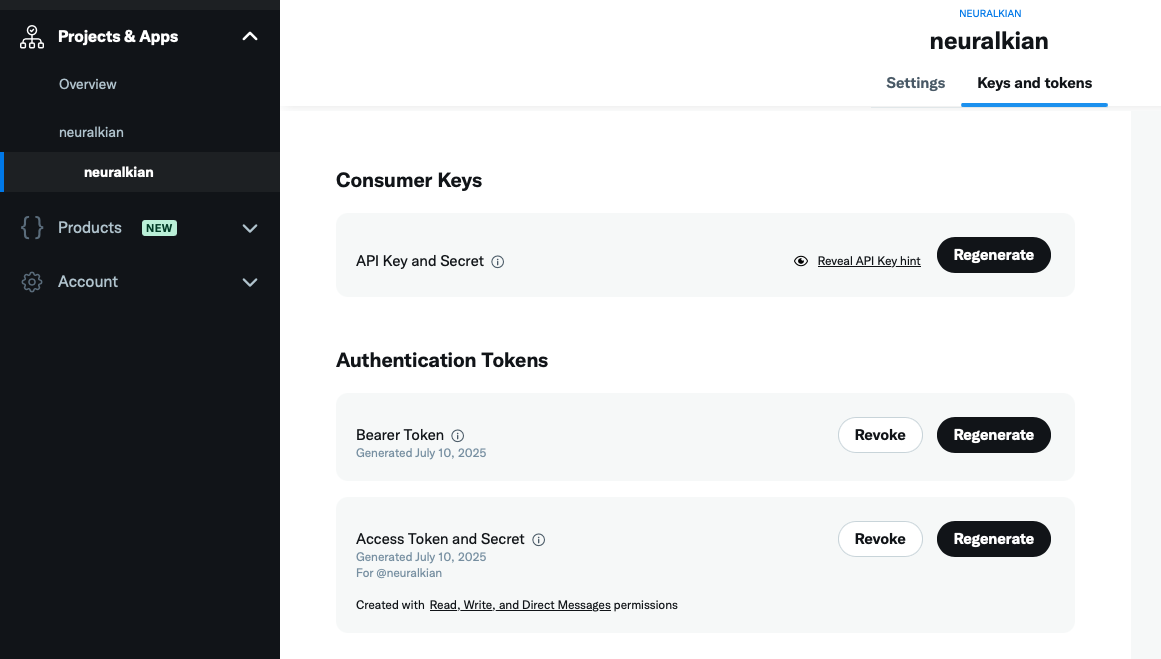
- Add these lines to your
~/.zshrcor~/.bashrc:
December 2025 update: this is honestly bad practice, so I recommend putting your environment variables in a separate .env file and then exporting that. Nevertheless, you need to somehow expose these keys to the environment.
export TWEEPY_BEARER_TOKEN="<your_bearer_token>"
export TWEEPY_CONSUMER_KEY="<your_consumer_key>"
export TWEEPY_CONSUMER_SECRET="<your_consumer_secret>"
export TWEEPY_ACCESS_TOKEN="<your_access_token>"
export TWEEPY_ACCESS_TOKEN_SECRET="<your_access_token_secret>"
Then reload your config:
source ~/.zshrc
or
source ~/.bashrc
Usage
Install from PyPI with uv:
uv tool install twtr
Then tweet from the CLI:
twtr "your tweet here"
Development
Set up the development environment:
uv sync
Run the package locally for testing:
# Using the entry point script
uv run twtr "your tweet here"

# Or as a Python module
uv run python -m twtr.cli "your tweet here"
Structure
.
├── LICENSE
├── README.md
├── keys.png
├── pyproject.toml
├── twtr
│   ├── __init__.py      # Public API (expose main functions/classes)
│   └── cli.py           # CLI entry point (separate from core logic)
└── uv.lock
1 maintainer

Metadata
1 maintainer
Release files for twtr 0.1.4
For a detailed explanation of source distributions (sdists) and built distributions (wheels), please see the package formats documentation.
Source distribution (sdist)
| File | Size | Uploaded | Provenance | |
|---|---|---|---|---|
| twtr-0.1.4.tar.gz | 95.8 kB | Without provenance | Details |
Built distribution (wheel)
| File | Interpreter | ABI | Platform | Reset |
|---|---|---|---|---|
| twtr-0.1.4-py3-none-any.whl | Python 3 | none | any | Details |
Total release size: 99.3 kB
Release files / twtr-0.1.4.tar.gz
| Download URL | twtr-0.1.4.tar.gz |
|---|---|
| Size | 95.8 kB |
| Tags | Source |
|
SHA-256 checksum How to use checksums |
ef56d21600e8c7990d1d0e281b866c91c0694870f1e827fb4f3ebb95a26c142e
|
|
BLAKE2b-256 checksum How to use checksums |
c8d65c8a78d851b0874ebb0ce4a976ccb15e4192695897545e849b46f305564a
|
| Upload date | |
|
Uploaded using Trusted Publishing? What is trusted publishing? |
Yes |
| Uploaded via |
uv/0.9.15 {"installer":{"name":"uv","version":"0.9.15","subcommand":["publish"]},"python":null,"implementation":{"name":null,"version":null},"distro":{"name":"Ubuntu","version":"24.04","id":"noble","libc":null},"system":{"name":null,"release":null},"cpu":null,"openssl_version":null,"setuptools_version":null,"rustc_version":null,"ci":true}
|
Release files / twtr-0.1.4-py3-none-any.whl
| Download URL | twtr-0.1.4-py3-none-any.whl |
|---|---|
| Size | 3.5 kB |
| Tags | Python 3 |
|
SHA-256 checksum How to use checksums |
d53795089ad8881f48156a736b8da0fb93d4012b05dcc3bb8e5f9af47954c0e0
|
|
BLAKE2b-256 checksum How to use checksums |
606ffd27f6f00f0d091099fcf875d5b7255c9a4c1eb28039eaeb736e5169f64a
|
| Upload date | |
|
Uploaded using Trusted Publishing? What is trusted publishing? |
Yes |
| Uploaded via |
uv/0.9.15 {"installer":{"name":"uv","version":"0.9.15","subcommand":["publish"]},"python":null,"implementation":{"name":null,"version":null},"distro":{"name":"Ubuntu","version":"24.04","id":"noble","libc":null},"system":{"name":null,"release":null},"cpu":null,"openssl_version":null,"setuptools_version":null,"rustc_version":null,"ci":true}
|
Security for twtr 0.1.4
Provenance
Provenance describes where a file came from. On PyPI, provenance is shared via attestations, which provide a verifiable record of the build or publishing details. View details, limitations and caveats.
No provenance found
None of the files in this release were uploaded with provenance metadata.
A note on package security
PyPI is a repository for distributing packages, not a service for auditing them. While third-party security researchers and our staff do their best to detect and remove malicious packages, PyPI cannot guarantee the quality, security or suitability of any given package.
To learn more about protecting yourself from malicious actors, visit our package security documentation.














