
Minimal CLI to tweet via Twitter API.
Verified details
These details have been verified by PyPIProject links
GitHub Statistics
Maintainers

Project description
twtr
Setup
- Make a free account and project at developer.x.com and get the following keys:
- Bearer Token
- Consumer Key
- Consumer Secret
- Access Token
- Access Token Secret
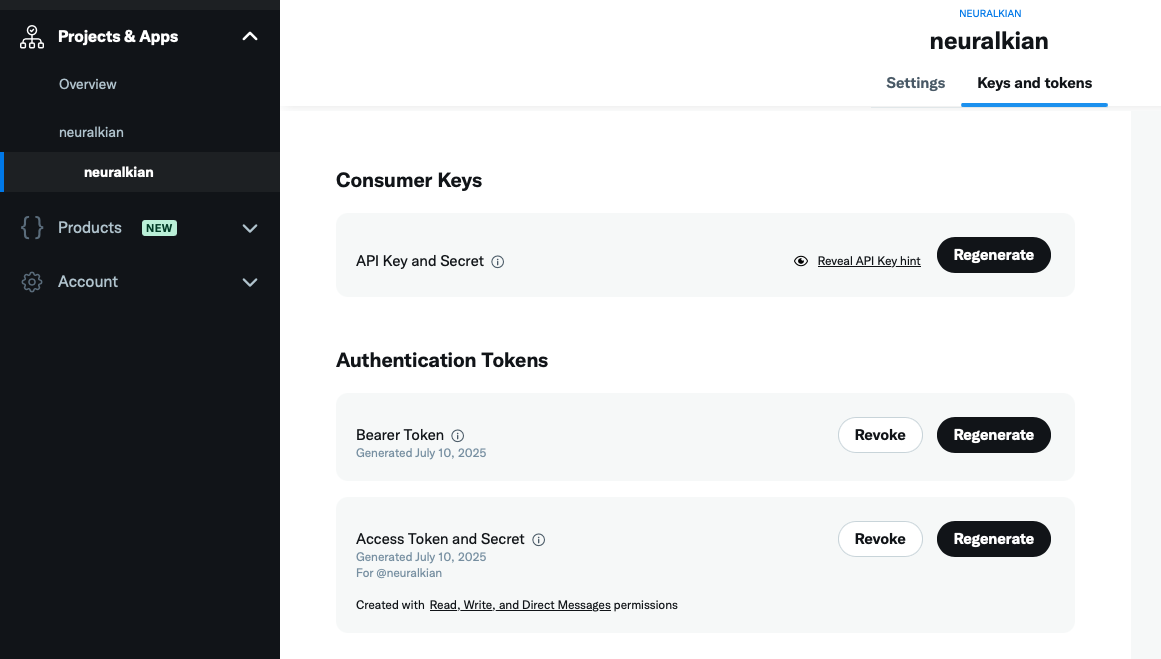
- Add these lines to your
~/.zshrcor~/.bashrc:
export TWEEPY_BEARER_TOKEN="<your_bearer_token>"
export TWEEPY_CONSUMER_KEY="<your_consumer_key>"
export TWEEPY_CONSUMER_SECRET="<your_consumer_secret>"
export TWEEPY_ACCESS_TOKEN="<your_access_token>"
export TWEEPY_ACCESS_TOKEN_SECRET="<your_access_token_secret>"
Then reload your config:
source ~/.zshrc
or
source ~/.bashrc
Usage
Install from PyPI with uv:
uv tool install twtr
Then tweet from the CLI:
twtr "your tweet here"
Project details
Verified details
These details have been verified by PyPIProject links
GitHub Statistics
Maintainers


Download files
Download the file for your platform. If you're not sure which to choose, learn more about installing packages.
Source Distribution
twtr-0.0.8.tar.gz
(78.8 kB
view details)
Built Distribution
Filter files by name, interpreter, ABI, and platform.
If you're not sure about the file name format, learn more about wheel file names.
Copy a direct link to the current filters
twtr-0.0.8-py3-none-any.whl
(2.9 kB
view details)
File details
Details for the file twtr-0.0.8.tar.gz.
File metadata
- Download URL: twtr-0.0.8.tar.gz
- Upload date:
- Size: 78.8 kB
- Tags: Source
- Uploaded using Trusted Publishing? Yes
- Uploaded via: uv/0.7.20
File hashes
| Algorithm | Hash digest | |
|---|---|---|
| SHA256 |
07fafd72bdf530af9772b3801fabfd2c64421625757b86459ed467b7de6f9241
|
|
| MD5 |
ae440b2997ef327c4d2f0d3bf4820f45
|
|
| BLAKE2b-256 |
00d877aa03a2b9ef15c23eddb3c51a7a895e585f9d7d1f1c87e065a426ed77fb
|
File details
Details for the file twtr-0.0.8-py3-none-any.whl.
File metadata
- Download URL: twtr-0.0.8-py3-none-any.whl
- Upload date:
- Size: 2.9 kB
- Tags: Python 3
- Uploaded using Trusted Publishing? Yes
- Uploaded via: uv/0.7.20
File hashes
| Algorithm | Hash digest | |
|---|---|---|
| SHA256 |
7b2f1b59dd23761822ad0d1a2de101a4cdb40dde454f4d2a746c6a9dad7d2744
|
|
| MD5 |
fb8762477734eb28ec96e46a62a80c3e
|
|
| BLAKE2b-256 |
afa2a4b1771c41fd8e084e6b06fec1d36fccf4372cc44b5f5f0c17c98b5ce377
|






