
Decentralised, minimalist microblogging service for hackers.

Project description




twtxt is a decentralised, minimalist microblogging service for hackers.
So you want to get some thoughts out on the internet in a convenient and slick way while also following the gibberish of others? Instead of signing up at a closed and/or regulated microblogging platform, getting your status updates out with twtxt is as easy as putting them in a publicly accessible text file. The URL pointing to this file is your identity, your account. twtxt then tracks these text files, like a feedreader, and builds your unique timeline out of them, depending on which files you track. The format is simple, human readable, and integrates well with UNIX command line utilities.
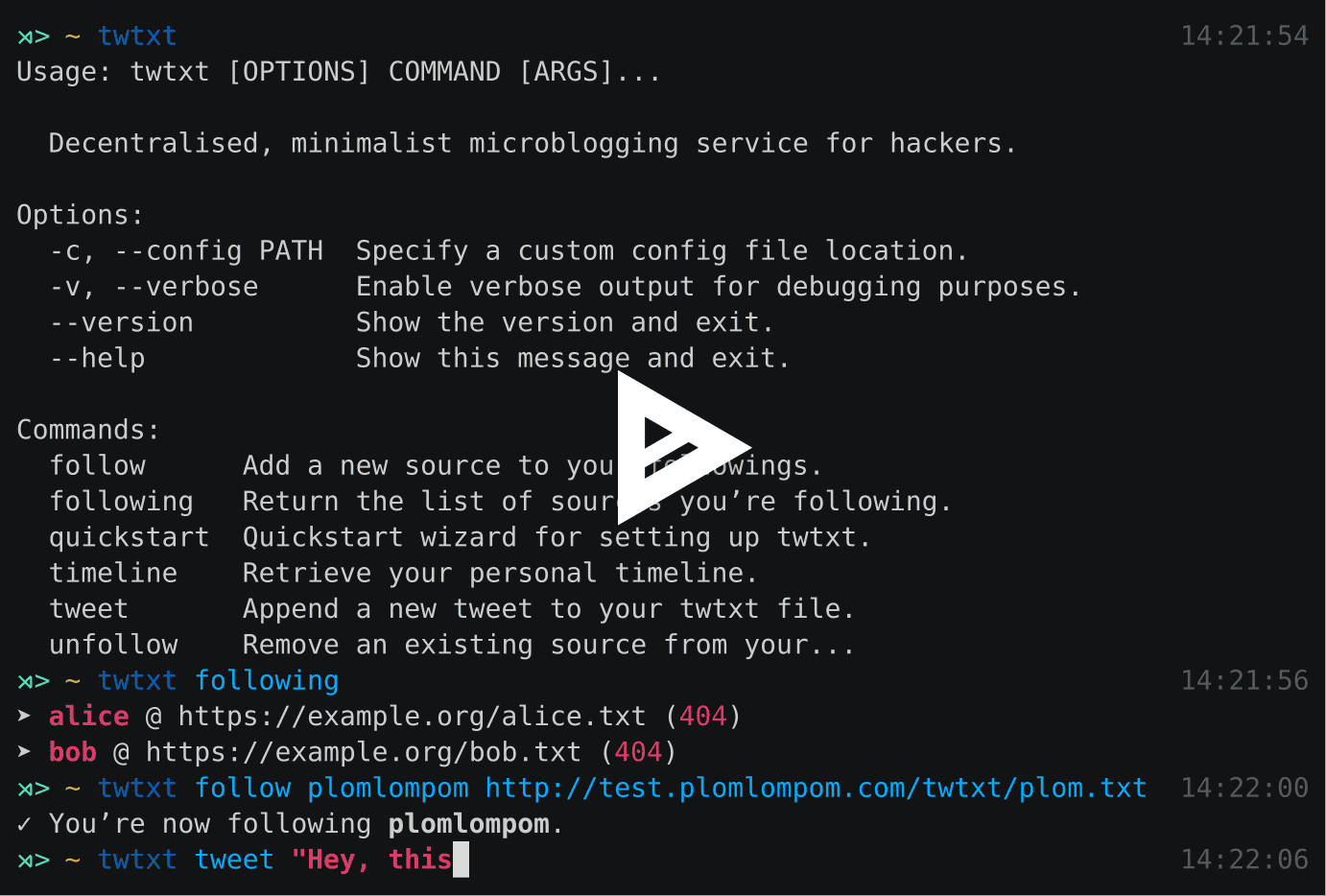
tl;dr: twtxt is a CLI tool, as well as a format specification for self-hosted flat file based microblogging.
Features
A beautiful command-line interface thanks to click.
Asynchronous HTTP requests thanks to asyncio/aiohttp and Python 3.
Integrates well with existing tools (scp, cut, echo, date, etc.) and your shell.
Don’t like the official client? Tweet using echo -e "`date -Im`\tHello world!" >> twtxt.txt!
Installation
Release version:
Make sure that you have at least Python 3.4.1 installed.
Install this package using pip:
$ pip3 install twtxtTip: Instead of installing the package globally (as root), you may want to install this package locally by passing --user to pip, make sure that you include ~/.local/bin/ in your $PATH. Using pyvenv and running twtxt from within a virtualenv is also an option!
Run twtxt quickstart. :)
Development version:
Clone the git repository:
$ git clone https://github.com/buckket/twtxt.gitInstall the package via pip in developer mode:
$ pip3 install -e twtxt/Running tests:
Run the tests against all supported python versions:
$ make testRun the tests against a specific python version:
$ tox -e py34Usage
twtxt features an excellent command-line interface thanks to click. Don’t hesitate to append --help or call commands without arguments to get information about all available commands, options and arguments.
Here are a few of the most common operations you may encounter when using twtxt:
Follow a source:
$ twtxt follow bob http://bobsplace.xyz/twtxt
✓ You’re now following bob.
List all sources you’re following:
$ twtxt following
➤ alice @ https://example.org/alice.txt
➤ bob @ http://bobsplace.xyz/twtxt
Unfollow a source:
$ twtxt unfollow bob
✓ You’ve unfollowed bob.
Post a status update:
$ twtxt tweet "Hello, this is twtxt!"View your timeline:
$ twtxt timeline

➤ bob (5 minutes ago):
This is my first "tweet". :)

➤ alice (2 hours ago):
I wonder if this is a thing?
View feed of specific source:
$ twtxt view twtxt

➤ twtxt (a day ago):
Fiat Lux!
$ twtxt view http://example.org/twtxt.txt
➤ http://example.org/twtxt.txt (a day ago):
Fiat Lux!Configuration
twtxt uses a simple INI-like configuration file. It’s recommended to use twtxt quickstart to create it. On Linux twtxt checks ~/.config/twtxt/config for its configuration. OSX uses ~/Library/Application Support/twtxt/config. Consult get_app_dir to find out the config directory for other operating systems.
Here’s an example conf file, showing every currently supported option:
[twtxt]
nick = buckket
twtfile = ~/twtxt.txt
twturl = http://example.org/twtxt.txt
check_following = True
use_pager = False
use_cache = True
porcelain = False
limit_timeline = 20
timeout = 5.0
sorting = descending
pre_tweet_hook = "scp buckket@example.org:~/public_html/twtxt.txt {twtfile}"
post_tweet_hook = "scp {twtfile} buckket@example.org:~/public_html/twtxt.txt"
# post_tweet_hook = "aws s3 {twtfile} s3://mybucket.org/twtxt.txt --acl public-read --storage-class REDUCED_REDUNDANCY --cache-control 'max-age=60,public'"

[following]
bob = https://example.org/bob.txt
alice = https://example.org/alice.txt
[twtxt] section:
Option: |
Type: |
Default: |
Help: |
|---|---|---|---|
nick |
TEXT |
your nick, will be displayed in your timeline |
|
twtfile |
PATH |
path to your local twtxt file |
|
twturl |
TEXT |
URL to your public twtxt file |
|
check_following |
BOOL |
True |
try to resolve URLs when listing followings |
use_pager |
BOOL |
False |
use a pager (less) to display your timeline |
use_cache |
BOOL |
True |
cache remote twtxt files locally |
porcelain |
BOOL |
False |
style output in an easy-to-parse format |
limit_timeline |
INT |
20 |
limit amount of tweets shown in your timeline |
timeout |
FLOAT |
5.0 |
maximal time a http request is allowed to take |
sorting |
TEXT |
descending |
sort timeline either descending or ascending |
pre_tweet_hook |
TEXT |
command to be executed before tweeting |
|
post_tweet_hook |
TEXT |
command to be executed after tweeting |
pre_tweet_hook and post_tweet_hook are very useful if you want to push your twtxt file to a remote (web) server. Check the example above tho see how it’s used with scp.
[followings] section:
This section holds all your followings as nick, URL pairs. You can edit this section manually or use the follow/unfollow commands of twtxt for greater comfort.
Format specification
The central component of sharing information, i.e. status updates, with twtxt is a simple text file containing all the status updates of a single user. One status per line, each of which is equipped with an ISO 8601 date/time string followed by a TAB character (\t) to separate it from the actual text. A specific ordering of the statuses is not mandatory.
The file must be encoded with UTF-8 and must use LF (\n) as line separators.
A status should consist of up to 140 characters, longer status updates are technically possible but discouraged. twtxt will warn the user if a newly composed status update exceeds this limit, and it will also shorten incoming status updates by default. Also note that a status may not contain any control characters.
Mentions are embedded within the text in either @<source.nick source.url> or @<source.url> format and should be expanded by the client, when rendering the tweets. The source.url is available to provide a way to discover new twtxt.txt files and distinguish between multiple users using the same nickname locally. The source.url can be interpreted as a TWTXT URI.
Take a look at this example file:
2016-02-04T13:30+01 You can really go crazy here! ┐(゚∀゚)┌
2016-02-03T23:05+01 @<example http://example.org/twtxt.txt> welcome to twtxt!
2016-02-01T11:00+01 This is just another example.
2015-12-12T12:00+01 Fiat lux!
Contributions
A web-based directory of twtxt users by reednj: http://twtxt.reednj.com/
A web-based directory of twtxt users by xena: https://twtxtlist.cf
A web-based twtxt feed hoster for the masses by plomlompom: https://github.com/plomlompom/htwtxt
A twtxt-to-atom converter in sh by erlehmann: http://news.dieweltistgarnichtso.net/bin/twtxt2atom
A twitter-to-twtxt converter in node.js by DracoBlue: https://gist.github.com/DracoBlue/488466eaabbb674c636f
A port to node.js / npm by Melvin Carvalho: https://github.com/webize/twtxt
License
twtxt is released under the MIT License. See the bundled LICENSE file for details.


Download files
Download the file for your platform. If you're not sure which to choose, learn more about installing packages.
Source Distribution
Built Distribution
Filter files by name, interpreter, ABI, and platform.
If you're not sure about the file name format, learn more about wheel file names.
Copy a direct link to the current filters
File details
Details for the file twtxt-1.2.0.tar.gz.
File metadata
- Download URL: twtxt-1.2.0.tar.gz
- Upload date:
- Size: 19.3 kB
- Tags: Source
- Uploaded using Trusted Publishing? No
File hashes
| Algorithm | Hash digest | |
|---|---|---|
| SHA256 |
c417c0ed385288e68d9fa5fef0d6af892b708a4d88800af2b6c1d11735eb312f
|
|
| MD5 |
262c28144e5e571a547f3ac650967697
|
|
| BLAKE2b-256 |
bc3a2ec21276b1680626c54fc5c90dca5415aede3f822689abebb2bb6cd4416e
|
File details
Details for the file twtxt-1.2.0-py3-none-any.whl.
File metadata
- Download URL: twtxt-1.2.0-py3-none-any.whl
- Upload date:
- Size: 23.2 kB
- Tags: Python 3
- Uploaded using Trusted Publishing? No
File hashes
| Algorithm | Hash digest | |
|---|---|---|
| SHA256 |
5813972f2cb60319d52de8d81c553f6f2b522998430b13e48aae148448474ccb
|
|
| MD5 |
ed60eb4e3fa385096c1627aaee88807e
|
|
| BLAKE2b-256 |
ece3279f984c8ce40cfd231a4e633efec7f24405d13a9e96f66444e9add39cfe
|






