

Typio: Make Your Terminal Type Like a Human





Overview
Typio is a lightweight Python library that prints text to the terminal as if it were being typed by a human. It supports multiple typing modes (character, word, line, sentence, typewriter, and adaptive), configurable delays and jitter for natural variation, and seamless integration with existing code via a simple function, decorator, or context manager. Typio is designed to be minimal, extensible, and safe, making it ideal for demos, CLIs, tutorials, and storytelling in the terminal.
| PyPI Counter |  |
| Github Stars |  |
| Branch | main | dev |
| CI |  |
 |
| Code Quality |  |
 |
Installation
Source Code
- Download Version 1.5 or Latest Source
pip install .
PyPI
- Check Python Packaging User Guide
pip install typio==1.5
Conda
- Check Conda Managing Package
- Update Conda using
conda update conda - Run
conda install sepandhaghighi::typio
Usage
Function
Use the type_print function to print text with human-like typing effects. You can configure the typing speed, randomness, typing mode, output stream, and flushing behavior.
Examples
from typio import type_print
from typio import TypeMode

type_print("Hello, world!")

type_print(
    "Typing with style and personality.",
    delay=0.06,
    jitter=0.02,
	end="\n",
    mode=TypeMode.ADAPTIVE,
    flush=False,
)
You can also redirect the output to any file-like object:
with open("output.txt", "w") as file:
    type_print("Saved with typing effects.", file=file)
Parameters
| Name | Type | Description | Default |
|---|---|---|---|
text |
str |
Text to be printed | -- |
delay |
float |
Base delay (seconds) between emitted units | 0.04 |
jitter |
float |
Random delay variation (seconds) | 0 |
end |
str |
Ending character(s) | \n |
mode |
TypeMode | Callable |
Typing mode (built-in or custom) | TypeMode.CHAR |
seed |
int |
Random seed for reproducible output | None |
file |
TextIOBase |
Output stream | sys.stdout |
flush |
bool |
Automatically flush output after each emitted unit | True |
Built-in Modes
Typio supports the following modes:
| Mode | Description |
|---|---|
TypeMode.RANDOM1,2 |
Select one built-in mode randomly |
TypeMode.RANDOM_SAFE |
Select one environment-safe built-in mode randomly |
TypeMode.CHAR |
Emit text character by character |
TypeMode.WORD |
Emit text word by word, preserving whitespace |
TypeMode.LINE |
Emit text line by line |
TypeMode.SENTENCE |
Emit text character by character with longer pauses after ., !, ? |
TypeMode.TYPEWRITER |
Emit text character by character with longer pauses after newlines |
TypeMode.ADAPTIVE |
Emit text with adaptive delays based on character type (spaces, punctuation, alphanumeric) |
TypeMode.ACCELERATE |
Emit text character by character with progressively decreasing delay (gradually speeds up over time) |
TypeMode.DECELERATE |
Emit text character by character with progressively increasing delay (gradually slows down over time) |
TypeMode.BURST |
Emit text in bursts of characters followed by short pauses |
TypeMode.FAT_FINGER1,2 |
Emit text mimicking human typos and corrections |
TypeMode.THOUGHTFUL |
Emit text while pause slightly before long words to simulate thinking |
TypeMode.HEARTBEAT |
Emit text with alternating short and long pauses to simulate a heartbeat-like rhythm |
TypeMode.REWIND1 |
Emit text while occasionally deleting and retyping words to simulate reconsideration |
TypeMode.GLITCH1 |
Emit text with occasional random glitches that are quickly corrected |
TypeMode.RANDOM_CASE |
Emit text with randomly varying character casing |
TypeMode.WAVE |
Emit text with sinusoidal delay variation |
TypeMode.STUTTER |
Emit text with stuttering effect on some words |
TypeMode.NERVOUS |
Emit text erratically typing with inconsistent pauses |
TypeMode.HESITATION |
Emit text with occasional pauses within words to simulate human hesitation |
TypeMode.OVERTHINK1 |
Emit text while occasionally deleting and retyping a chunk of text to simulate overthinking |
TypeMode.CONFIDENT |
Emit text quickly with brief pauses, adding longer delays after punctuation to simulate confident typing |
TypeMode.ECHO |
Emit text with occasional repetition of characters faintly, like a glitchy terminal echo |
TypeMode.DRUNK |
Emit text with erratic timing and occasional character duplication or skipping |
TypeMode.GLIDE |
Emit text with smooth deceleration then acceleration |
TypeMode.FOCUS_DRIFT |
Emit text with occasional attention drift, causing slowdowns and pauses mid-word |
TypeMode.RUBBER_DUCK2 |
Emit text while occasionally repeating fragments as if explaining thoughts aloud to a rubber duck |
TypeMode.PANIC1,2 |
Emit text with an increasing rate of typos and progressively slower typing to simulate panic |
Decorator/Context Manager
Use the @typestyle decorator to apply typing effects to all print calls within a function without modifying the function's implementation.
from typio import typestyle
from typio import TypeMode

@typestyle(delay=0.05, mode=TypeMode.TYPEWRITER, flush=True)
def intro():
    print("Welcome to Typio.")
    print("Every print is typed.")

intro()
Use typestyle with a with statement to apply typing effects to every print() call inside a specific block.
from typio import typestyle, TypeMode

with typestyle(delay=0.05, mode=TypeMode.TYPEWRITER, flush=True):
    print("This line is typed.")
    print("So is this one.")

print("This line uses the normal output stream.")
Parameters
| Name | Type | Description | Default |
|---|---|---|---|
delay |
float |
Base delay (seconds) between emitted units | 0.04 |
jitter |
float |
Random delay variation (seconds) | 0 |
seed |
int |
Random seed for reproducible output | None |
mode |
TypeMode | Callable |
Typing mode (built-in or custom) | TypeMode.CHAR |
flush |
bool |
Automatically flush output after each emitted unit | True |
Custom Mode
Typio also allows defining custom typing modes.
A custom mode is a callable that receives a TypioContext instance and the text to be printed.
Examples
The following custom mode, dramatic, adds longer pauses after punctuation to create a dramatic typing effect.
from typio import TypioContext

def dramatic(ctx: TypioContext, text: str):
    for ch in text:
        ctx.emit(ch)
        if ch in ".!?":
            ctx.sleep(delay=ctx.delay * ctx.random.uniform(3, 7))
Usage with type_print function:
type_print(
    "Wait... what?!",
    mode=dramatic,
    delay=0.05,
    jitter=0.02,
    flush=True
)
Usage with @typestyle decorator:
@typestyle(delay=0.06, mode=dramatic, flush=True)
def demo():
    print("This is serious.")
    print("Very serious!")

demo()
Parameters
This table describes the TypioContext API, which is the interface exposed to custom typing modes for emitting text, controlling timing, and accessing delay settings.
| Name | Type | Description |
|---|---|---|
emit(text) |
method |
Emit a text fragment using typing effects |
sleep(delay=None, jitter=None) |
method |
Pause execution with optional delay and jitter override |
flush() |
method |
Flush the underlying output stream |
delay |
property |
Base delay in seconds |
jitter |
property |
Jitter value in seconds |
random |
property |
Random generator controlled by Typio's seed parameter |
CLI
Typio provides a simple command line interface for printing text with typing effects.
Examples
> typio "Hello world!" --mode=typewriter --delay=0.03
Pass --seed to make randomized modes reproducible:
> typio "Hello world!" --mode=glitch --seed=42
Use random to select one built-in mode:
> typio "Hello world!" --mode=random --seed=42
List all available typing modes:
> typio --list-modes
Options
| Option | Type | Description | Default |
|---|---|---|---|
text |
str |
Text to be printed (positional argument) | None |
--text |
str |
Text to be printed (optional argument) | None |
--version |
bool |
Display Typio version | False |
--list-modes |
bool |
List all available typing modes | False |
--delay |
float |
Base delay (seconds) between emitted units | 0.04 |
--jitter |
float |
Random delay variation (seconds) | 0.0 |
--end |
str |
Ending character(s) | \n |
--mode |
str |
Typing mode | char |
--seed |
int |
Random seed for reproducible output | None |
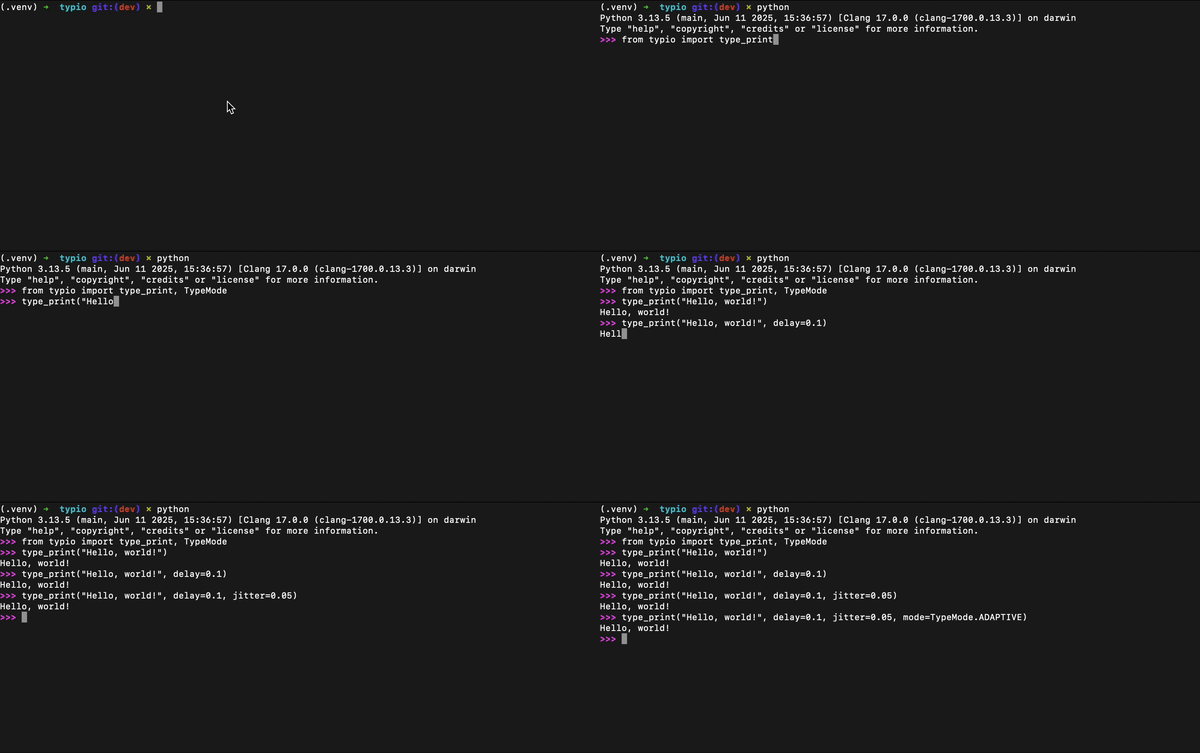
Screen Record
Issues & Bug Reports
Just fill an issue and describe it. We'll check it ASAP!
- Please complete the issue template
Show Your Support
Star This Repo
Give a ⭐️ if this project helped you!
Donate to Our Project
Bitcoin
1KtNLEEeUbTEK9PdN6Ya3ZAKXaqoKUuxCyEthereum
0xcD4Db18B6664A9662123D4307B074aE968535388Litecoin
Ldnz5gMcEeV8BAdsyf8FstWDC6uyYR6pgZDoge
DDUnKpFQbBqLpFVZ9DfuVysBdr249HxVDhTron
TCZxzPZLcJHr2qR3uPUB1tXB6L3FDSSAx7Ripple
rN7ZuRG7HDGHR5nof8nu5LrsbmSB61V1qqBinance Coin
bnb1zglwcf0ac3d0s2f6ck5kgwvcru4tlctt4p5qefTether
0xcD4Db18B6664A9662123D4307B074aE968535388Dash
Xd3Yn2qZJ7VE8nbKw2fS98aLxR5M6WUU3sStellar
GALPOLPISRHIYHLQER2TLJRGUSZH52RYDK6C3HIU4PSMNAV65Q36EGNLZilliqa
zil1knmz8zj88cf0exr2ry7nav9elehxfcgqu3c5e5Coffeete

Changelog
All notable changes to this project will be documented in this file.
The format is based on Keep a Changelog and this project adheres to Semantic Versioning.
Unreleased
1.5 - 2026-11-24
Added
- Anaconda publish workflow
- Context manager
TypioRuntimeErrorclass
Changed
- Test system modified
README.mdupdated
1.4 - 2026-10-22
Added
RANDOMmodeRANDOM_SAFEmode--list-modesCLI argument
Changed
Python 3.15added totest.ymlREADME.mdupdated- Test system modified
- Build system modified
1.3 - 2026-09-21
Added
flushparameterTypioContext.randomproperty
Changed
- Global random state pollution bug fixed
- Test system modified
README.mdupdated--modeCLI argument modified- Validation system modified
functions.pyrenamed tocore.pyTypioContext.sleepmethod modified
1.2 - 2026-08-17
Added
textCLI argumentseedparameter--seedCLI argument_TypioPrinter._split_tokensmethod
Changed
_TypioPrinter.writereturn bug fixed- Delay zero value bug fixed
- Jitter zero value bug fixed
- Test system modified
- Dependencies structure modified
1.1 - 2026-06-03
Added
RUBBER_DUCKmodePANICmode
Changed
- Test system modified
README.mdupdated
1.0 - 2026-05-18
Added
DRUNKmodeGLIDEmodeFOCUS_DRIFTmodeTypioValidationErrorclass
Changed
- Test system modified
README.mdupdated
0.9 - 2026-04-28
Added
HESITATIONmodeOVERTHINKmodeCONFIDENTmodeECHOmode
Changed
- Test system modified
README.mdupdated
0.8 - 2026-04-20
Added
RANDOM_CASEmodeWAVEmodeSTUTTERmodeNERVOUSmode
Changed
- Test system modified
README.mdupdated
0.7 - 2026-04-09
Added
HEARTBEATmodeREWINDmodeGLITCHmode
Changed
- Test system modified
README.mdupdated
0.6 - 2026-03-27
Added
THOUGHTFULmodeFAT_FINGERmodeBURSTmode
0.5 - 2026-03-09
Added
ACCELERATEmodeDECELERATEmode- Screen record video
Changed
- CLI messages updated
- CLI modified
- Test system modified
0.4 - 2026-02-19
Added
- Command line interface
Changed
_emitmethod modifiedREADME.mdupdated- Test system modified
0.3 - 2026-02-11
Added
TypioContextclass
Changed
- Test system modified
README.mdupdated_TypioPrinterclass all attributes changed to private_emitmethod modified_sleepfunction modified
0.2 - 2026-02-04
Changed
README.mdupdatedendparameter added totype_printfunction- Test system modified
0.1 - 2026-01-31
Added
type_printfunctiontypestyledecoratorCHARmodeWORDmodeLINEmodeSENTENCEmodeTYPEWRITERmodeADAPTIVEmode
1 maintainer

Metadata
1 maintainer
Release files for typio 1.5
For a detailed explanation of source distributions (sdists) and built distributions (wheels), please see the package formats documentation.
Source distribution (sdist)
| File | Size | Uploaded | Provenance | Actions |
|---|---|---|---|---|
| typio-1.5.tar.gz | 26.8 kB | Without provenance | Details for typio-1.5.tar.gz |
Built distribution (wheel)
| File | Interpreter | ABI | Platform | Actions Reset |
|---|---|---|---|---|
| typio-1.5-py3-none-any.whl | Python 3 | none | any | Details for typio-1.5-py3-none-any.whl |
Total release size: 44.8 kB
Release files / typio-1.5.tar.gz
| Download URL | typio-1.5.tar.gz |
|---|---|
| Size | 26.8 kB |
| Tags | Source |
|
SHA-256 checksum How to use checksums |
b5a2fbd27d5fb494246c888ffede08b7fbcd26ec8682efd51bec78fee585bef9
|
|
BLAKE2b-256 checksum How to use checksums |
c185da6caa7ddf7dbada1f1222ca56c2b97bd407ab1afdf8c0dab5d63d20d92a
|
| Upload date | |
|
Uploaded using Trusted Publishing? What is trusted publishing? |
No |
| Uploaded via |
twine/7.0.0 CPython/3.15.2
|
Release files / typio-1.5-py3-none-any.whl
| Download URL | typio-1.5-py3-none-any.whl |
|---|---|
| Size | 17.9 kB |
| Tags | Python 3 |
|
SHA-256 checksum How to use checksums |
3655104977c565f1939e07c3e621d4b48f42fc933494b8a5f63e01fc6f105943
|
|
BLAKE2b-256 checksum How to use checksums |
067c9df09472b5ed1d66b2e7183402f9ae7c12bfddef35de6ecfe938415d66e8
|
| Upload date | |
|
Uploaded using Trusted Publishing? What is trusted publishing? |
No |
| Uploaded via |
twine/7.0.0 CPython/3.15.2
|
Security for typio 1.5
Provenance
Provenance describes where a file came from. On PyPI, provenance is shared via attestations, which provide a verifiable record of the build or publishing details. View details, limitations and caveats.
No provenance found
None of the files in this release were uploaded with provenance metadata.
A note on package security
PyPI is a repository for distributing packages, not a service for auditing them. While third-party security researchers and our staff do their best to detect and remove malicious packages, PyPI cannot guarantee the quality, security or suitability of any given package.
To learn more about protecting yourself from malicious actors, visit our package security documentation.














