
Typio: Make Your Terminal Type Like a Human

Project description

Typio: Make Your Terminal Type Like a Human




Overview
Typio is a lightweight Python library that prints text to the terminal as if it were being typed by a human. It supports multiple typing modes (character, word, line, sentence, typewriter, and adaptive), configurable delays and jitter for natural variation, and seamless integration with existing code via a simple function or a decorator. Typio is designed to be minimal, extensible, and safe, making it ideal for demos, CLIs, tutorials, and storytelling in the terminal.
| PyPI Counter |  |
| Github Stars |  |
| Branch | main | dev |
| CI |  |
 |
| Code Quality |  |
 |
Installation
Source Code
- Download Version 1.0 or Latest Source
pip install .
PyPI
- Check Python Packaging User Guide
pip install typio==1.0
Usage
Function
Use type_print function to print text with human-like typing effects. You can control the typing speed, randomness, mode, and output stream.
Example
from typio import type_print
from typio import TypeMode

type_print("Hello, world!")

type_print(
    "Typing with style and personality.",
    delay=0.06,
    jitter=0.02,
	end="\n",
    mode=TypeMode.ADAPTIVE,
)
You can also redirect the output to any file-like object:
with open("output.txt", "w") as file:
    type_print("Saved with typing effects.", file=file)
Parameters
| Name | Type | Description | Default |
|---|---|---|---|
text |
str |
Text to be printed | -- |
delay |
float |
Base delay (seconds) between emitted units | 0.04 |
jitter |
float |
Random delay variation (seconds) | 0 |
end |
str |
Ending character(s) | \n |
mode |
TypeMode | Callable |
Typing mode (built-in or custom) | TypeMode.CHAR |
file |
TextIOBase |
Output stream | sys.stdout |
Built-in Modes
| Mode | Description |
|---|---|
TypeMode.CHAR |
Emit text character by character |
TypeMode.WORD |
Emit text word by word, preserving whitespace |
TypeMode.LINE |
Emit text line by line |
TypeMode.SENTENCE |
Emit text character by character with longer pauses after ., !, ? |
TypeMode.TYPEWRITER |
Emit text character by character with longer pauses after newlines |
TypeMode.ADAPTIVE |
Emit text with adaptive delays based on character type (spaces, punctuation, alphanumeric) |
TypeMode.ACCELERATE |
Emit text character by character with progressively decreasing delay (gradually speeds up over time) |
TypeMode.DECELERATE |
Emit text character by character with progressively increasing delay (gradually slows down over time) |
TypeMode.BURST |
Emit text in bursts of characters followed by short pauses |
TypeMode.FAT_FINGER |
Emit text mimicking human typos and corrections |
TypeMode.THOUGHTFUL |
Emit text while pause slightly before long words to simulate thinking |
TypeMode.HEARTBEAT |
Emit text with alternating short and long pauses to simulate a heartbeat-like rhythm |
TypeMode.REWIND |
Emit text while occasionally deleting and retyping words to simulate reconsideration |
TypeMode.GLITCH |
Emit text with occasional random glitches that are quickly corrected |
TypeMode.RANDOM_CASE |
Emit text with randomly varying character casing |
TypeMode.WAVE |
Emit text with sinusoidal delay variation |
TypeMode.STUTTER |
Emit text with stuttering effect on some words |
TypeMode.NERVOUS |
Emit text erratically typing with inconsistent pauses |
TypeMode.HESITATION |
Emit text with occasional pauses within words to simulate human hesitation |
TypeMode.OVERTHINK |
Emit text while occasionally deleting and retyping a chunk of text to simulate overthinking |
TypeMode.CONFIDENT |
Emit text quickly with brief pauses, adding longer delays after punctuation to simulate confident typing |
TypeMode.ECHO |
Emit text with occasional repetition of characters faintly, like a glitchy terminal echo |
TypeMode.DRUNK |
Emit text with erratic timing and occasional character duplication or skipping |
TypeMode.GLIDE |
Emit text with smooth deceleration then acceleration |
TypeMode.FOCUS_DRIFT |
Emit text with occasional attention drift, causing slowdowns and pauses mid-word |
Decorator
Use the @typestyle decorator to apply typing effects to all print calls inside a function, without changing the function's implementation.
Example
from typio import typestyle
from typio import TypeMode

@typestyle(delay=0.05, mode=TypeMode.TYPEWRITER)
def intro():
    print("Welcome to Typio.")
    print("Every print is typed.")

intro()
Parameters
| Name | Type | Description | Default |
|---|---|---|---|
delay |
float |
Base delay (seconds) between emitted units | 0.04 |
jitter |
float |
Random delay variation (seconds) | 0 |
mode |
TypeMode | Callable |
Typing mode (built-in or custom) | TypeMode.CHAR |
Custom Mode
Typio also allows defining custom typing modes.
A custom mode is a callable that receives a typing context and the text being printed.
Example
This custom mode, named dramatic, adds exaggerated pauses after punctuation to create a dramatic typing effect.
from typio import TypioContext

def dramatic(ctx: TypioContext, text: str):
    for ch in text:
        ctx.emit(ch)
        if ch in ".!?":
            ctx.sleep(delay=ctx.delay * 6)
Usage with type_print function:
type_print(
    "Wait... what?!",
    mode=dramatic,
    delay=0.05,
    jitter=0.02,
)
Usage with @typestyle decorator:
@typestyle(delay=0.06, mode=dramatic)
def demo():
    print("This is serious.")
    print("Very serious!")

demo()
Parameters
This table describes the TypioContext API, which is the interface exposed to custom typing modes for emitting text, controlling timing, and accessing delay settings.
| Name | Type | Description |
|---|---|---|
emit(text) |
method |
Emit a text fragment using typing effects |
sleep(delay=None, jitter=None) |
method |
Pause execution with optional delay and jitter override |
flush() |
method |
Flush the underlying output stream |
delay |
property |
Base delay in seconds |
jitter |
property |
Jitter value in seconds |
CLI
Typio provides a simple command line interface for printing text with typing effects.
Example
> typio --text="Hello world!" --mode=typewriter --delay=0.03
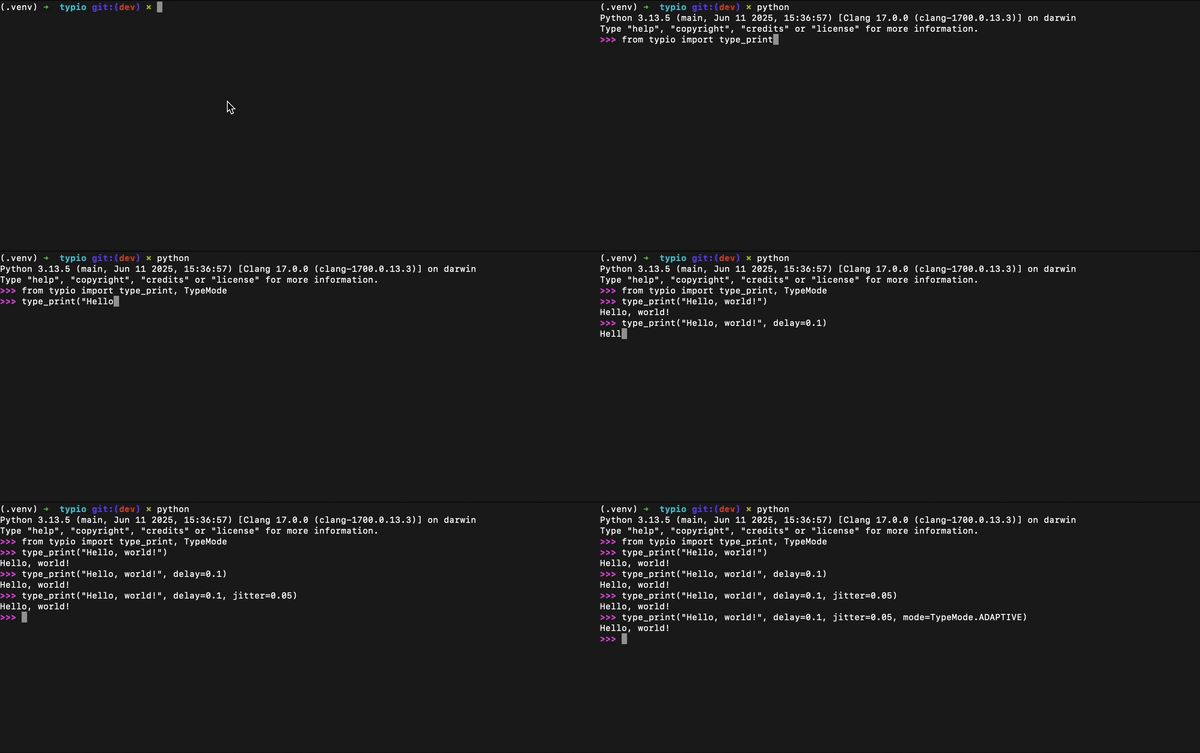
Screen Record
Issues & Bug Reports
Just fill an issue and describe it. We'll check it ASAP!
- Please complete the issue template
Show Your Support
Star This Repo
Give a ⭐️ if this project helped you!
Donate to Our Project
Bitcoin
1KtNLEEeUbTEK9PdN6Ya3ZAKXaqoKUuxCyEthereum
0xcD4Db18B6664A9662123D4307B074aE968535388Litecoin
Ldnz5gMcEeV8BAdsyf8FstWDC6uyYR6pgZDoge
DDUnKpFQbBqLpFVZ9DfuVysBdr249HxVDhTron
TCZxzPZLcJHr2qR3uPUB1tXB6L3FDSSAx7Ripple
rN7ZuRG7HDGHR5nof8nu5LrsbmSB61V1qqBinance Coin
bnb1zglwcf0ac3d0s2f6ck5kgwvcru4tlctt4p5qefTether
0xcD4Db18B6664A9662123D4307B074aE968535388Dash
Xd3Yn2qZJ7VE8nbKw2fS98aLxR5M6WUU3sStellar
GALPOLPISRHIYHLQER2TLJRGUSZH52RYDK6C3HIU4PSMNAV65Q36EGNLZilliqa
zil1knmz8zj88cf0exr2ry7nav9elehxfcgqu3c5e5Coffeete

Changelog
All notable changes to this project will be documented in this file.
The format is based on Keep a Changelog and this project adheres to Semantic Versioning.
Unreleased
1.0 - 2026-05-18
Added
DRUNKmodeGLIDEmodeFOCUS_DRIFTmodeTypioValidationErrorclass
Changed
- Test system modified
README.mdupdated
0.9 - 2026-04-28
Added
HESITATIONmodeOVERTHINKmodeCONFIDENTmodeECHOmode
Changed
- Test system modified
README.mdupdated
0.8 - 2026-04-20
Added
RANDOM_CASEmodeWAVEmodeSTUTTERmodeNERVOUSmode
Changed
- Test system modified
README.mdupdated
0.7 - 2026-04-09
Added
HEARTBEATmodeREWINDmodeGLITCHmode
Changed
- Test system modified
README.mdupdated
0.6 - 2026-03-27
Added
THOUGHTFULmodeFAT_FINGERmodeBURSTmode
0.5 - 2026-03-09
Added
ACCELERATEmodeDECELERATEmode- Screen record video
Changed
- CLI messages updated
- CLI modified
- Test system modified
0.4 - 2026-02-19
Added
- Command line interface
Changed
_emitmethod modifiedREADME.mdupdated- Test system modified
0.3 - 2026-02-11
Added
TypioContextclass
Changed
- Test system modified
README.mdupdated_TypioPrinterclass all attributes changed to private_emitmethod modified_sleepfunction modified
0.2 - 2026-02-04
Changed
README.mdupdatedendparameter added totype_printfunction- Test system modified
0.1 - 2026-01-31
Added
type_printfunctiontypestyledecoratorCHARmodeWORDmodeLINEmodeSENTENCEmodeTYPEWRITERmodeADAPTIVEmode


Download files
Download the file for your platform. If you're not sure which to choose, learn more about installing packages.
Source Distribution
Built Distribution
Filter files by name, interpreter, ABI, and platform.
If you're not sure about the file name format, learn more about wheel file names.
Copy a direct link to the current filters
File details
Details for the file typio-1.0.tar.gz.
File metadata
- Download URL: typio-1.0.tar.gz
- Upload date:
- Size: 20.4 kB
- Tags: Source
- Uploaded using Trusted Publishing? No
- Uploaded via: twine/6.2.0 CPython/3.14.5
File hashes
| Algorithm | Hash digest | |
|---|---|---|
| SHA256 |
47dc8af902741279b8c29b6a9ad1bdf85ec13e3e4f945fd54e1b9b3287fa3df2
|
|
| MD5 |
0720f9f1f838c784cf700de0ee2165d0
|
|
| BLAKE2b-256 |
a8524271f62fb5ef5f3104871f70331016803119e9f8ea7d11938edf9d8c99f1
|
File details
Details for the file typio-1.0-py3-none-any.whl.
File metadata
- Download URL: typio-1.0-py3-none-any.whl
- Upload date:
- Size: 14.9 kB
- Tags: Python 3
- Uploaded using Trusted Publishing? No
- Uploaded via: twine/6.2.0 CPython/3.14.5
File hashes
| Algorithm | Hash digest | |
|---|---|---|
| SHA256 |
1d217727f741cc40f73a65b8215fe133dd1a465845327d4d4df7dc3156edbaaa
|
|
| MD5 |
4f7cd12157f40033786067598a8ec1fe
|
|
| BLAKE2b-256 |
5965465aa7c80c6fde7afd39cf720e5482a90d378807c00bc3358c10cae534f7
|






