
⚔️ Tyrion — Terminal-Native AI Coding Agent
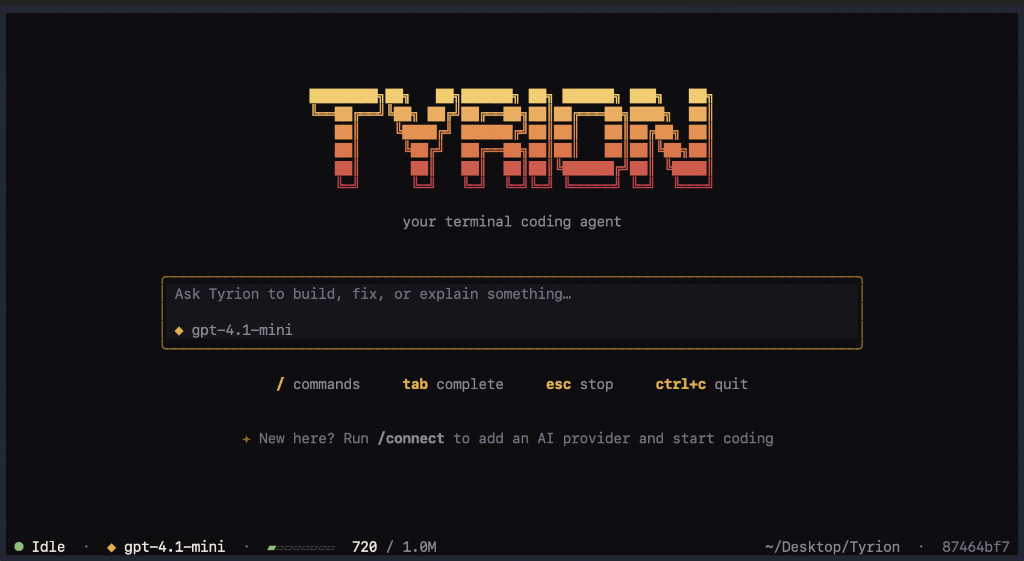
A powerful, transparent, and responsive AI coding companion built directly for your terminal.




📦 Install
Works on macOS and Linux. On Windows, use WSL.
curl -LsSf https://raw.githubusercontent.com/Xtejasveer/tyrion/main/install.sh | sh && exec "$SHELL" -l
Then just run tyrion. The && exec "$SHELL" -l at the end restarts your shell so tyrion works right away in this same terminal window. (In scripts and CI, leave that part off: there is no shell to restart.) The script installs uv if you don't have it, then installs Tyrion into its own isolated environment. You don't need Python installed (uv fetches Python 3.12 for you), and it never uses sudo. Want to read it first? install.sh is short.
- Update: run the install command again.
- Uninstall:
uv tool uninstall tyrion-cli(your chats and settings in~/.tyrionare left alone; delete that folder to remove them too). command not found: tyrion? The terminal window you installed from can't see the new command yet (this happens if the command was run without the&& exec "$SHELL" -lpart). Runexec "$SHELL" -l, or open a new terminal window, or runexport PATH="$HOME/.local/bin:$PATH"and try again. The installer prints these for you at the end.
📖 Overview
Tyrion is an autonomous terminal-native coding agent designed to pair-program with you directly inside your command line. Whether you are exploring an unfamiliar codebase, refactoring complex modules, fixing bugs, or writing unit tests, Tyrion provides a fluid, distraction-free environment that operates on your local workspace.
Equipped with filesystem tools, terminal execution capabilities, automatic token compaction, and in-UI provider switching, Tyrion pairs deep reasoning with responsive terminal aesthetics.
🏛️ Architecture
Tyrion's core engine architecture is derived from the Pi coding agent architecture developed by Mario Zechner (BadLogic Games). It adheres strictly to modular separation of concerns, separating pure stateless execution from stateful orchestration and persistence.
┌─────────────────────────────────────────────────────────────┐
│                    Presentation Layer                       │
│      Textual TUI (app.py)  │  Print CLI (cli.py / rendering)│
├─────────────────────────────────────────────────────────────┤
│                    Coding Domain Layer                      │
│   CodingSession  │  Coding Tools (read, write, edit, bash)  │
│   System Prompt Builder  │  Compaction & Token Accounting   │
├─────────────────────────────────────────────────────────────┤
│                    Agent Harness Layer                      │
│    AgentHarness (Stateful brain, cancellation, events)      │
│    Session Persistence (Append-only JSONL Tree)             │
├─────────────────────────────────────────────────────────────┤
│                    Pure Agent Loop Layer                    │
│      run_agent_loop (Stateless generator, turn manager)     │
├─────────────────────────────────────────────────────────────┤
│                    Model Provider Layer                     │
│    OpenAI-Compatible Streaming Provider (OpenRouter, etc.)  │
└─────────────────────────────────────────────────────────────┘
Key Architectural Layers
-
Pure Agent Loop (
src/tyrion_agent/loop.py):- A completely stateless generator driving model-to-tool feedback cycles.
- Emits fine-grained events (
AgentStartEvent,TurnStartEvent,MessageUpdateEvent,ToolExecutionStartEvent,ToolExecutionEndEvent,TurnEndEvent,AgentEndEvent). - Knows nothing about disk persistence or frontends; simply consumes an immutable transcript and yields execution events.
-
Agent Harness (
src/tyrion_agent/harness.py):- The stateful supervisor that wraps the pure loop.
- Manages message history, handles cooperative cancellation, dispatches events to listeners, and auto-repairs interrupted tool calls.
-
Append-Only Tree Session Storage (
src/tyrion_agent/sessions/):- Conversations are persisted to append-only JSONL logs on disk.
- Sessions are structured as trees rather than linear lists, enabling branching, time-travel, and lossless restoration via
reconstruct_state().
-
Model Provider Abstraction (
src/tyrion_ai/):- High-performance, streaming SSE client supporting OpenAI, OpenRouter, DeepSeek, and local LLMs (Ollama, vLLM).
- Captures real server-side token usage (
stream_options: {"include_usage": True}) and features self-healing retries if a provider rejects usage flags. - Configurable context window limits and local override support via
~/.tyrion/model_limits.json.
-
Coding Domain & Tools (
src/tyrion_coding/):CodingSession: Coordinates the project workspace, loads project guidelines (AGENTS.md/ instructions), and automatically assembles system prompts.- Real-time token compaction: Summarizes older conversation history using the model when nearing the 80% context window ceiling.
🎯 Use Cases
- Codebase Exploration & Analysis: Ask Tyrion to inspect directories, summarize module relationships, and trace function call graphs across unfamiliar repositories.
- Hands-Off Multi-File Refactoring: Prompt Tyrion to migrate legacy patterns or update dependencies; it reads targets, formulates plans, edits files, and verifies changes.
- Bug Diagnosis & TDD: Feed Tyrion a failing test suite or trace error; it will isolate the defect, apply precise edits, and re-run pytest until all tests are green.
- Remote & SSH Pair Programming: Full-featured interactive TUI that runs in headless servers, Docker containers, and SSH sessions without requiring a browser or Electron.
✨ Features
- 🎨 Lannister Brand Theme: Warm ink-black surfaces (
#0e0d10,#16151a), rich Lannister gold (#e0b04f), crimson accents, and custom Pygments syntax highlighting designed for chat readability. - ⌨️ Interactive Slash Command Palette: Type
/anywhere in the prompt to open an instant auto-completing command menu with arrow-key navigation and keyboard shortcuts. - ⚡ Full Tool Arsenal:
read: Reads files with line number indexing and byte caps.write: Creates or replaces files safely.edit: Precise substring replacements with uniqueness validation.bash: Subprocess execution with process group termination (os.killpg) to eliminate orphan background processes.
- 🔌 In-UI Connection (
/connect): Connect your OpenRouter or OpenAI API keys directly within the app and have them saved in~/.tyrion/credentials.json(readable only by you). - 📊 Real-Time Token Usage Bar: Dynamic status bar with visual block gauges (
▰▰▰▱▱▱) displaying exact server-reported token usage against context limits. - 🧹 Automatic & Manual Compaction (
/compact): Compresses long conversations into persistent summaries, preserving immediate context while keeping token usage lean. - 🗂️ Session Resuming (
/resume): Visual session picker overlay allowing you to jump between past conversations and pick up right where you left off.
🛡️ Safety
Tyrion is early software (v0.1). Read this before pointing it at a project you care about:
- It runs commands and edits files without asking. The
bash,writeandedittools act immediately and can reach any path your user can. Use it inside a git repository so you can review and undo changes (git diff,git restore). - Your code leaves your machine. Your prompts and the files Tyrion reads are sent to the model provider you connect.
- Your API key is stored in plain text in
~/.tyrion/credentials.json, readable only by you (permissions600). Prefer a key with a spending limit. - Files can carry instructions. In an untrusted repository, a malicious file could try to steer the model into running commands.
🚀 Getting Started
Just want to use Tyrion? See Install above. This section is for running it from source.
Prerequisites
- Python 3.12+
uv(recommended) orpip
Installation from source
Clone the repository and install dependencies:
git clone https://github.com/Xtejasveer/tyrion.git
cd tyrion
uv sync
Running Tyrion
Launch the interactive Terminal User Interface:
uv run tyrion
Tip: On first launch, run /connect to select your model provider (e.g. OpenRouter) and enter your API key.
Command-Line Usage
Tyrion also supports quick one-shot command-line runs:
# Ask a direct question
uv run tyrion "Explain how the routing works in src/api.py"

# Specify a model
uv run tyrion --model google/gemini-2.5-flash "Write unit tests for tools.py"

# Resume an existing session by ID
uv run tyrion --resume <session_id>

# Include a file's contents in the prompt
uv run tyrion "What is causing this traceback? $(cat error.log)"

# Or pipe the whole prompt in
cat prompt.txt | uv run tyrion
🕹️ Slash Commands Reference
| Command | Description |
|---|---|
/connect |
Open provider dialog to enter & persist your API key |
/model <name> |
Hot-swap active LLM model on the fly |
/resume |
Open visual session picker modal to switch conversations |
/compact |
Manually compress and summarize older conversation history |
/clear |
Wipe current transcript and return to centered landing screen |
/help |
List all available slash commands and descriptions |
/quit / /exit |
Gracefully exit the application |
🧪 Testing
Tyrion comes with a comprehensive test suite covering the agent loop, bash tool process isolation, SSE streaming, model limits, context compaction, TUI dialogs, command menu navigation, and theme rendering:
uv run pytest
============================= 200 passed in 17.28s =============================
🤝 Acknowledgements
Tyrion's core architecture and design principles are derived from the Pi coding agent architecture designed by Mario Zechner (BadLogic Games). We extend our gratitude to Mario for the clean conceptual framework of separating the pure stateless agent loop from stateful harnesses and persistent session trees.
📜 License
This project is licensed under the MIT License — see the LICENSE file for details.
1 maintainer

Metadata
1 maintainer
Release files for tyrion-cli 0.1.0
For a detailed explanation of source distributions (sdists) and built distributions (wheels), please see the package formats documentation.
Source distribution (sdist)
| File | Size | Uploaded | |
|---|---|---|---|
| tyrion_cli-0.1.0.tar.gz | 82.7 kB | Details |
Built distribution (wheel)
| File | Interpreter | ABI | Platform | Reset |
|---|---|---|---|---|
| tyrion_cli-0.1.0-py3-none-any.whl | Python 3 | none | any | Details |
Total release size: 156.4 kB
Release files / tyrion_cli-0.1.0.tar.gz
| Download URL | tyrion_cli-0.1.0.tar.gz |
|---|---|
| Size | 82.7 kB |
| Tags | Source |
|
SHA-256 checksum How to use checksums |
44bd96281e6f17e750045fa16b15c8507accee4f5f7a29d82f3b2585d083586b
|
|
BLAKE2b-256 checksum How to use checksums |
90d967d627f804b922bef6f54fce56b89c6ca0fdeeb96857a8c361a4b15e3c41
|
| Upload date | |
|
Uploaded using Trusted Publishing? What is trusted publishing? |
Yes |
| Uploaded via |
twine/7.0.0 CPython/3.13.14
|
Provenance
Provenance describes where a file came from. On PyPI, provenance is shared via attestations, which provide a verifiable record of the build or publishing details. View details, limitations and caveats.


PyPI Publish Attestation
PyPI verified that this artifact, at this checksum, originated from the publisher listed below.
Signed by GitHub Actions, verified by PyPI on Sep 19, 2026.
Transparency logRelease files / tyrion_cli-0.1.0-py3-none-any.whl
| Download URL | tyrion_cli-0.1.0-py3-none-any.whl |
|---|---|
| Size | 73.7 kB |
| Tags | Python 3 |
|
SHA-256 checksum How to use checksums |
4f1bf0d0d9f2127ae35538fed38151c753952c6a5f20cd7e87dfb36551906cd1
|
|
BLAKE2b-256 checksum How to use checksums |
66ae722c3e358c02bd944f232f071e5d781db5aec363877ae397c90811dfe2d9
|
| Upload date | |
|
Uploaded using Trusted Publishing? What is trusted publishing? |
Yes |
| Uploaded via |
twine/7.0.0 CPython/3.13.14
|
Provenance
Provenance describes where a file came from. On PyPI, provenance is shared via attestations, which provide a verifiable record of the build or publishing details. View details, limitations and caveats.
PyPI Publish Attestation
PyPI verified that this artifact, at this checksum, originated from the publisher listed below.
Signed by GitHub Actions, verified by PyPI on Sep 19, 2026.
Transparency log













