
Tyrion
A terminal-native AI coding agent. Tyrion is a command-line tool that pairs a large language model with your local codebase, so you can ask it to explore, explain, refactor, debug, and test your code without leaving the terminal. It reads and edits your files, runs shell commands, and streams its reasoning back to you in a responsive text interface — working with any OpenAI-compatible model (OpenAI, OpenRouter, DeepSeek, or a local model via Ollama or vLLM).
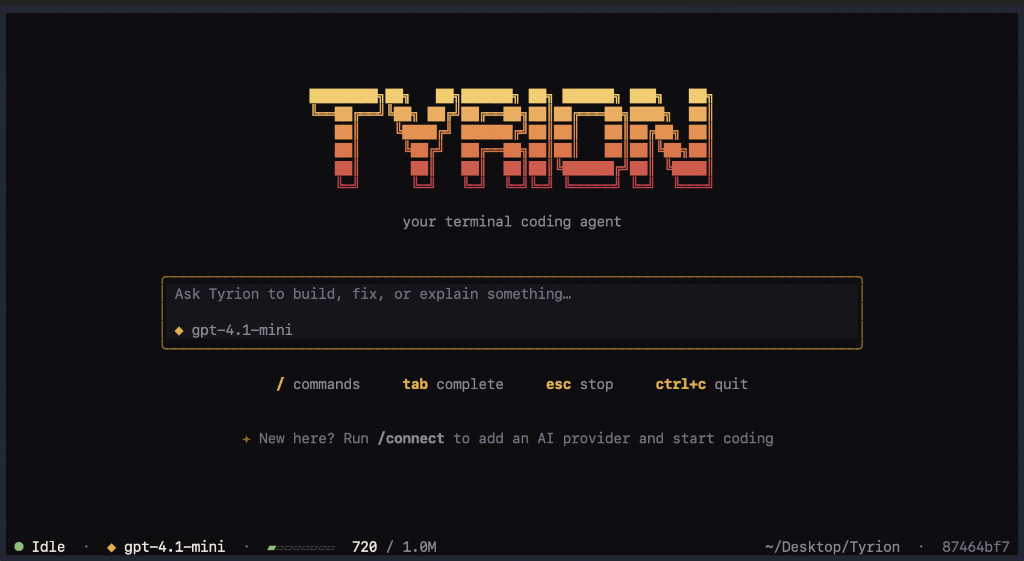




Table of Contents
- What Tyrion Is
- How It Works
- Installation
- Quick Start
- Command-Line Usage
- Slash Commands
- Configuration
- Architecture
- Evaluation
- Safety and Limitations
- Development
- Testing
- Acknowledgements
- License
What Tyrion Is
Tyrion is an AI pair programmer that lives in your terminal. You describe a task in plain language — "find and fix the failing test in parser.py", "explain how routing works in this project", "add type hints to the utils module" — and Tyrion carries it out by taking a sequence of actions on your machine: reading files, making precise edits, and running commands, checking its own work as it goes.
Unlike a chat window that can only talk about your code, Tyrion can act on it. And unlike an editor plugin or a browser-based tool, it runs entirely in the terminal, which means it works the same way over SSH, inside a Docker container, or on a headless server, with no browser or GUI required.
What makes it useful:
- It operates on your real workspace. Tyrion reads the actual files in your project directory and edits them in place, rather than working from pasted snippets.
- It is transparent. Every file it reads, every edit it makes, and every command it runs is shown to you as it happens, along with a live view of token usage.
- It is model-agnostic. Tyrion speaks the standard OpenAI chat-completions protocol, so you can point it at a frontier model, a cost-effective hosted model, or a model running locally on your own hardware, and switch between them mid-session.
- It remembers. Conversations are saved to disk and can be resumed later, so long-running work survives closing the terminal.
Typical uses:
- Understanding a codebase. Ask Tyrion to summarize a module, trace how a function is called, or explain an unfamiliar part of the project.
- Fixing bugs. Give it a failing test or an error trace; it locates the cause, applies a fix, and re-runs the tests to confirm.
- Refactoring. Have it rename symbols, restructure modules, or update patterns across multiple files, verifying that tests still pass.
- Writing tests. Ask it to add unit tests for a function or module.
- Remote development. Because it is terminal-only, it runs comfortably over SSH and in containers where graphical tools cannot.
How It Works
When you send Tyrion a request, it enters a loop:
- The model receives your message, the relevant project context, and a set of tools it is allowed to use.
- The model responds — either with a direct answer, or by calling a tool (for example, reading a file or running a command).
- Tyrion executes the tool call and feeds the result back to the model.
- Steps 2 and 3 repeat until the model has enough information to finish, at which point it returns its final answer.
This is what allows Tyrion to complete multi-step tasks on its own: it can read a file, decide what to change, make the edit, run the tests, and react to the result — all within a single request from you.
Tyrion has four tools:
| Tool | What it does |
|---|---|
read |
Reads a file, with line numbering and size limits to stay within the model's context. |
write |
Creates a new file or replaces an existing one. |
edit |
Makes a precise, targeted change to a file by replacing exact text, with a uniqueness check to prevent ambiguous edits. |
bash |
Runs a shell command. Commands run in their own process group, so background processes are cleaned up reliably. |
Installation
Tyrion runs on macOS and Linux. On Windows, use WSL.
The one-line installer sets everything up for you:
curl -LsSf https://raw.githubusercontent.com/Xtejasveer/tyrion/main/install.sh | sh && exec "$SHELL" -l
Then run tyrion.
The trailing && exec "$SHELL" -l restarts your shell so the tyrion command is available immediately in the same window. (In scripts and CI, omit it — there is no interactive shell to restart.) The installer downloads uv if it is not already present, then installs Tyrion into its own isolated environment. You do not need Python installed beforehand — uv fetches Python 3.12 for you — and the installer never uses sudo. The script is short and readable: see install.sh.
Alternatives:
- If you already use uv:
uv tool install tyrion-cli - With pipx (requires Python 3.12+):
pipx install tyrion-cli - The package is published on PyPI as
tyrion-cli. The command it installs istyrion.
Pin a specific version:
curl -LsSf https://raw.githubusercontent.com/Xtejasveer/tyrion/main/install.sh | TYRION_VERSION=0.1.0 sh && exec "$SHELL" -l
Update: uv tool upgrade tyrion-cli (or re-run the install command).
Uninstall: uv tool uninstall tyrion-cli. Your conversations and settings in ~/.tyrion are left in place; delete that folder to remove them as well.
If you see command not found: tyrion: the current terminal has not picked up the new command yet (this happens when the install command is run without the && exec "$SHELL" -l part). Run exec "$SHELL" -l, open a new terminal window, or run export PATH="$HOME/.local/bin:$PATH". The installer prints these instructions at the end.
Quick Start
Launch the interactive interface:
tyrion
On first launch, run /connect to choose your model provider (for example OpenRouter) and enter your API key. The key is stored locally in ~/.tyrion/credentials.json, readable only by you. Once connected, type a request and press Enter.
Command-Line Usage
Tyrion also runs as a one-shot command for quick, non-interactive tasks:
# Ask a direct question about your code
tyrion "Explain how the routing works in src/api.py"

# Choose a specific model for this run
tyrion --model google/gemini-2.5-flash "Write unit tests for tools.py"

# Resume a previous session by its ID
tyrion --resume <session_id>

# Include a file's contents in the prompt
tyrion "What is causing this traceback? $(cat error.log)"

# Pipe a prompt in from standard input
cat prompt.txt | tyrion
(When running from a cloned source checkout instead of an installed package, prefix these with uv run, for example uv run tyrion "...".)
Slash Commands
Inside the interactive interface, type / to open an auto-completing command menu. The available commands are:
| Command | Description |
|---|---|
/connect |
Open the provider dialog to enter and save your API key. |
/model <name> |
Switch the active model without restarting. |
/resume |
Open a picker to switch to a past conversation. |
/compact |
Summarize and compress older conversation history to free up context. |
/clear |
Clear the current transcript and return to the landing screen. |
/help |
List all available commands. |
/quit or /exit |
Exit the application. |
Configuration
Tyrion stores everything under ~/.tyrion in your home directory:
| Path | Purpose |
|---|---|
~/.tyrion/credentials.json |
Your API keys, stored with owner-only permissions (600). |
~/.tyrion/sessions/ |
Saved conversations, one append-only log file per session. |
~/.tyrion/model_limits.json |
Optional overrides for a model's context-window size. |
Supported providers. Any service that exposes an OpenAI-compatible chat-completions endpoint works, including OpenAI, OpenRouter, and DeepSeek, as well as local servers such as Ollama and vLLM. You can provide credentials interactively with /connect, or through standard environment variables (for example OPENAI_API_KEY, OPENROUTER_API_KEY, and matching *_BASE_URL variables).
Architecture
Tyrion's engine is organized into clearly separated layers, following the design of the Pi coding agent by Mario Zechner. The central principle is a strict separation between pure, stateless execution and the stateful orchestration and persistence around it, which keeps the core logic simple to reason about and test.
+-------------------------------------------------------------+
|                     Presentation Layer                      |
|   Textual TUI (app.py)  |  Command-line interface (cli.py)  |
+-------------------------------------------------------------+
|                    Coding Domain Layer                      |
|   CodingSession  |  Tools (read, write, edit, bash)         |
|   System-prompt builder  |  Token accounting & compaction   |
+-------------------------------------------------------------+
|                     Agent Harness Layer                     |
|   AgentHarness: state, cancellation, event dispatch,        |
|   and repair of interrupted tool calls                      |
+-------------------------------------------------------------+
|                    Pure Agent Loop Layer                    |
|   run_agent_loop: a stateless generator driving the         |
|   model-to-tool cycle                                       |
+-------------------------------------------------------------+
|                    Model Provider Layer                     |
|   Streaming OpenAI-compatible client (OpenAI, OpenRouter,   |
|   DeepSeek, Ollama, vLLM)                                    |
+-------------------------------------------------------------+
1. Pure agent loop (src/tyrion_agent/loop.py). A stateless async generator that drives the model-to-tool cycle. It consumes an immutable transcript and emits fine-grained events (AgentStartEvent, TurnStartEvent, MessageUpdateEvent, ToolExecutionStartEvent, ToolExecutionEndEvent, TurnEndEvent, AgentEndEvent). It knows nothing about disk storage or the user interface, which makes it straightforward to test in isolation.
2. Agent harness (src/tyrion_agent/harness.py). The stateful supervisor wrapping the pure loop. It owns the message history, supports cooperative cancellation, dispatches events to any number of subscribed listeners, and repairs tool calls left dangling by an interrupted run.
3. Session storage (src/tyrion_agent/sessions/). Conversations are written to append-only JSONL logs. Sessions are modeled as trees rather than flat lists, which enables branching, time-travel, and lossless restoration of a past state.
4. Model provider (src/tyrion_ai/). A streaming client for OpenAI-compatible endpoints. It reads real server-reported token usage, retries automatically if a provider rejects the usage flag, and supports per-model context-window overrides.
5. Coding domain and tools (src/tyrion_coding/). The CodingSession ties the pieces together: it sets up the workspace, loads any project instructions (such as an AGENTS.md file), assembles the system prompt, and manages token compaction, which summarizes older history automatically as the conversation approaches the model's context limit.
Evaluation
Tyrion includes an evaluation harness (in the evals/ directory) that measures how well the agent performs on real coding tasks, so that changes to the agent can be checked against a consistent benchmark rather than judged by impression.
The harness runs Tyrion against a set of "golden" tasks — small, self-contained coding problems such as fixing a bug, adding a test, implementing a function, or performing a multi-file edit. Each task runs in an isolated sandbox (a throwaway copy of a fixture project), so evaluation never touches your real code. Each run is then scored on several complementary metrics:
- Code correctness (deterministic): does the task's test suite pass after the agent's changes? This is an objective pass/fail signal, not an opinion.
- Tool correctness (deterministic): did the agent use the tools the task expects?
- Task completion, argument correctness, and step efficiency (LLM-judged, via DeepEval): did the agent satisfy the intent, pass sensible arguments to its tools, and reach the goal without wasted steps?
The deterministic metrics are free and reproducible and form the trustworthy core. The LLM-judged metrics are optional and add insight into the more subjective, quality dimensions that a pass/fail test cannot capture. The evaluation dependencies are kept separate from the runtime, so a normal install of Tyrion never pulls them in.
Safety and Limitations
Tyrion is early software (version 0.1). Please read this before using it on a project you care about.
- It acts without asking for confirmation. The
bash,write, andedittools take effect immediately and can reach anything your user account can. Run Tyrion inside a git repository so you can review its changes withgit diffand undo them withgit restore. - Your code is sent to your model provider. Your prompts and the contents of the files Tyrion reads are transmitted to whichever model provider you connect.
- API keys are stored in plain text in
~/.tyrion/credentials.json(with owner-only600permissions). Prefer a key that has a spending limit. - Files can contain instructions. In an untrusted repository, a file could attempt to manipulate the model into taking unwanted actions. Be cautious pointing Tyrion at code you do not trust.
Development
To run Tyrion from a source checkout:
Prerequisites: Python 3.12 or newer, and uv (recommended).
git clone https://github.com/Xtejasveer/tyrion.git
cd tyrion
uv sync
uv run tyrion
uv sync installs the project along with its development dependencies. Use uv run to execute commands inside the project environment.
Testing
Tyrion has a comprehensive test suite covering the agent loop, bash process isolation, streaming, model limits, context compaction, the terminal interface, the command menu, and theme rendering:
uv run pytest
Acknowledgements
Tyrion's core architecture is based on the Pi coding agent designed by Mario Zechner of BadLogic Games. The clear separation between a pure, stateless agent loop, a stateful harness, and persistent session trees is drawn directly from that work, and is gratefully acknowledged.
License
Tyrion is released under the MIT License. See LICENSE for details.
1 maintainer

Metadata
1 maintainer
Release files for tyrion-cli 0.1.1
For a detailed explanation of source distributions (sdists) and built distributions (wheels), please see the package formats documentation.
Source distribution (sdist)
| File | Size | Uploaded | |
|---|---|---|---|
| tyrion_cli-0.1.1.tar.gz | 84.3 kB | Details |
Built distribution (wheel)
| File | Interpreter | ABI | Platform | Reset |
|---|---|---|---|---|
| tyrion_cli-0.1.1-py3-none-any.whl | Python 3 | none | any | Details |
Total release size: 159.4 kB
Release files / tyrion_cli-0.1.1.tar.gz
| Download URL | tyrion_cli-0.1.1.tar.gz |
|---|---|
| Size | 84.3 kB |
| Tags | Source |
|
SHA-256 checksum How to use checksums |
c2414ec18b885ce50147ed81dfa5de1a0fef7fc0c11f8b94c0e58005dca8c9a4
|
|
BLAKE2b-256 checksum How to use checksums |
fb21e38cfcb5e1c0daeb3d17b5c207308a549bb85c2ff2d350a5bc918d650a50
|
| Upload date | |
|
Uploaded using Trusted Publishing? What is trusted publishing? |
Yes |
| Uploaded via |
twine/7.0.0 CPython/3.13.14
|
Provenance
Provenance describes where a file came from. On PyPI, provenance is shared via attestations, which provide a verifiable record of the build or publishing details. View details, limitations and caveats.


PyPI Publish Attestation
PyPI verified that this artifact, at this checksum, originated from the publisher listed below.
Signed by GitHub Actions, verified by PyPI on Sep 27, 2026.
Transparency logRelease files / tyrion_cli-0.1.1-py3-none-any.whl
| Download URL | tyrion_cli-0.1.1-py3-none-any.whl |
|---|---|
| Size | 75.1 kB |
| Tags | Python 3 |
|
SHA-256 checksum How to use checksums |
aad4c415bd520c9ea3cabdeac82c125af52c44fe87fdd1e5958d34ed7f126996
|
|
BLAKE2b-256 checksum How to use checksums |
9404dc58ef27814cea46c320115ec672d56f42e0f02abd63ae87d634b4a68698
|
| Upload date | |
|
Uploaded using Trusted Publishing? What is trusted publishing? |
Yes |
| Uploaded via |
twine/7.0.0 CPython/3.13.14
|
Provenance
Provenance describes where a file came from. On PyPI, provenance is shared via attestations, which provide a verifiable record of the build or publishing details. View details, limitations and caveats.
PyPI Publish Attestation
PyPI verified that this artifact, at this checksum, originated from the publisher listed below.
Signed by GitHub Actions, verified by PyPI on Sep 27, 2026.
Transparency log













