

The anti-slop harness for AI-generated frontends.
UIdetox helps your coding agent turn generic, LLM-style UI output into production-quality interface work through a repeatable scan → fix → verify loop.
It combines:
- deterministic anti-pattern detection,
- opinionated design guidance,
- mechanical tooling checks,
- and autonomous issue batching with memory-aware continuation.
Quick Start • Autonomous Loop • Commands
The AI Slop Problem
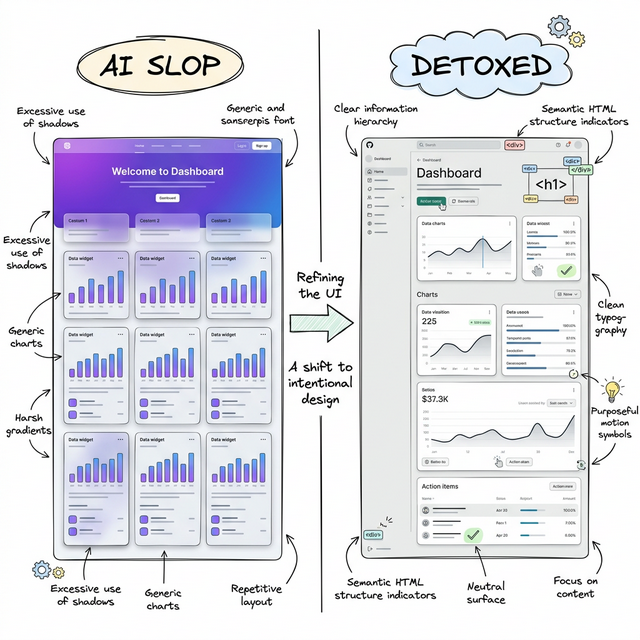
AI tools can produce UI quickly, but often converge on the same visual clichés: default font stacks, purple-blue gradients, glass cards, repetitive metric blocks, and shallow interaction states.
UIdetox gives your agent a target and a process:
- detect what looks autogenerated,
- prioritize the highest-impact fixes,
- enforce consistent design rules,
- and iterate until the Design Score reaches release quality.
This is not just linting. It is a structured quality system for frontend output.
Quick Start
Run a one-off command without a persistent installation:
# Published release
uvx uidetox --version

# Current local checkout
uvx --from . uidetox --version
uvx creates a temporary isolated environment. A cold cache still downloads
runtime dependencies; use --offline only after those dependencies are cached.
First-run guided setup
Run uvx uidetox with no subcommand in an interactive terminal to start the
resumable setup. Progress is saved in .uidetox/onboarding.json; rerun the same
command to continue from the next incomplete step.
The wizard:
- explains the workflow and detects supported coding agents,
- asks before installing namespaced UIdetox skills and instructions,
- detects optional codebase-memory, Pillow, Playwright, and Chromium support,
- asks for the website/app purpose, audience, primary job, tone, preserved contracts, and constraints, and
- appends a redacted intent-provenance event and writes a copy-ready agent
prompt to
.uidetox/agent-handoff.md.
No optional installer runs without confirmation. Codebase-memory setup remains
guidance-only because its installer restarts agent MCP processes. Noninteractive
no-command runs, --help, and --version keep their normal read-only behavior.
Install UIdetox when running a multi-command workflow:
# With uv
uv tool install uidetox

# Or with pip
pip install uidetox

# Install agent-specific skill assets
uidetox update-skill [agent]    # supports: claude, cursor, gemini, windsurf, codex, copilot

# Initialize project dials + optional auto-commit / preview URL
uidetox setup --auto-commit --dev-server http://localhost:5173

# Map frontend structure and generate three topology-level redesigns
uidetox map src
uidetox redesign src --variants 3
uidetox compare
uidetox prototype REDESIGN-01-task-flow

# Start autonomous protocol
uidetox loop
Optional Capabilities
Base install includes scanning, checks, issue queues, and remediation workflows.
Persistent project memory is also included and stored locally in
.uidetox/memory.json; it needs no optional dependency.
Install only capabilities needed by your workflow:
# Screenshot capture and visual diffs
pip install 'uidetox[capture]'
python -m playwright install chromium

# Local PNG comparison without browser capture
pip install 'uidetox[visual]'

# Every optional capability
pip install 'uidetox[all]'
Playwright's Python package does not include Chromium; run browser install command
after installing capture or all before first uidetox capture.
Contributing
Use Python 3.11-3.13. From a clean checkout, install UIdetox and its test dependencies in an isolated environment, then run the canonical verification gate:
python -m pip install -e '.[dev]'
python -m pytest -q -W error
The test command should finish with an all-green result and no failures or errors.
Agent Bootstrap Prompt
Paste this into your coding agent to kick off a full detox pass:
Eliminate AI slop from this codebase. Make the frontend feel hand-crafted. Target: Design Score 95+.

BOOTSTRAP:
  pip install uidetox
  uidetox update-skill <your_agent>   # claude | cursor | gemini | codex | windsurf | copilot
  uidetox setup --auto-commit         # add --dev-server if preview is not on :3000
  uidetox loop                        # prints the full protocol — follow it

THE LOOP (repeat until score ≥ 95 and queue is empty):
  1. uidetox next                     # get highest-priority batch + SKILL.md context
  2. Fix every issue properly          # full rewrites, not snippets — read files first
  3. uidetox batch-resolve IDs --note "..." && uidetox check --fix && uidetox status

RULES:
  - Don't be lazy. Rewrite entire files if needed. No TODOs, no "I'll handle this later."
  - The tool's rules override your instincts. Trust the analyzer and SKILL.md over your biases.
  - Don't stop after one fix. Don't ask permission. Don't summarize between iterations.
  - When score ≥ 95 and queue is empty: uidetox finish
The Autonomous Protocol
uidetox loop remains a safe preview: it prints the scan → fix → verify protocol for an agent to follow. Add --execute to run the deterministic phases in process and persist resumable state at .uidetox/workflow-state.json:
uidetox loop --execute
uidetox loop --execute --proposal-id REDESIGN-01-task-flow
uidetox loop --execute --proposal-id REDESIGN-01-task-flow --review-score 97
Execution never invokes an external agent CLI and never chooses a redesign proposal automatically. It stops explicitly when source fixes need an agent, proposal selection is missing, subjective scoring needs human/LLM input, or verification evidence is stale/blocked. Completed fresh phases are skipped on resume; source or input changes invalidate only dependent downstream phases. Failures are recorded once and retried only on a later invocation. Passing the score, queue, and freshness gates marks uidetox finish as eligible—it does not run finalization automatically.
The Intelligence Layer
UIdetox combines static AST analysis with persistent local project memory so fixes remain correct and consistent with the project's identity.
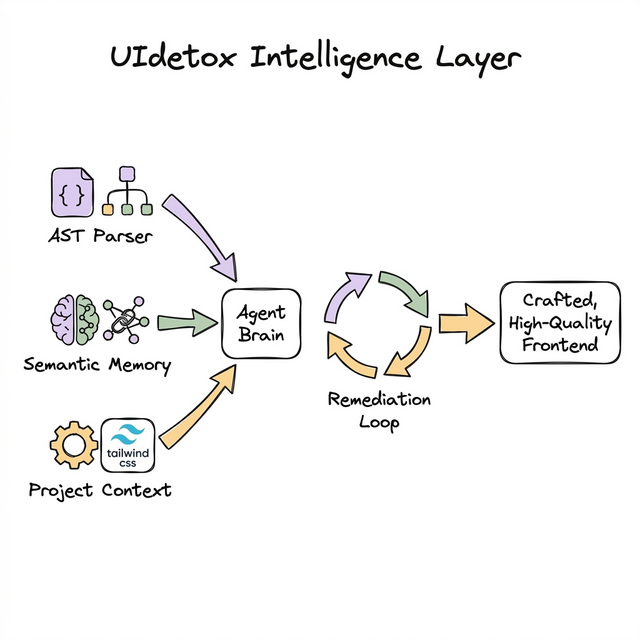
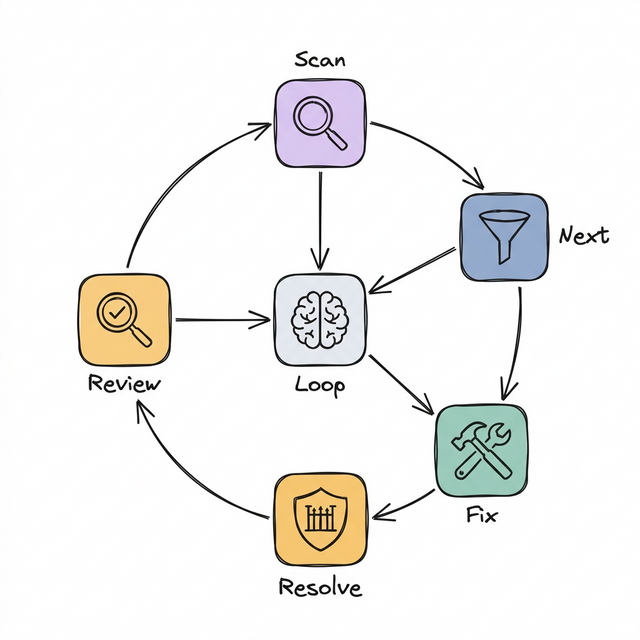
The Remediation Flow
Each iteration follows a strict quality gate. Issues are batched by component, skill rules are injected, and fixes are verified against the project's build system before being committed.
Compare existing local PNGs directly with uidetox visual-evidence --before before.png --after after.png. Add --reviewer-artifacts for a heat overlay,
changed-area crop, blend, and contact sheet. Add --isolated --allowed-root /path/to/project when decoding external/local baselines in a bounded worker.
Isolation uses a versioned JSON protocol, path and resource ceilings, and
parent-side manifest verification; it is process isolation, not a complete OS
sandbox. URLs and animated/multi-frame images are unsupported. See the
visual-evidence ADR.
Design Score = Objective × 0.6 + Subjective × 0.4 — the agent keeps looping until this hits the target.
Structural Redesign
uidetox map [target] builds .uidetox/frontend-map.json: a semantic graph of files, components, render relationships, routes, regions, actions, state, data dependencies, and design tokens. Tree-sitter provides syntax-aware extraction where a language grammar is available; every node records extraction provenance/confidence and unsupported languages fall back to regex. The artifact includes source hashes and an extractor version.
Add --runtime --url http://localhost:5173 to observe the rendered DOM at mobile, tablet, and desktop widths. Runtime evidence includes visible regions, accessible roles/names, interaction states, bounding boxes, computed layout/type/color styles, responsive topology, and optional full-page screenshots via --screenshots. It also emits selector-specific findings for component and text misalignment, font baseline/family mismatch, truncated text, clipped children, text touching card/control edges, inadequate or uneven horizontal/vertical padding, and tight multiline leading. Finding counts and details are stored under runtime_finding_count, runtime_finding_counts, and runtime_findings. Start the dev server first. Browser observation requires playwright install chromium.
uidetox redesign [target] --variants 3 consumes that map and writes .uidetox/redesigns.json. Stale maps are refreshed automatically when mapped source files are added, changed, deleted, or the extractor changes. Proposals change page topology, navigation, component ownership, action placement, interaction model, responsive composition, and density before suggesting source edits. Pairwise structural distance prevents three cosmetic variants of the same layout.
uidetox compare presents every proposal across the same seven structural dimensions and shows pairwise distance. uidetox prototype <proposal-id> writes an isolated, agent-ready brief under .uidetox/prototypes/; mapped source evidence is explicitly quarantined as untrusted data.
Use --refresh-map to force a rebuild, --map-file or --file to consume a specific artifact, --output to choose an artifact path, and --json for automation.
Commands
| Command | Purpose |
|---|---|
uidetox loop |
Preview the autonomous protocol; add --execute for durable in-process phase execution. |
uidetox setup |
Interactively capture website/app purpose, audience, primary job, tone, brand, preserved contracts, and constraints; persist typed design dials, dev_server, and auto-commit behavior. Use --no-intent-prompt for automation. |
uidetox intent |
Inspect effective intent with per-field source, evidence, confidence, and confirmation state (--json, --require-confirmed). |
uidetox scan |
Run 218-rule static analysis + dynamic WCAG theme audit + subjective rubric injection. |
uidetox map [target] |
Build a persistent semantic frontend graph; optionally detect rendered layout, clipping, typography, and spacing defects (--runtime, repeatable --url, --screenshots, --timeout, --output, --json). |
uidetox redesign [target] |
Generate 1–5 structurally divergent, contract-preserving redesign plans (--variants, --refresh-map, --map-file, --output, --json). |
uidetox compare |
Compare redesign proposals across topology, navigation, ownership, action placement, interaction, responsive model, density, and pairwise distance (--file, --json). |
uidetox prototype <proposal-id> |
Create a disposable implementation brief with contracts, migration steps, acceptance checks, and untrusted-evidence isolation (--file, --output, --stdout). |
uidetox next |
Get the highest-priority issue batch with SKILL.md context. |
uidetox batch-resolve |
Resolve issues atomically with verification + auto-commit. |
uidetox status |
Show blended Design Score, velocity, and queue health. |
uidetox review |
Subjective quality scoring across 4 design dimensions. |
uidetox capture |
Capture before/after screenshots and visual diffs (--stage before/after, --url, --responsive). Start your dev server first — uidetox does not launch it. Diff is amplified 8× for visibility. |
uidetox visual-evidence |
Compare local PNGs with exact/masked metrics and optional reviewer artifacts. Add --isolated plus repeatable --allowed-root for bounded process isolation (not a complete OS sandbox). |
uidetox diff |
Compare fresh static analysis against stored baseline — shows NEW / FIXED / UNCHANGED issues. Supports --since <sha>, --output table/json/github, --save. |
uidetox watch |
Poll a directory for file changes and re-scan on each modification. Use --interval (default 1s) and --no-clear. |
uidetox rescan |
Fresh re-analysis with dedup and auto-escalation. |
uidetox check --fix |
Mechanical gate: tsc → lint → format. |
uidetox plan |
Attack plan grouped by component with effort estimates. |
uidetox autofix |
T1-first quick-win guidance across 12 categories. |
uidetox finish |
Squash-merge session branch into main. |
Design skill commands
Targeted refinement — use when a component needs deeper attention:
uidetox polish · animate · colorize · harden · normalize · bolder · distill · audit · critique
Design Dials
Set during uidetox setup and used throughout scan/fix prompts and redesign structure:
-
DESIGN_VARIANCE (1–10)
- 1–3: clean, centered, conventional
- 4–7: varied composition, controlled asymmetry
- 8–10: aggressive asymmetry, whitespace contrast, high visual character
-
MOTION_INTENSITY (1–10)
- 1–3: minimal transitions
- 4–7: meaningful motion and staged reveal
- 8–10: advanced spring/scroll-driven interactions
-
VISUAL_DENSITY (1–10)
- 1–3: spacious editorial feel
- 4–7: balanced application density
- 8–10: compact cockpit-like information layout
-
dev_server- Used by
uidetox capture - Defaults to
http://localhost:3000 - Override per run with
--urlor persist it withuidetox setup --dev-server http://localhost:5173
- Used by
Default baseline: (8, 6, 4).
Design preflight
Interactive uidetox setup asks why the website/app exists, who it serves, what users must accomplish, how it should feel, which brand signals matter, what must survive, and which constraints apply. Press Enter to defer any answer to semantic-map inference; use --no-intent-prompt in non-interactive workflows. Equivalent flags include --product-goal, --audience, --primary-job, --tone, --genre, --page-kind, --brand, repeatable --preserve, and repeatable --constraint.
Intent persists under design_intent in .uidetox/config.json. Every field carries provenance (explicit, mapped, or fallback), evidence references, confidence, and confirmation state/time. uidetox intent shows this data; uidetox intent --require-confirmed exits 2 until product goal, audience, and primary job are user-confirmed. Redesign artifacts preserve the same provenance and warn when proposals depend on inferred intent.
Anti-Pattern Coverage
The analyzer includes 218 deterministic rules in a canonical registry. Every rule has a stable ID, applicability extensions, category, upstream provenance, and exact prompt-routing keys. uidetox next routes by rule ID first; manual findings use token-boundary fallback matching.
| Category | Examples |
|---|---|
| Typography | Generic font stacks, hardcoded px fonts, tight line-height, weak weight spectrum |
| Color | Purple-blue gradients, pure black, raw hex literals, duplicate color values, gradient text |
| Layout | Center bias, flex-math, card nesting, overpadding, viewport height, lazy flex-center |
| Materiality | Glassmorphism abuse, generic shadows, neon glow, opacity stacking, gradient text |
| Motion | Bounce animation clichés, missing transitions on interactive elements |
| States | Missing hover/focus/dark-mode, disabled without cursor change |
| Content | Generic copy, AI cliché phrases, lorem ipsum, placeholder names, emoji overuse |
| Code Quality | Div soup, z-index stacking, inline styles, nested ternaries, any type, ts-ignore |
| Duplication | Duplicate Tailwind blocks, copy-paste components, repeated handlers/media queries |
| Dead Code | Commented-out code, unused imports/state, unreachable code, empty handlers, dead CSS |
Each rule is classified into tiers with estimated effort:
| Tier | Effort | Impact | Examples |
|---|---|---|---|
| T1 | ~2 min | 1 pt | Font swap, color fix, remove unused import |
| T2 | ~8 min | 3 pts | Add hover states, fix layout pattern, extract duplicate |
| T3 | ~20 min | 5 pts | Redesign component layout, implement dark mode |
| T4 | ~45 min | 10 pts | Major component restructure, full accessibility pass |
Credits & License
Inspired by and built on ideas from:
MIT © OJamals
1 maintainer

Metadata
1 maintainer
Release files for uidetox 1.9.0
For a detailed explanation of source distributions (sdists) and built distributions (wheels), please see the package formats documentation.
Source distribution (sdist)
| File | Size | Uploaded | |
|---|---|---|---|
| uidetox-1.9.0.tar.gz | 604.7 kB | Details |
Built distribution (wheel)
| File | Interpreter | ABI | Platform | Reset |
|---|---|---|---|---|
| uidetox-1.9.0-py3-none-any.whl | Python 3 | none | any | Details |
Total release size: 1.0 MB
Release files / uidetox-1.9.0.tar.gz
| Download URL | uidetox-1.9.0.tar.gz |
|---|---|
| Size | 604.7 kB |
| Tags | Source |
|
SHA-256 checksum How to use checksums |
353af37aa1d4a139ef64199a9dcb8508b908e77ec4fd97ae3ec4729867f09874
|
|
BLAKE2b-256 checksum How to use checksums |
97b6161f8d8579a6d40430e2c113a857be90c934986c026d2fbde2e03fa06c4a
|
| Upload date | |
|
Uploaded using Trusted Publishing? What is trusted publishing? |
No |
| Uploaded via |
twine/6.1.0 CPython/3.13.13
|
Release files / uidetox-1.9.0-py3-none-any.whl
| Download URL | uidetox-1.9.0-py3-none-any.whl |
|---|---|
| Size | 430.7 kB |
| Tags | Python 3 |
|
SHA-256 checksum How to use checksums |
74ac635c50776fb8e1cc9b06bd39891a75f97a031575aca2ad9f7ec1fab77dfe
|
|
BLAKE2b-256 checksum How to use checksums |
fb929ec99daeb72b4f4c2a3f1d3c7511ec4318d7caa1420f419df569de71308f
|
| Upload date | |
|
Uploaded using Trusted Publishing? What is trusted publishing? |
No |
| Uploaded via |
twine/6.1.0 CPython/3.13.13
|














