
Agent harness and CLI to eliminate AI slop from frontend code

Project description

The anti-slop harness for AI-generated frontends.
UIdetox helps your coding agent turn generic, LLM-style UI output into production-quality interface work through a repeatable scan → fix → verify loop.
It combines:
- deterministic anti-pattern detection,
- opinionated design guidance,
- mechanical tooling checks,
- and autonomous issue batching with memory-aware continuation.
Quick Start • Autonomous Loop • Commands
The AI Slop Problem
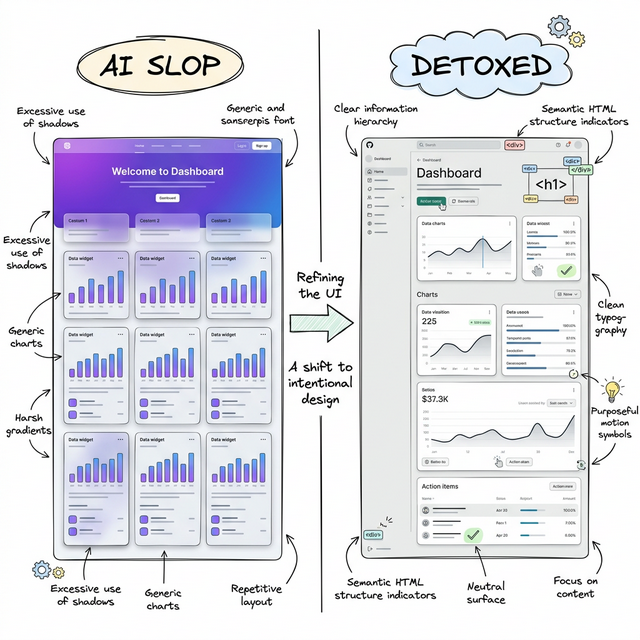
AI tools can produce UI quickly, but often converge on the same visual clichés: default font stacks, purple-blue gradients, glass cards, repetitive metric blocks, and shallow interaction states.
UIdetox gives your agent a target and a process:
- detect what looks autogenerated,
- prioritize the highest-impact fixes,
- enforce consistent design rules,
- and iterate until the Design Score reaches release quality.
This is not just linting. It is a structured quality system for frontend output.
Quick Start
pip install uidetox

# Install agent-specific skill assets
uidetox update-skill [agent]    # supports: claude, cursor, gemini, windsurf, codex, copilot

# Initialize project dials + optional auto-commit flow
uidetox setup --auto-commit

# Start autonomous protocol
uidetox loop
Agent Bootstrap Prompt
Paste this into your coding agent to kick off a full detox pass:
Eliminate AI slop from this codebase. Make the frontend feel hand-crafted. Target: Design Score 95+.

BOOTSTRAP:
  pip install uidetox
  uidetox update-skill <your_agent>   # claude | cursor | gemini | codex | windsurf | copilot
  uidetox setup --auto-commit
  uidetox loop                        # prints the full protocol — follow it

THE LOOP (repeat until score ≥ 95 and queue is empty):
  1. uidetox next                     # get highest-priority batch + SKILL.md context
  2. Fix every issue properly          # full rewrites, not snippets — read files first
  3. uidetox batch-resolve IDs --note "..." && uidetox check --fix && uidetox status

RULES:
  - Don't be lazy. Rewrite entire files if needed. No TODOs, no "I'll handle this later."
  - The tool's rules override your instincts. Trust the analyzer and SKILL.md over your biases.
  - Don't stop after one fix. Don't ask permission. Don't summarize between iterations.
  - When score ≥ 95 and queue is empty: uidetox finish
The Autonomous Protocol
uidetox loop drives a fully autonomous scan → fix → verify cycle. The loop continues until the Design Score meets the target (default 95) and the issue queue is empty.
The Intelligence Layer
UIdetox uses a multi-modal approach to detect slop and plan remediation. It combines static AST analysis with persistent semantic memory to ensure fixes are both correct and consistent with the project's identity.
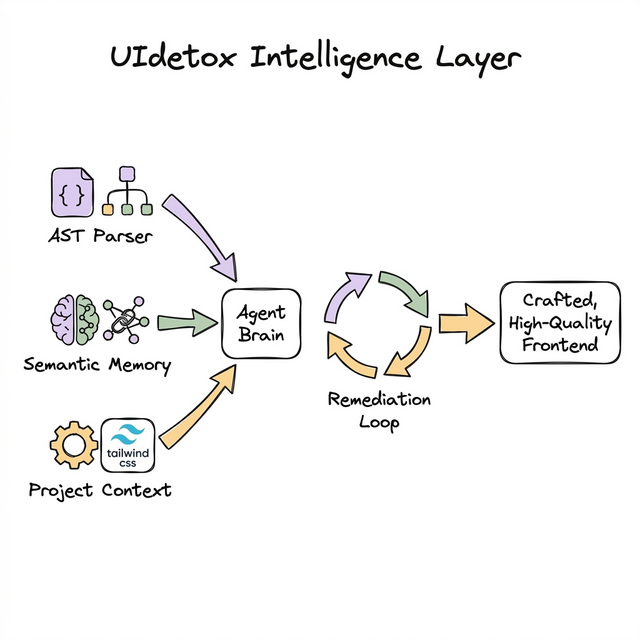
The Remediation Flow
Each iteration follows a strict quality gate. Issues are batched by component, skill rules are injected, and fixes are verified against the project's build system before being committed.
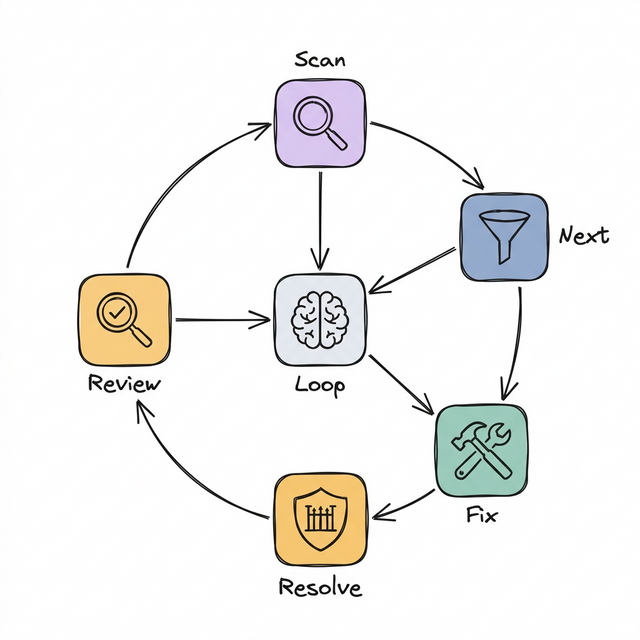
[!TIP] Self-Healing Mechanics: If a fix breaks the build (TSC or Lint errors), UIdetox captures the compiler output, injects it back into the agent's context, and requires a fix before the issue can be resolved.
[!TIP] Visual Regression Workflow: Use
uidetox capture --stage beforeanduidetox capture --stage after(optionally with--responsive) to generate screenshot diffs that are surfaced insideuidetox review.
Design Score = Objective × 0.6 + Subjective × 0.4 — the agent keeps looping until this hits the target.
Commands
| Command | Purpose |
|---|---|
uidetox loop |
Start the autonomous workflow (scan → fix → verify cycle). |
uidetox scan |
Run 60+ rule static analysis + dynamic WCAG theme audit + subjective rubric injection. |
uidetox next |
Get the highest-priority issue batch with SKILL.md context. |
uidetox batch-resolve |
Resolve issues atomically with verification + auto-commit. |
uidetox status |
Show blended Design Score, velocity, and queue health. |
uidetox review |
Subjective quality scoring across 4 design dimensions. |
uidetox capture |
Capture before/after screenshots and visual diffs (--stage before/after, --responsive). |
uidetox rescan |
Fresh re-analysis with dedup and auto-escalation. |
uidetox check --fix |
Mechanical gate: tsc → lint → format. |
uidetox plan |
Attack plan grouped by component with effort estimates. |
uidetox autofix |
T1-first quick-win guidance across 12 categories. |
uidetox finish |
Squash-merge session branch into main. |
Design skill commands
Targeted refinement — use when a component needs deeper attention:
uidetox polish · animate · colorize · harden · normalize · bolder · distill · audit · critique
Design Dials
Set during uidetox setup and used throughout scan/fix prompts:
-
DESIGN_VARIANCE (1–10)
- 1–3: clean, centered, conventional
- 4–7: varied composition, controlled asymmetry
- 8–10: aggressive asymmetry, whitespace contrast, high visual character
-
MOTION_INTENSITY (1–10)
- 1–3: minimal transitions
- 4–7: meaningful motion and staged reveal
- 8–10: advanced spring/scroll-driven interactions
-
VISUAL_DENSITY (1–10)
- 1–3: spacious editorial feel
- 4–7: balanced application density
- 8–10: compact cockpit-like information layout
Default baseline: (8, 6, 4).
Anti-Pattern Coverage
The analyzer includes 60+ deterministic rules organized across these categories:
| Category | Examples |
|---|---|
| Typography | Generic font stacks, hardcoded px fonts, tight line-height, weak weight spectrum |
| Color | Purple-blue gradients, pure black, raw hex literals, duplicate color values, gradient text |
| Layout | Center bias, flex-math, card nesting, overpadding, viewport height, lazy flex-center |
| Materiality | Glassmorphism abuse, generic shadows, neon glow, opacity stacking, gradient text |
| Motion | Bounce animation clichés, missing transitions on interactive elements |
| States | Missing hover/focus/dark-mode, disabled without cursor change |
| Content | Generic copy, AI cliché phrases, lorem ipsum, placeholder names, emoji overuse |
| Code Quality | Div soup, z-index stacking, inline styles, nested ternaries, any type, ts-ignore |
| Duplication | Duplicate Tailwind blocks, copy-paste components, repeated handlers/media queries |
| Dead Code | Commented-out code, unused imports/state, unreachable code, empty handlers, dead CSS |
Each rule is classified into tiers with estimated effort:
| Tier | Effort | Impact | Examples |
|---|---|---|---|
| T1 | ~2 min | 1 pt | Font swap, color fix, remove unused import |
| T2 | ~8 min | 3 pts | Add hover states, fix layout pattern, extract duplicate |
| T3 | ~20 min | 5 pts | Redesign component layout, implement dark mode |
| T4 | ~45 min | 10 pts | Major component restructure, full accessibility pass |
Credits & License
Inspired by and built on ideas from:
MIT © OJamals
Release history Release notifications | RSS feed


Download files
Download the file for your platform. If you're not sure which to choose, learn more about installing packages.
Source Distribution
Built Distribution
Filter files by name, interpreter, ABI, and platform.
If you're not sure about the file name format, learn more about wheel file names.
Copy a direct link to the current filters
File details
Details for the file uidetox-1.5.0.tar.gz.
File metadata
- Download URL: uidetox-1.5.0.tar.gz
- Upload date:
- Size: 355.7 kB
- Tags: Source
- Uploaded using Trusted Publishing? No
- Uploaded via: twine/6.2.0 CPython/3.12.13
File hashes
| Algorithm | Hash digest | |
|---|---|---|
| SHA256 |
3ca3db6e312308ddebc17719264cfaf1de491d3e57e05c97e6996c12879e7a1a
|
|
| MD5 |
c454073d5447b8ce63f0aaec5f9e29bb
|
|
| BLAKE2b-256 |
3a00e7b897d7c6a3f78268c66d01306580aec7a9d8c965c02c5a60b972dd4d49
|
File details
Details for the file uidetox-1.5.0-py3-none-any.whl.
File metadata
- Download URL: uidetox-1.5.0-py3-none-any.whl
- Upload date:
- Size: 272.7 kB
- Tags: Python 3
- Uploaded using Trusted Publishing? No
- Uploaded via: twine/6.2.0 CPython/3.12.13
File hashes
| Algorithm | Hash digest | |
|---|---|---|
| SHA256 |
66d87495c719c69d67df3b1d03bda6627abe4522e1d931b0cc54701628b1e590
|
|
| MD5 |
56ea7c19306aceb71f6dacf1fcfaeb60
|
|
| BLAKE2b-256 |
c7d249a2e5c23f03a3957f86a79440bb1b2d914fa062275758d2669e390b0529
|






