
ultraml


Preprocess ultrasound imaging data for machine learning.
Ultrasound exports arrive wrapped in vendor chrome — patient banners, depth
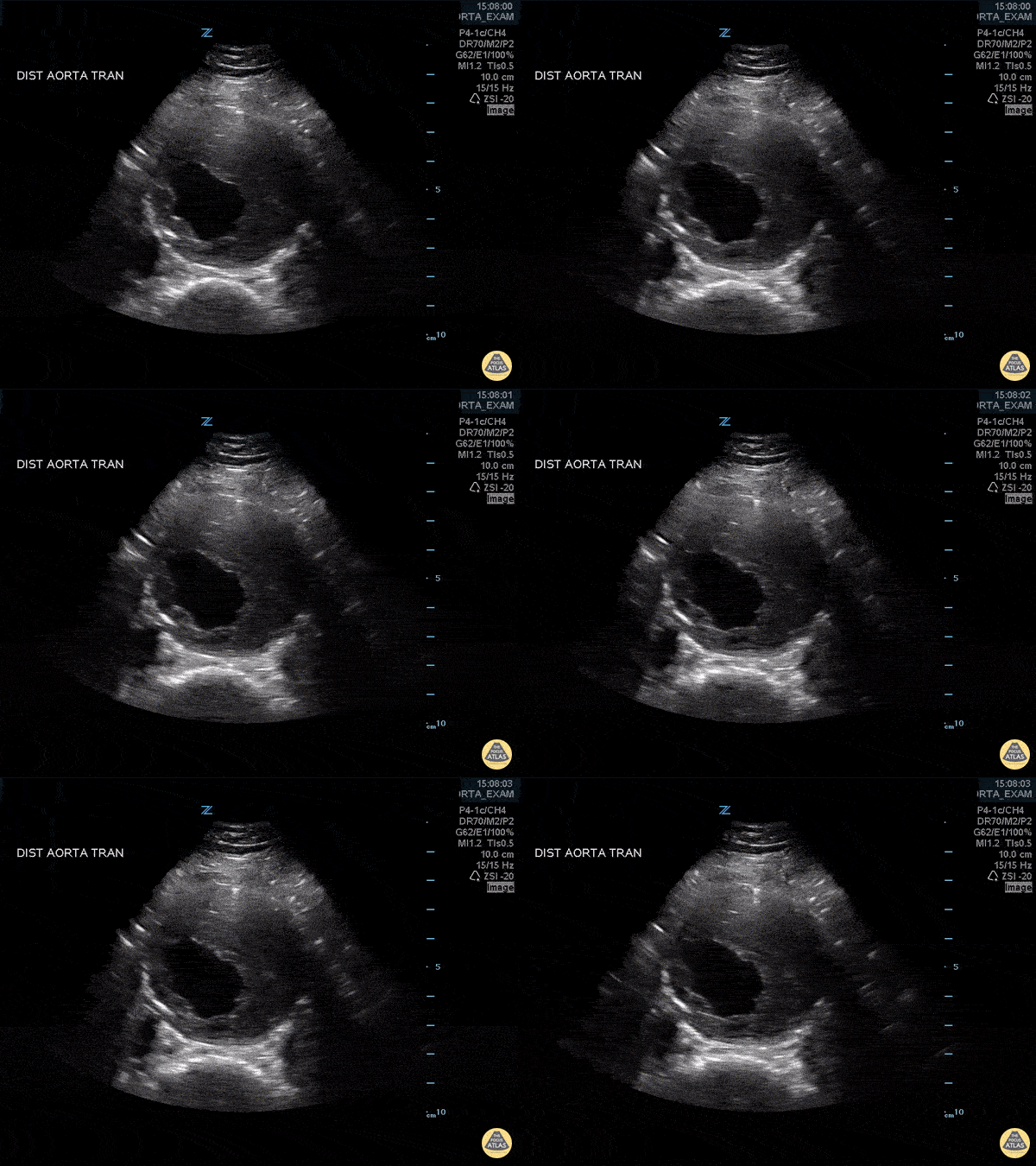
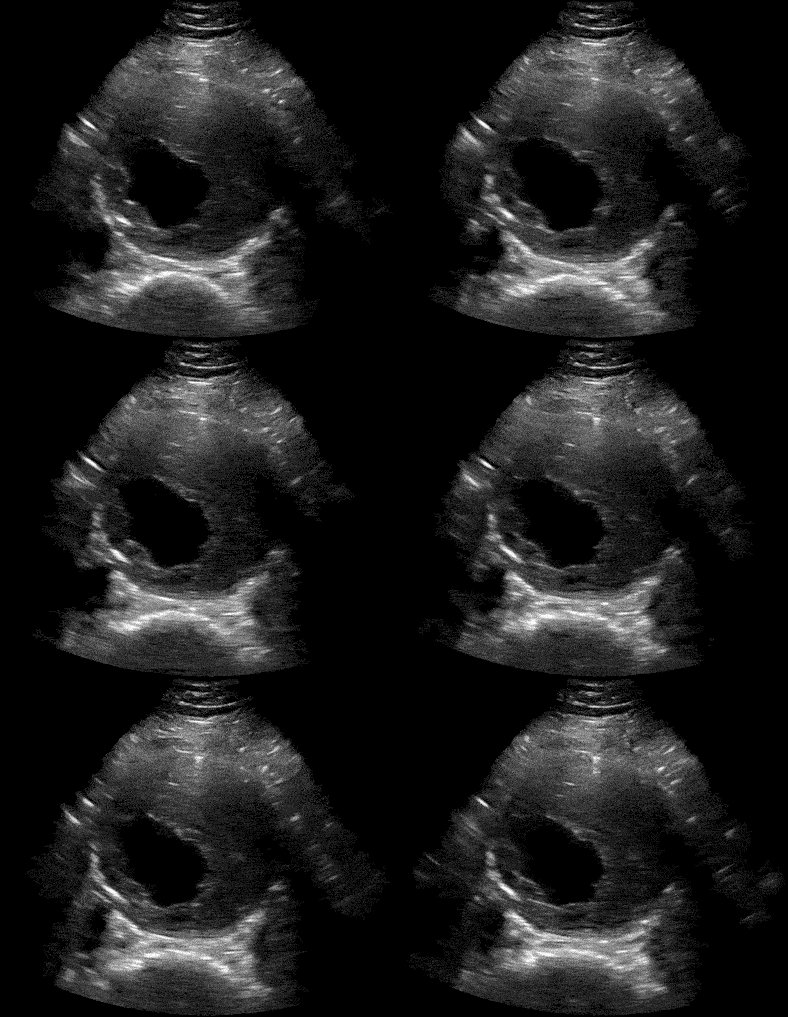
scales, logos, ECG strips. ultraml finds the beamform inside a clip or a
frame, drops everything around it, and hands back frames you can train on.
| Before | After | Extracted Background |
|---|---|---|
 |
 |
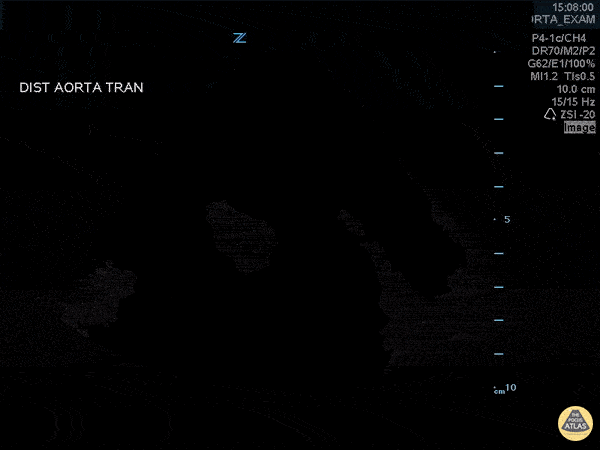 |
How it works. The beamform changes between frames while overlaid text and chrome do not, so per-pixel variation over time separates the two. Bright regions connected to a moving pixel are absorbed into the mask, the mask is cleaned up with a median blur, and the result is cropped to its tightest bounding box. For a single image there is no time axis to exploit, so the region is estimated from intensity down the centre columns instead.
Installation
pip install ultraml
DICOM input needs pydicom, which is kept optional because most users do not
need it:
pip install pydicom
From source:
git clone https://github.com/stan-hua/ultraml.git
cd ultraml
pip install -e .
Quickstart
From the command line:
ultraml video --path=scan.mp4 --save_dir=frames/
Or from Python:
from ultraml import convert_video_to_frames

save_paths, background_path = convert_video_to_frames(
    path="path/to/video.mp4",
    save_dir="path/to/save/frames",
    prefix_fname="frame_",
    overwrite=True,
)
print(f"{len(save_paths)} frames written")
Command line
Installing the package puts an ultraml command on your path, so a cohort can
be preprocessed without writing any Python. Three commands:
# A single video
ultraml video --path=scan.mp4 --save_dir=frames/

# A single DICOM, evenly sampling 10 frames
ultraml dicom --path=scan.dcm --save_dir=frames/ --uniform_num_samples=10

# Every video and DICOM under a directory, one sub-directory of frames each
ultraml batch --in_dir=studies/ --save_dir=frames/
batch reports what it could not use and keeps going, rather than letting one
frozen clip abort the run:
Converted 41/43 inputs (1284 frames) to `frames/`
Skipped 2:
	studies/scan_07.dcm
		No pixel varies across the sequence, so no ultrasound region could be found. The clip is frozen, or a single repeated frame.
Every command takes --prefix_fname, --background_save_path, --overwrite,
--grayscale, --crop, and --apply_filter. Flags you do not pass keep the
library's defaults. Run ultraml --help, or ultraml video --help, for the
full list.
Usage
File-level
Read a video or DICOM from disk, extract the beamform, and write one PNG per frame.
Video → image frames
from ultraml import convert_video_to_frames

video_save_dir = "path/to/save/frames"
background_save_path = "path/to/save/background.png"
save_paths, background_save_path = convert_video_to_frames(
    path="path/to/video.mp4",
    save_dir=video_save_dir,
    prefix_fname="frame_",
    background_save_path=background_save_path,
    overwrite=True,
)
print(f"{len(save_paths)} video frames saved")
print(f"Background saved = {background_save_path is not None}")
DICOM → image frames
# Requires pydicom: pip install pydicom
from ultraml import convert_dicom_to_frames

save_paths, background_save_path = convert_dicom_to_frames(
    path="path/to/dicom.dcm",
    save_dir="path/to/save/dicom_frames",
    prefix_fname="dicom_frame_",
    grayscale=True,
    uniform_num_samples=10,      # evenly sample 10 frames; -1 keeps all
    background_save_path="path/to/save/background.png",
    overwrite=True,
)
print(f"{len(save_paths)} DICOM frames saved")
Single-image and multiframe DICOMs are both handled. With overwrite=False,
an already-populated save_dir is left alone and the existing paths are
returned.
Array-level
Work directly on numpy arrays, without touching disk.
Extract the beamform from a clip
from ultraml import extract_ultrasound_video_foreground, convert_img_to_uint8

video_frames_arr = ...        # (T, H, W) or (T, H, W, C) numpy array
foreground, static_mask = extract_ultrasound_video_foreground(
    img_sequence=video_frames_arr,
    apply_filter=True,
    crop=True,
)

# To recover the background, mask out the moving parts of any frame
background_img = convert_img_to_uint8(video_frames_arr[0])
background_img[~static_mask] = 0
Returns the clip with everything outside the beamform zeroed, cropped to the
region, plus a boolean (H, W) mask marking the static parts — the
background.
Locate the beamform without modifying pixels
from ultraml import compute_ultrasound_video_mask

mask, (y_min, y_max, x_min, x_max) = compute_ultrasound_video_mask(
    img_sequence=video_frames_arr,
    apply_filter=True,
)
cropped = video_frames_arr[:, y_min:y_max, x_min:x_max]
Use this to store one bounding box per clip and apply it lazily, instead of materialising every extracted frame — which matters over a cohort.
Extract from a single image
from ultraml import extract_ultrasound_image_foreground

foreground, static_mask = extract_ultrasound_image_foreground(
    img=img_arr,              # single (H, W) or (H, W, C) numpy array
    apply_filter=True,
    crop=True,
    keep_color=False,
)
With no time axis to exploit, the region is estimated from intensity down the centre columns instead.
Colour Doppler
Extraction collapses to grayscale by default, returning (T, H, W) for a clip
and (H, W) for an image. Pass keep_color=True to keep the input's channels
— needed for colour Doppler, where the flow overlay is the signal:
foreground, static_mask = extract_ultrasound_video_foreground(
    img_sequence=video_frames_arr,
    keep_color=True,
)
The same flag works on extract_ultrasound_image_foreground, and on the CLI
as --grayscale=False. The mask is always decided on luminance, so colour
never determines where the beamform is — only what survives inside it.
Input is scaled to 8-bit before masking, so 16-bit DICOM pixel data is handled
without wrapping. Float input outside [0, 1] is rejected rather than
truncated.
Tuning the mask
The defaults are heuristics. They are exposed on
compute_ultrasound_video_mask, and forwarded through
extract_ultrasound_video_foreground:
| Argument | Default | Meaning |
|---|---|---|
std_threshold |
5 |
Per-pixel variation over time at or above which a pixel counts as moving |
intensity_threshold |
15 |
Brightness absorbed into the mask when connected to a moving pixel |
blur_size |
5 |
Median blur kernel size, odd |
apply_filter |
True |
Whether to median blur at all — closes gaps, drops speckle |
crop |
True |
Whether to crop to the region's bounding box |
foreground, static_mask = extract_ultrasound_video_foreground(
    img_sequence=video_frames_arr,
    std_threshold=8,
    intensity_threshold=20,
)
If you tune these, log what you used — the values are dataset-specific.
When no beamform can be found
Extraction raises EmptyMaskError rather than returning a blank frame. An
all-zero result is indistinguishable from a legitimately dark scan, so
returning one silently poisons a dataset with blank samples. It is raised when
a clip is frozen (no pixel varies across the sequence), when a single frame is
repeated, or when the region has no extent after filtering.
Handle it per clip when running over a cohort:
from ultraml import extract_ultrasound_video_foreground, EmptyMaskError

try:
    foreground, static_mask = extract_ultrasound_video_foreground(video_frames_arr)
except EmptyMaskError as error:
    print(f"Skipping clip: {error}")
EmptyMaskError subclasses ValueError, so existing except ValueError
handlers still catch it.
API
| Function | Purpose |
|---|---|
convert_video_to_frames(path, save_dir, ...) |
Video file → extracted image frames on disk |
convert_dicom_to_frames(path, save_dir, ...) |
DICOM file → extracted image frames on disk |
extract_ultrasound_video_foreground(img_sequence, ...) |
Clip array → beamform-only clip + background mask |
compute_ultrasound_video_mask(img_sequence, ...) |
Clip array → boolean mask + bounding box, pixels untouched |
extract_ultrasound_image_foreground(img, ...) |
Image array → beamform-only image + background mask |
convert_img_to_uint8(img_arr) |
Scale an image array to uint8 |
is_image_dark(img_arr) |
Whether at least 60% of a frame is dark pixels |
Both file-level functions forward extra keyword arguments to the frame-level
preprocessing, which accepts grayscale, extract_beamform, crop, and
apply_filter.
Development
pip install -e .
pip install pytest pydicom
pytest tests/
The DICOM tests skip automatically if pydicom is not installed, and the
video tests skip if no mp4 encoder is available.
License
MIT — see LICENSE.
1 maintainer

Metadata
1 maintainer
Release files for ultraml 0.2.0
For a detailed explanation of source distributions (sdists) and built distributions (wheels), please see the package formats documentation.
Source distribution (sdist)
| File | Size | Uploaded | |
|---|---|---|---|
| ultraml-0.2.0.tar.gz | 26.1 kB | Details |
Built distribution (wheel)
| File | Interpreter | ABI | Platform | Reset |
|---|---|---|---|---|
| ultraml-0.2.0-py3-none-any.whl | Python 3 | none | any | Details |
Total release size: 45.6 kB
Release files / ultraml-0.2.0.tar.gz
| Download URL | ultraml-0.2.0.tar.gz |
|---|---|
| Size | 26.1 kB |
| Tags | Source |
|
SHA-256 checksum How to use checksums |
5b23d5aec20c08974a1e420a554f827a533c837d3ef298b41d2efacf49b37fc1
|
|
BLAKE2b-256 checksum How to use checksums |
8cdfa23f804379aab4903188a8d5384ef25afefe5b27a0cdd6979a70cd610233
|
| Upload date | |
|
Uploaded using Trusted Publishing? What is trusted publishing? |
Yes |
| Uploaded via |
twine/7.0.0 CPython/3.13.14
|
Provenance
Provenance describes where a file came from. On PyPI, provenance is shared via attestations, which provide a verifiable record of the build or publishing details. View details, limitations and caveats.


PyPI Publish Attestation
PyPI verified that this artifact, at this checksum, originated from the publisher listed below.
Signed by GitHub Actions, verified by PyPI on Aug 14, 2026.
Transparency logRelease files / ultraml-0.2.0-py3-none-any.whl
| Download URL | ultraml-0.2.0-py3-none-any.whl |
|---|---|
| Size | 19.5 kB |
| Tags | Python 3 |
|
SHA-256 checksum How to use checksums |
ff2e13224d329ae954793e9c4d8a73857f5debc2cb142f53d271f05193b13318
|
|
BLAKE2b-256 checksum How to use checksums |
54b5873e7c95c1ba235c9cec43fbb39e0b588b93f2e4ec0926a248a849678fb4
|
| Upload date | |
|
Uploaded using Trusted Publishing? What is trusted publishing? |
Yes |
| Uploaded via |
twine/7.0.0 CPython/3.13.14
|
Provenance
Provenance describes where a file came from. On PyPI, provenance is shared via attestations, which provide a verifiable record of the build or publishing details. View details, limitations and caveats.
PyPI Publish Attestation
PyPI verified that this artifact, at this checksum, originated from the publisher listed below.
Signed by GitHub Actions, verified by PyPI on Aug 14, 2026.
Transparency log













