
Audit your Claude Code installation and clear context-window bloat. Local-only.
Verified details
These details have been verified by PyPIProject links
GitHub Statistics
Maintainers

Project description
unclog

Every MCP, skill, hook, and CLAUDE.md line you've installed occupies your context window on every turn. unclog scans your Claude Code install, measures the bloat, and offers a reversible fix.
# install
uv tool install unclog

# run
unclog
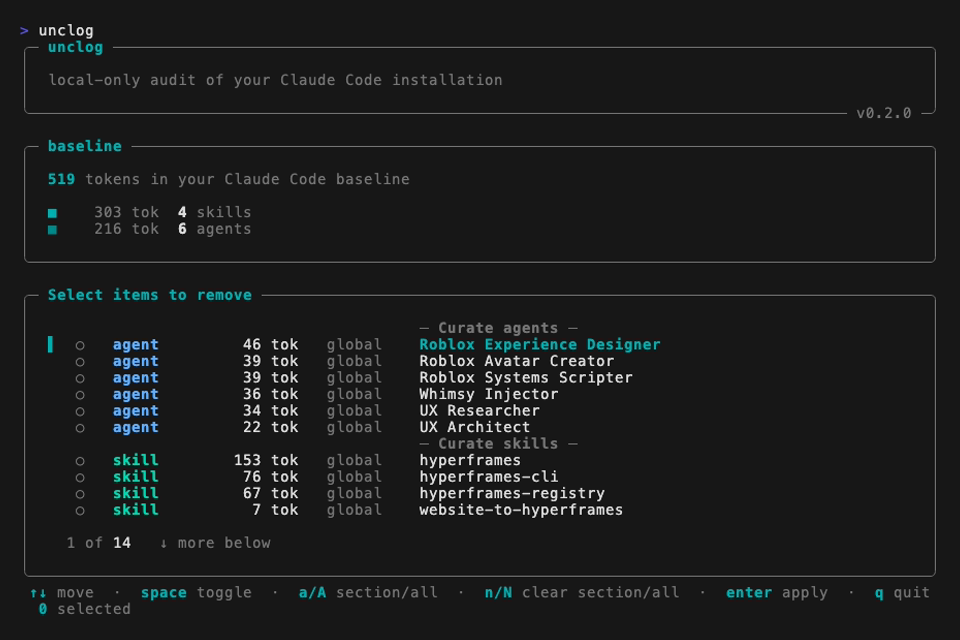
Demo

What it finds
| Category | What unclog surfaces |
|---|---|
| CLAUDE.md | cross-project duplicates, scope mismatches |
| Auto-memory | per-project MEMORY.md files auto-injected into every turn |
| Hooks | every-turn handlers whose stdout silently joins your context |
| MCP servers | configured-but-dead, loaded-but-never-called, and — by default — live tools-schema token counts from a local stdio probe |
| Skills / agents / commands | zero-invocation entries older than your unused_days threshold |
| Plugins | stale installs and disabled-but-still-on-disk residue |
| Project hygiene | missing .claudeignore in repos that bundle node_modules/, venv/, etc. |
| Baseline | total tokens consumed before you type a message |
Fixing things
unclog never writes without a confirmed prompt. After the report, one sectioned picker opens with:
- Apply — detector-driven fixes; conservative-safe findings start checked.
- Curate agents / skills / MCPs — every local agent, skill, and remote MCP, sorted by token cost. Always starts unchecked; consent is per-item.
Picker keys: ↑↓ move · space toggle · a / A check section / all · n / N clear section / all · enter apply · q quit. A full snapshot is written to ~/.claude/.unclog/snapshots/<id>/ before any change.
unclog restore               # restore the most recent snapshot
unclog restore <id>          # restore a specific one
unclog restore --list        # enumerate every snapshot
Usage
unclog                       # scan global + every known project, report, fix
unclog --project <path>      # narrow the audit to a single project
unclog --report              # scan + report, skip the fix flow
unclog --json                # structured output (schema unclog.v0.1)
unclog --no-probe-mcps       # skip the live MCP probe (keeps the scan read-only)
unclog --list-claude-md      # diagnostic: list every auto-injected context file with token counts
unclog --yes                 # apply every auto-checked finding
unclog --verbose             # restore the full pre-picker chrome (scan-meta, tips, also-running)
unclog --no-animation        # disable the post-apply baseline countdown
unclog --plain               # ASCII-only, CI-safe
NO_COLOR=1 or a non-TTY pipe auto-enables --plain. The default mode trims chrome once you've seen it; pass -v/--verbose to bring it back.
Guarantees
- Local-only. Every measurement runs in-process via
tiktoken. No telemetry, no accounts, no network. - Reversible. Every apply pass writes a full snapshot first.
- No background processes.
unclogruns, prints, optionally applies, exits.
Requirements
Python 3.11+, Claude Code ≥ 2.1.90, macOS or Linux. (Windows: v0.2.)
Development
uv sync --all-extras --dev
uv run pytest
uv run ruff check src tests
uv run mypy src/unclog
License
MIT. See LICENSE.
Project details
Verified details
These details have been verified by PyPIProject links
GitHub Statistics
Maintainers


Download files
Download the file for your platform. If you're not sure which to choose, learn more about installing packages.
Source Distribution
Built Distribution
Filter files by name, interpreter, ABI, and platform.
If you're not sure about the file name format, learn more about wheel file names.
Copy a direct link to the current filters
File details
Details for the file unclog-0.1.2.tar.gz.
File metadata
- Download URL: unclog-0.1.2.tar.gz
- Upload date:
- Size: 982.2 kB
- Tags: Source
- Uploaded using Trusted Publishing? Yes
- Uploaded via: uv/0.11.7 {"installer":{"name":"uv","version":"0.11.7","subcommand":["publish"]},"python":null,"implementation":{"name":null,"version":null},"distro":{"name":"Ubuntu","version":"24.04","id":"noble","libc":null},"system":{"name":null,"release":null},"cpu":null,"openssl_version":null,"setuptools_version":null,"rustc_version":null,"ci":true}
File hashes
| Algorithm | Hash digest | |
|---|---|---|
| SHA256 |
82ac3b42432c22ccafd1eb62c8b2f578a009350c77a27f0fec48c2411be04b28
|
|
| MD5 |
6cf05790f509dfeb27fa469b49ff5e5d
|
|
| BLAKE2b-256 |
113ed0986b8860ab133cc30bd20cb7c84631f1a683053b9f62517b90ccf4a657
|
File details
Details for the file unclog-0.1.2-py3-none-any.whl.
File metadata
- Download URL: unclog-0.1.2-py3-none-any.whl
- Upload date:
- Size: 126.0 kB
- Tags: Python 3
- Uploaded using Trusted Publishing? Yes
- Uploaded via: uv/0.11.7 {"installer":{"name":"uv","version":"0.11.7","subcommand":["publish"]},"python":null,"implementation":{"name":null,"version":null},"distro":{"name":"Ubuntu","version":"24.04","id":"noble","libc":null},"system":{"name":null,"release":null},"cpu":null,"openssl_version":null,"setuptools_version":null,"rustc_version":null,"ci":true}
File hashes
| Algorithm | Hash digest | |
|---|---|---|
| SHA256 |
13b62689a5679604f910885e030a35a5b31101c1f96146a9d866d7b3eb91f389
|
|
| MD5 |
952628b50d0dc5929a4c73d97f53db3e
|
|
| BLAKE2b-256 |
4f5d447c53b6ece2348a25edac055bc0a6ab5b5acc8e25ff4387de1f3d644e9b
|






