
Audit your Claude Code installation and clear context-window bloat. Local-only.
Verified details
These details have been verified by PyPIProject links
GitHub Statistics
Maintainers

Project description
unclog

Every agent, skill, and MCP server you've installed occupies your Claude Code context window on every turn. unclog scans your install, shows you what's costing tokens, and lets you handpick what to delete.
# install
uv tool install unclog

# run
unclog
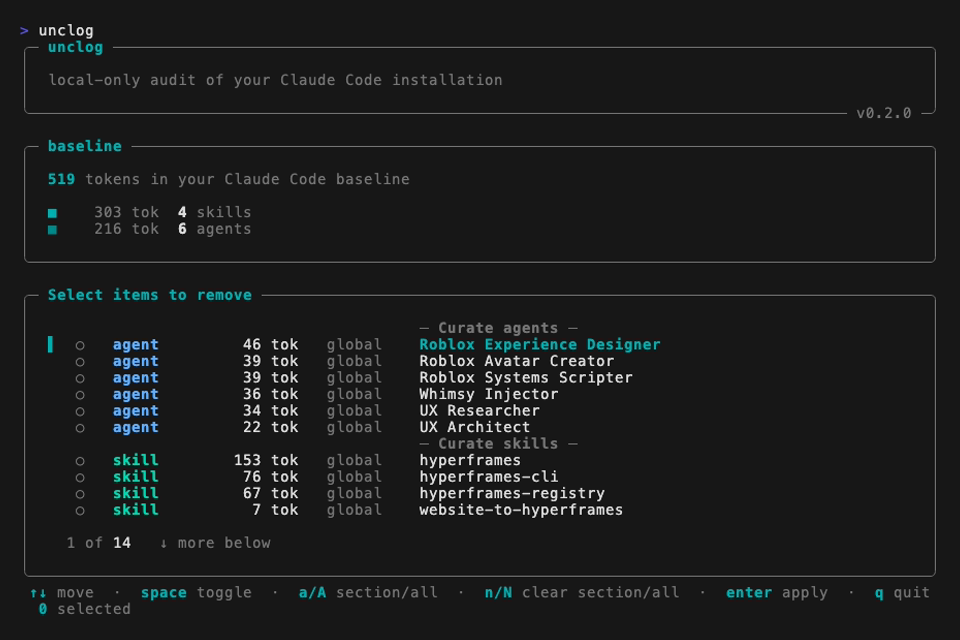
What it shows
- Every agent in
~/.claude/agents/, with its token cost. - Every skill in
~/.claude/skills/, with its token cost. - Every MCP server declared in
~/.claude.json(global and per-project), with its measured session-token cost when available. - A baseline — the total tokens loaded before you type a single message.
Fixing things
After the scan, one sectioned picker opens. Tick the agents / skills / MCPs you want to remove, hit enter, confirm once, done. A post-apply line shows how many tokens you saved and the new baseline.
Picker keys: ↑↓ move · space toggle · a / A check section / all · n / N clear section / all · enter apply · q quit.
Actions are destructive. Deleted files are removed from disk. Commented-out MCPs are renamed to __unclog_disabled__<name> in your config (easy to restore by hand, but there is no undo command).
Guarantees
- Local-only. All measurement runs in-process via
tiktoken. No telemetry, no accounts, no network. - No background processes.
unclogruns, prints, optionally applies, exits.
Requirements
Python 3.11+, Claude Code ≥ 2.1.90, macOS or Linux.
Development
uv sync --all-extras --dev
uv run pytest
uv run ruff check src tests
uv run mypy src/unclog
License
MIT. See LICENSE.
Project details
Verified details
These details have been verified by PyPIProject links
GitHub Statistics
Maintainers


Download files
Download the file for your platform. If you're not sure which to choose, learn more about installing packages.
Source Distribution
Built Distribution
Filter files by name, interpreter, ABI, and platform.
If you're not sure about the file name format, learn more about wheel file names.
Copy a direct link to the current filters
File details
Details for the file unclog-0.2.0.tar.gz.
File metadata
- Download URL: unclog-0.2.0.tar.gz
- Upload date:
- Size: 455.1 kB
- Tags: Source
- Uploaded using Trusted Publishing? Yes
- Uploaded via: uv/0.11.7 {"installer":{"name":"uv","version":"0.11.7","subcommand":["publish"]},"python":null,"implementation":{"name":null,"version":null},"distro":{"name":"Ubuntu","version":"24.04","id":"noble","libc":null},"system":{"name":null,"release":null},"cpu":null,"openssl_version":null,"setuptools_version":null,"rustc_version":null,"ci":true}
File hashes
| Algorithm | Hash digest | |
|---|---|---|
| SHA256 |
d5f68db1fe5c1b6c49c675e49aa5893c95176b85cfb0e0b91b68263cd315b161
|
|
| MD5 |
719eb4cc08e0f29e6e47487a6c29dab4
|
|
| BLAKE2b-256 |
74fc8a3c7e0a69ab7c5136dabae8d34eb166a36b855853ef432e76977dfdf7b4
|
File details
Details for the file unclog-0.2.0-py3-none-any.whl.
File metadata
- Download URL: unclog-0.2.0-py3-none-any.whl
- Upload date:
- Size: 44.8 kB
- Tags: Python 3
- Uploaded using Trusted Publishing? Yes
- Uploaded via: uv/0.11.7 {"installer":{"name":"uv","version":"0.11.7","subcommand":["publish"]},"python":null,"implementation":{"name":null,"version":null},"distro":{"name":"Ubuntu","version":"24.04","id":"noble","libc":null},"system":{"name":null,"release":null},"cpu":null,"openssl_version":null,"setuptools_version":null,"rustc_version":null,"ci":true}
File hashes
| Algorithm | Hash digest | |
|---|---|---|
| SHA256 |
daf5c486256fd8f4d95015ed49e2cccbb24ed951a43e187efd5feae18d2002f4
|
|
| MD5 |
e96630176470b9d66e1f09556d09f601
|
|
| BLAKE2b-256 |
dc0ceab26b1883c240ac233744dc84fab1f0ba2aa492249a6d2daf1e0ae14478
|






