

upd
Update dependencies across a polyglot repository—locally, safely, and in one command.
Python · Node.js · Rust · Go · Ruby · .NET · Gradle · Docker · Terraform · Nix flakes · GitHub Actions · pre-commit · Mise



upd gives you one reviewable update plan across mixed stacks. It preserves
hand-written constraints, comments, and formatting; previews every proposed
change before it writes; and runs without a hosted service or repository
onboarding.
Try it now
From any directory inside a Git repository:
uvx upd
That first run is a dry run: it reports what would change and leaves every file
untouched. No repository onboarding or hosted account is required. Review the
plan, then apply it with uvx upd --apply.
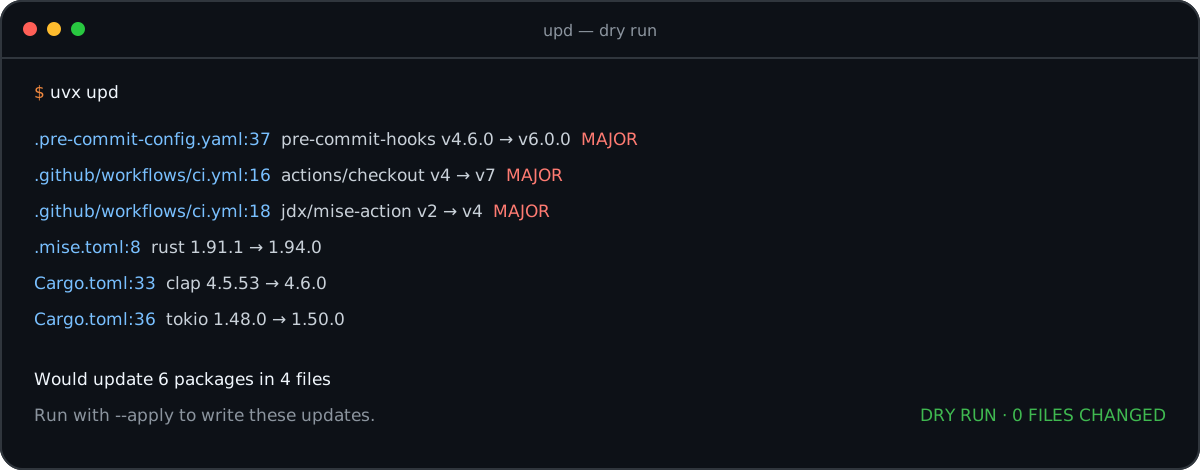
One preview across four file types. Nothing changes until you pass --apply.
Install another way · See every supported file · Compare dependency tools
Why upd
- One command for a mixed stack. Check application dependencies, tool versions, container images, GitHub Actions, pre-commit hooks, and Terraform modules in the same run instead of assembling a different updater for each file type.
- Safe on the first run. Dry-run is the default, constraints and formatting are preserved, and major updates are called out before you decide what to apply.
- Local first, automation ready. Start with an interactive terminal review, then use the same CLI, configuration, stable exit codes, JSON/SARIF output, and rolling PR or MR workflows in CI.
upd is a local checker and editor, not a package manager or a hosted update
bot. It can delegate lockfile refreshes to the package managers already in your
project and can run inside your own GitHub or GitLab automation. A refresh
writes the lockfile without installing packages or syncing an environment;
the exact command per ecosystem, and the one old bun release that is the
exception, are listed under Commands run by --lock. See the
decision guide and dated benchmarks
for an exact comparison with adjacent tools.
For uv projects, upd update --apply --lock runs exactly uv lock after
changing a manifest with an existing lockfile (at the workspace root when
applicable). It passes no flags and never runs uv sync; synchronize your
Python environment separately. Without --lock, a normal update refreshes
neither the lockfile nor the environment. upd audit --fix-audit --apply
refreshes applicable lockfiles by default; --no-lock opts out.
Where upd fits
Choose by the job rather than treating every dependency tool as interchangeable:
| If you need to… | Start with… |
|---|---|
| Preview and edit versions across a mixed-language repository from one local command | upd |
| Resolve, lock, install, and manage a Python environment | uv or PDM |
| Continuously create update branches and PRs across the broadest manager catalog | Renovate or Dependabot |
| Enforce immutable GitHub Actions references as a dedicated policy | pinact or ratchet |
Dated performance evidence
On the committed 18-reference fixture, the verified 2026-08-28 run recorded:
| Workload | upd mean | Same-workload cohort |
|---|---|---|
| Check 12 Python constraints | 134.7 ms | uppd: 269.7 ms |
| Update 12 Python constraints | 138.7 ms | uppd: 250.8 ms |
| Check 6 GitHub Actions | 758.7 ms | taze: 1,019.0 ms; ratchet: 1,029.1 ms |
| Update 6 GitHub Actions | 746.3 ms | taze: 566.3 ms; ratchet: 1,066.8 ms |
Lower is better. These are five-run live-network observations, not universal speed claims. Every timed update was first verified to change all intended references and leave a parseable result. See the full matrix, methodology, variance, commands, and raw JSON.
Features
- Multi-ecosystem: Python, Node.js, Rust, Go, Ruby, .NET, Docker, Terraform, Nix flakes, GitHub Actions, pre-commit, Mise/asdf
- Dry-run by default: nothing is written without
--apply - Fast: parallel registry requests, with a 24-hour version cache
- Constraint-aware: respects
>=2.0,<3(Python),~> 7.1(Ruby), and^2.0.0/~2.0.0(npm, Cargo) - Format-preserving: keeps formatting, comments, and structure
- Update filters:
--only-bump,--max-bump,--package(exact names or quoted globs such as'shiny*'),--lang, or approve one by one with-i - Major warnings: breaking changes are flagged with
(MAJOR) - Pre-release aware: updates pre-releases to newer pre-releases
- Cooldown: hold back releases younger than N days, against supply-chain attacks
- Security auditing: OSV vulnerability scanning with auto-fix and SARIF output
- Check mode: exit 1 if updates are available (for CI and pre-commit)
- Gitignore-aware: honors
.gitignoreand prunes hidden directories, without missing the dotfiles it updates - Private registries: authentication for PyPI, npm, Cargo, Go, and GitHub
- Config file: include or exclude paths, ignore packages, and pin versions via
.updrc.toml
Installation
From crates.io
cargo install upd

# or with cargo-binstall (faster, pre-built binary)
cargo binstall upd
From PyPI
pip install upd
# or with uv
uv pip install upd
If you installed an earlier release under the old distribution name, migrate
once with pip uninstall upd-cli && pip install upd. The upd-cli command
remains available as a compatibility alias.
From source
git clone https://github.com/rvben/upd
cd upd
cargo install --path .
Usage
# Preview changes without modifying files (default when no --apply)
upd

# Apply updates to files
upd --apply

# Limit to specific files or directories
upd --apply requirements.txt pyproject.toml

# Approve updates one by one
upd -i

# Only the packages you name
upd -p requests,flask

# Select a package family (quote globs so your shell passes them to upd)
upd --package 'shiny*'

# Cap the bump level (allow patch + minor, skip major). Updates above the
# ceiling are reported as held back, never as up to date, and do not
# change the exit code.
upd --max-bump minor

# Restrict to exactly one level (repeatable, comma-separated)
upd --only-bump major

# One ecosystem at a time: python, node, rust, go, ruby, dot-net,
# docker, terraform, nix, actions, pre-commit, mise, annotated
upd --lang python

# Both pre-commit YAML and prek.toml, including supported hook dependencies
upd --lang prek

# Exit 1 if anything is outdated (for CI and pre-commit)
upd --check

# Regenerate lockfiles after writing; a failed refresh rolls its directory back
upd --apply --lock

# Print the effective configuration and exit
upd --show-config
upd --help lists every flag; Stability
documents the ones that are contractual, and upd schema emits the whole
interface as JSON.
--package accepts exact names and case-sensitive globs using *, ?, and
character classes such as [ab]. Wildcards can cross namespace separators, so
patterns such as '@scope/*' and 'github.com/org/*' work as expected. Quote
globs on the command line to prevent shell expansion. A glob that matches no
package produces a warning without changing the exit code; use repeated or
comma-separated values instead of brace alternation.
Dry-run by default:
updwithout--applyonly previews changes. Pass--applyto write updates.--check,--dry-run, and--interactivedo not require--apply.VCS-root scoping: When no path argument is given,
updscans from the nearest.gitancestor directory rather than the current working directory. This prevents accidental rewrites when CWD is a subdirectory inside a repository.
Commands
upd --version      # Print version
upd self-update    # Check for upd updates
upd clean-cache    # Clear the version cache
upd lock-refresh   # Refresh uv, npm, and Cargo locks within manifest constraints
upd align          # Align versions across files (--check exits 1 on misalignment)
upd audit          # Scan for known vulnerabilities (exit 6 if found)
upd schema         # Machine-readable interface description
For repositories replacing dependency bots, upd also provides separate
reusable GitHub workflows for policy-constrained freshness updates and
validated security-remediation pull requests. See
GitHub dependency pull requests.
Example Output
.pre-commit-config.yaml:37: Would update pre-commit/pre-commit-hooks v4.6.0 → v6.0.0 (MAJOR)
.github/workflows/ci.yml:16: Would update actions/checkout v4 → v6 (MAJOR)
.github/workflows/ci.yml:18: Would update jdx/mise-action v2 → v4 (MAJOR)
.mise.toml:8: Would update rust 1.91.1 → 1.94.0
Cargo.toml:33: Would update clap 4.5.53 → 4.6.0
Cargo.toml:36: Would update tokio 1.48.0 → 1.50.0

Would update 6 package(s) (2 major, 3 minor, 1 patch) in 4 file(s), 8 up to date
Output includes clickable file:line: locations (recognized by VS Code, iTerm2, and modern terminals).
Version Constraints
upd respects version constraints in your dependency files:
| Constraint | Behavior |
|---|---|
>=2.0,<3 |
Updates within 2.x range only |
^2.0.0 |
Updates within 2.x range (npm/Cargo); never crosses the major bound |
~2.0.0 |
Updates within 2.0.x range (npm); ~2.0.0 (Cargo) stays within 2.0.x |
~> 7.1 |
Updates within 7.x range (Ruby pessimistic) |
>=2.0 |
Updates to any version >= 2.0 |
==2.0.0 |
Updates the exact pin to the latest version (e.g. ==2.0.0 → ==3.1.5). To freeze a package, use [pin] or ignore in .updrc.toml. |
==2.0.* |
Never rewritten. A PEP 440 prefix match names a series, not a release. See Bounds that are not floors. |
An update moves the lower bound and leaves every other clause where the
author wrote it, so >=1.0, <2.0 becomes >=1.5.0, <2.0. A constraint is an
unordered set of clauses, so the lower bound is found wherever it sits
(<2.0, >=1.0 answers alike), and an upper bound is honored when picking the
new version: the release chosen is the newest one the constraint already admits.
npm ranges keep the shape they were written in. A comparator range
(">=1.0.0 <2.0.0") and a hyphen range ("4.17.0 - 4.18.0") each keep their
ceiling. A wildcard or partial range takes its ceiling from its own floor, like
a caret, so it follows the newest release and the whole shape moves with it:
"4.3.x" becomes "4.4.x" and "^1.2" becomes "^3.1", never a fully
written version. npm lets a comparator stand apart from the version it applies
to, and that spacing is part of the shape: ">= 1.2.7 < 1.3.0" is read as the
range it is and comes back spaced the same way. npm's tilde has two spellings
and "~>1.2.3" means what "~1.2.3" does, ceiling included; each comes back
spelled the way it was written.
An npm spec that names no published version is left alone and reported nowhere:
"*", a dist-tag ("latest", "next", "beta"), and the workspace:,
file:, link:, npm:, git+ssh: and github:owner/repo forms all resolve
somewhere other than a release on the registry, so there is no version to
compare and nothing an update could move.
Python bump labels and --only-bump / --max-bump follow the changed release
component: 0.0.77 → 0.0.78 is patch, and 0.77 → 0.78 is minor.
Other ecosystems retain their existing pre-1.0 compatibility classification.
Python update reports include each declaration's section and full constraint.
Specifier shape changes are opt-in. A [normalize.pyproject] table in
.updrc.toml can independently make project dependencies, optional
dependencies, or standardized dependency groups use ==, >=, or <=; projects without
that table retain the shape-preserving behavior above. See
the configuration guide.
Bounds that are not floors
Only an inclusive lower bound names the version a project is on, so only
that bound is raised. >1.2.3 names the one version its author refuses, <3
and <=3 are ceilings, != 1.5 is an exclusion, and an OR range
("^1 || ^2") has no single branch to edit. None of them is a floor, so none
of them is moved. They are checked against the registry and reported anyway:
| Outcome | Reported as |
|---|---|
| The constraint admits the newest release | Up to date |
| The newest release has outgrown it | A warning naming the release and the constraint |
| The spec cannot be read at all | An error, exit 2 |
The last row is the point of the other two: a dependency nothing looked at must not be counted as up to date, and a constraint that has quietly frozen a dependency should say so rather than pass under a green tick.
A PEP 440 prefix match reads the same way for the same reason. ==6.* and
==6.0.* name a series rather than a release, so there is no version in them to
raise and nothing an update may write over them; they are checked and reported
by the table above. pyyaml==6.* with 6.0.3 published is up to date, and
rich==13.7.* with 15.0.0 published is a warning. [pin] and upd align
answer the same way: neither writes a release into a specifier that has nowhere
to hold one, and the pin reports an error rather than a rewrite.
Annotated Version Pins
Files without a dependency-manifest format can carry a trailing annotation:
shinyhub_version: "0.11.16" # upd: pypi shinyhub
Directory walks scan annotations in otherwise-unrecognized Makefile,
makefile, GNUmakefile, justfile, Justfile, *.mk, *.sh, *.bash,
*.yml, and *.yaml files. Any file passed explicitly is scanned as annotated.
To add other files to normal repository discovery, use repository-relative globs
in .updrc.toml:
include = ["deploy/*.env", "config/version.conf"]
exclude = ["**/archive/**"] # exclude wins over include
An include never changes a recognized manifest's parser: for example, a
matching main.tf remains Terraform. Use --verbose to diagnose an upd:
marker in an otherwise undiscovered UTF-8 text file up to 1 MiB.
Dockerfiles also scan annotated ARG and ENV versions alongside FROM updates:
# upd: pypi uv
ARG UV_VERSION=0.9.30
Use upd --apply to update both image tags and annotated versions.
--lang annotated selects annotations only; --lang python selects PyPI
annotations, and --lang docker selects image tags only. Place the comment
immediately above a single-line ARG or ENV assignment. Docker treats inline
# text as instruction arguments, so inline annotations are refused.
Renovate comments such as # renovate: datasource=pypi depName=uv work too.
A GitHub Actions workflow keeps its Actions updater and is
scanned for annotations as well, so a tool version passed to an action through a
with: input can be updated beside the uses: refs around it. See
GitHub Actions.
Version Precision
By default, upd preserves version precision from the original file:
# Original file has 2-component versions
flask>=2.0        →  flask>=3.1        (not 3.1.5)
django>=4         →  django>=6         (not 6.0.0)

# Original file has 3-component versions
requests>=2.0.0   →  requests>=2.32.5

# GitHub Actions major-only tags
actions/checkout@v3  →  actions/checkout@v4  (not @v4.2.0)
Use --full-precision to always output full semver versions:
upd --full-precision
flask>=2.0        →  flask>=3.1.5
django>=4         →  django>=6.0.0
requests>=2.0.0   →  requests>=2.32.5
Version Alignment
In monorepos or projects with multiple dependency files, the same package might have different versions:
# requirements.txt
requests==2.28.0

# requirements-dev.txt
requests==2.31.0

# services/api/requirements.txt
requests==2.25.0
upd align updates every occurrence to the highest version found:
upd align              # Align all packages to highest version
upd align --dry-run    # Preview changes
upd align --check      # Exit 1 if misalignments (for CI)
upd align --lang python # Align only Python packages
It only aligns within one ecosystem, skips packages with upper bound
constraints (e.g. >=2.0,<3.0) to avoid breaking them, and ignores
pre-release versions when finding the highest version.
Pre-commit Integration
Add upd to your .pre-commit-config.yaml:
repos:
  - repo: https://github.com/rvben/upd-pre-commit
    rev: v0.0.24
    hooks:
      - id: upd-check
        # Optional: only check specific ecosystems
        # args: ['--lang', 'python']
Available hooks:
| Hook ID | Description |
|---|---|
upd-check |
Fail if any dependencies are outdated |
upd-check-major |
Fail only on major (breaking) updates |
Both hooks run on pre-push by default. Uses language: python which installs upd from PyPI automatically, so no manual installation is needed.
Documentation
Everything you look up rather than read lives in docs/.
Releases
Vership workflow, publication guarantees, automated integration pins, and safe retry procedures. → docs/releases.md
Supported files
Every file upd discovers, per ecosystem, plus annotated version pins in files
it does not otherwise understand.
→ docs/ecosystems.md
Comparison and benchmarks
A dated feature matrix for related dependency tools, plus workload-based, reproducible benchmarks that avoid ranking unlike operations. → docs/comparison.md
Security auditing
OSV vulnerability scanning, --fix-audit, SARIF output, and CI integration.
→ docs/audit.md
Security policy
Private vulnerability reporting, supported versions, trust boundaries, and release integrity. → SECURITY.md
Configuration file
.updrc.toml discovery order and every key it accepts.
→ docs/configuration.md
Cooldown (minimum release age)
Hold back versions published less than N days ago, per ecosystem or per language,
and keep --lock refreshes to the same cooldown.
→ docs/configuration.md#cooldown-minimum-release-age
Caching
Where the 24-hour version cache lives and how to clear or bypass it. → docs/configuration.md#caching
Environment variables
Every variable upd reads, in one table.
→ docs/configuration.md#environment-variables
Private repositories
Credential detection for PyPI, npm, Cargo, Go, and GitHub, including private
indexes declared in pyproject.toml.
→ docs/private-registries.md
GitHub pull requests
Run any supported dependency updates as one rolling GitHub PR, with immutable Action SHA verification, validation, artifact reporting, and opt-in auto-merge. → docs/github-actions.md
GitLab merge requests
Run scheduled dependency updates as one rolling GitLab MR, with validation, lease-protected branch updates, and explicitly opt-in GitLab-native auto-merge. → docs/gitlab.md
Stability
The stable CLI surface, exit codes, --lock commands, and output guarantees.
→ docs/stability.md
Development
# Build
make build

# Run tests
make test

# Lint
make lint

# Format
make fmt

# All checks
make check
License
MIT
1 maintainer

Release files for upd 0.13.2
For a detailed explanation of source distributions (sdists) and built distributions (wheels), please see the package formats documentation.
Source distribution (sdist)
| File | Size | Uploaded | |
|---|---|---|---|
| upd-0.13.2.tar.gz | 990.5 kB | Details |
Built distributions (wheels)
| File | Reset | |||
|---|---|---|---|---|
| upd-0.13.2-py3-none-win_amd64.whl | Python 3 | none | Windows x86-64 | Details |
| upd-0.13.2-py3-none-musllinux_1_2_x86_64.whl | Python 3 | none | Linux musl 1.2+ x86-64 | Details |
| upd-0.13.2-py3-none-manylinux_2_17_x86_64.manylinux2014_x86_64.whl | Python 3 | none | Linux glibc 2.17+ x86-64 | Details |
| upd-0.13.2-py3-none-manylinux_2_17_aarch64.manylinux2014_aarch64.whl | Python 3 | none | Linux glibc 2.17+ ARM64 | Details |
| upd-0.13.2-py3-none-macosx_11_0_arm64.whl | Python 3 | none | macOS 11.0+ ARM64 | Details |
| upd-0.13.2-py3-none-macosx_10_12_x86_64.whl | Python 3 | none | macOS 10.12+ x86-64 | Details |
Total release size: 36.0 MB
Release files / upd-0.13.2.tar.gz
| Download URL | upd-0.13.2.tar.gz |
|---|---|
| Size | 990.5 kB |
| Tags | Source |
|
SHA-256 checksum How to use checksums |
0c34cfb1e93ccaa428333cd9a701b64d102c5e5be67257dbdbd82d70bbcb5e4f
|
|
BLAKE2b-256 checksum How to use checksums |
247196b75ffcd23fa89d86ad7359098ae580f3270938c8da757067e56a2a2fe5
|
| Upload date | |
|
Uploaded using Trusted Publishing? What is trusted publishing? |
No |
| Uploaded via |
twine/7.0.0 CPython/3.12.3
|
Release files / upd-0.13.2-py3-none-win_amd64.whl
| Download URL | upd-0.13.2-py3-none-win_amd64.whl |
|---|---|
| Size | 5.1 MB |
| Tags | Python 3 Windows x86-64 |
|
SHA-256 checksum How to use checksums |
8dcf881b81bc82bdc3ed17bf47621d1d6469f1de48bc14230fc4e9cca7223009
|
|
BLAKE2b-256 checksum How to use checksums |
26ca2ff46e6d72f7dc975d8147f985bc97cdbb0cdc88401f9278e477e545b8db
|
| Upload date | |
|
Uploaded using Trusted Publishing? What is trusted publishing? |
No |
| Uploaded via |
twine/7.0.0 CPython/3.12.3
|
Release files / upd-0.13.2-py3-none-musllinux_1_2_x86_64.whl
| Download URL | upd-0.13.2-py3-none-musllinux_1_2_x86_64.whl |
|---|---|
| Size | 6.9 MB |
| Tags | Linux musl 1.2+ x86-64 Python 3 |
|
SHA-256 checksum How to use checksums |
45308040e21d49472d1ec9f2bdbc5efa7af51ea9c115fc0fb7155037ef172356
|
|
BLAKE2b-256 checksum How to use checksums |
7064a5811155ef62a687d716e7d61adece8d4e8f9f1530d9d20e3fd3ca996d5c
|
| Upload date | |
|
Uploaded using Trusted Publishing? What is trusted publishing? |
No |
| Uploaded via |
twine/7.0.0 CPython/3.12.3
|
Release files / upd-0.13.2-py3-none-manylinux_2_17_x86_64.manylinux2014_x86_64.whl
| Download URL | upd-0.13.2-py3-none-manylinux_2_17_x86_64.manylinux2014_x86_64.whl |
|---|---|
| Size | 6.9 MB |
| Tags | Linux glibc 2.17+ x86-64 Python 3 |
|
SHA-256 checksum How to use checksums |
c90a7cf0a97e85387cb4fedd0c901be90199c24557afe45d34e6f5f60eea0e48
|
|
BLAKE2b-256 checksum How to use checksums |
2af5e80c7bb7843948e9997d1c41536e2056be7b6f6da70348391e59a94500fb
|
| Upload date | |
|
Uploaded using Trusted Publishing? What is trusted publishing? |
No |
| Uploaded via |
twine/7.0.0 CPython/3.12.3
|
Release files / upd-0.13.2-py3-none-manylinux_2_17_aarch64.manylinux2014_aarch64.whl
| Download URL | upd-0.13.2-py3-none-manylinux_2_17_aarch64.manylinux2014_aarch64.whl |
|---|---|
| Size | 6.9 MB |
| Tags | Linux glibc 2.17+ ARM64 Python 3 |
|
SHA-256 checksum How to use checksums |
91e2b89a48b8751650f260f851aaa897393a39cca8265fa805ae6df403d655dd
|
|
BLAKE2b-256 checksum How to use checksums |
65fa706d52ce5906768625e6dd38c2fc21fb9017ee78c3f8ae7e050a68ee622c
|
| Upload date | |
|
Uploaded using Trusted Publishing? What is trusted publishing? |
No |
| Uploaded via |
twine/7.0.0 CPython/3.12.3
|
Release files / upd-0.13.2-py3-none-macosx_11_0_arm64.whl
| Download URL | upd-0.13.2-py3-none-macosx_11_0_arm64.whl |
|---|---|
| Size | 4.4 MB |
| Tags | Python 3 macOS 11.0+ ARM64 |
|
SHA-256 checksum How to use checksums |
77b1a79fc465f76c1abed427d94146c688365550218b2b410f8ff5d2d4693294
|
|
BLAKE2b-256 checksum How to use checksums |
ca825a00152fbbb1cb2fa5a62947e22a2e396e4e774f0fadda81af6afaef7a83
|
| Upload date | |
|
Uploaded using Trusted Publishing? What is trusted publishing? |
No |
| Uploaded via |
twine/7.0.0 CPython/3.12.3
|
Release files / upd-0.13.2-py3-none-macosx_10_12_x86_64.whl
| Download URL | upd-0.13.2-py3-none-macosx_10_12_x86_64.whl |
|---|---|
| Size | 4.7 MB |
| Tags | Python 3 macOS 10.12+ x86-64 |
|
SHA-256 checksum How to use checksums |
9e1d9f8a406ad57c450f6b371c7d4bfaed6172084e5154dd56c478215b8653f9
|
|
BLAKE2b-256 checksum How to use checksums |
56c28c5a8a8be800d6efb46c21d52fcbd3c17d0f3158771f29b9c506e6b9f1d8
|
| Upload date | |
|
Uploaded using Trusted Publishing? What is trusted publishing? |
No |
| Uploaded via |
twine/7.0.0 CPython/3.12.3
|














