





UrbIrrad
Source code: arep-dev/urbirrad on GitLab.
Documentation: UrbIrrad user guide.
Have you wrestled with Radiance command-line options, or explored Honeybee, and wished for a focused way to calculate solar exposure in a building or urban scene?
UrbIrrad offers a Python/YAML workflow:
- Provide geometry and weather,
- Choose the radiation components,
- Run a case.
You do not need to assemble the Radiance command pipeline yourself. It is a standalone tool.
UrbIrrad calculates solar irradiance on a triangular sensor mesh using Radiance through PyRadiance.
The default example calculates only the direct beam on one
upward-facing plane, without reflections. Diffuse sky, six receiving
directions and reflected direct sunlight are optional additions described below.
It stores the time series in a compressed HDF5
file and creates an XDMF companion file for visualization in ParaView.
Not just outdoors.
The "Urb" in UrbIrrad reflects its urban-study context, not a restriction to exterior sensors. Calculate direct and diffuse solar irradiance outdoors (streets, courtyards, public spaces), indoors through modelled openings and glazing, or in open and semi-open spaces such as covered walkways, terraces and atria. The same workflow applies: where you place the sensors and which geometry you model determine the exposure. There is no separate indoor/outdoor switch.
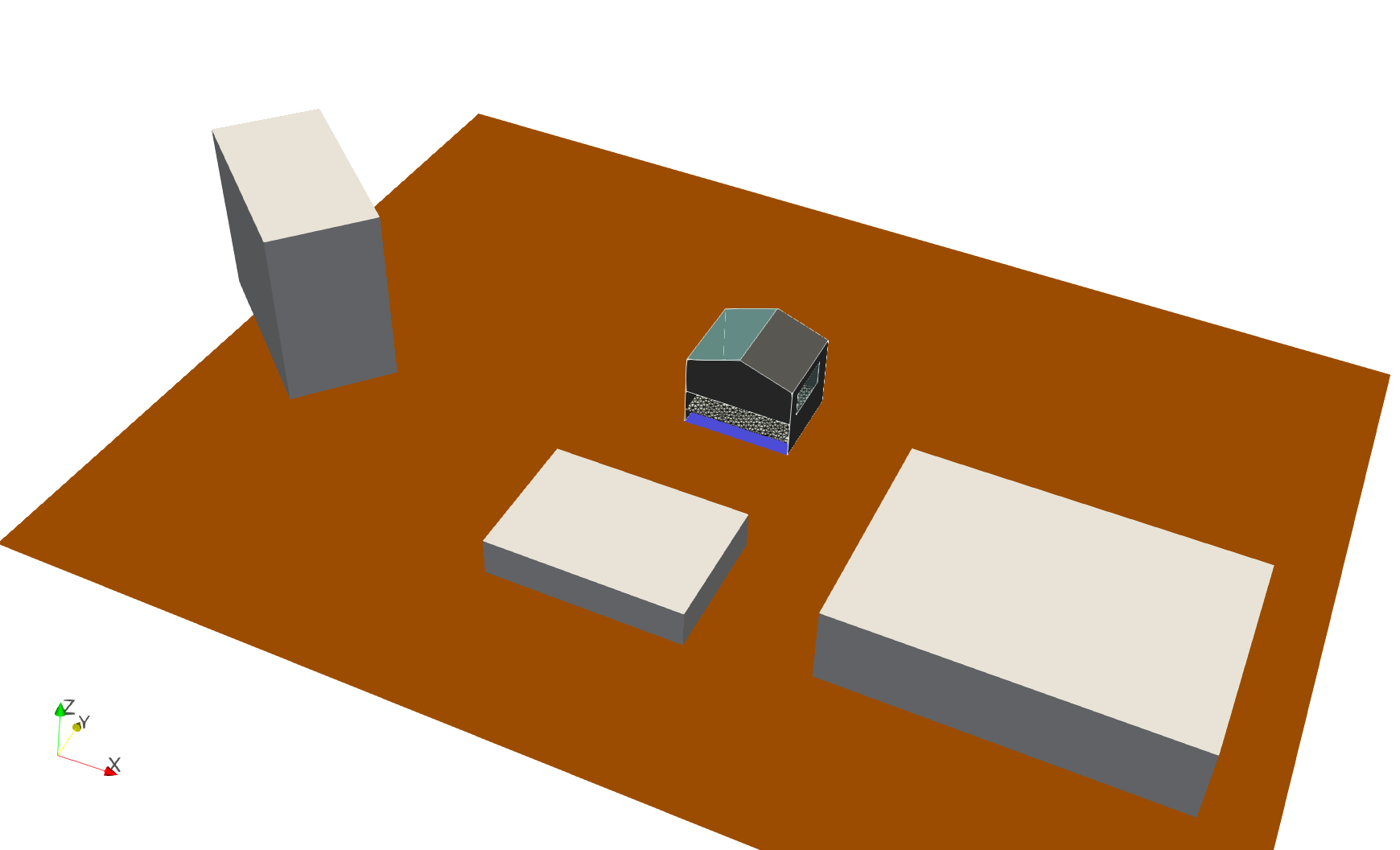
The included Montauban case evaluates sensors inside the modelled building, with surrounding urban geometry providing the wider shading context. It is an indoor solar-exposure example in an urban setting, not just an outdoor sunlight map. Interior walls, openings and glazing must be represented appropriately; the tool reports solar irradiance, not illuminance in lux or an artificial-lighting calculation.
For diffuse sky and reflected sunlight, reusable scene-to-sky matrices avoid repeating the full ray trace for each weather interval. The direct beam uses a separate batch of exact solar positions. See how Radiance calculations work for the engines, matrix method and caching limits.
Coordinates use X = East, Y = North, Z = Up, geometry is expressed in
metres, and irradiance results are expressed in W/m².
Mesh inputs:
STL, VTP, VTK, OBJ and PLY are supported for both scene
surfaces and sensor meshes. Inputs must be triangular surfaces, not volume
meshes or point clouds. No automatic triangulation/repair is performed;
solar material properties remain in the YAML, not file colors or textures.
See surface-mesh formats.
Scope: shortwave solar radiation only. UrbIrrad will not calculate longwave thermal radiation or overall mean radiant temperature (MRT). A future post-processing option may estimate the shortwave solar contribution to MRT; any complete MRT calculation belongs in an external comfort workflow.
Development status
UrbIrrad is under active development. Configuration, APIs and result formats may evolve as new options are developed and validated. See the roadmap for completed milestones, next priorities and proposals.
Installation
Install a released version from PyPI
Python 3.12 or newer is required. With Miniforge or another Conda distribution:
conda create -n rad python=3.12 -y
conda activate rad
python -m pip install urbirrad
If you already have a suitable Python environment, just run
python -m pip install urbirrad. Git is not required to install the package.
The package does not include the example geometry or weather files. To run the included example, install Git and download the repository:
git clone https://gitlab.com/arep-dev/urbirrad.git
cd urbirrad
Alternatively, download and extract the repository archive from GitLab.
Install from source for development
To work on the code rather than use a released version:
git clone https://gitlab.com/arep-dev/urbirrad.git
cd urbirrad
conda create -n rad python=3.12 -y
conda activate rad
python -m pip install -e .
PyRadiance provides the Radiance executables needed on Windows; no separate Radiance installation is required for the included example.
Official resources:
- Radiance: website and source code.
- PyRadiance: documentation and source code.
Run the included example
The Montauban example contains weather, a triangular sensor surface, two wall families, two glazing families, ground and surrounding urban geometry. It covers 1–15 July by default.
From the repository root:
conda activate rad
python -m urbirrad.cli check examples/template_case/case.yaml
python -m urbirrad.cli run examples/template_case/case.yaml --nproc 4
The default calculates direct irradiance only on an upward-facing horizontal plane, without surface reflections. Sensors are placed at triangle centers with a 0.05 m upward offset; triangle normals do not define their orientation. The terminal shows progress and stage timings.
Choose a separate YAML to increase complexity without extra mode arguments:
YAML in examples/template_case/ |
Calculation | Result folder |
|---|---|---|
case.yaml |
Direct only, one horizontal plane | results/ |
case_01_diffuse.yaml |
Direct + original diffuse sky, Radiance -ab 3 |
results/01_diffuse/ |
case_02_six_directions.yaml |
Direct + diffuse sky in six directions | results/02_six_directions/ |
case_03_reflected_direct.yaml |
Also add diffuse reflections of direct sunlight, six directions | results/03_reflected_direct/ |
Six directions are intended especially for thermal-comfort studies, bringing solar outputs closer to six-direction MRT measurement/modelling approaches. They are not an overall MRT calculation. Future body weighting and optical properties may support a shortwave solar contribution to MRT only; longwave radiation remains outside UrbIrrad's scope. Purely specular solar reflections are not included in the reflected-direct component. See methods and limitations.
For a finer sky representation, set simulation.sky_subdivision: 2 in the
YAML. The default remains MF=1. This affects diffuse sky and reflected direct,
not the exact direct beam; caches are separated by resolution. See
sky subdivision before comparing
accuracy and cost.
Each run saves annual_solar.h5 and its annual_solar.xmf companion. Open
the XMF in ParaView 6.1 with XDMF Reader, not Xdmf3 Reader or Xdmf3 Reader T,
click Apply, and color by solar_direct for the default case.
To clean generated outputs and rerun, preserving caches:
python -m urbirrad.cli clean examples/template_case/case.yaml
python -m urbirrad.cli run examples/template_case/case.yaml --nproc 4
Alternatively, use run --force to overwrite results. Configure dates,
components, geometry and materials in the YAML. See the
getting-started guide for copying and adapting a case.
Documentation
Potential sunshine, without weather irradiance
And while we're at it: Radiance may feel a little overkill for a simple shadow count, but you can also get potential sunshine hours on your sensor plane, using the geometry you've already prepared.
A separate geometric mode counts potential direct-sun exposure hours: opaque obstacles cast shadows, glazing is removed, and clouds/DNI/DHI are ignored. It does not calculate W/m². Run the dedicated example:
python -m urbirrad.cli run examples/template_case/case_potential_sunshine.yaml --nproc 4
Set simulation.timestep_minutes to 60 (default) or 30 in that YAML.
Open results/potential_sunshine_static/potential_sunshine.xmf with
XDMF Reader and color by sunshine_hours. See the
potential-sunshine guide for sampling conventions
and limitations. This is one static field on the mesh,
without timesteps. To add the same static information to a direct-irradiance
run, set output.save_sunshine_hours: true; annual_sunshine.xmf then opens
the cumulative field stored alongside irradiance in annual_solar.h5.
User guides
For glazing data, a separate utility can prepare solar_transmittance from
a manufacturer value or, when unavailable, an explicit EnergyPlus-based
Ug/g estimate. It supports glazing alone or a complete glazing + film assembly;
TL is optional information, not an input to the solar correlation. It does
not modify cases or run simulations. See
glazing solar properties for equations and limits.
python -m urbirrad.glazing --ug 1.0 --g 0.35 --tl 0.70
Read the online documentation, or browse the Markdown documentation directly in GitLab. The site is built with MkDocs and the Read the Docs theme.
- Getting started: installation, example, case adaptation.
- YAML configuration: supported keys and actual defaults.
- Methods and limitations: direct, diffuse, directions and reflections.
- How Radiance calculations work: ray tracing, commands, matrices and reuse.
- Potential sunshine hours: geometric exposure duration, no weather intensity.
- Results and ParaView: files, fields, caching and troubleshooting.
- Python API essentials: run, load, select directions and export.
- HDF5 reference: dataset layout and schema compatibility.
- Documentation maintenance: MkDocs preview/build and GitLab Pages publishing.
To preview the documentation in your browser:
python -m pip install -r requirements-docs.txt
python -m mkdocs serve
The GitLab CI/CD configuration builds the documentation strictly and publishes it to GitLab Pages from the default branch. See publication instructions for GitLab settings and how to find the deployed URL.
Developer tests
Tests are optional for normal use:
python -m pip install -e ".[test]"
python -m pytest -q
License
This project is distributed under the MIT License. Dependencies retain their own licenses; see third-party notices.
Repository layout
urbirrad/                 Python package
tests/                    automated tests
examples/template_case/   runnable example and copyable project structure
docs/                     user guides, reference, validation and image assets
mkdocs.yml                documentation navigation and build configuration
.gitlab-ci.yml            documentation checks and GitLab Pages deployment
requirements-docs.txt     optional documentation builder
roadmap.md                development priorities and future proposals
1 maintainer

Metadata
1 maintainer
Release files for urbirrad 0.1.1
For a detailed explanation of source distributions (sdists) and built distributions (wheels), please see the package formats documentation.
Source distribution (sdist)
| File | Size | Uploaded | |
|---|---|---|---|
| urbirrad-0.1.1.tar.gz | 82.2 kB | Details |
Built distribution (wheel)
| File | Interpreter | ABI | Platform | Reset |
|---|---|---|---|---|
| urbirrad-0.1.1-py3-none-any.whl | Python 3 | none | any | Details |
Total release size: 146.2 kB
Release files / urbirrad-0.1.1.tar.gz
| Download URL | urbirrad-0.1.1.tar.gz |
|---|---|
| Size | 82.2 kB |
| Tags | Source |
|
SHA-256 checksum How to use checksums |
cf413a23d613bc797e780966395cd27bc3bced52ec31ecffb013c652830d9fcf
|
|
BLAKE2b-256 checksum How to use checksums |
e658da7778a2bff7983ae597453e2a7a3b075ec4eb7d177d6dc4610ee0c8b957
|
| Upload date | |
|
Uploaded using Trusted Publishing? What is trusted publishing? |
No |
| Uploaded via |
twine/7.0.0 CPython/3.12.14
|
Release files / urbirrad-0.1.1-py3-none-any.whl
| Download URL | urbirrad-0.1.1-py3-none-any.whl |
|---|---|
| Size | 64.0 kB |
| Tags | Python 3 |
|
SHA-256 checksum How to use checksums |
c1a4772eda029928e3bc9c952398f94032b55a2fb82a9750c570beec8004c9a5
|
|
BLAKE2b-256 checksum How to use checksums |
94bd3ab4ea0bed09ea519ed4964fde51eff872427af2e60be0cedf205639c865
|
| Upload date | |
|
Uploaded using Trusted Publishing? What is trusted publishing? |
No |
| Uploaded via |
twine/7.0.0 CPython/3.12.14
|













