
uvnote

[!NOTE] uvnote is pre v1, so things are subject to change
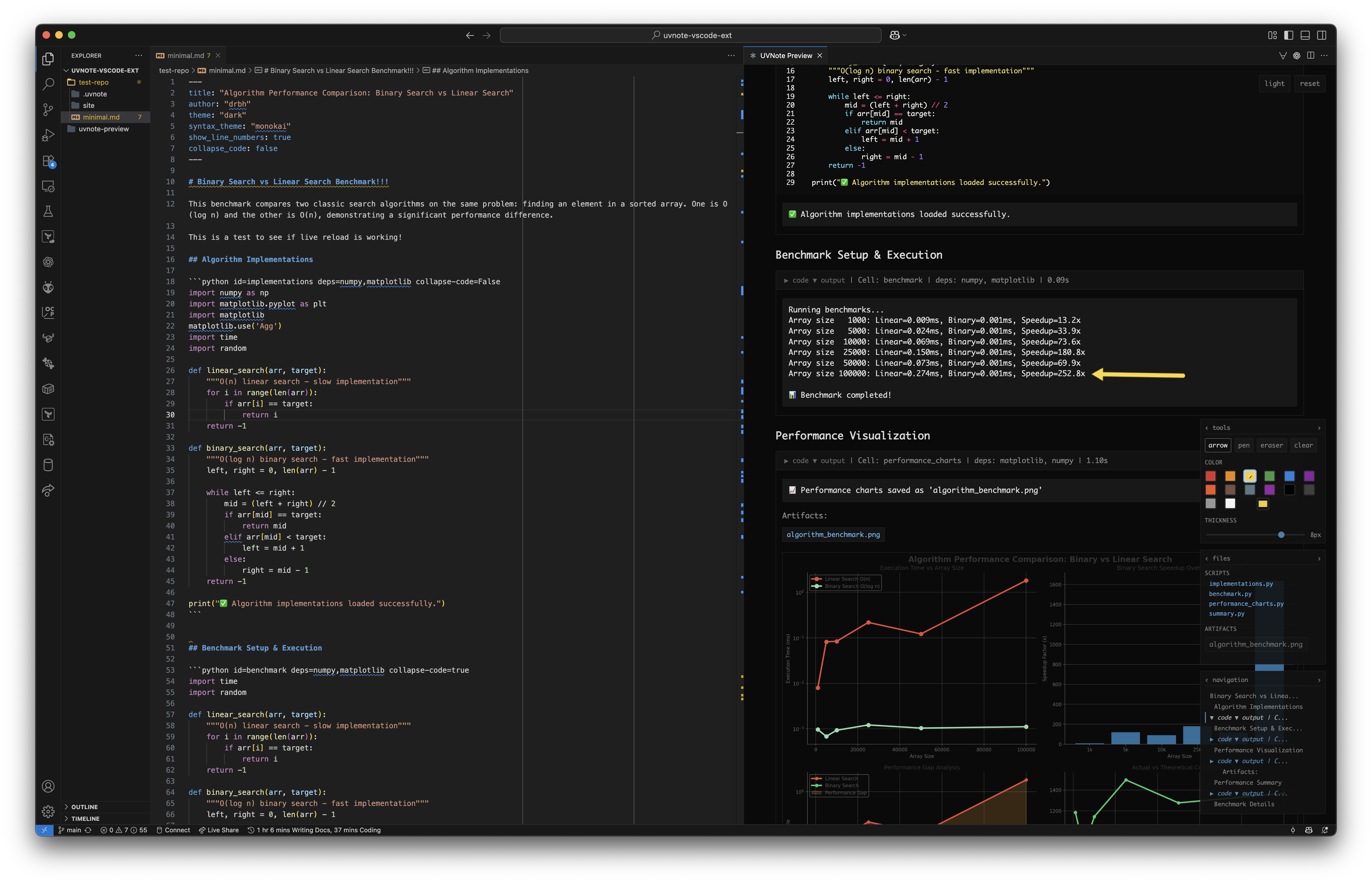
uvnote is a computational document system that allows you to create reproducible, shareable, and interactive documents using plain Markdown and uv/PEP 723 scripts.
In other words, its a alternative for Jupyter notebooks that is more lightweight, more reproducible, and more portable.
uvnote is kinda like a combination of a Markdown file and a Jupyter notebook and a static site generator.
Concept
The premise is simple:
- you write normal markdown files with python code blocks
- each code block is expanded to a uv/PEP 723 script
- the output of each script is capture and rendered in the markdown file.
- all data/scripts are hashed and cached (in
.uvnote/cache) so everything can be inspected and intelligently re-run when needed. - no magic runtimes (relies on uv)
- no hidden state (cells are not stateful, they are just scripts)
- no special file formats (just plain markdown)
Cool features
okay, so the core concept is simple (embed uv scripts in markdown), but there are some cool features that make uvnote more powerful than just that!
- interactive auto fading drawing tools to help present the note to others in an engaging way
- automatically generate a table of contents/links artifacts for easy navigation
- light/dark mode
- simplify syntax for dependencies (e.g.
deps=numpy,pandasin code block header will be expanded to the PEP 723 metadata) - and again NO MAGIC, so if you want to change css or add custom HTML you can easily do that.
How to use
Currently, the recommended way to use uvnote is to directly run the script from GitHub using uvx, this will download and run the latest version of uvnote without needing to install anything until we have a proper release.
Check version
uvx uvnote --version
# uvnote, version 0.3.1
Create a new uvnote file
uvx uvnote init --name mynote.md
# Created mynote.md
Compile the uvnote file to HTML
uvx uvnote build mynote.md
# Found 1 code cells
# 13:21:10 - INFO - dependency_graph:
# 13:21:10 - INFO -   roots=1eb8d5a3
# 13:21:10 - INFO -
# 13:21:10 - INFO - execution_plan:
# 13:21:10 - INFO -   cells=1
# 13:21:10 - INFO -   order=1eb8d5a3
# 13:21:10 - INFO -
# 13:21:10 - INFO - progress=1/1
# 13:21:10 - INFO - cell=1eb8d5a3
# 13:21:10 - INFO -   cache=miss
# 13:21:10 - INFO -   script=.uvnote/cells/1eb8d5a3.py
# 13:21:10 - INFO -   command=uv_run script=1eb8d5a3.py
# 13:21:10 - INFO -   duration=0.06s
# 13:21:10 - INFO -   status=success
# 13:21:10 - INFO -   result=success
# 13:21:10 - INFO - execution_summary:
# 13:21:10 - INFO -   success=1/1
# 13:21:10 - INFO -   duration=0.06s
# 13:21:10 - INFO -   status=complete
# Generated: site/mynote.html
# Copied cell files to: site/cells
Open the generated HTML file
open site/mynote.html
Commands
uvx uvnote --help
outputs
Usage: uvnote [OPTIONS] COMMAND [ARGS]...

  uvnote: Stateless, deterministic notebooks with uv and Markdown.

Options:
  --version  Show the version and exit.
  --help     Show this message and exit.

Commands:
  build          Build static HTML from markdown file.
  build-loading  Build HTML with loading placeholders for stale cells.
  cache-prune    Prune cache to target size using LRU eviction.
  clean          Clear cache and site files.
  export         Export cell files and their dependencies to a directory.
  graph          Show dependency graph for markdown file.
  run            Run cells from markdown file.
  serve          Watch markdown file, rebuild on changes, and serve HTML...
Frontmatter options
You can specify some options in the frontmatter of the markdown file to customize the behavior of uvnote.
---
title: My Note
author: you
theme: dark | light
syntax_theme: monokai
ui_theme: default | monocolor
show_line_numbers: true | false
---
Code block options
You can specify some options in the code block header to customize the behavior of each code block.
\`\`\`python id=unique_id deps=numpy,pandas collapse-code=true
# your code here
\`\`\`
id: A unique identifier for the code block. If not provided, a hash of the code will be used.deps: A comma-separated list of dependencies to install for the code block. These willdepends: A comma-separated list of other code block ids that this code block depends on. This will ensure that the dependent code blocks are run before this one.collapse-code: If true, the code block will be collapsed by default in the rendered HTML.collapse-output: If true, the output of the code block will be collapsed by default in the rendered HTML.
Experimental features
We support a serve command that will watch the markdown file for changes and automatically rebuild and serve the HTML file with live reloading. This works in most cases but can be a bit buggy when cell execution takes a long time and cannot be easily cancelled.
1 maintainer

Release files for uvnote 0.3.1
For a detailed explanation of source distributions (sdists) and built distributions (wheels), please see the package formats documentation.
Source distribution (sdist)
| File | Size | Uploaded | |
|---|---|---|---|
| uvnote-0.3.1.tar.gz | 73.4 kB | Details |
Built distribution (wheel)
| File | Interpreter | ABI | Platform | Reset |
|---|---|---|---|---|
| uvnote-0.3.1-py3-none-any.whl | Python 3 | none | any | Details |
Total release size: 133.6 kB
Release files / uvnote-0.3.1.tar.gz
| Download URL | uvnote-0.3.1.tar.gz |
|---|---|
| Size | 73.4 kB |
| Tags | Source |
|
SHA-256 checksum How to use checksums |
af8f40c8953141cab09b9bff0bf9a3f2596d8c7d4b1f6f96ea5243ba414b64b7
|
|
BLAKE2b-256 checksum How to use checksums |
c6d09a98530847b730c831a34d6dc49eaecbbdca73f646034a21529fb22a62ba
|
| Upload date | |
|
Uploaded using Trusted Publishing? What is trusted publishing? |
No |
| Uploaded via |
twine/6.2.0 CPython/3.11.13
|
Release files / uvnote-0.3.1-py3-none-any.whl
| Download URL | uvnote-0.3.1-py3-none-any.whl |
|---|---|
| Size | 60.3 kB |
| Tags | Python 3 |
|
SHA-256 checksum How to use checksums |
3de523ab6a15d00b7f563dd3d28080d5e6a731498868b1c712a1562c123d053a
|
|
BLAKE2b-256 checksum How to use checksums |
67e343b000cdee49ad39c4a2dd81e61c3bb4ec2f15911c5914332757fcde4078
|
| Upload date | |
|
Uploaded using Trusted Publishing? What is trusted publishing? |
No |
| Uploaded via |
twine/6.2.0 CPython/3.11.13
|














