
ux3270
IBM 3270-like terminal UI library for Python.
Overview
Create terminal applications with an IBM 3270-style interaction model: display a form, let the user fill it in, continue when they submit.
Screenshots
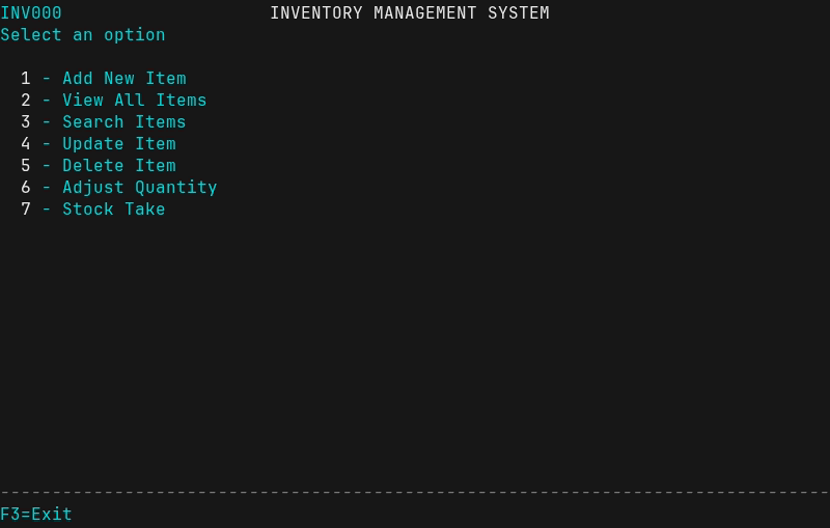
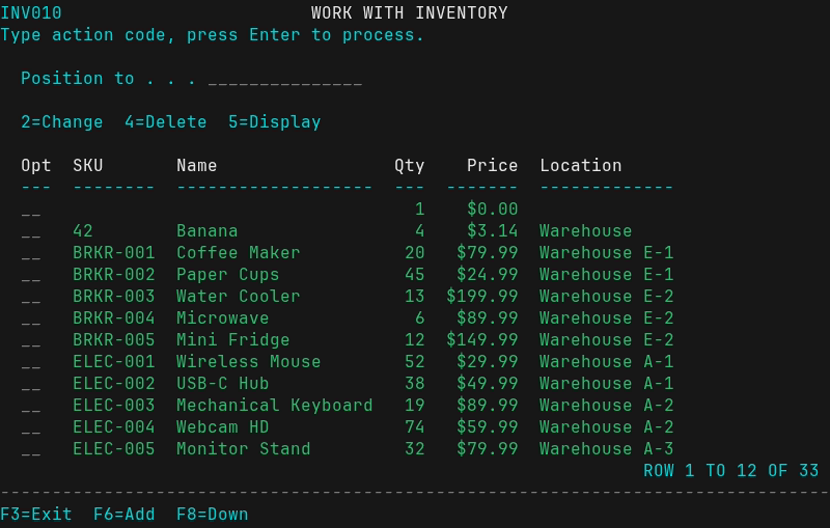
The inventory management demo app showcases the library's capabilities:
| Main Menu | Inventory List | Data Entry Form |
|---|---|---|
 |
 |
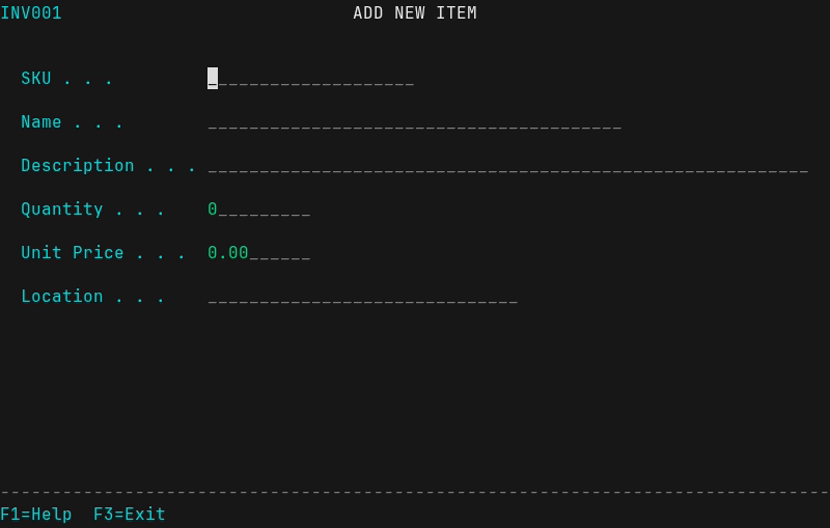 |
| Menu with single-key selection | Work-with list with action codes | Form with field validation |
Installation
pip install ux3270
Or with uv:
uv add ux3270
For development of ux3270 itself:
git clone https://github.com/ljosa/ux3270.git
cd ux3270
uv venv && uv pip install -e .
Quick Start
from ux3270.dialog import Menu, Form, Table, TabularEntry, WorkWithList, SelectionList, show_message

# Create a form with help text
form = Form("DATA ENTRY", help_text="Enter your information")
form.add_field("Name", length=30, required=True,
               help_text="Your full name")
form.add_field("Email", length=40)
result = form.show()  # F1 for help, F3 to cancel
if result:
    print(f"Hello, {result['Name']}!")

# Form with F4=Prompt lookup
def select_dept():
    sel = SelectionList("SELECT DEPARTMENT", ["Code", "Name"])
    sel.add_row(Code="ENG", Name="Engineering")
    sel.add_row(Code="SAL", Name="Sales")
    selected = sel.show()
    return selected["Code"] if selected else None

form = Form("ASSIGNMENT")
form.add_field("Department", prompt=select_dept)  # F4 shows list
result = form.show()

# Work-with list (action codes per row)
wwl = WorkWithList("WORK WITH ITEMS", ["ID", "Name", "Status"])
wwl.add_action("2", "Change")
wwl.add_action("4", "Delete")
wwl.add_action("5", "Display")
wwl.set_add_callback(add_new_item)  # F6=Add
wwl.add_row(ID="001", Name="Item 1", Status="Active")
wwl.add_row(ID="002", Name="Item 2", Status="Inactive")
result = wwl.show()  # Returns [{"action": "2", "row": {...}}, ...]
for item in result or []:
    if item["action"] == "2":
        edit_item(item["row"]["ID"])

# Create a menu
menu = Menu("MAIN MENU")
menu.add_item("1", "Option 1", lambda: print("Selected 1"))
menu.add_item("2", "Option 2", lambda: print("Selected 2"))
menu.run()  # Runs until user exits with F3 or X

# Display a table (with pagination)
table = Table("RESULTS", ["ID", "Name", "Status"])
table.add_row("001", "Item 1", "Active")
table.add_row("002", "Item 2", "Inactive")
table.show()  # F7/F8 to page up/down

# Tabular entry (table with editable columns)
te = TabularEntry("PORTFOLIO UPDATE", panel_id="PORT01")
te.add_column("Ticker", width=8)
te.add_column("Name", width=20)
te.add_column("New Amount", width=12, editable=True, required=True)
te.add_column("Previous", width=12)
te.add_row(Ticker="AAPL", Name="Apple Inc", Previous="1,234.56")
te.add_row(Ticker="GOOGL", Name="Alphabet", Previous="5,678.90")
result = te.show()  # Tab between cells, Enter to submit

# Show a message
show_message("Operation completed", msg_type="success")
Demo App
The inventory management system demonstrates the library:
# Load sample data and run
inventory-app --demo

# Or just run (empty database)
inventory-app

# Other options
inventory-app --help
Keyboard Controls
| Context | Key | Action |
|---|---|---|
| All | F1 | Help |
| All | F3 | Cancel/Exit |
| Forms | Tab | Next field |
| Forms | Shift+Tab | Previous field |
| Forms | Enter | Submit |
| Forms | F4 | Prompt (show selection list) |
| Fields | Left/Right | Move cursor |
| Fields | Home/End | Start/end of field |
| Fields | Delete | Delete at cursor |
| Fields | Backspace | Delete before cursor |
| Fields | Insert | Toggle insert/overwrite mode |
| Fields | Ctrl+E | Erase to end of field |
| Menus | 1-9, A-Z | Select item |
| Tables/Lists | F7 | Page backward |
| Tables/Lists | F8 | Page forward |
| Tables | Enter | Return |
| Selection Lists | S | Select item |
| Work-with Lists | 1-9, A-Z | Enter action code |
| Work-with Lists | Enter | Process actions |
| Work-with Lists | F6 | Add new record |
| Tabular Entry | Tab | Next editable cell |
| Tabular Entry | Shift+Tab | Previous editable cell |
| Tabular Entry | Enter | Submit all values |
Terminal Width
Tables and lists automatically adapt to terminal width:
- Uses actual terminal width (not hardcoded 80 columns)
- Short columns are preserved at natural width
- Long columns are truncated to fit available space
- Truncated content shows
>indicator (e.g., "Very long tex>")
IBM 3270 Colors
The library uses IBM 3270 color conventions:
- Green: Input fields
- Turquoise: Labels (protected fields)
- White: Titles, headers (intensified)
- Red: Error messages
- Yellow: Warnings
Requirements
- Python 3.10+
- Unix-like system (Linux, macOS)
- Terminal with ANSI support
Development
Building and Viewing Documentation Locally
uv run mkdocs serve
Then open http://127.0.0.1:8000 in your browser. The site auto-reloads on changes.
Regenerating Screenshots
Screenshots require Docker with VHS:
./screenshots/generate.sh
Cutting a Release
The version number must be updated in two places that must match:
pyproject.toml: Theversionfield (e.g.,version = "0.2.0")- Git tag: Must be
v+ version (e.g.,v0.2.0)
Release process:
# 1. Update version in pyproject.toml
#    Edit: version = "0.2.0"

# 2. Commit the version bump
git add pyproject.toml
git commit -m "Bump version to 0.2.0"

# 3. Create and push tag (triggers release workflow)
git tag v0.2.0
git push origin main --tags
The GitHub Actions workflow will automatically:
- Build and publish the package to PyPI
- Deploy versioned documentation to GitHub Pages
Documentation Versions
Documentation is versioned using mike. Each release gets its own version, with latest always pointing to the most recent release. Users can switch versions using the dropdown in the docs.
License
MIT
1 maintainer

Metadata
1 maintainer
Release files for ux3270 1.1.0
For a detailed explanation of source distributions (sdists) and built distributions (wheels), please see the package formats documentation.
Source distribution (sdist)
| File | Size | Uploaded | |
|---|---|---|---|
| ux3270-1.1.0.tar.gz | 884.0 kB | Details |
Built distribution (wheel)
| File | Interpreter | ABI | Platform | Reset |
|---|---|---|---|---|
| ux3270-1.1.0-py3-none-any.whl | Python 3 | none | any | Details |
Total release size: 927.8 kB
Release files / ux3270-1.1.0.tar.gz
| Download URL | ux3270-1.1.0.tar.gz |
|---|---|
| Size | 884.0 kB |
| Tags | Source |
|
SHA-256 checksum How to use checksums |
0daf7f305975ba2e2d3e4e522f40bebe60fd6ff58a02781cb973567d215a1d06
|
|
BLAKE2b-256 checksum How to use checksums |
16fdb0607d41d173378fd2edb1451d020f28d6e0aa3e8f08db5d2160eb232ef7
|
| Upload date | |
|
Uploaded using Trusted Publishing? What is trusted publishing? |
Yes |
| Uploaded via |
twine/6.1.0 CPython/3.13.7
|
Provenance
Provenance describes where a file came from. On PyPI, provenance is shared via attestations, which provide a verifiable record of the build or publishing details. View details, limitations and caveats.


PyPI Publish Attestation
PyPI verified that this artifact, at this checksum, originated from the publisher listed below.
Signed by GitHub Actions, verified by PyPI on Feb 13, 2026.
Transparency logRelease files / ux3270-1.1.0-py3-none-any.whl
| Download URL | ux3270-1.1.0-py3-none-any.whl |
|---|---|
| Size | 43.8 kB |
| Tags | Python 3 |
|
SHA-256 checksum How to use checksums |
82ddbfe79d19971ecc6a3245f1d4fe9d24df521c97945e1caf815abf4579ad42
|
|
BLAKE2b-256 checksum How to use checksums |
70bc78d179acb198ad3ea0799aa3819ca2ba3056f2586bfee396cff39012d77a
|
| Upload date | |
|
Uploaded using Trusted Publishing? What is trusted publishing? |
Yes |
| Uploaded via |
twine/6.1.0 CPython/3.13.7
|
Provenance
Provenance describes where a file came from. On PyPI, provenance is shared via attestations, which provide a verifiable record of the build or publishing details. View details, limitations and caveats.
PyPI Publish Attestation
PyPI verified that this artifact, at this checksum, originated from the publisher listed below.
Signed by GitHub Actions, verified by PyPI on Feb 13, 2026.
Transparency log













